

U3000 on 2010-2017 Jaguar XJ: Understanding the Control Module Fault Code
Code U3000 on a 2010-2017 Jaguar XJ indicates a general fault in an electronic control module. The specific module at fault must be identified with a professional scanner. The most common causes are a weak vehicle battery or specific, documented glitches in the Keyless Vehicle Module (KVM) or Telematics Control Unit (TCU).
- U3000 is a general code; you MUST use a professional scanner to find out which module is logging the fault and what the two-digit suffix is.
- Always test the main vehicle battery and charging system before any other diagnosis. A weak battery is the most likely cause.
- Consult Technical Service Bulletins (TSBs). For a U3000-63 in the KVM, the fix is to clear the code. For a U3000-49 in the TCU, the module itself is likely faulty.
- Do not replace any control module without confirming it is the point of failure, as they are expensive and require programming.
What's Unique About the 2010-2017 Jaguar XJ

The 2010-2017 Jaguar XJ (X351 generation) has a complex and highly integrated electrical system with dozens of control modules. These systems are notoriously sensitive to battery voltage. A weak or dying battery is a very common trigger for random U3000 codes across various modules, as the unstable power supply can cause them to glitch or reset. Forum users frequently report that a host of mysterious electrical faults were resolved simply by replacing an aging battery, even one that still tested as 'good'. After replacement, the Battery Management System (BMS) should be reset using a compatible scan tool 🎬 See how to perform a BMS battery reset. to ensure the new battery is charged correctly.
Diagnostic Flowchart

Tap your situation to follow the diagnostic path that matches what you're seeing on this vehicle.
Symptoms You May Notice

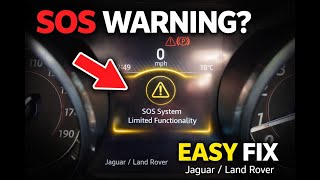
- "SOS Limited Availability" or "SOS System Inactive" warning on the instrument cluster.
- Keyless entry system not working or 'Smart Key Not Found' message.
- Vehicle fails to start or detects no key.
- Check Engine Light or other warning lamps illuminated.
- InControl Remote app features not working or showing vehicle as 'Asleep'.
- No specific symptoms, just a stored fault code found during a scan.
- Erratic behavior of other electronic systems, like windows or folding mirrors, especially after a battery disconnect.
- Replacing a control module without first thoroughly testing and confirming the vehicle's main battery and charging system are in perfect health.
- Replacing the Keyless Vehicle Module (KVM) for a U3000-63 code, when TSB #SSM72206 explicitly advises to simply clear the code.
- Replacing the TCU internal battery for the 'SOS Limited Availability' message but failing to perform the subsequent reset procedure or clearing the stored DTC, causing the message to remain.
Most Likely Causes

- Low Vehicle Battery Voltage 🔴 High Probability → Shop Vehicle Battery Modern Jaguars have a high electrical demand, and their control modules are very sensitive to voltage drops. A weak battery can cause numerous, seemingly unrelated electronic faults. Owners on JaguarForums.com frequently advise using a battery tender (e.g., CTEK) if the car is not driven daily to prevent these issues.
How to confirm: Test the battery with a multimeter or electronic load tester. A healthy AGM battery should show at least 12.4V at rest, several hours after charging. Check the charging system voltage (should be 13.7V-14.7V) with the engine running. Many auto parts stores can load test the battery, but be aware that even a battery that passes may not be sufficient for the XJ's sensitive electronics.
Typical fix: Recharge or replace the vehicle's main 12V battery. Ensure the new battery is the correct type (usually a Group Size H7 or H8 AGM) and that the Battery Management System (BMS) is reset using a compatible scan tool (like JLR SDD) to ensure proper charging and longevity.
Est. part cost: $250-$500 - Telematics Control Unit (TCU) Internal Fault 🟡 Medium Probability → Shop Telematics Interface Module As documented in TSB #SSM74054, the TCU can log a U3000-49 code due to an internal electronic failure, often related to its own small, non-rechargeable backup battery which has a life of 5-7 years.
How to confirm: Use a Jaguar-specific scan tool to find code U3000-49 stored in the Telematics Control Unit (TCU). The "SOS Limited Availability" message is a strong indicator.
Typical fix: Per the TSB, the TCU module may need to be replaced. However, a common DIY repair is to replace only the TCU's internal battery. After replacing the battery, the fault may not clear automatically. A reset procedure may be required by turning the vehicle's accessories on (engine off) and holding the maintenance assistance button (next to the SOS button) until it blinks slowly. If this fails, the code must be cleared with a JLR diagnostic tool.
Est. part cost: $25 (internal battery) - $1200 (full module) - Keyless Vehicle Module (KVM) Self-Reset 🟡 Medium Probability → Shop Body Control Module TSB #SSM72206 states that the KVM (also called the Remote Function Actuator or RFA) can log a U3000-63 code after performing a "self reset". This was a known software issue on modules with software versions prior to 31.1 (e.g., GEN 3 FK72-14C104-AF or GEN 2 DPLA-14C104-AG).
How to confirm: Use a Jaguar-specific scan tool to find code U3000-63 stored in the KVM/RFA module. The KVM on a LHD X351 is located in the passenger footwell, under/behind the glovebox area.
Typical fix: The TSB explicitly states NOT to replace the module for this code, as it has no effect on functionality. The recommended action is to clear the Diagnostic Trouble Code (DTC) using a compatible scan tool. If it persistently returns, a software update to version 31.1 or later can permanently prevent it from recurring.
Est. part cost: $0 - $200 (for software update)
Rare But Worth Checking
- Wiring or Connector Issue: A damaged wire or corroded connector pin leading to any specific module can interrupt its power or data connection, causing it to log a U3000 fault. A visual inspection of the wiring for the identified module is always a good idea. One owner resolved persistent network faults by physically cleaning the pins on the BCM, door modules, and KVM.
- Software Glitch (Other Modules): Jaguar has issued other TSBs for U3000 codes in different modules. For example, TSB #SSM73549 addresses a U3000-49 in the Side Object Detection (blind spot) modules, advising to clear the code if no symptoms are present. Another TSB addresses U3000-96 in the Image Processing Module B (IPMB), also advising to clear the code if no symptoms are present. This highlights a pattern of software-related fixes for this code across the vehicle.
- Other Internal Module Failures (Suffix Specific): Other suffix codes point to specific internal module problems: U3000-04 (System Internal Failures, often from low voltage at crank), U3000-42 (General memory failure), U3000-51 (Module not programmed), or U3000-96 (Component Internal Failure). Diagnosis depends on the specific module and suffix.
Diagnosis Steps
- Connect a Jaguar-specific diagnostic tool (like JLR SDD or Pathfinder) to the OBD-II port.
- Perform a full vehicle scan to identify which specific control module(s) have logged the U3000 code.
- Record the 2-digit suffix code (e.g., -49, -63, -96) associated with the U3000 code. This is critical for diagnosis.
- Thoroughly test the main vehicle battery's voltage and load capacity. A reading below 12.4V at rest indicates a problem that must be addressed first. Do not trust a battery that has been deeply discharged, even if it seems to recharge.
- Check the alternator output with the engine running to ensure it's between 13.7V and 14.5V.
- If U3000-49 is found in the TCU, follow the guidance in TSB #SSM74054. Consider the DIY internal battery replacement as a first step. Afterwards, attempt the manual reset procedure using the overhead console buttons or clear the code with a diagnostic tool.
- If U3000-63 is found in the KVM, follow TSB #SSM72206, which indicates a harmless self-reset. Clear the code and do not replace the module.
- If the code is in another module, check for relevant TSBs and inspect the wiring and connectors for that specific module for any signs of damage, corrosion, or looseness.
- If the battery is good, wiring is intact, and the code is not covered by a TSB, the fault likely lies with the module itself, which may require replacement and programming.
Parts You'll Likely Need
- AGM Vehicle Battery — A weak or failing battery is the most common cause of spurious electronic module faults, including U3000, on modern Jaguars. The correct size is typically a Group H7 or H8 AGM battery.
Trusted brands: Bosch, Interstate, DieHard, Varta
OEM price range: $350-$500
Aftermarket price range: $250-$450 - Telematics Control Unit (TCU)
(OEM #C2D49833 (example, varies by VIN))— This module can fail internally, logging a U3000-49 code and causing an "SOS Limited Availability" warning, as documented in TSB #SSM74054. Another TSB, K444NAS2, also addresses TCU issues requiring replacement or reprogramming on certain 2016-2017 models.
Trusted brands: Jaguar (OEM)
OEM price range: $500-$1200 - Keyless Vehicle Module (KVM)
(OEM #DPLA-14C104-AG (example, varies by VIN))— This module is only needed if it has a hard internal failure. It should NOT be replaced for a U3000-63 code. A failure could cause a no-start or key-not-found issue that isn't resolved by other means.
Trusted brands: Jaguar (OEM)
OEM price range: $200-$600
Related Codes That Often Appear With This One
- U1000-00 —
Technical Service Bulletins (TSBs) & Recalls
- SSM74054: Describes U3000-49 in the Telematics Control Unit (TCU) causing an 'SOS Limited Availability' warning.
- SSM72206: Describes U3000-63 in the Keyless Vehicle Module (KVM) as a harmless 'self reset' and advises against module replacement.
- SSM72205: A related TSB for Land Rover models that also describes the U3000-63 KVM self-reset issue, showing it's a JLR-wide problem.
Platform-Specific Known Issues
- TSB SSM74054: An "SOS Limited Availability" warning on the instrument cluster accompanied by DTC U3000-49 in the TCU points to an internal failure of the Telematics Control Unit.
- TSB SSM72206: DTC U3000-63 found in the Keyless Vehicle Module (KVM) is caused by a harmless software-induced 'self reset' and the module should not be replaced; the code should simply be cleared.
Mechanic-Grade Diagnostic Values
- Main 12V AGM Battery Voltage (at rest) — expected: 12.4V or higher. Failure: A reading below 12.4V indicates a discharged or failing battery that must be addressed before further module diagnosis.
- Charging System Voltage (engine running) — expected: 13.7V - 14.7V. Failure: Readings outside this range indicate a problem with the alternator or Battery Management System (BMS).
Hidden / Shadow Codes Worth Checking
- U3000-04: System Internal Failures, often triggered by low battery voltage during engine cranking. (see via JLR SDD or Pathfinder diagnostic tool.)
- U3000-42: Control Module General Memory Failure, indicating an internal memory test error. (see via JLR SDD or Pathfinder diagnostic tool.)
- U3000-96: Component Internal Failure. Can be logged in modules like the Image Processing Module B (IPMB) due to software errors, often with no functional effect. (see via JLR SDD or Pathfinder diagnostic tool.)
Scan Tool Commands That Help
- JLR SDD / Pathfinder: Battery replacement / Battery monitoring system reset — This function must be run after replacing the main 12V vehicle battery to inform the Battery Management System (BMS) of the new battery's state of health, ensuring correct charging strategy and preventing premature failure.
- JLR SDD / Pathfinder: Configure new module / Replace ECU — When a new control module (like a KVM or TCU) is installed, it must be programmed to the vehicle's specific configuration file to function. Used modules are often VIN-locked and cannot be reprogrammed.
- JLR SDD / Pathfinder: Clear DTCs — This is the specific, and only, action required to address the U3000-63 fault in the Keyless Vehicle Module (KVM) as per TSB SSM72206.
Wiring & Ground Locations
- Keyless Vehicle Module (KVM/RFA) — In the front passenger footwell, on the right side, under/behind the glovebox area (on LHD vehicles).. This is the location of the module that logs the U3000-63 code. Physical access is needed to check its connectors or for replacement if a true hardware failure occurs.
- Telematics Control Unit (TCU) — Located behind the rear seat bolster, sometimes described as between the seats above the center console area.. This module logs the U3000-49 code. Access is required to replace the module or its internal backup battery to fix the 'SOS Limited Availability' warning.
- Rear Fuse Box (Central Junction Box) — Accessed through the flap behind the rear center armrest.. This fuse box contains fuses for many modules, including the TCU on some models. Pulling a fuse can sometimes reset a module and temporarily clear a fault.
Real Owner Repair Stories
- Go-Parts.com (Jaguar XJ (year not specified)) — Random electrical faults and U3000 code.
❌ Tried (didn't work) Hand-checking battery terminals, which felt tight.
✅ What actually fixed it The issue was a slightly loose negative battery terminal clamp. Although it felt tight by hand, there was a microscopic gap causing momentary power loss under load. Squeezing the clamp tighter with a tool and ensuring a solid connection resolved all faults. - JaguarForums.com user (2017 Jaguar XE (similar telematics system)) — "SOS Limited" error message on the dash.
❌ Tried (didn't work) Simply replacing the TCU internal battery did not make the message disappear.
✅ What actually fixed it After replacing the small internal battery in the TCU, a manual reset was required. With the vehicle accessories on (engine off), the user pressed and held the maintenance assistance button (on the overhead console) until the light blinked slowly. This registered the new battery and cleared the warning message without a trip to the dealer. - CarTechnoloGY forum user (Jaguar XF (similar electronics to XJ)) — After a flat battery was replaced, rear windows, folding mirrors, and fuel cap release stopped working. Codes U1000-00 and U3000-49 were logged in the BCM.
❌ Tried (didn't work) Clearing codes with a standard scanner.
✅ What actually fixed it The problem was identified as BCM memory corruption caused by the battery voltage event. A specialist had to re-flash the BCM with factory data to restore its functionality.
"I Checked Everything" — The Actual Cause
- In one documented case, multiple random electrical faults and a U3000 code persisted despite the battery testing as 'good'. The root cause was not a faulty module but a negative battery terminal clamp that felt tight by hand but was just loose enough to cause intermittent power interruptions under load. Properly tightening the clamp with a tool resolved the issues completely.
When the Usual Fixes Don't Work
- While the most common fix for the 'SOS Limited Availability' message (U3000-49 in TCU) is replacing the TCU's internal battery, this does not always resolve the issue on its own. Multiple owner reports confirm that after the physical battery swap, the stored fault code must be cleared. This can sometimes be done with a manual reset procedure involving the overhead console buttons, but in other cases, it requires a dealer-level diagnostic tool (like JLR SDD) to connect to the module and clear the persistent code before the warning light will extinguish.
OEM Part Supersession History
DPLA-14C104-AG (example KVM part)→FK72-14C104-AF (example KVM part)— Software and hardware revisions to address issues like the U3000-63 self-reset glitch.
Heads up: KVM modules are VIN-locked and generally 'once programmable'. A new module must be programmed to the car using JLR software; a used module from another vehicle cannot be reprogrammed. Later model year modules (2018+) use different hardware (e.g., SPC560B60L3 chip) and are not backward compatible without specialized tools.
Model Year Variations Within This Range
- 2016-2017: The 2016 model year facelift introduced significant electronic changes, including the new InControl Touch Pro infotainment system, a new reconfigurable TFT instrument cluster, and new driver assistance systems. This means the Telematics Control Unit (TCU), Image Processing Module (IPMA), and other related modules are different from the 2010-2015 models and may have different software versions or failure modes.
- 2013-2017: Starting in the 2013 model year, all engines were paired with an 8-speed automatic transmission (replacing the 6-speed), and an Intelligent Stop/Start system was added. These changes affected the programming of the ECM, TCM, and Battery Management System.
Helpful Videos


We Have This Part in Stock


The information in this article is provided for general reference and educational purposes only. Vehicle specifications, procedures, and part compatibility can vary by production date, trim level, and region. Always consult your vehicle's factory service manual and verify part numbers before purchasing or performing repairs. Safety-critical components such as airbags, seat belts, and braking systems should be installed by a qualified professional.
- Jaguar XJ:
- 🧭 Diagnostic Flowchart
- 🎬 Helpful Videos
- 🛍️ Shop This Part
- What's Unique About the 2010-2017 Jaguar XJ
- Symptoms You May Notice
- Most Likely Causes
- Rare But Worth Checking
- Diagnosis Steps
- Parts You'll Likely Need
- Related Codes That Often Appear With This One
- Technical Service Bulletins (TSBs) & Recalls
- Platform-Specific Known Issues
- Mechanic-Grade Diagnostic Values
- Hidden / Shadow Codes Worth Checking
- Scan Tool Commands That Help
- Wiring & Ground Locations
- Real Owner Repair Stories
- "I Checked Everything" — The Actual Cause
- When the Usual Fixes Don't Work
- OEM Part Supersession History
- Model Year Variations Within This Range
- 🎟️ Get 5% Off