

GMC Safari 1985-1994 Ignition Knock (Detonation) Sensor Guide
Everything you need to know about replacing the knock sensor on your GMC Safari van.
- A failing knock sensor will trigger a Check Engine Light and cause poor performance and fuel economy.
- Do not ignore a bad knock sensor, as prolonged engine knock can cause severe engine damage.
- The sensor is located on the passenger side of the engine block and can be difficult to access.
- Always consider replacing the wiring harness connector along with the sensor for a reliable repair.
Understanding the Ignition Knock Sensor in Your 1985-1994 GMC Safari
The knock sensor is a small but critical part of your van's engine management system. For the 4.3L V6 engine common in these model years, this sensor is vital for preventing engine damage caused by detonation. When it fails, the engine's computer can no longer make the precise adjustments needed for optimal performance and safety, often putting the engine into a 'safe mode' with reduced power to prevent damage.
Symptoms of a Failing Knock Sensor
A bad knock sensor can be tricky to diagnose because its symptoms can mimic other engine problems. Here’s what to look out for:
- Check Engine Light: This is the most common sign. The computer will store a trouble code, often P0325 (Knock Sensor 1 🎬 See this guide on diagnosing the P0325 trouble code Circuit Malfunction), which can be read with a basic code reader.
- Engine Pinging or Knocking: You might hear a metallic pinging or knocking sound, especially during acceleration. This is the sound of detonation that the sensor is supposed to detect.
- Poor Acceleration and Power Loss: Your van may feel sluggish and slow to accelerate. The engine computer retards timing to protect the engine, which reduces power.
- Reduced Fuel Economy: When ignition timing is not optimal, the engine burns fuel less efficiently, leading to more trips to the gas pump.
Don't Ignore the Signs
While you can often drive with a bad knock sensor, it's not recommended. The engine computer loses its ability to prevent harmful detonation, which can lead to serious and expensive internal engine damage over time.
Choosing Your Aftermarket Replacement Part
When it comes to sensors, quality matters. For a part as critical as the knock sensor, opting for the cheapest option can lead to doing the job twice. Aftermarket brands have different quality tiers.
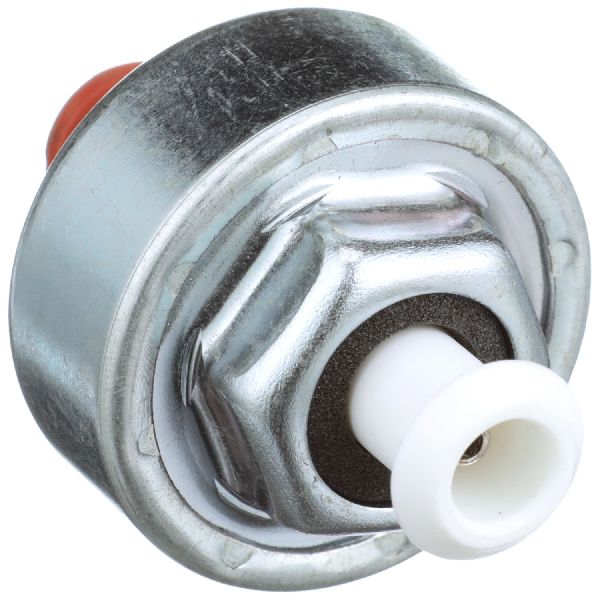
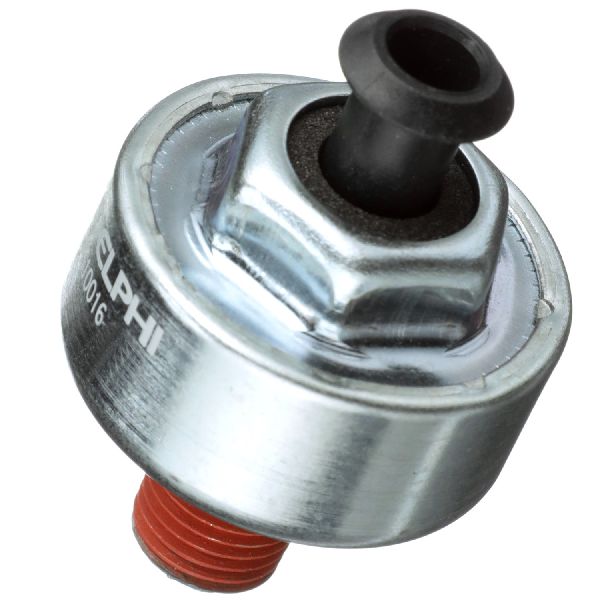
- Premium Aftermarket (e.g., Delphi, NGK/NTK, Standard Ignition): These brands are often original equipment (OEM) suppliers for many automakers and are known for their quality and reliability. Reviews show that many professional technicians and experienced DIYers prefer these brands to avoid repeat failures, even when they cost a bit more. Delphi and NGK, in particular, are well-regarded for sensor technology.
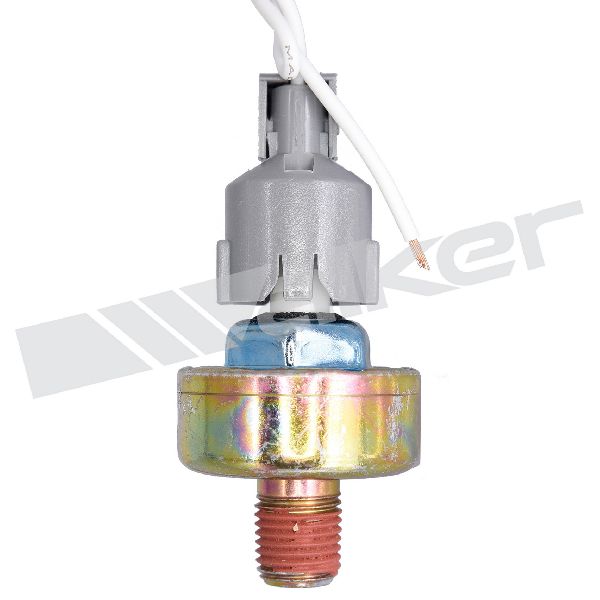
- Standard Aftermarket (e.g., Walker Products, Global Parts): These brands offer a good balance of price and quality. Walker Products has a long history in the aftermarket and produces parts that meet or exceed OE specifications. They are a solid choice for daily drivers.
- Economy Brands (e.g., True Tech): While the price is attractive, be cautious. Some budget sensors can fail prematurely or be dead-on-arrival, forcing you to do the replacement all over again. For a sensor that can be difficult to access, spending a little more on a quality part is a wise investment.
Pro Tip: Replace the Harness
The wiring harness connector for the knock sensor is a common point of failure. It's exposed to heat and can become brittle and corroded. It is highly recommended to replace the short wiring pigtail at the same time as the sensor to ensure a good connection.
Cost of Replacing a GMC Safari Knock Sensor
| Part/Service | Estimated Cost |
|---|---|
| New OEM (ACDelco) | $55 - $95 |
| New Aftermarket | $42 - $74 |
| Shop Labor | $100 - $200 |
| Total (DIY) | $42 - $74 |
| Total (Shop) | $142 - $295 |
Frequently Asked Questions (FAQ)
Where is the knock sensor located on the 1985-1994 GMC Safari?
On the GMC Safari with the 4.3L V6 engine, the knock sensor is typically located on the passenger side of the engine block, often near the starter motor 🎬 Watch: Locate and replace the sensor on a 4.3L V6 or just above the oil pan rail. Accessing it usually requires working from underneath the vehicle. Coolant may drain from the port when the sensor is removed, so be prepared.
Can I replace the knock sensor myself?
Yes, this is a DIY-feasible job for someone with basic mechanical skills and tools. However, its location can make it difficult to reach. You will need to safely raise and support the vehicle. The sensor can be tight and sometimes requires a good set of vice grips 🎬 Watch: Pro tips for removing stubborn Chevy knock sensors if the hex head becomes rounded. The job typically takes about an hour.
What is the torque specification for the knock sensor?
While specific torque specs for this exact vehicle are hard to find, a general specification for GM knock sensors of this type is around 15 ft-lbs. Overtightening can damage the sensor's sensitive internal crystal, and under-tightening can lead to inaccurate readings. It's crucial to get it right.
Are there any recalls or TSBs for this issue?
Searches of the NHTSA database did not reveal any specific recalls or Technical Service Bulletins (TSBs) for the ignition knock sensor on the 1985-1994 GMC Safari. Any issues are typically addressed on a case-by-case basis as a standard repair.
Helpful Videos
![How to Fix P0325 Engine Code in 2 Minutes [1 DIY Method / Only $10.86]](https://img.youtube.com/vi/JYNnrWkGL9w/mqdefault.jpg)
Technical Specifications
OEM Part Numbers: 10456288 10456018
Thread Size: 3/8 Inch x 16 Straight Thread. Connector: 1-Pin Square Connector.
We Have This Part in Stock


The information in this article is provided for general reference and educational purposes only. Vehicle specifications, procedures, and part compatibility can vary by production date, trim level, and region. Always consult your vehicle's factory service manual and verify part numbers before purchasing or performing repairs. Safety-critical components such as airbags, seat belts, and braking systems should be installed by a qualified professional.
- GMC Safari:
- 🎬 Helpful Videos
- 🛍️ Shop This Part
- Understanding the Ignition Knock Sensor in Your 1985-1994 GMC Safari
- Symptoms of a Failing Knock Sensor
- Don't Ignore the Signs
- Choosing Your Aftermarket Replacement Part
- Pro Tip: Replace the Harness
- Cost of Replacing a GMC Safari Knock Sensor
- Frequently Asked Questions (FAQ)
- 🎟️ Get 5% Off