

2018-2024 Genesis G80 & Electrified G80 Camera and Sensor Guide
This guide covers the various cameras and radar sensors on the 2018-2024 Genesis G80 and 2023-2024 Electrified G80, focusing on common failures, replacement costs, and the critical need for professional calibration.
- Professional ADAS calibration is mandatory after replacing any camera or radar sensor; the part will not work without it.
- The term 'Video Camera' refers to a complex system of multiple cameras and radar sensors for different safety features.
- Always match the OEM part number exactly when buying a used component, as there are many variations based on vehicle options.
- Software issues can mimic hardware failures. Check for recalls or TSBs related to software updates before replacing parts.
Understanding the G80's Camera and Radar Systems
The term "video camera" for the Genesis G80 and Electrified G80 refers to a network of different cameras and sensors, not a single part. These components are integral to the car's advanced safety and convenience features. Understanding the role of each part is crucial for accurate diagnosis and replacement.
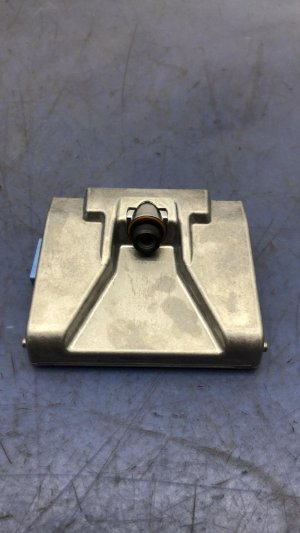
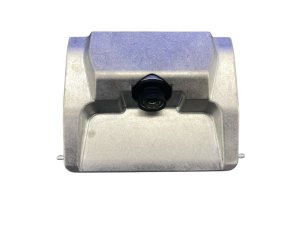
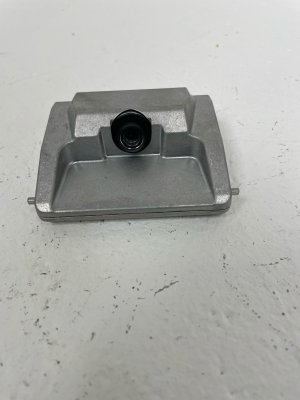
- Front Windshield Camera: Mounted behind the rearview mirror, this camera watches the road ahead for lane markings and potential obstacles. It is the primary sensor for Lane Keeping Assist (LKA), Forward Collision-Avoidance Assist (FCA), and High Beam Assist.
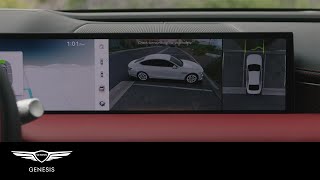
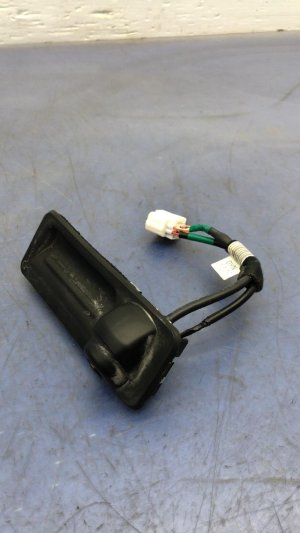
- Surround View Cameras: For vehicles equipped with the Surround View Monitor, there are cameras in the front grille, the rear decklid/trunk handle, and under each side mirror. 🎬 Watch: How to use the Surround View and Blind-Spot monitors These provide the 360-degree, top-down view used for parking.
- Standard Rear-View Camera: Vehicles without the surround view option have a single rear-facing camera, typically integrated into the trunk release handle.
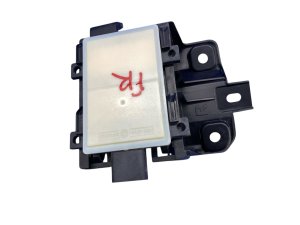
- Blind Spot Radar Sensors: Located behind the rear bumper cover on the left and right sides, these are not cameras but radar units. They detect vehicles in your blind spots and enable the Blind-Spot Collision-Warning (BCW) system.
- Front Radar Sensor: Positioned behind the front grille or lower bumper, this sensor is used for the Adaptive Cruise Control system, maintaining a set distance from the vehicle ahead.
Symptoms of Failure
Failure of a camera or radar sensor can disable one or more of the vehicle's driver-assistance features. Symptoms are often specific to the component that has failed.
Note: Software glitches can also cause many of these symptoms. Genesis has issued recalls and TSBs for software issues that can cause screens to go blank or systems to become unresponsive. Always ensure your vehicle's software is up to date before replacing hardware.
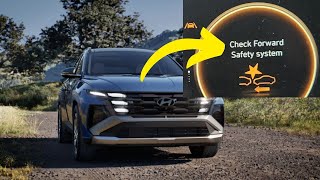
- Warning Lights on the Dashboard: The most common symptom is a warning message on the instrument cluster, such as "Check Forward Safety System, 🎬 See what this common dashboard warning light looks like" "Check Blind Spot Detection System," or other ADAS-related alerts.
- Blank or Flickering Camera Display: The rearview or surround-view camera image may appear black, distorted, or flicker on the infotainment screen.
- Inoperative Driver-Assist Features: You may find that features like adaptive cruise control, lane-keeping assist, or blind-spot monitoring cannot be activated or behave erratically. The option might be grayed out in the vehicle's settings menu.
- False or Inconsistent Alerts: The system may give false warnings, such as a collision alert when there is no obstacle, or a blind-spot warning when no car is present. Conversely, it may fail to provide a warning when it should.
- Erratic Braking or Steering: In severe cases, a malfunctioning front camera or radar can cause the automatic emergency braking system to engage unexpectedly or the lane-keeping system to steer erratically.
Known Issues, TSBs, and Recalls
While widespread hardware failures are not commonly reported, some issues related to the G80's camera and sensor systems have been noted.
- Software-Related Recalls: Genesis has issued recalls for software issues that can cause the instrument cluster and infotainment screens to go blank or reboot while driving, temporarily disabling the display for speed, warnings, and camera views. This affects both the G80 and Electrified G80. The fix is a software update performed by a dealer.
- Rearview Camera Logic Recall: A recall was issued for some Genesis models (though primarily GV60 and GV80) for incorrect rearview camera software logic, where the display could switch to a different screen if the vehicle was put in reverse and accelerated too quickly before the infotainment system fully booted.
- TSB for Rear Camera Image: Technical Service Bulletins have been issued for older G80 models (2017-2018) where a black or distorted image is displayed from the rearview camera after the navigation unit is replaced. This is caused by incorrect variant coding and requires a dealer to reprogram the system.
- Dirty Sensors: A common cause for intermittent warnings, especially for the front radar, is dirt, grime, snow, or ice blocking the sensor. Before seeking repairs, ensure the areas on the front and rear bumpers where sensors are located are clean.
Buying a Used G80 Camera or Radar Sensor
Purchasing a used OEM camera or sensor can be a cost-effective solution, but careful verification is essential due to the complexity of these systems.
1. Match the Part Number Exactly
This is the most critical step. Genesis uses many different part numbers for cameras and sensors that look physically identical but have different internal software or calibrations for specific trim levels, model years, or feature sets (e.g., with or without Surround View). Using the wrong part will result in it not functioning, even after calibration.
2. Inspect for Physical Damage
- Cameras: Check the lens for scratches, cloudiness, or cracks. Inspect the housing and electrical connector for any signs of damage.
- Radar Sensors: Examine the plastic housing for any cracks, deep scuffs, or signs that it has been impacted. The mounting brackets are also critical; if they are bent, the sensor will be misaligned and may not be calibratable.
3. Inquire About the Donor Vehicle
Ask the seller for information about the vehicle the part came from. A part from a vehicle that sustained a heavy impact in the area of the sensor or camera carries a higher risk of unseen internal damage.
4. Plan for Professional Calibration
A used camera or sensor will not work correctly by simply plugging it in. It must be professionally calibrated to the new vehicle. Factor the cost of this service into your total budget. This is not a DIY procedure and requires specialized equipment.
5. Why Used OEM is Often Better Than New Aftermarket
For complex electronic components like ADAS sensors, a used OEM part is often a safer choice than a new aftermarket one. OEM parts are designed to communicate flawlessly with the vehicle's other systems. Aftermarket sensors can sometimes cause communication errors or may not calibrate as precisely as the original units, potentially compromising the performance of safety features.
Replacement and Calibration Overview
Physically replacing most cameras and sensors is relatively straightforward, but the final calibration step makes this a job for a professional shop with ADAS service equipment.
| Aspect | Details |
|---|---|
| Installation Difficulty | Physical Swap: 2/5 (Easy to Moderate). Full Job w/ Calibration: 5/5 (Professional Required). |
| Key Steps | 1. Disconnect the 12V battery. 2. Remove trim panels, bumper covers, or mirror caps to access the component. 3. Disconnect the electrical connector and unbolt the old unit. 4. Install the new unit. 5. Reassemble the vehicle. 6. Perform ADAS calibration. |
The Critical Calibration Step
ADAS calibration is the process of aligning the cameras and sensors so they can accurately interpret the vehicle's surroundings. This is required any time a sensor is replaced, the windshield is replaced, or even when a wheel alignment is performed. A technician uses special targets placed at precise distances and angles from the vehicle, along with a diagnostic scan tool, to configure the system. Failure to calibrate a new part will result in non-functioning safety systems and persistent dashboard warnings.
Cost Comparison
The cost of replacing a camera or radar sensor can be substantial, primarily due to the price of the parts and the need for specialized calibration.
| Part / Service | Estimated Cost |
|---|---|
| New OEM Part (Dealer) | $500 - $2,000+ per sensor/camera |
| New Aftermarket Part | $250 - $700 (Limited availability and not recommended for radar sensors) |
| Used OEM Part | $50 - $400+ depending on component |
| Shop Labor (Installation) | $150 - $400 (Varies by location of part) |
| Shop Labor (ADAS Calibration) | $250 - $600 per calibration |
| Total Dealer Replacement | $1,200 - $2,800+ |
Frequently Asked Questions (FAQ)
Do I have to go to a Genesis dealer for calibration?
While a Genesis dealer is always an option, many independent auto glass shops and collision repair centers now have the necessary ADAS calibration equipment. However, it's crucial to verify they have the specific targets and software for your Genesis model before committing to the service.
What happens if I don't calibrate the new camera or sensor?
The associated safety systems (like lane assist, adaptive cruise, or blind-spot monitoring) will not function, and you will likely have persistent warning lights on your dashboard. The part will not work correctly until it is calibrated to your specific vehicle.
Can I replace just one camera in the surround-view system?
Yes, individual cameras can be replaced. However, after replacing any single camera in the system, a full surround-view system calibration is required to stitch the images from all four cameras together correctly.
My blind spot monitor stopped working but there was no accident. What could be the cause?
Aside from a faulty sensor, the issue could be a wiring problem or a software glitch. In some cases, the option for the system can become grayed out in the settings menu. A diagnostic scan by a professional is the best way to identify the root cause before replacing expensive parts.
Helpful Videos
Technical Specifications
OEM Part Numbers: 87326-T1000 94310T1030 95760B1010 95760B1030 95760-B1210 95766B1010 95895B1500 99110-T1020 99110-T1120 99150-T1000 99211T1010 99211T1110 99250-T1010
System components include front windshield camera, front grille camera, rear decklid camera, side mirror cameras, front radar sensor, and rear blind-spot radar sensors. All components require post-installation ADAS calibration.
We Have This Part in Stock

The information in this article is provided for general reference and educational purposes only. Vehicle specifications, procedures, and part compatibility can vary by production date, trim level, and region. Always consult your vehicle's factory service manual and verify part numbers before purchasing or performing repairs. Safety-critical components such as airbags, seat belts, and braking systems should be installed by a qualified professional.
- Genesis G80:
- Genesis Electrified G80:
- 🎬 Helpful Videos
- 🛍️ Shop This Part
- Understanding the G80's Camera and Radar Systems
- Symptoms of Failure
- Known Issues, TSBs, and Recalls
- Buying a Used G80 Camera or Radar Sensor
- 1. Match the Part Number Exactly
- 2. Inspect for Physical Damage
- 3. Inquire About the Donor Vehicle
- 4. Plan for Professional Calibration
- 5. Why Used OEM is Often Better Than New Aftermarket
- Replacement and Calibration Overview
- The Critical Calibration Step
- Cost Comparison
- Frequently Asked Questions (FAQ)
- 🎟️ Get 5% Off