

2017-2025 Hyundai & Genesis Antenna: Solving GPS, Radio & Water Leak Issues
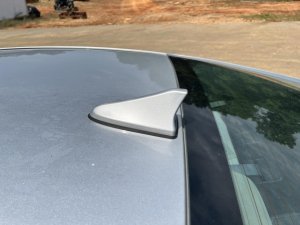
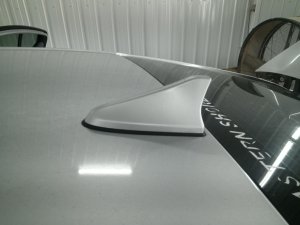
This guide explains the common causes of poor radio, GPS, and satellite reception and helps you find the exact replacement shark fin antenna for your Elantra, Sonata, Tucson, Santa Cruz, G80, GV70, or GV80.
- Compatibility is extremely complex. You MUST match the part number from your original antenna, which requires lowering the headliner to view it.
- Many GPS and Blue Link issues are software-related. Always perform an infotainment system reset before replacing the antenna.
- The most common physical failures are a broken/missing plastic cover (often from car washes) and a failed base gasket causing water leaks.
- If only the cover is broken but the electronics still work, you can often save money by epoxying a new cover onto the old base.
Is Your Antenna Really Broken? Try This First!

Pro Tip: Many issues with GPS, Blue Link, or Genesis Connected Services are caused by software glitches, not a bad antenna. Before spending money on a replacement, perform an infotainment system reset. Use a paperclip to press the small pinhole reset button (often near the volume knob) for 10 seconds. If there is no pinhole, press and hold the MAP and SETUP buttons together for 10 seconds until the system reboots. This simple step resolves a surprising number of problems.
Symptoms of a Failing Antenna

A problem with the roof antenna can manifest in several ways. Because it contains multiple electronic components, you may experience one or more of the following issues:
- Poor or No GPS Signal: This is a very common symptom of internal failure. The navigation screen may show a "No GPS" error, be unable to find your vehicle's location, or show your car in a random place (like the middle of the ocean).
- Static or Weak Radio Reception: You may notice your AM and FM radio stations are full of static, or you can't tune into stations that were previously clear. The weaker AM signal is often the first to degrade.
- Satellite Radio (SiriusXM) Not Working: The satellite radio may cut out frequently, get stuck on a "Preparing" screen, or constantly show a "No Signal" or "Check Antenna" message.
- Blue Link / Genesis Connected Services Inoperative: Remote features from the phone app (like remote start or door locks) may stop working. The SOS light in the overhead console may also turn red. While this can be a hardware failure, always try a system reset first as it is often a software or network issue.
- Water Leaking Into the Cabin: If the antenna's base gasket fails, water can leak through the mounting hole in the roof. This can cause visible water stains on the rear of the headliner.
- Visible Physical Damage: The most obvious sign is a loose, cracked, or missing plastic antenna cover. These are known to become brittle and can be knocked off in an automatic car wash or even fly off while driving.
Common Failures and Known Issues

Two main issues plague these antennas across all listed Hyundai and Genesis models. The problem is so common that Hyundai issued a Technical Service Bulletin (TSB 16-01-051) for the 2017 Sonata, but the same design weakness appears in many other vehicles.
1. Broken or Missing Antenna Cover
The most frequent failure is the plastic shark fin cover becoming loose or detaching completely. This is often caused by the plastic mounting bosses inside the cover becoming brittle and breaking, especially after force is applied by an automatic car wash.
Warning: A missing antenna cover exposes the internal circuit board to rain and moisture. This will quickly lead to corrosion and the failure of GPS, radio, and other functions. If your cover is missing but the antenna still works, you must immediately cover the exposed electronics or replace the unit to prevent permanent damage.
2. Internal Failure from Water Intrusion
The second common failure is a leak from the foam or rubber gasket at the base of the antenna where it meets the roof. Over time, this gasket can compress or dry out, allowing water to seep past it. This water can stain the headliner and, more importantly, drip onto the antenna's electrical connectors and internal electronics, causing corrosion and failure of GPS, radio, or telematics functions.
Technical Service Bulletins (TSBs) and Recalls
While there are no widespread recalls for the antenna hardware itself, several service bulletins acknowledge related problems:
- Hyundai TSB 16-01-051 (Service Campaign TUU): This bulletin for the 2017 Sonata describes how weak mounting bosses can cause the antenna cover to loosen. It provides a procedure for technicians to inspect the antenna by gently rocking it and replacing it if it's loose. This same failure mode is widely reported by owners of the Elantra, Tucson, Santa Cruz, and Genesis models.
- Hyundai TSB 17-BE-014: This guide for troubleshooting multimedia reception issues notes that on some sedans like the Elantra (AD), the AM/FM antenna is integrated into the rear window glass. On these models, the roof antenna is ONLY for GPS and Satellite Radio. This is important for diagnosis—if only your AM/FM reception is bad on one of these cars, the roof antenna is not the cause.
Critical: Verifying Compatibility Before You Buy
This is the most important step. These vehicles use many different antenna variants that look identical but are not interchangeable. Ordering the wrong one will result in features not working.
Warning: Compatibility depends on your vehicle's factory-installed options, primarily the presence of a factory navigation system and a sunroof/panoramic roof. The only way to guarantee you are buying the correct part is to match the OEM part number printed on the sticker on the bottom of your original antenna. This requires partially lowering the headliner to see it, but it prevents the headache of buying the wrong part.
Understanding Part Numbers
The part numbers often include color codes. For example, 96210-L5000-EB is for a Sonata in Ebony Black. When buying a used part, it's more important to match the base number (e.g., 96210-L5000) than the color code. You can always have a mismatched color cover painted to match your vehicle. Below are some known part numbers, but you must verify the number on your specific vehicle.
| Example OEM Part Numbers |
|---|
| 86210AA200 |
| 95460G8000 |
| 95460G8300 |
| 95460L1100 |
| 96210-AA000-EB |
| 96210-AA200 / 96210-AA200-EB |
| 96210-AB000-EB |
| 96210-F2010 / 96210-F2010-MJB |
| 96210-F2100 / 96210-F2100-PR3 |
Buying a Used Antenna: What to Inspect

A used OEM antenna is an excellent value compared to a new dealer part. Follow this checklist when buying a recycled antenna:
- Verify the Part Number: This is non-negotiable. Ensure the part number on the used unit matches your original.
- Inspect the Housing: Carefully check the plastic shark fin cover for any hairline cracks, especially around the base. A cracked housing has likely allowed water in, damaging the electronics.
- Check the Base Gasket: The foam or rubber seal on the bottom must be pliable, complete, and not flattened or dry-rotted. A bad gasket will cause a water leak.
- Examine the Connectors: Look at the electrical connector ports and pins. They should be clean, straight, and free of any green or white corrosion.
Antenna Replacement Overview (Difficulty: 3/5)

Replacing the antenna is a feasible DIY job for someone comfortable with removing interior trim. It does not require complex mechanical skills, but patience is key to avoid damaging the headliner. The job typically takes 1-2 hours.
- Access the Headliner: In the back seat area, carefully pull down the door weatherstripping from the top of the door frame. Remove any plastic C-pillar trim panels and the rear grab handles if present.
- Lower the Headliner: Remove the 3-4 plastic clips at the very back of the headliner near the rear window. This will allow you to gently pull the rear of the headliner down a few inches to gain access. You do not need to remove the entire headliner.
- Disconnect the Antenna: Reach above the headliner and disconnect the 2-3 electrical connectors leading to the antenna.
- Remove the Mounting Nut: Use a 19mm socket or wrench to unscrew the single nut holding the antenna to the roof.
- Remove the Old Antenna: From outside the vehicle, lift the old antenna off the roof. Clean the roof surface thoroughly, removing any residue from the old gasket.
- Install the New Antenna: Seat the new antenna, ensuring the gasket is properly aligned. From inside, reinstall and tighten the mounting nut to a torque of 7-11 ft-lbs (8-15 Nm). Do not overtighten, as this can crack the housing or damage the roof.
- Test and Reassemble: Reconnect the electrical cables. Before reinstalling the headliner, turn the car on and test all functions (AM/FM, GPS, SXM). Once confirmed, reinstall the headliner, clips, and trim in the reverse order of removal.
Cost of Replacement
The cost can vary significantly depending on the path you choose.
| Item | Estimated Cost |
|---|---|
| New OEM Antenna | $200 - $400 |
| New Aftermarket Antenna | $50 - $120 (Functionality of all features not guaranteed) |
| Used OEM Antenna | $50 - $150 |
| Shop Labor | $150 - $300 |
Frequently Asked Questions (FAQ)
My antenna cover broke off but the radio still works. Do I need to replace the whole thing?
Not necessarily. If the functions still work, the internal electronics are not yet damaged. You MUST cover the exposed circuit board to protect it from rain. The most cost-effective repair is to buy a used antenna or an aftermarket cover and use a strong, waterproof adhesive like J-B Weld Plastic Bonder or a similar epoxy to secure the new cover over the existing base.
Why did my GPS stop working but the AM/FM radio is fine?
This is a classic symptom of an internal failure in the shark fin antenna. The antenna housing contains separate circuits for GPS, satellite radio, and AM/FM. It's very common for one of these circuits to fail (often the GPS) while the others continue to function.
I have a water leak from my antenna. Can I just put silicone around the outside?
This is not recommended and is only a temporary fix at best. The leak is coming from underneath the antenna base. The correct repair is to remove the antenna, clean the roof surface and the antenna base, and install a new gasket or create a proper seal with a high-quality automotive-grade sealant before re-torquing the antenna.
My Blue Link / Connected Services app stopped working. Is the antenna bad?
It could be, but it's more likely a software or network issue. Before suspecting the hardware, always perform an infotainment system reset using the pinhole button or the MAP+SETUP button combination. Also, ensure your Blue Link subscription is active. If the problem persists, the issue could be the telematics part of the antenna, but software troubleshooting should always come first.
Helpful Videos
Technical Specifications
OEM Part Numbers: 86210AA200 95460G8000 95460G8300 95460L1100 96210-AA000-EB 96210-aa200 96210-AA200-EB 96210-AB000-EB 96210-F2010 96210-F2010-MJB 96210-F2100 96210-F2100-PR3 96210-F2100-V8S 96210-F2100-VU8 96210-F2100-WW8
Mounting Nut Torque: 7-11 ft-lbs (8-15 Nm)
We Have This Part in Stock

The information in this article is provided for general reference and educational purposes only. Vehicle specifications, procedures, and part compatibility can vary by production date, trim level, and region. Always consult your vehicle's factory service manual and verify part numbers before purchasing or performing repairs. Safety-critical components such as airbags, seat belts, and braking systems should be installed by a qualified professional.
- Hyundai Elantra:
- Hyundai Elantra N:
- Genesis G80:
- Genesis GV70:
- Genesis GV80:
- Hyundai Santa Cruz:
- Hyundai Sonata:
- Hyundai Tucson:
- 🎬 Helpful Videos
- 🛍️ Shop This Part
- Is Your Antenna Really Broken? Try This First!
- Symptoms of a Failing Antenna
- Common Failures and Known Issues
- 1. Broken or Missing Antenna Cover
- 2. Internal Failure from Water Intrusion
- Technical Service Bulletins (TSBs) and Recalls
- Critical: Verifying Compatibility Before You Buy
- Understanding Part Numbers
- Buying a Used Antenna: What to Inspect
- Antenna Replacement Overview (Difficulty: 3/5)
- Cost of Replacement
- Frequently Asked Questions (FAQ)
- 🎟️ Get 5% Off