

2002-2004 Acura RSX Radio: Solving Anti-Theft Codes and Bose vs. Standard Systems
This guide covers common failures, the crucial difference between Bose and standard radios, and how to handle the anti-theft code when replacing your head unit.
- The Bose (Type-S) and Standard (Base) audio systems are NOT interchangeable. You must buy a replacement radio that matches your car's original system.
- After installation, you will need a 5-digit anti-theft code to unlock the radio. This does NOT require a dealer visit.
- The anti-theft code can usually be found on a sticker in the glove box or retrieved online for free using the radio's serial number.
- The most common failures are the CD player mechanism and the display screen backlight.
Symptoms of a Failing RSX Audio System
When the factory radio in a 2002-2004 Acura RSX begins to fail, it can present several distinct symptoms. Diagnosing the issue correctly can help you decide whether to repair, replace, or troubleshoot a related component.
- CD Player Errors: The most common failure point is the CD player mechanism. You may experience a "disc error" message on the display, or the unit may refuse to accept or eject discs. Sometimes, the player will make clicking or grinding noises without playing the CD.
- No Sound or Intermittent Audio: The radio may power on, display the station or track information, but produce no sound from any speaker. This can be caused by an internal amplifier failure in standard systems or a problem with the external amp in Bose systems.
- Blank or Dim Display: The LCD screen that shows the radio station, time, and CD track information can fail. It might go completely blank, become very dim and hard to read, or flicker intermittently. This is often due to failing solder joints or backlight components inside the head unit.
- Alternator Whine: A high-pitched whining noise that changes pitch with engine RPM is often a sign of a bad ground connection to the radio or a failing alternator introducing noise into the electrical system.
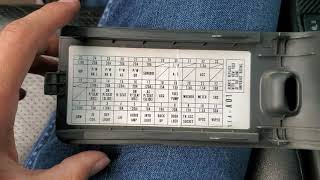
- Unit Will Not Power On: If the radio is completely dead, the first step is to check the fuse. A blown fuse can cause a total loss of power. If the fuse is good, it could indicate a more severe internal failure of the head unit. 🎬 Watch: Troubleshooting steps if your Acura stereo won't power on.
Bose vs. Standard System: A Critical Distinction
The single most important factor when replacing the audio system in a 2002-2004 Acura RSX is identifying whether your vehicle has the standard sound system or the premium Bose system. The two are not interchangeable.
Warning: A radio from a Bose-equipped RSX will NOT work correctly in a car with a standard system, and vice-versa. The wiring, amplification, and impedance are completely different.
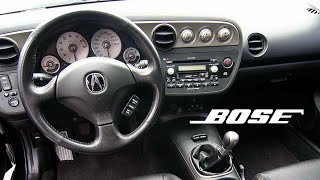
The Bose system, typically found in the Type-S trim, uses an external amplifier located under the passenger seat. 🎬 See this overview of the Bose amplifier and speaker system. The head unit for this system outputs a low-level (pre-amp) signal. The standard system, found in base models, has an amplifier built directly into the head unit itself. Installing the wrong type of radio will result in no sound, distorted sound, or potential damage to the components.
How to Identify Your System:
- Look at the Head Unit: Bose factory radios will have the "Bose" logo printed on the face of the unit, often near the CD slot or display.
- Check Speaker Grilles: The speaker covers in the doors or on the rear deck may also have the Bose logo.
- Check Your VIN: The 8th digit of your VIN can signify the trim level. For the RSX, a '0' often indicates a Type-S, which typically included the Bose system.
The Anti-Theft Radio Code Explained
Like many Honda and Acura vehicles of this era, the RSX factory radio has an anti-theft feature. If the unit loses power for any reason (e.g., disconnecting the battery, replacing the radio, or a blown fuse), it will lock itself and display the word "CODE" upon being powered back on. You must enter a specific 5-digit code to unlock it. This is not a programming or flashing procedure; it is a simple security code entry that does not require special tools or a dealer visit if you have the code.
How to Find Your Radio Code:
- Glove Box Sticker: The most common place to find the code is on a small white sticker inside the glove box, often on the side wall.
- Owner's Manual: The code is often written on an "Anti-Theft Radio Identification Card" included with the owner's manual.
- Fuse Box Cover: In some cases, a sticker with the code may be placed on the under-hood fuse box.
- Online Retrieval: If you cannot find the code, you can retrieve it from Acura's official website. You will need your vehicle's VIN and the radio's serial number.
How to Find Your Radio's Serial Number:
If you need the serial number for online retrieval, you don't have to remove the radio. With the radio off, press and hold the #1 and #6 preset buttons, then turn the radio on. The serial number will be displayed on the screen. Write this number down to use on the Acura radio code website.
Buying a Used 2002-2004 RSX Radio
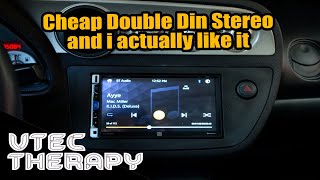
A used OEM radio is often the best and most cost-effective solution for a failed unit, as it preserves the factory look and functionality without the need for installation kits and wiring adapters. 🎬 Watch: A walkthrough of installing a touchscreen unit in an RSX. Here’s what to look for:
- Verify Compatibility: First and foremost, confirm the used unit is from the correct system (Bose or Standard) for your car. A radio for a standard system will have part numbers like 39100-S6M-A000. A Bose unit will have a different part number and will be explicitly labeled as such.
- Ask for the Radio Code: When buying from a private seller or recycler, always ask if they have the 5-digit security code for the unit. While you can retrieve it yourself using the serial number, having the code upfront saves you a step.
- Inspect the Faceplate: Check for heavy scratches on the display screen, worn-off button labels, and broken knobs. While cosmetic, these can affect usability and appearance.
- Check the CD Mechanism: If possible, ask the seller to confirm the CD player was working. Since this is a common failure point, it's a key area of concern.
Known Issues, TSBs, and Recalls
There are no major recalls or Technical Service Bulletins (TSBs) directly related to the widespread failure of the audio head unit itself for the 2002-2004 Acura RSX. Most issues are related to the age and wear of the electronic components. One TSB from May 2004, #05012004, simply notes that audio and navigation anti-theft codes are available on the Acura Interactive Network for dealers, confirming the code retrieval process. Other recalls for this vehicle generation pertain to airbags or owner's manual information and do not affect the audio system.
Cost of Replacement
Replacing the audio system has a wide range of costs depending on the path you choose. Going with a used OEM unit is typically the most budget-friendly option for a direct-fit replacement.
| Part Type | Estimated Cost |
|---|---|
| New OEM | $350 - $500+ (if available) |
| New Aftermarket (with install kit) | $120 - $400+ |
| Used OEM | $50 - $150 |
| Shop Labor for Installation | $75 - $150 |
Frequently Asked Questions (FAQ)
Does a used 2002-2004 RSX radio need to be programmed by a dealer?
No, the radio does not need to be programmed or flashed to the vehicle's VIN. However, you will need to enter the 5-digit anti-theft code after installation. This can be done by anyone and does not require a dealer visit if you have the code or can retrieve it online.
Will a radio from a Type-S work in my base model RSX?
No. The Type-S model typically came with the Bose premium sound system, which uses an external amplifier. The base model has the amplifier built into the radio. The head units are not interchangeable and will not function correctly if swapped.
My radio display says 'CODE'. What do I do?
This means the anti-theft system has been activated. You need to find your 5-digit radio code, which is often on a sticker in the glove box or with your owner's manual. Once you have the code, use the radio preset buttons to enter it and unlock the radio.
I don't have the radio code for my used unit. Is it useless?
No. You can retrieve the code yourself. Turn the radio off. Press and hold preset buttons 1 and 6, then turn the radio on. The radio's serial number will appear on the screen. You can then enter this serial number along with your car's VIN on the official Acura radio code lookup website to get the unlock code for free.
What tools do I need to replace the RSX radio?
Replacing the radio is a relatively simple job. You will typically need a panel trim removal tool to avoid scratching the dashboard, and an 8mm socket or Phillips head screwdriver to remove the bolts holding the radio in place.
Helpful Videos
Technical Specifications
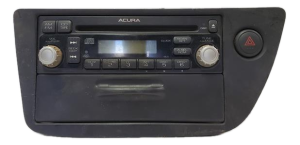
OEM Part Numbers: 39100-S6M-A000 39100S6MA00ZA
System type: Standard (non-Bose) or Premium (Bose). The head units are not cross-compatible. Security: 5-digit anti-theft code required after power loss.
We Have This Part in Stock

The information in this article is provided for general reference and educational purposes only. Vehicle specifications, procedures, and part compatibility can vary by production date, trim level, and region. Always consult your vehicle's factory service manual and verify part numbers before purchasing or performing repairs. Safety-critical components such as airbags, seat belts, and braking systems should be installed by a qualified professional.
- Acura RSX:
- 🎬 Helpful Videos
- 🛍️ Shop This Part
- Symptoms of a Failing RSX Audio System
- Bose vs. Standard System: A Critical Distinction
- How to Identify Your System:
- The Anti-Theft Radio Code Explained
- How to Find Your Radio Code:
- How to Find Your Radio's Serial Number:
- Buying a Used 2002-2004 RSX Radio
- Known Issues, TSBs, and Recalls
- Cost of Replacement
- Frequently Asked Questions (FAQ)
- 🎟️ Get 5% Off