

Audi MMI Failure (2005-2015): No Sound, Black Screens & Component Protection Explained
This guide covers the complex audio systems in the 2005-2013 A8, 2007-2009 S8 & Q7, and 2012-2015 A7, S7 & RS7, focusing on common failures, diagnosis, and the critical 'Component Protection' anti-theft system.
- Most audio failures (no sound, black screen) are caused by a single failed module on the MOST fiber-optic network, not the entire system.
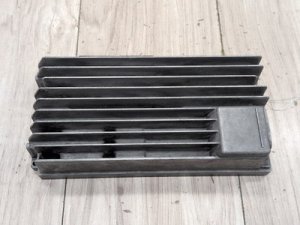
- The trunk-mounted amplifier is the most common point of failure, usually due to water damage from clogged sunroof drains or leaking seals.
- Replacing any audio module with a new or used part will trigger 'Component Protection,' which requires a visit to a dealer or specialist to remove and restore sound.
- Diagnose the specific faulty module using a fiber-optic bypass loop before purchasing any parts. Repairing your original unit can be a cost-effective way to avoid Component Protection issues.
Understanding Your Audi's Audio System: MMI 2G vs. MMI 3G+

This guide covers two distinct generations of Audi's MMI system, which are not interchangeable. Identifying your system is the first step to diagnosis.
MMI 2G High (2005-2009)
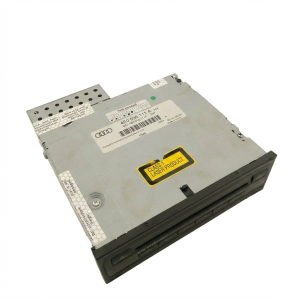
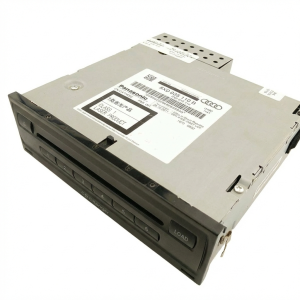
Found in the 2005-2013 Audi A8, 2007-2009 Audi S8, and 2007-2009 Audi Q7. This system is characterized by a remote 6-disc CD changer, typically in the glovebox, and a separate navigation DVD drive in the trunk. The modules are spread throughout the vehicle, with the amplifier and radio tuner often located in the trunk area.
MMI 3G & 3G+ (2012-2015)
Found in the 2012-2015 Audi A7, 2013-2015 Audi S7, and 2014-2015 Audi RS7. This system is more integrated, with the main 'head unit' in the dash containing a hard drive for navigation, as well as CD/DVD slots and SD card readers. While more consolidated, it still uses a MOST fiber-optic loop to connect to a separate amplifier and other modules.
Common Failure Symptoms

Because of the MOST fiber-optic loop design, a single faulty module can cause system-wide problems. A failure in the amplifier, for example, can make it seem like the entire MMI system is dead.
1. No Sound From Any Source
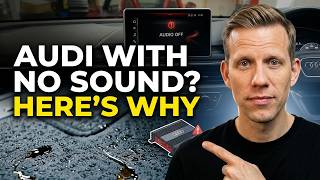
This is the most common symptom. The MMI screen may appear to work correctly—allowing you to change stations or select media—but there is complete silence from the speakers. This almost always points to a failure in the amplifier or a break in the fiber-optic loop leading to it. In some cases, a single shorted speaker can cause the amplifier to shut down all output as a protective measure.
🎬 Watch: Why your Audi has no sound and how to fix it.2. Black or Rebooting MMI Screen
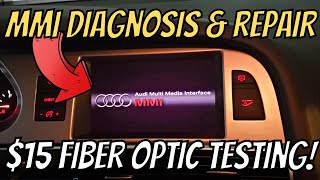
If the MMI screen is black, flickers, or gets stuck on the Audi splash screen and reboots, it indicates a break in the MOST loop. The system cannot initialize because a module in the chain is not responding. This could be the amplifier, radio tuner, CD changer, or the main MMI control unit itself.
3. Water Damage to Trunk-Mounted Components
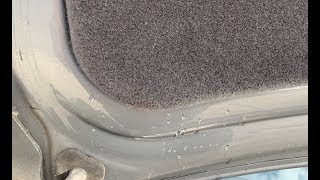
For the Audi Q7, A8, and A7, the audio amplifier and other modules are often located in the left side of the trunk. These areas are highly susceptible to water damage from clogged sunroof drains, leaking rear window washer lines, or failed trunk lid seals. 🎬 Watch: How to stop water from entering the trunk lid. If you experience audio problems, one of the first checks should be for dampness, corrosion, or water stains on or around the electronic modules in the trunk.
4. 'Component Protection Active' Message
This message appears after an audio module has been replaced. It is an anti-theft feature that locks the functionality of the new or used part until it is adapted to the vehicle by an authorized dealer or a specialist with online access to Audi's servers. When Component Protection is active, you will typically have no sound.
Diagnosing the Faulty Module

The key to fixing a dead MMI system is to find the broken link in the fiber-optic chain. The most effective DIY method is using a MOST fiber-optic bypass loop.
- Locate the Modules: In most of these vehicles, the amplifier and radio tuner are in the left side of the trunk, behind a removable panel.
- Systematically Bypass Each Module: Unplug the fiber-optic connector from a module (e.g., the amplifier).
- Insert the Loop Tool: Plug the bypass loop into the connector you just removed. This reconnects the fiber-optic circuit, bypassing the disconnected module.
- Test the System: Turn on the ignition. If the MMI screen comes back to life and other functions are restored (though you still won't have sound if you're bypassing the amp), you have found the faulty module.
- Repeat: If the system is still dead, reconnect the module and move to the next one in the loop (e.g., the radio tuner), repeating the process until the faulty component is isolated.
Pro Tip: A working fiber-optic cable will have a visible flashing red light from one of its two ports when the system is on. If you unplug a connector and see no red light coming from the vehicle's harness, the break is in a module 'upstream' from that point.
Known Issues, TSBs, and Recalls
- Water Intrusion (All Models): The most common killer of audio components, especially the amplifier in the trunk. Clogged sunroof drains are a primary cause in the Q7. Leaking trunk seals or license plate light housings can affect the A8. For the A7, clogged drains are also a known issue. Regular inspection and cleaning of drains is critical preventative maintenance.
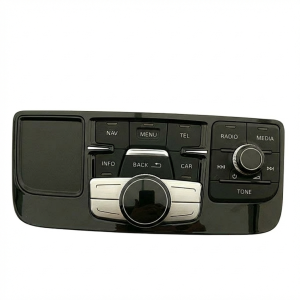
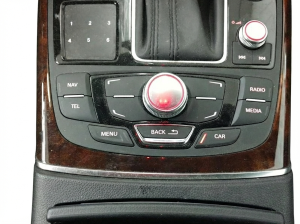
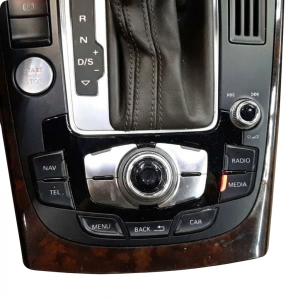
- MMI Control Panel Failure (All Models): The center console control panel (with the main knob and buttons) is a module itself. Spilled liquids can cause buttons to become sticky or fail, requiring cleaning or replacement.
- Software/Firmware Issues: In MMI 2G systems, accidentally entering the 'Bootloader' menu can brick the system, requiring a special update CD from a dealer to restore function. MMI 3G systems can suffer from hard drive failures or software corruption, causing them to get stuck on the 'Initializing Navigation' screen.
- Recalls: There are no major safety recalls directly related to the failure of these audio system modules. The official NHTSA and Audi recall sites should be checked with your vehicle's VIN for any applicable service campaigns.
Buying a Used Audio System Component

Purchasing a used module can be a cost-effective solution, but it requires careful attention to detail. The single most important factor is Component Protection.
Warning: Any used audio module (amplifier, radio tuner, MMI head unit) installed in your vehicle will trigger 'Component Protection Active' and will not function correctly until it is adapted by an Audi dealer or a specialist with the proper online diagnostic tools (ODIS). This service can cost $100-$300 and is a necessary part of the replacement cost. There is no DIY workaround for Component Protection.
- Match Part Numbers Exactly: You must match the OEM part number from your original unit. There are many variations for Bose, Bang & Olufsen, and standard audio systems, as well as for different body styles (e.g., Sedan vs. Avant/Wagon). An incorrect part number may not work at all.
- Verify the Sound System: Ensure the replacement part is from a vehicle with the same sound system as yours (Bose, B&O, or Standard). An amplifier for a Bose system will not work correctly with a standard system, and vice-versa. Check speaker grilles for logos to confirm.
- Inspect for Water Damage: When buying a used part, especially an amplifier, inspect it closely for any signs of corrosion or water stains on the casing or connectors. Reject any part that shows signs of moisture exposure.
- Consider a Repair Service: For common failures like amplifiers, services exist that will repair your original unit. This is often a great option as it returns your own part, requires no Component Protection removal, and is often 'plug and play'.
Cost Breakdown
Prices can vary significantly based on the specific component, vehicle, and sound system option. The amplifier is the most commonly replaced part.
| Part / Service | Estimated Cost |
|---|---|
| New OEM Amplifier (Bose/B&O) | $1,100 - $2,000+ |
| Used OEM Amplifier | $150 - $500 |
| Repair Service (Your Original Unit) | $250 - $450 |
| Shop Labor to Replace Amplifier | $150 - $300 |
| Component Protection Removal (Dealer/Specialist) | $100 - $300 |
Frequently Asked Questions (FAQ)
Do I have to go to the dealer to replace my amplifier?
You can replace the amplifier yourself or have an independent shop do it, but you will almost certainly need a dealer or a specialist with Audi online access to remove the Component Protection to restore sound. Alternatively, sending your original amplifier for repair avoids this issue entirely.
My MMI screen is black. How do I know if it's the screen or another module?
A black screen is rarely a problem with the physical screen itself. It's usually a symptom of a broken MOST fiber-optic loop. A failed amplifier, radio tuner, or MMI head unit will prevent the system from starting up, leaving the screen black. Use a fiber-optic bypass loop to find the actual failed component.
Why did my audio stop working after a heavy rain?
This strongly suggests water has leaked into the trunk and damaged the amplifier or another electronic module. Check the area around the amplifier in the left side of the trunk for any signs of moisture. You must fix the source of the leak before replacing any electronic parts.
Can I upgrade from a standard audio system to a Bose or B&O system?
This is not a simple swap. It would require replacing the amplifier, all speakers, the wiring harness, and extensive coding with diagnostic tools like VCDS. It is a complex and expensive retrofit that is not recommended for most owners.
Helpful Videos
Technical Specifications
OEM Part Numbers: 4E0035111A 4E0035541E 4E0035541EX 4E0035541P 4E0035541PX 4E0035541S 4E0035541SX 4E0057111 4E0057111C 4E0057111D 4E0057111E 4E0057111F 4E0910110C 4E0910111C 4E0910111D 4L0035223A 4L0035223D 4L0910223G 4G0035746H 4L2035746E
System architecture is based on a Media Oriented Systems Transport (MOST) fiber-optic bus. Modules include amplifiers (Bose, Bang & Olufsen, Standard), radio tuners, MMI control units, and media changers. Compatibility is strictly determined by part number, vehicle model, and installed sound system.
We Have This Part in Stock

The information in this article is provided for general reference and educational purposes only. Vehicle specifications, procedures, and part compatibility can vary by production date, trim level, and region. Always consult your vehicle's factory service manual and verify part numbers before purchasing or performing repairs. Safety-critical components such as airbags, seat belts, and braking systems should be installed by a qualified professional.
- Audi A8:
- Audi S8:
- Audi A7:
- Audi Q7:
- Audi RS7:
- Audi S7:
- 🎬 Helpful Videos
- 🛍️ Shop This Part
- Understanding Your Audi's Audio System: MMI 2G vs. MMI 3G+
- MMI 2G High (2005-2009)
- MMI 3G & 3G+ (2012-2015)
- Common Failure Symptoms
- 1. No Sound From Any Source
- 2. Black or Rebooting MMI Screen
- 3. Water Damage to Trunk-Mounted Components
- 4. 'Component Protection Active' Message
- Diagnosing the Faulty Module
- Known Issues, TSBs, and Recalls
- Buying a Used Audio System Component
- Cost Breakdown
- Frequently Asked Questions (FAQ)
- 🎟️ Get 5% Off