

2006-2011 Chevrolet HHR Radio: Decoding VIN Lock, Options, and Common Failures
Learn about the critical anti-theft programming, different sound system options, and how to choose the right used radio for your Chevrolet HHR.
- Any replacement OEM radio MUST be reprogrammed to your car's VIN by a GM dealer or a shop with a Tech 2 tool; otherwise, it will remain in 'THEFTLOCK' mode.
- Before buying, check the RPO code (e.g., U1C for base, UQA for Pioneer) on the glove box sticker to ensure you get a compatible unit.
- Loss of sound is often caused by failed door speakers due to moisture damage, not a bad radio. If the tweeters work but the main speakers don't, suspect the speakers first.
- Replacing the radio is an easy DIY job, but you must budget for the subsequent professional programming cost ($100-$200).
Symptoms of a Failing HHR Radio
When the factory radio in a 2006-2011 HHR begins to fail, it can manifest in several ways. Some issues can be a minor annoyance, while others can point to a complete failure of the head unit.
- No Power or Blank Display: The most obvious symptom is a completely dead unit. The display will be blank, and no audio will play. This can sometimes be caused by a blown fuse, but often points to an internal failure of the head unit itself.
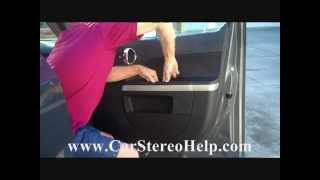
- Intermittent or No Audio: You might find that the sound cuts in and out, or disappears entirely, even though the radio display appears to be working normally. In many cases, this is actually caused by failed door speakers, a very common issue on the HHR due to moisture getting into the doors. If only the tweeters in the A-pillars are making sound, it's a strong sign the main door speakers have failed. 🎬 Watch: How to troubleshoot no audio and remove door speakers.
- CD Player Malfunctions: The CD player may refuse to accept, eject, or play discs. You might hear mechanical grinding noises or the unit may simply report an error.
- Worn or Unresponsive Buttons: The printing on frequently used buttons, like the volume and tuning knobs, can wear off. Over time, the physical buttons may also stop responding to presses due to worn internal contacts.
- "LOCKED" or "THEFTLOCK" Display: If you see this message, the radio has lost communication with the vehicle's BCM or has been installed from another vehicle. This is the anti-theft system at work, and it will not function until it is reprogrammed.
Radio Variants and Option Codes
Chevrolet offered a few different audio systems for the HHR. It is crucial to know which system your vehicle has before purchasing a replacement, as they are not always interchangeable. You can find your vehicle's option codes on the silver "Service Parts Identification" sticker, usually located inside the glove box door.
| RPO Code | Description | Notes |
|---|---|---|
| U1C | Base AM/FM Stereo with Single-CD Player | This is the most common radio found in LS and some LT models. |
| US8 / US9 | AM/FM Stereo with CD/MP3 Player | An upgraded version that adds MP3 playback capability. May also include RDS. |
| UUI | AM/FM/CD/MP3 with USB Port | Found in later model years (approx. 2009-2011), this radio added a front-mounted USB port for digital music files. |
| UQA | Pioneer Premium 7-Speaker System | This option includes an external amplifier and a subwoofer. The head unit is programmed differently to work with the external amp and is not a direct swap for a U1C or US8 radio without significant modifications. |
Warning: The vehicle's warning chimes (for keys in ignition, headlights on, etc.) are generated by the radio. If you install an aftermarket radio without the correct wiring interface adapter, you will lose these important safety sounds.
The #1 Issue: Anti-Theft VIN Lock and Programming
The single most important thing to understand when replacing an HHR radio is the anti-theft system. The radio reads the Vehicle Identification Number (VIN) from the car's Body Control Module (BCM). If the VIN in the radio's memory does not match the BCM's VIN, the radio will enter "THEFTLOCK" mode and will not operate.
This means any used or recycled OEM radio you purchase must be reprogrammed to your vehicle's VIN after installation.
How to Unlock a Replacement Radio
- GM Dealership: This is the most straightforward option. A dealer technician will use a Tech 2 scan tool or a modern equivalent with a subscription to GM's online service to pair the radio to your car. This service typically costs a flat fee, often equivalent to 0.5-1.0 hour of labor.
- Equipped Independent Shop: Many independent auto repair shops that specialize in GM vehicles own a Tech 2 or other professional scan tool and can perform the same service.
- Mail-In Unlocking Services: Some businesses offer to unlock the radio if you mail it to them. They reprogram the unit and send it back, allowing for a plug-and-play installation.
Pro Tip: The older tricks for unlocking GM radios by holding down buttons to get a code do not work on these newer GMLAN-based units. Programming with a specialized tool is required.
Known Issues, TSBs, and Recalls
While there have been no specific safety recalls for the audio system itself, the HHR was subject to a major recall for the ignition switch (NHTSA Recall No. 14V171000). This recall could indirectly affect the radio if power is interrupted during the repair. A Technical Service Bulletin (TSB) was also issued regarding potential installation conflicts when trying to add both a GM Accessories XM Radio Kit and a Personal Audio Link (PAL) at the same time, as they may use the same connector.
Buying a Used 2006-2011 HHR Audio System
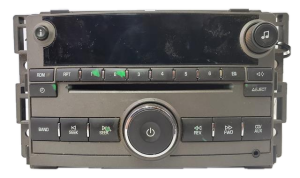
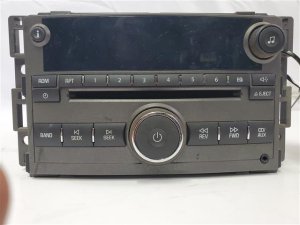
A used OEM radio is an excellent, cost-effective replacement for a failed unit. It preserves the factory appearance and functionality, including steering wheel controls, without the need for complex adapters. Here's what to look for:
- Verify the Part Number and RPO Code: Before buying, check the RPO code on your glove box sticker (U1C, UQA, etc.) and try to match it to the donor vehicle. While several part numbers may look identical, matching the option code is the best way to ensure compatibility, especially between base and Pioneer systems.
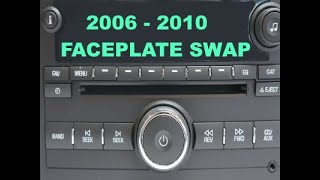
- Inspect the Faceplate: Check for excessive wear on the buttons and knobs. Ensure the display is not cracked. A unit with a worn faceplate might still be functional, and it's sometimes possible to swap your old faceplate onto the replacement radio chassis to fix cosmetic issues. 🎬 Watch: How to swap radio faceplates and fix AUX ports.
- Factor in Programming Costs: Remember that a used radio is essentially a paperweight until it's programmed. When comparing the price of a used unit to a new aftermarket one, be sure to add the expected cost of dealer or shop programming ($100-$200) to your budget.
- Ask About the Donor VIN: While not always necessary, some technicians may ask for the VIN of the vehicle the radio came from during the reprogramming process. It can be helpful to have if the seller can provide it.
Cost of Replacement
| Part Type | Estimated Cost |
|---|---|
| New OEM | $300 - $500+ (if available) |
| New Aftermarket | $120 - $400+ (plus adapters) |
| Used OEM | $50 - $150 |
| Remanufactured | $200 - $300 |
| Shop Labor (Physical Swap) | $75 - $150 |
| Shop Labor (VIN Programming) | $100 - $200 |
Step-by-Step Replacement Overview
Physically swapping the radio is a straightforward job that most DIYers can handle.
- Use a panel tool to gently pry off the large plastic trim piece that surrounds the radio and climate controls.
- Disconnect the electrical connectors for the hazard switch and any other components on the trim panel.
- Remove the 7mm screws that secure the radio and climate control module to the dashboard.
- Carefully pull the radio out, then disconnect the main wiring harnesses and the antenna cable from the back.
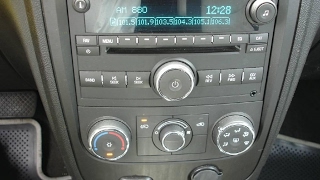
- Installation is the reverse of removal. Connect the new radio, secure it with the screws, and snap the trim panel back into place. 🎬 See this step-by-step radio removal and replacement walkthrough.
- After installation, the radio will display "LOCKED" and must be taken to a dealer or equipped shop for programming.
Frequently Asked Questions (FAQ)
What does the "LOCKED" message on my HHR radio mean?
The "LOCKED" message means the radio's anti-theft system has been triggered. This happens when the radio is disconnected from power and installed in a vehicle with a different VIN than the one it was originally paired with. The radio is unusable until it is reprogrammed to your car's VIN by a GM dealer or a properly equipped independent shop.
Can I install a radio from a Cobalt or G5 into my HHR?
Physically, many GM radios from the same era (like those from a Chevrolet Cobalt or Pontiac G5) have the same size and connectors. However, they may have different programming for features like the Pioneer sound system or different button illumination colors. While it might work after VIN programming, compatibility is not guaranteed. It is always best to use a radio from another HHR.
Do I need special tools to remove the HHR radio?
You will need a plastic trim removal tool (or a flat-head screwdriver wrapped in tape to prevent scratching) and a 7mm socket or nut driver. No special radio removal keys are required.
Will my steering wheel controls work with a replacement radio?
If you replace your failed radio with a used OEM unit from another HHR, your steering wheel controls will function perfectly after the unit is programmed. If you opt for an aftermarket radio, you will need to purchase and install a separate steering wheel control interface adapter to retain this functionality.
My radio lights up but there's no sound. Is the radio bad?
While it could be an internal amplifier failure in the radio, it is far more common for the door speakers to have failed. This happens frequently on the HHR due to moisture damage. A simple test is to connect a known good speaker to the wiring behind the radio; if you get sound, the radio is likely fine and your speakers need to be replaced.
Helpful Videos
Technical Specifications
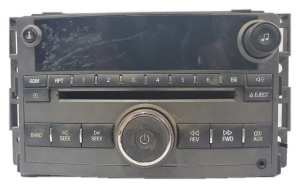
OEM Part Numbers: 15299283 15812373 15832812 15877246 15951993 25833527 25833529 20788673 20919523 15951994
Integrates with GMLAN vehicle data bus. Features VIN-based 'TheftLock' anti-theft system. Vehicle warning chimes are generated through the radio's speakers.
We Have This Part in Stock

The information in this article is provided for general reference and educational purposes only. Vehicle specifications, procedures, and part compatibility can vary by production date, trim level, and region. Always consult your vehicle's factory service manual and verify part numbers before purchasing or performing repairs. Safety-critical components such as airbags, seat belts, and braking systems should be installed by a qualified professional.
- Chevrolet HHR:
- 🎬 Helpful Videos
- 🛍️ Shop This Part
- Symptoms of a Failing HHR Radio
- Radio Variants and Option Codes
- The #1 Issue: Anti-Theft VIN Lock and Programming
- How to Unlock a Replacement Radio
- Known Issues, TSBs, and Recalls
- Buying a Used 2006-2011 HHR Audio System
- Cost of Replacement
- Step-by-Step Replacement Overview
- Frequently Asked Questions (FAQ)
- 🎟️ Get 5% Off