

Ford Explorer, Focus & Police Interceptor Audio Control Module Guide (2016-2019): Fixing Failures and Compatibility
Diagnose and replace the audio control module in your 2016-2019 Ford Explorer, 2016-2019 Police Interceptor Utility, or 2016-2018 Ford Focus by understanding the common failures and critical compatibility requirements.
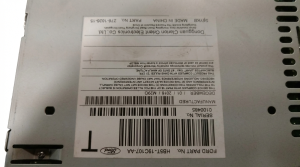
- Compatibility is critical: You MUST match the engineering ID number (e.g., GB5T-18A802-ED) from the sticker on the back of your original unit. Different letters mean different features.
- A working screen with no sound is the classic symptom of a failed Audio Control Module (ACM), which is separate from the touchscreen's APIM module.
- If you swap in a used module with an identical part number, programming is generally not required. A different part number will require programming with dealer tools or FORScan.
- This guide applies to the 2016-2019 Explorer/Police Interceptor and 2016-2018 Focus. The 2020+ Explorer uses a completely different system.
Vehicle Fitment and Generation Note
This guide covers the audio control system for the following vehicles:
- 2016-2019 Ford Explorer
- 2016-2019 Ford Police Interceptor Utility
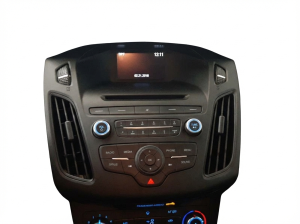
- 2016-2018 Ford Focus
Important: The 2020 and newer Ford Explorer and Police Interceptor Utility models use a completely different dashboard design and audio control system (with part numbers like LC5T-18K811-AH). The information in this guide and the associated part numbers (e.g., GB5T-18A802-xx) apply only to the 2016-2019 generation.
Symptoms of a Failing Audio Control Module
Failures in the audio control module (ACM) or the front control panel (FCIM) can manifest in several ways. Often, these issues are caused by internal electronic failures within the ACM itself.
- No Sound from Speakers: This is the most common symptom. The touchscreen display may appear to work perfectly, allowing you to change stations or select sources, but no audio comes out of the speakers.
- Loud Popping or Static: A loud pop or crackle from the speakers, often occurring at startup or randomly while driving, is a strong indicator of an internal ACM hardware failure.
- Blinking or Flashing Clock: The clock on the display may blink continuously and refuse to hold the correct time. This is a known issue directly linked to a faulty ACM.
- System Won't Power On: The entire audio system, including the screen, may be black and unresponsive. While this can also be an issue with the APIM (the touchscreen module), it often points to a power failure inside the ACM.
- Unresponsive Buttons or Controls: The physical buttons and knobs on the control panel may stop responding, preventing you from adjusting the volume, changing the station, or controlling climate functions.
- Chimes Move to Instrument Cluster: Vehicle warning chimes that normally play through the main speakers may start coming from a small speaker in the instrument cluster instead. This happens when the vehicle's network loses communication with the ACM.
Before assuming the module is bad, it's always wise to perform a soft reset by holding the power and right-seek buttons for 10 seconds, or to disconnect the vehicle's battery for five minutes to reset all modules. If symptoms persist, the ACM is the likely culprit.
Understanding the Difference: APIM vs. ACM/FCIM
It's crucial to understand the different parts of the SYNC 3 system to correctly diagnose a problem:
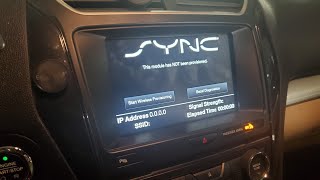
- APIM (Accessory Protocol Interface Module): This is the "SYNC module" or the computer that runs the 8-inch touchscreen display, navigation, Bluetooth, and apps like Apple CarPlay/Android Auto. A black screen where the radio still plays audio often points to a failed APIM.
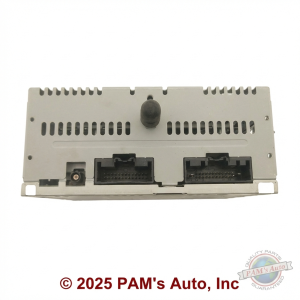
- ACM (Audio Control Module): This is the "radio." It's a separate metal box, often located behind the FCIM, that handles AM/FM/SiriusXM tuning and generates the audio signal sent to the speakers. A working screen with no sound is a classic ACM failure symptom.
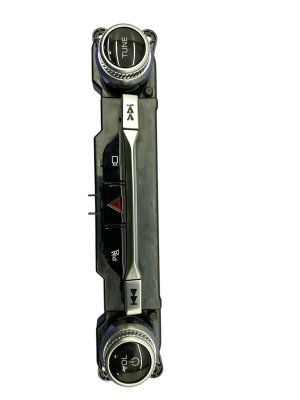
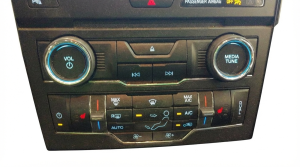
- FCIM (Front Controls Interface Module): This is the physical panel with the buttons and knobs. It acts as the interface for both the ACM and the HVAC system.
Known Issues, TSBs, and Recalls
While no specific recalls exist for this audio system, Ford has issued Technical Service Bulletins (TSBs) for related problems. For example, TSB 14-0169 addressed an intermittent "no audio output" issue on some 2013-2014 Explorers, which was fixed by reprogramming the ACM. Similarly, TSB 13-1-13 dealt with popping or distorted sound, also resolved with a software update. While these TSBs are for earlier models, they show a history of software-related audio fixes, so it's always worth checking with a dealer if any updates apply to your vehicle before replacing hardware.
Buying a Used Audio System: The Ultimate Compatibility Guide
This is the most critical section for anyone buying a replacement part. Due to the many vehicle options, getting the right module is essential. Failure to match the part correctly will result in it not working.
1. The ID Number is Everything
Ford produced dozens of variations of this control panel. To ensure compatibility, you must match the engineering ID number on the back of your original unit. This number is far more important than the year or model of the donor vehicle.
Warning: You must physically remove your original control panel 🎬 Watch this video for a step-by-step removal and troubleshooting guide. to find the ID number on the sticker on its back. There is no other way to be certain. The number will be in a format like GB5T-18A802-ED.
The letters at the end (e.g., -EA, -EB, -CA, -CB) are critical. They define the features the panel supports:
- Sony vs. Non-Sony Audio: Panels for the premium Sony sound system are not interchangeable with the standard system.
- Button Configuration: Panels may or may not have buttons for features like Heated/Cooled Seats or a Heated Steering Wheel. Your replacement must have the exact same button layout.
- Screen Size: These panels are designed for the 8-inch SYNC 3 touchscreen. They will not work with the smaller 4-inch display.
2. Visually Compare the Buttons
In addition to matching the ID number, always visually compare the buttons on the front of the panel with your original. Make sure every feature and option matches perfectly.
3. Why Used OEM is the Best Choice
True aftermarket replacements for these specific control modules are virtually nonexistent. The options are typically a very expensive new part from a Ford dealer, a repair service for your original unit, or a used OEM part. A used OEM module is often the most cost-effective solution, provided you follow the compatibility rules above. A used part with a matching ID number is typically plug-and-play.
Programming and Installation
Whether a replacement module needs programming depends on the situation.
- Matching Part Numbers: If you install a used ACM/FCIM with the exact same engineering ID number as your original, programming is generally not required. It should be a plug-and-play replacement.
- Different Part Numbers or Upgrades: If you install a module from a different vehicle with different features (or are trying to upgrade), it will need to be programmed. This involves using a diagnostic tool to configure the module for your vehicle's specific options (like Sony audio, number of speakers, etc.).
Who Can Program the Module?
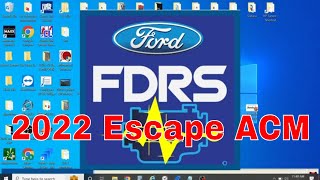
- Dealer: A Ford dealership can always program the module using their proprietary software (FDRS). 🎬 See how a technician uses FDRS to program the module.
- Independent Shops: Many independent repair shops that specialize in diagnostics have the necessary J2534 pass-thru tools and software subscriptions to perform the programming.
- DIY with FORScan: For the tech-savvy DIYer, a tool called FORScan can be used. If your original ACM is still functional enough to be read, you can back up its "As-Built" data and restore it to the replacement module. This is a powerful tool but requires careful research to use correctly.
Cost Breakdown
Prices can vary, but here is a general estimate for replacing the audio control module/panel.
| Part Type | Estimated Cost |
|---|---|
| New OEM (Dealer) | $600 - $1,200+ |
| Used OEM (Salvage/Online) | $70 - $250 |
| Remanufactured / Repair Service | $180 - $350 |
| Shop Labor (Installation & Programming) | $150 - $300 |
Frequently Asked Questions (FAQ)
Does a replacement audio control module have to be programmed?
If the part number on the replacement module is an exact match to your original, it usually does not require programming. However, if the part number is different or you are upgrading, it must be programmed to your vehicle's VIN and options using dealer software or a tool like FORScan.
My screen is black but the radio still plays. Is this the ACM?
No, that is more likely a failure of the APIM module, which is the computer that runs the touchscreen itself. A failed ACM typically results in a working screen but no sound.
Can I upgrade to a panel with heated seat buttons if my car doesn't have them?
Technically, it is possible, but it is a complex job. You would not only need to replace the control panel but also install the heating elements in the seats and then use FORScan to enable the feature in both the FCIM and other vehicle modules. It is not a simple plug-and-play swap.
What is FORScan and can I use it myself?
FORScan is a powerful software tool that allows deep access to the electronic modules in Ford vehicles. It can be used by DIYers to diagnose codes, change vehicle settings, and program modules. While it can save you a trip to the dealer, it has a steep learning curve and can cause serious issues if used incorrectly. Extensive research on forums and tutorials is recommended before attempting to use it.
What about the audio system in the Police Interceptor Utility?
The Police Interceptor Utility is based on the Explorer and uses the same core components. However, decommissioned police vehicles can have unique issues. It's common for wiring to be cut or modified during decommissioning, which can cause radio problems even if the hardware is good. Also, base model PIUs may not have the SYNC system, making radio swaps more complicated.
Helpful Videos
Technical Specifications
OEM Part Numbers: FB5T18B849AD FB5T18B849AE FB5T18B849AF FB5T18B849AH FB5T18B849AJ FB5Z18A849D FB5Z18A849F GB5T-18A802-EA GB5T-18A802-EB GB5T-18A802-EC GB5T-18A802-ED GB5T-19C107-BG GB5T-19C107-JA GB5T-19C107-KC GB5T-AA GB5T-18A802-BA GB5T-18A802-BB GB5T-18A802-BC GB5T-18A802-BD GB5T-18A802-CA GB5T-18A802-CB GB5T-18A802-CC GB5T-18A802-CD
System is comprised of multiple modules: APIM (SYNC Screen), ACM (Audio processing/tuner), and FCIM (Front button panel). Designed for SYNC 3 systems with an 8-inch touchscreen. Communicates on the vehicle's CAN bus network.
We Have This Part in Stock

The information in this article is provided for general reference and educational purposes only. Vehicle specifications, procedures, and part compatibility can vary by production date, trim level, and region. Always consult your vehicle's factory service manual and verify part numbers before purchasing or performing repairs. Safety-critical components such as airbags, seat belts, and braking systems should be installed by a qualified professional.
- Ford Explorer:
- Ford Police Interceptor Utility:
- Ford Focus:
- 🎬 Helpful Videos
- 🛍️ Shop This Part
- Vehicle Fitment and Generation Note
- Symptoms of a Failing Audio Control Module
- Understanding the Difference: APIM vs. ACM/FCIM
- Known Issues, TSBs, and Recalls
- Buying a Used Audio System: The Ultimate Compatibility Guide
- 1. The ID Number is Everything
- 2. Visually Compare the Buttons
- 3. Why Used OEM is the Best Choice
- Programming and Installation
- Who Can Program the Module?
- Cost Breakdown
- Frequently Asked Questions (FAQ)
- 🎟️ Get 5% Off