

2014-2019 Ford Fiesta Audio System: Decoding Sync Faults, Part Numbers, and Programming
This guide explains the common failures of the Ford Fiesta audio and Sync systems, how to find the exact replacement part, and what you need to know about programming.
- A replacement audio module (ACM or APIM) MUST be programmed to your vehicle's VIN to function correctly.
- Many common issues like freezing, Bluetooth problems, and blank screens are caused by the SYNC (APIM) module, not the radio (ACM) itself.
- You must match the part number from your original unit exactly to ensure compatibility with features like satellite radio, screen size, and HD radio.
- Before replacing hardware, try a system reset and check for available SYNC software updates, as many problems are software-related.
Common Failure Symptoms
Problems with the Fiesta's audio system often point to the SYNC (APIM) module rather than the radio (ACM) itself. These issues are frequently software-related but can also indicate hardware failure.
- SYNC System Freezes or is Unresponsive: The screen may be stuck on the Ford logo, or it may not respond to touch or button presses. This is a classic symptom of a failing APIM module 🎬 Watch: How to diagnose and fix common SYNC module symptoms or a software glitch.
- Blank or Black Screen: The display may not turn on at all, even though you can still hear audio from the radio. This can be a problem with the screen itself or a total failure of the APIM module.
- No Audio Output: You might experience a sudden loss of all sound from the speakers. Sometimes this is preceded by a loud "pop." This can point to a failure within the radio (ACM) or an internal amplifier issue.
- Bluetooth Connectivity Issues: The system may refuse to pair with a phone, drop connections randomly, or connect for calls but not for music streaming. Often, a system reset can temporarily fix this, but persistent problems suggest a failing APIM.
- System Reboots Randomly: The entire SYNC system may shut down and restart on its own while you are driving.
- USB Ports Not Working: The USB ports in the console may stop charging your phone or recognizing media devices, which is another common sign of APIM failure.
- Radio Won't Turn Off: In some cases, the radio may stay on even after the car is turned off and the key is removed. This can often be temporarily resolved by pulling the radio fuse to reset the system.
Known Issues, TSBs, and Recalls
While most issues are related to individual component failure, Ford has issued Technical Service Bulletins (TSBs) for SYNC performance concerns. TSB 20-2255, for example, notes that many APIM modules were being replaced when they simply needed a software update to correct performance issues like freezing or lagging. Before replacing hardware, it's always worth checking if a software update is available.
There have been no major recalls specifically for the audio or SYNC system failures in the 2014-2019 Fiesta. However, a recall (25V695) was issued for the 2019 model year because the rearview camera image might not display, which is related to the infotainment system.
CRITICAL: Programming is Required
You cannot simply swap a used audio module (either the ACM or APIM) from another Fiesta and expect it to work perfectly. These modules are programmed to the specific Vehicle Identification Number (VIN) of the car they came from. A replacement module must be reprogrammed to match your car's features, such as screen size, satellite radio, steering wheel controls, and backup camera. Without programming, you may have missing features or the unit may not function at all.
Can a Used Audio Module Be Reprogrammed?
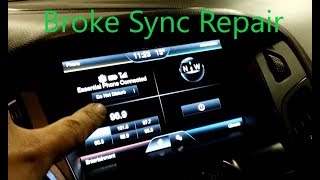
Yes. Reprogramming can be done by a Ford dealership using their Integrated Diagnostic Software (IDS). Some independent shops with advanced tools may also be able to perform this service. For advanced DIY mechanics, a tool called FORScan combined with a compatible OBD-II adapter can be used to write your vehicle's original "As-Built" data 🎬 See this walkthrough on repairing and reprogramming your APIM to the replacement module. This process requires a computer and some technical knowledge but is a common practice in online Ford communities.
Unlike older vehicles, these radios do not use a simple anti-theft code; the security is tied to the vehicle's VIN.
Buying a Used 2014-2019 Ford Fiesta Audio System
Purchasing a used OEM audio component is an excellent way to save money, but careful matching is essential. Here’s what to look for:
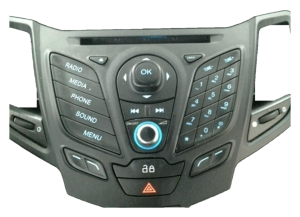
- Match Part Numbers Exactly: This is the most important rule. Ford produced many variations of these radios and control panels. The only way to guarantee compatibility is to match the engineering ID number on your original part to the one you are buying. Sellers often note that even if units look identical, different data streams can prevent them from working correctly.
- Verify Your Options: Before you buy, know exactly what your car has. Does it have satellite radio? HD radio? The basic SYNC system or the larger touchscreen? The part you buy must be from a vehicle with the same options.
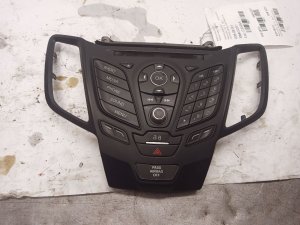
- Control Panel vs. Radio Module: Be clear about what part you are buying. The control panel (the faceplate with buttons) is often sold separately from the radio/CD player module (the ACM) and the SYNC module (APIM). Make sure you are replacing the correct failed component.
- 2015 Model Year Split: Be extra cautious with 2015 models. The provided data indicates a manufacturing date split for some control panels. One fits vehicles made on or before March 4th, 2015, while another fits vehicles made on or after March 5, 2015. Always verify this if you have a 2015 Fiesta.
- Inspect Connectors: When you receive the part, check that all connector pins are straight and that the plastic housings are not cracked or damaged.
Cost Comparison
| Part Type | Estimated Cost |
|---|---|
| New OEM (Dealer) | $800 - $2500 (for APIM module) |
| New Aftermarket (Head Unit) | $150 - $600+ (often requires expensive dash kits) |
| Used OEM (Recycled) | $65 - $250 |
| Remanufactured OEM | $200 - $300 |
| Shop Labor (Installation & Programming) | 🎬 Watch: A full breakdown of car stereo installation costs$100 - $350 |
Frequently Asked Questions (FAQ)
Do I need a radio code to install a replacement Fiesta radio?
No, Ford vehicles from this era do not use a traditional 4-digit radio code. Instead, the radio is programmed to the car's VIN. If you install a used radio, it will need to be reprogrammed to your car, not unlocked with a code.
My screen is frozen. Do I need a whole new radio?
Not necessarily. First, try a soft reset by holding the Power and Seek Right buttons for about 10 seconds until the screen goes blank. If that doesn't work, try a master reset by disconnecting the car's battery for 15 minutes. If the problem persists, the issue is most likely the SYNC/APIM module, not the entire radio assembly.
Can I upgrade my basic radio to a touchscreen SYNC system?
Yes, but it is a complex and potentially expensive project. It involves replacing the screen, APIM module, control panel, and possibly adding wiring. Companies specialize in selling complete conversion kits, but it is not a simple plug-and-play swap and requires significant programming.
Why did my Bluetooth stop working?
This is a very common SYNC issue. Before assuming the hardware is bad, try deleting your phone from SYNC and deleting SYNC from your phone's Bluetooth menu. Then, perform a master reset of the SYNC system through the settings menu. If this provides only a temporary fix, it's a strong indicator that the APIM module is beginning to fail.
Helpful Videos
Technical Specifications
OEM Part Numbers: D2BT-18K811-PA D2BT-19C107-AF D2BT18K811BC D2BT18K811BD D2BT18K811PA D2BT19C107AE D2BT19C107AF D2BT19C107CB D2BT19C107CC D2BT19C107CD D2BT19C107CE D2BZ18C858B D2BZ18C858F D2BZ18C869E D2BZ18C869K
System is comprised of multiple components: Audio Control Module (ACM), Accessory Protocol Interface Module (APIM), and Front Control Interface Module (FCIM).
We Have This Part in Stock

The information in this article is provided for general reference and educational purposes only. Vehicle specifications, procedures, and part compatibility can vary by production date, trim level, and region. Always consult your vehicle's factory service manual and verify part numbers before purchasing or performing repairs. Safety-critical components such as airbags, seat belts, and braking systems should be installed by a qualified professional.
- Ford Fiesta: