

2007-2015 Mazda CX-9 Radio & Display Guide: Nav vs. Non-Nav Explained
This guide covers the common failures, costs, and critical compatibility differences between the navigation and non-navigation audio systems in the first-generation Mazda CX-9.
- The biggest pitfall is buying the wrong unit; Navigation and Non-Navigation systems are NOT interchangeable.
- A like-for-like OEM replacement radio does not require dealer programming or an anti-theft code.
- "Ghost touch" on navigation screens is a very common failure caused by the digitizer, which can be replaced separately from the entire unit.
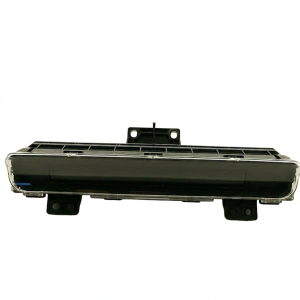
- The small upper information display (on non-nav models) is a separate part and can be replaced independently of the radio.
Identifying Your CX-9's Audio System: A Critical First Step
Before diagnosing issues or buying a replacement part, you must correctly identify which audio system your 2007-2015 Mazda CX-9 has. The two systems are not interchangeable. Installing a navigation unit in a car originally equipped with the standard radio will not work without extensive and costly modifications to the vehicle's wiring and other modules.
- Standard System: Features a basic radio with physical buttons and a small, separate, non-touch monochrome display screen located at the top of the center dashboard. This screen typically shows the clock, outside temperature, and basic radio information.
- Navigation System: Features a larger, full-color touchscreen integrated into the main radio unit. This single unit handles all radio, media (like CD/Bluetooth), and GPS navigation functions.
Warning: The most common mistake buyers make is purchasing a navigation head unit for a non-navigation vehicle, or vice-versa. Always match the type of unit that originally came with your vehicle. The part numbers for these systems are different and they use different wiring harnesses.
Symptoms of a Failing Audio System
Failures can occur in the main head unit, the separate upper display screen (on non-nav models), or related components like the amplifier.
Common Failure Symptoms:
- Black or Unresponsive Screen: The main navigation screen or the upper information display may go completely black or stop responding to touch or button presses. Sometimes audio still works, but the display is dead.
- "Ghost Touch" or Phantom Touches: The navigation touchscreen may start acting on its own, randomly pressing buttons, changing settings, or making calls. This is often caused by a failing digitizer (the touch-sensitive layer of the screen) and can worsen in warm weather.
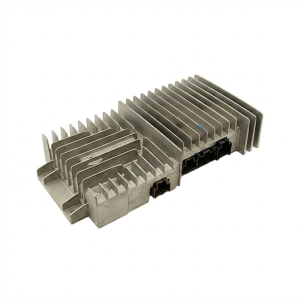
- No Sound from Speakers: The unit may power on, but no audio comes out. This can be caused by a blown fuse, a faulty head unit, or a failed factory amplifier, which is a common issue in Bose-equipped models.
- CD Player Errors: The built-in CD changer may jam, refusing to load, eject, or play discs.
- Bluetooth Connectivity Problems: Difficulty pairing a phone, frequent disconnections, or poor audio quality during calls can point to a failing Bluetooth module inside the radio.
- Faded or Pixelated Upper Display: The separate information screen on non-navigation models can suffer from dead pixels or become too dim to read.
Known Issues, Recalls, and TSBs
While there have been no major safety recalls specifically for the audio units in the 2007-2015 CX-9, several recalls for airbags and suspension components have been issued for this generation. It's always wise to check for any open recalls on your vehicle.
Mazda has released Technical Service Bulletins (TSBs) related to the audio and electronics systems, including troubleshooting procedures for Bluetooth connectivity issues (TSB 09-039/14). These bulletins provide dealership technicians with standardized repair instructions for known problems. Another TSB addresses potential speaker noise when using an auxiliary device.
Buying a Used Audio System for Your CX-9
Purchasing a used OEM audio unit can be a cost-effective solution, but careful verification is essential.
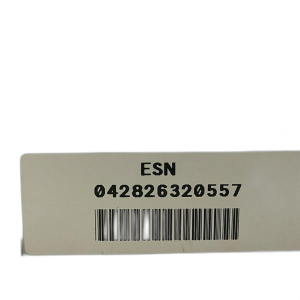
Compatibility Warning: This part is a combined radio receiver and navigation display screen for vehicles originally equipped with the factory navigation system. It will not function in a vehicle that did not come with factory navigation. Conversely, a standard radio will not work in a vehicle wired for navigation. To ensure compatibility, verify the identification number on your original unit before ordering.
What to Look For:
- Match Part Numbers: The most reliable way to ensure compatibility is to match the OEM part number from your original unit to the replacement. Do not rely on appearance alone.
- Inspect the Screen: For navigation units, check the touchscreen for deep scratches, delamination (bubbling or peeling layers), or spider-web-like cracks under the surface. These indicate a failing digitizer.
- Check Connectors: Ensure all electrical connector ports on the back of the unit are clean and free of damage or corrosion.
- Verify the Source: Ask the seller about the history of the part if possible. A unit from a low-mileage, collision-damaged vehicle is often a good choice.
Installation and Programming
For a like-for-like replacement (e.g., a used navigation unit to replace a broken navigation unit), the process is generally plug-and-play.
- Programming: Swapping an identical factory radio generally does not require dealer programming or flashing. The vehicle's main computer systems are separate from the audio unit's core functions.
- Anti-Theft Codes: Unlike some other manufacturers, Mazda radios from this era typically do not require an anti-theft code after the battery is disconnected or the unit is replaced. This simplifies the installation process.
- Immobilizer: The audio system is not tied to the vehicle's engine immobilizer system. Replacing the radio will not prevent the car from starting.
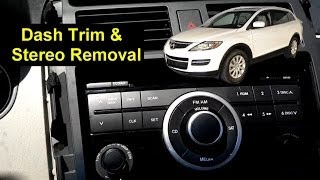
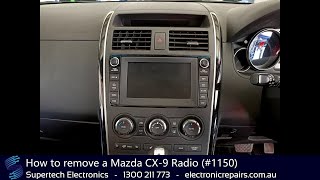
Pro Tip: When replacing the unit, the most difficult part is often removing the dashboard trim without scratching or breaking it. 🎬 See how to safely remove the radio and dash trim. Use plastic panel removal tools and follow a video guide to see where the clips and screws are located.
🎬 Watch this step-by-step guide to removing and replacing your stereo.Cost of Replacement
The cost to replace a Mazda CX-9 audio system can vary dramatically based on the type of unit and the source of the replacement part.
| Part Source | Estimated Cost |
|---|---|
| New OEM (Dealer) | $1,500 - $6,000+ |
| New Aftermarket (Touchscreen Upgrade) | $400 - $700 |
| Used OEM (Salvage/Online) | $100 - $250 |
| Remanufactured OEM | $200 - $400 |
| Shop Labor for Installation | $100 - $250 |
Frequently Asked Questions (FAQ)
Do I need an anti-theft code to install a replacement radio?
No, factory radios for the 2007-2015 Mazda CX-9 typically do not require an anti-theft code after installation. This makes swapping a used, identical unit a straightforward process.
Will a navigation radio work in my CX-9 that didn't come with navigation?
No. The navigation and non-navigation systems use different wiring harnesses and communicate with different vehicle modules. You cannot simply swap a navigation unit into a base model vehicle and expect it to work.
My touchscreen is pressing buttons by itself. Do I need a whole new radio?
This issue, known as "ghost touch," is almost always caused by a failing touchscreen digitizer, not the entire radio. While the dealer may quote a full unit replacement for over $1,500, the digitizer itself can be replaced by a knowledgeable DIYer or specialty repair shop for a fraction of the cost.
Can I replace just the small upper information display screen?
Yes. On non-navigation models, the upper clock and temperature display is a completely separate part from the main radio unit below it. If only that screen has failed, you can replace it independently without needing to change the radio.
Helpful Videos
Technical Specifications
OEM Part Numbers: GS3P66DR0 TD11-61-1J0 TD11611J0 TD11611J0A TD14-66-DV0A TD1466960 TD1466DV0A TD74611J0 TD7466DRXA TD75-61-1J0 TD75611J0 TE69611J0A TE69611J0B TE6966DV0 TE70611J0B TD1866DV0 TG1866DV0 TE9566DV0A TGY066DVX TEY166DVX
System types include standard AM/FM/CD with separate info display, and an all-in-one AM/FM/6-Disc CD Changer with touchscreen navigation. Some systems are integrated with a Bose amplifier.
We Have This Part in Stock

The information in this article is provided for general reference and educational purposes only. Vehicle specifications, procedures, and part compatibility can vary by production date, trim level, and region. Always consult your vehicle's factory service manual and verify part numbers before purchasing or performing repairs. Safety-critical components such as airbags, seat belts, and braking systems should be installed by a qualified professional.
- Mazda CX-9:
- 🎬 Helpful Videos
- 🛍️ Shop This Part
- Identifying Your CX-9's Audio System: A Critical First Step
- Symptoms of a Failing Audio System
- Common Failure Symptoms:
- Known Issues, Recalls, and TSBs
- Buying a Used Audio System for Your CX-9
- What to Look For:
- Installation and Programming
- Cost of Replacement
- Frequently Asked Questions (FAQ)
- 🎟️ Get 5% Off