

2018 Mazda 3 Base Radio Tuner: Why It Fails and Programming Needs
This guide covers common failures like no sound, static, and the critical, often overlooked, programming requirements for the 2018 Mazda 3's base audio system.
- A replacement unit will likely require programming by a dealer or specialist with Mazda software to function correctly.
- This audio system is for the base model only and is not compatible with vehicles that have the 7-inch LCD Mazda Connect system.
- This generation of Mazda 3 was included in a class-action lawsuit for infotainment system defects like freezing and rebooting.
- Before replacing the unit for a 'no sound' condition, always check the audio system fuses first, as this is a common and simple fix.
Symptoms of a Failing Audio System
When the audio tuner in a 2018 Mazda 3 begins to fail, it can manifest in several ways. Diagnosing the issue correctly can save you from replacing parts that are still functional, like speakers.
- Complete Silence: The most obvious symptom is a total lack of sound from all speakers. The unit may appear to power on, and you might be able to change stations, but no audio is produced.
- Static and Crackling: You may hear excessive static, popping, or crackling noises that are not related to a weak radio signal. If these noises occur across all audio sources (AM, FM, USB), it points to a problem with the unit itself rather than the antenna.
- Intermittent Functionality: The radio may work perfectly one moment and cut out the next. This can sometimes be triggered by bumps in the road, suggesting a loose internal connection.
- Unresponsive Controls: The physical buttons or knobs on the unit may stop working, making it impossible to change the volume, station, or audio source.
- Only Certain Inputs Work: A common failure mode for the internal tuner is when you can play music via Bluetooth or USB, but the AM/FM radio is only static or silent.
Pro Tip: Before assuming the unit is dead, check the fuse. A simple blown fuse is a common cause for a radio that won't power on. For a sudden loss of sound where the unit still has power, some owners have had success performing a reset by pulling the audio system's fuse for several minutes and then reinserting it.
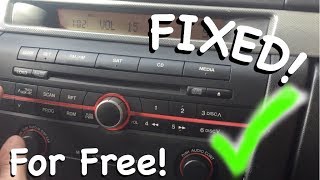
🎬 Watch: This quick video shows how to reset your radio.Known Issues and Legal Actions
The 2014-2018 generation of the Mazda 3 has been subject to scrutiny for its infotainment systems. While most complaints focus on the larger Mazda Connect touchscreen system, the underlying electronics of the era can be prone to issues.
Class Action Lawsuit
A class action lawsuit was filed concerning Mazda infotainment systems in various models, including the 2014-2018 Mazda 3. The lawsuit alleges defects that cause the systems to freeze, get stuck in a reboot loop, and become a distraction to the driver. While this part is the base model unit, it comes from the same generation of vehicles and electronics covered in the lawsuit, indicating potential for widespread software or hardware glitches.
Buying a Used 2018 Mazda 3 Audio System
Purchasing a used OEM audio tuner is a cost-effective way to restore your car's sound. However, there are critical factors to consider to ensure you get a compatible, working part.
Warning: This module may require programming by a Mazda dealer or a qualified independent shop with Mazda-specific diagnostic tools (like the Mazda IDS). It is not always a simple plug-and-play replacement. The unit is part of the car's networked systems, and a replacement may need to be configured to communicate correctly with the vehicle. Be sure to factor this potential cost into your budget.
Compatibility Check
- Verify Part Numbers: Match the OEM part number from your original unit to the replacement. Known part numbers include BANF-66-9C0, BANF669C0C, and BANF669C0H, but many other superseded numbers exist.
- Confirm Your System: This part is ONLY for models WITHOUT the 7-inch color LCD screen. It will not work in vehicles equipped with the Mazda Connect system.
Physical Inspection
- Check Connectors: Ensure all connector pins on the back of the unit are straight, clean, and free of any corrosion or damage.
- Look for Water Damage: Inspect the casing for any signs of water intrusion or rust, which can destroy the internal electronics.
- Why Used OEM is a Good Choice: A used OEM unit ensures perfect fitment in your dashboard and guarantees compatibility with factory wiring and steering wheel controls without the need for aftermarket adapters, which can be unreliable.
Cost of Replacement
The cost to replace the audio system can vary significantly based on the type of part you choose and who performs the installation.
| Part Type | Estimated Cost |
|---|---|
| New OEM | $650 - $980 |
| New Aftermarket | $130 - $350 (plus installation kits) |
| Used OEM | $125 - $200 |
| Shop Labor | $150 - $300 |
Frequently Asked Questions (FAQ)
Do I have to get a replacement radio programmed by the dealer?
It is a strong possibility. These audio units are integrated with the car's other electronic modules. While some swaps may work immediately, many require programming with Mazda's diagnostic software (IDS) to function correctly. It is best to assume programming will be needed and consult with your mechanic beforehand.
Can I install a used audio system myself?
Yes, the physical replacement is a manageable DIY project for someone with basic tools and experience. The process involves carefully removing the dash trim panels to access the unit's mounting bolts. However, due to the potential need for programming, the job may not be complete until it is taken to a shop with the appropriate software tools.
Is this the same as the Mazda Connect system with the touchscreen?
No. This part is specifically the tuner and receiver for the base model audio system that does not have the large, center-dash LCD screen. The Mazda Connect system is a different, more complex unit.
My radio has no sound. How do I know if the tuner is the problem?
While the tuner is a likely culprit, it's not the only possibility. First, check all related fuses in the interior and under-hood fuse boxes. Second, if some audio sources work (like Bluetooth) but others don't (like AM/FM radio), that strongly points to a failure within the tuner module. If no sources produce sound, and the fuses are good, the tuner or an external amplifier (if equipped) is the most probable cause.
Helpful Videos
Technical Specifications
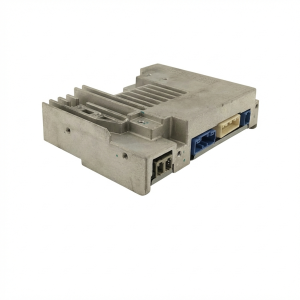
OEM Part Numbers: BANF-66-9C0 BANF669C0C BANF669C0H BANF-66-9C0A BANF-66-9C0B BANF-66-9C0D BANF-66-9C0E BANF-66-9C0F BANF-66-9C0J BANF-66-9C0K DELM-66-9C0A
AM/FM Tuner and Receiver for models without factory color LCD screen.
We Have This Part in Stock

The information in this article is provided for general reference and educational purposes only. Vehicle specifications, procedures, and part compatibility can vary by production date, trim level, and region. Always consult your vehicle's factory service manual and verify part numbers before purchasing or performing repairs. Safety-critical components such as airbags, seat belts, and braking systems should be installed by a qualified professional.
- Mazda MAZDA 3: