

2004-2010 Mazda3 Audio System: Fixing CD Changer Errors & Display Failures
This guide covers the common problems, compatibility issues, and replacement options for the first-generation Mazda3's various audio systems.
- Compatibility is critical: Radios for Bose and non-Bose systems are not interchangeable.
- The 6-disc CD changer is notoriously unreliable and prone to jamming; replacing it with another used one carries risk.
- The radio head unit and the upper information display are separate parts and can be replaced independently.
- No dealer programming is required when swapping a factory radio for another compatible factory radio.
Understanding the 2004-2010 Mazda3 Audio System Variants

Before diagnosing or replacing your audio system, it's critical to identify which version your Mazda3 has. The components are generally not interchangeable, and using the wrong part can lead to features not working. The main differences are between the standard and Bose systems, the type of CD player, and the presence of a trip computer.
- Standard Audio System: This was the base system, typically featuring a single-disc CD/MP3 player and 4 or 6 speakers. It is NOT compatible with components from the Bose system.
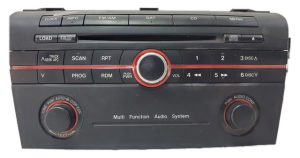
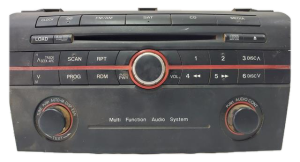
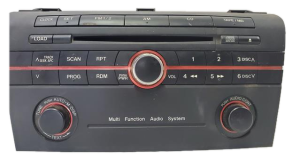
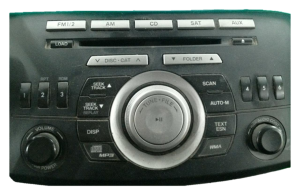
- 6-Disc In-Dash CD Changer: An optional upgrade, this head unit looks similar to the single-disc player but has a 'LOAD' button and markings for the 6-disc capability. These units are notoriously prone to jamming. They were available for both standard and Bose systems, but the units themselves are different and not interchangeable.
- Bose Premium Audio System: This system included 7 speakers, a subwoofer, and an external amplifier. Head units designed for the Bose system will have 'Bose' branding on the faceplate and will not work correctly in a car with the standard wiring, as they send a different type of signal to the external amplifier.
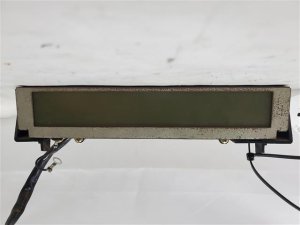
- Information Display Screen: This is the separate LCD screen at the top of the dash that shows radio, clock, and temperature information. Some higher trims included a trip computer, and the display for those models is different. A display from a car with a trip computer may not work correctly in a car without one.
Warning: Compatibility is the biggest challenge. Always verify the part number on your original radio before ordering a replacement. A radio from a car with a Bose system will not work in a car with the standard system, and vice-versa.
Symptoms of a Failing Mazda3 Audio System

Failures in these audio systems can range from minor annoyances to a completely dead unit. Here are the most common problems owners experience:
- CD Changer Errors: The 6-disc changer is famous for malfunctioning. Common issues include a "CHECK CD" or "CD IN" error message on the display, discs getting stuck, or a continuous whirring/clicking noise as the unit endlessly tries to load or eject a disc. Disconnecting the battery sometimes resets the unit, but often the mechanism is physically jammed. 🎬 Watch this video for 6-disc changer troubleshooting and removal tips.
- Blank Information Display: The upper LCD screen may go completely blank, even though the radio and CD player still produce sound. This can be caused by a loose connection behind the head unit, as the display has its own harness on some model years, or a failure of the display itself.
- No Power / Unit is Dead: If the radio won't turn on at all, the first thing to check is the fuse. In many Mazdas, the radio fuse is shared with other interior components and may be labeled 'ROOM' in the fuse box. If the fuse is good, the problem could be an internal failure in the head unit. 🎬 See this guide on why your Mazda radio isn't working.
- Distorted or No Sound: Sound that is distorted, full of static, or completely absent can be caused by bad wiring, failing speakers, or a fault in the head unit's internal amplifier (or the external Bose amp).
- Buttons or Knobs Not Working: Physical wear can cause buttons and knobs to stop responding, making it impossible to change stations, adjust volume, or control other functions.
Known Issues, TSBs, and Recalls
As of early 2026, there are no specific recalls from the National Highway Traffic Safety Administration (NHTSA) for the audio system itself in the 2004-2010 Mazda3. However, the most widely reported problem in owner forums is the failure of the 6-disc CD changer mechanism. While not a safety issue, it is a very common and frustrating point of failure. Some later model Mazdas (outside this year range) had TSBs for speaker noise due to corrosion, but this specific issue is not documented for the first-generation Mazda3.
Buying a Used 2004-2010 Mazda3 Audio System: What to Look For

Due to the high cost of new OEM units, a used audio system is often the most practical solution. Here’s how to choose a good one:
- Verify the Part Number: This is the most important step. Remove your old unit and find the sticker with the Mazda part number. Match this number exactly or use a verified cross-reference. Some known head unit part numbers include BBM266AH0, BBM266AR0A, and BR9K-66-ARX. The display screen has its own part number, such as BAP966ARX.
- Confirm the System Type: Double-check if the donor vehicle had a Bose or standard system. Look for 'Bose' logos on the faceplate. Do not buy a Bose unit for a standard car.
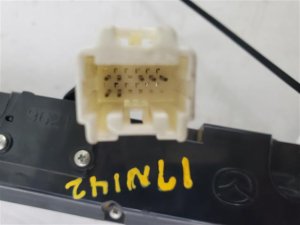
- Inspect the Connectors: Check the back of the used unit for any bent or corroded pins. Ensure the plastic connectors are not cracked or broken.
- Test the CD Mechanism (If Possible): If buying from a local seller, ask if they can connect it to power to demonstrate that the CD player loads and ejects properly. For 6-disc changers, this is especially important.
- Consider an Aftermarket Upgrade: If your primary goal is modern features like Bluetooth or navigation, an aftermarket head unit might be a better choice. You will need a specific dash kit and wiring harness to make it fit and connect properly. Kits are available to retain steering wheel controls. 🎬 Watch: Step-by-step guide to installing a Bluetooth radio in your Mazda3.
Pro Tip: If only your information display is broken, you can often replace just that part without needing a whole new radio. The display and the radio are separate components.
Programming and Installation Notes

For the 2004-2010 Mazda3, the factory audio systems are generally plug-and-play and do not require dealer programming or flashing after installation. There is no complex anti-theft system that links the radio to the vehicle's VIN. If you swap a like-for-like unit, it should work immediately upon connection. The most difficult part of the installation is carefully removing the dashboard trim without breaking any clips.
Cost Comparison
| Part Type | Estimated Cost |
|---|---|
| New OEM (Dealer) | $400 - $700+ (if available) |
| New Aftermarket (Single or Double DIN) | $150 - $600 |
| Used OEM (Recycled) | $75 - $285 |
| Shop Labor for Installation | $100 - $200 |
Frequently Asked Questions (FAQ)
Does the 2004-2010 Mazda3 radio need an anti-theft code?
No, these factory radios do not typically require an anti-theft code. They are not VIN-locked to the vehicle, so a replacement unit should work without needing to be programmed by a dealer.
Can I upgrade from a single CD player to the 6-disc changer?
Yes, this is possible as long as you use a 6-disc changer that is compatible with your existing audio system (Bose or non-Bose). The wiring connectors are generally the same. However, given the high failure rate of the 6-disc changers, it may not be a reliable upgrade.
Why is my display blank but the radio still plays music?
This is a common issue where the upper information display fails independently of the radio head unit. The cause is often a loose electrical connector behind the radio or a failure in the display's internal components. You may only need to replace the display screen (Part No. BAP966ARX or similar) rather than the entire radio.
Is it easier to install an aftermarket radio instead?
For many owners, yes. An aftermarket radio can provide modern features like Bluetooth, Apple CarPlay, and Android Auto. You will need a dash kit to fit the new radio into the Mazda3's unique dash shape, a wiring harness adapter, and potentially an interface to retain your steering wheel controls. While it involves more parts, the result is often a more capable system.
Helpful Videos
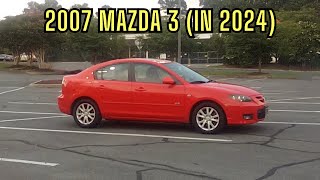
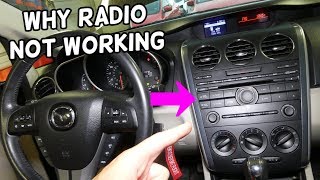
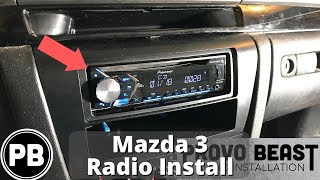
Technical Specifications
OEM Part Numbers: BAP966ARX BBM266AH0 BBM266AH0A BBM266AR0A BN8F-66-9R0A BN8S669RXA BP4K66EV0 BP4R611J0A BR9G66ARX BR9K-66-ARX BBM466ARXB BR9E669R0A
System varies by trim. Options include standard 4 or 6-speaker system, 7-speaker Bose premium system with external amplifier, single-disc CD/MP3 player, and a 6-disc in-dash CD changer.
We Have This Part in Stock

The information in this article is provided for general reference and educational purposes only. Vehicle specifications, procedures, and part compatibility can vary by production date, trim level, and region. Always consult your vehicle's factory service manual and verify part numbers before purchasing or performing repairs. Safety-critical components such as airbags, seat belts, and braking systems should be installed by a qualified professional.
- Mazda MAZDA3:
- 🎬 Helpful Videos
- 🛍️ Shop This Part
- Understanding the 2004-2010 Mazda3 Audio System Variants
- Symptoms of a Failing Mazda3 Audio System
- Known Issues, TSBs, and Recalls
- Buying a Used 2004-2010 Mazda3 Audio System: What to Look For
- Programming and Installation Notes
- Cost Comparison
- Frequently Asked Questions (FAQ)
- 🎟️ Get 5% Off