

2017-2024 Audi A4 & 2018 S4 Trunk Camera: Solving Black Screens & Failures
A detailed guide to diagnosing and replacing the integrated trunk handle backup camera, including common software recalls and wiring issues.
- Many 'black screen' issues are caused by software glitches that are fixable for free under an Audi recall; check your VIN before buying parts.
- Intermittent flickering or random failures are most often caused by broken wires in the rubber harness between the trunk lid and the car body.
- This part is only for vehicles with factory option code KA2. It is not a simple plug-and-play upgrade for cars without a factory-installed camera.
- Replacement is not complete until the new camera is 'coded' to the vehicle using a diagnostic tool like VCDS or OBDeleven.
Diagnosing Failures in Your Audi A4 & S4 Rear Camera
Problems with the rear camera on the 2017-2024 Audi A4 and 2018 Audi S4 (B9 platform) are common, but the cause isn't always a faulty camera. Symptoms often point to one of three areas: software glitches, wiring damage, or a failed camera unit. Before buying a replacement, a few simple checks can help you pinpoint the problem.
Step 1: Check for Software Recalls
Audi has issued several software-related recalls for backup camera failures. The most common symptom is a completely black or blue screen when shifting into reverse. This is often caused by a software error in the infotainment unit that prevents the camera image from displaying. Before performing any physical repairs, check with an Audi dealer or use Audi's online lookup tool with your VIN to see if your vehicle is affected by an open safety recall like 91DZ, 91DF, or 90TV. A simple, free software update at the dealership often resolves these black-screen issues.
🎬 Watch: Troubleshooting the Audi backup camera black screenStep 2: Inspect the Trunk Wiring Harness
If your camera is flickering, showing distorted lines, or working intermittently, the problem is very likely the wiring harness. The wires run from the car's body to the trunk lid through a flexible rubber boot. Years of opening and closing the trunk can cause these wires to fatigue and break internally, leading to a poor connection. To check this, carefully pull back the rubber boot and inspect the bundle of wires for any signs of cracking, fraying, or pinching. A broken wire here is a very common culprit and is much cheaper to repair than replacing the entire camera assembly.
Step 3: Scan for Fault Codes
Using a diagnostic tool like VCDS or OBDeleven can provide critical clues. A common fault code associated with a complete failure is 02873 - Rearview Camera System Control Module, no signal/communication. This can indicate a wiring issue, a blown fuse, or a failed camera module. Another code, B1264 - Rearview Camera Signal Fault, points toward a corrupted or lost video signal, often related to the software recalls or wiring interference. In some cases, water ingress into the trunk can damage control modules, so check the area around the right-side trunk liner for any signs of moisture.
Pro Tip: Before assuming the camera is dead, try resetting your MMI system. For most models, press and hold the NAV/MAP, RADIO, and central control knob buttons simultaneously for a few seconds until the system reboots. This can sometimes clear temporary software glitches.
Symptoms of a Failing Audi A4/S4 Trunk Camera
When the trunk handle camera begins to fail, you'll experience one or more of the following symptoms:
- Black or Blue Screen: The most common symptom. When you put the car in reverse, the MMI screen goes black or blue instead of showing the rear view. The parking sensor graphic may still appear, and the audible beeps may still work. This is frequently linked to software recalls.
- Intermittent Operation: The camera works some of the time but fails randomly. This often points to a failing wire in the trunk harness that makes and breaks connection as the trunk lid is moved.
- Flickering or Distorted Image: The video feed appears on screen but is unstable, with flickering, static, or rolling horizontal lines. This indicates a poor signal, which could be a wiring fault or an internal failure in the camera.
- "Camera Not Available" Message: The MMI displays a message indicating the system is unavailable.
- Failed Trunk Latch: Since the trunk release button is part of the same assembly, a complete failure of the unit can also result in the trunk failing to open via the handle.
Buying a Used Trunk Handle Camera
Purchasing a used OEM camera assembly is a cost-effective way to fix your vehicle. Because this part contains sensitive electronics, buying a tested, recycled OEM unit is often a more reliable choice than a cheap, new aftermarket part. Here’s what to look for:
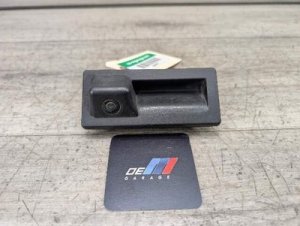
- Verify the Part Number: For the A4 and S4 sedan, the correct part number is most often 3V0827566L. The Avant (wagon) model uses a different part number (3V0827566M) which includes a washer jet and will not fit the sedan correctly.
- Check for Option Code KA2: This part is for vehicles that came from the factory with a backup camera, designated by option code KA2. Do not purchase this as a retrofit for a car without a factory camera unless you are prepared to run new wiring and perform extensive coding.
- Physical Inspection: Inspect the camera lens for deep scratches, haziness, or condensation, which can degrade image quality. Check the electrical connector pins for any signs of corrosion or damage. Test the microswitch for the trunk release; it should have a distinct click when pressed.
- Source Vehicle Information: If possible, get the VIN of the donor car. This allows you to check its original options and confirm it had the correct camera system. Low mileage is always a plus, but the condition of the wiring and lens is more important.
Warning: A Technical Service Bulletin (TSB 2055713) notes that using a decorative license plate frame can physically interfere with or damage the camera lens on these vehicles. Always ensure any frame does not make contact with the camera housing.
Replacement Overview
Replacing the trunk handle camera is a moderately difficult job that is feasible for a DIYer with the right tools.
- Difficulty: 3 out of 5.
- Estimated Time: 1.5 - 2.5 hours.
- Tools Required: Trim removal tools, Torx drivers, diagnostic tool (VCDS/OBDeleven).
The basic steps involve removing the inner trunk lid liner, disconnecting the electrical connector, unbolting the old handle assembly, and installing the new one. 🎬 See this step-by-step camera installation walkthrough The most critical part of the process is the coding and calibration required after installation. The car's computer must be told that a camera is present. This involves using a diagnostic tool to enable the '6C - Rear View Camera' module in the Gateway and making adaptations in the infotainment module. Failure to perform this step will result in the new camera not working at all.
Cost of Replacement
| Part Type | Estimated Cost |
|---|---|
| New OEM (Dealer) | $800 - $950 |
| New OEM (Online) | $100 - $150 |
| Used OEM | $75 - $150 |
| New Aftermarket | $50 - $100 |
| Shop Labor Cost | $75 - $200 (plus coding fees) |
Frequently Asked Questions (FAQ)
Why is my screen black but the parking sensors still beep?
This is a classic symptom of a camera-specific failure. The parking sensors are a separate system that uses ultrasonic sensors in the bumper. When the video signal from the camera is lost (due to a software glitch, wiring fault, or camera failure), the MMI defaults to a black screen but the audio warnings from the parking sensors continue to function normally.
Can I install this on my Audi A4 that didn't come with a camera?
While physically possible, it is a complex and expensive retrofit. This part is designed for cars with factory option code KA2. Retrofitting involves not only installing the camera but also running a new wiring harness through the car to the infotainment module and extensive, expert-level coding. It is not a simple plug-and-play upgrade.
Do I have to get the new camera coded by the dealer?
No, you do not necessarily need to go to a dealer. However, coding is mandatory for the camera to function. An independent European auto specialist can perform the coding, or you can do it yourself if you own a diagnostic tool like VCDS by Ross-Tech or a professional-level tool like OBDeleven.
🎬 Watch: How to code your Audi using OBDelevenWhat is the difference between part number 3V0827566L and 3V0827566M?
The part number ending in 'L' is for the Sedan models. The part number ending in 'M' is for the Avant (wagon) and Allroad models and includes a small nozzle for a camera washing system, which connects to the rear window washer fluid line. The two parts are not interchangeable.
Helpful Videos


Technical Specifications
OEM Part Numbers: 3V0827566L 3V0827566C 3V0827566M (Avant/Wagon only)
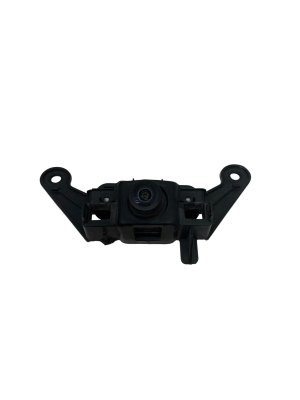
Integrated trunk release handle and camera module. Fits vehicles with PR code KA2 (Rear view camera system type 2). Requires coding after installation.
We Have This Part in Stock

The information in this article is provided for general reference and educational purposes only. Vehicle specifications, procedures, and part compatibility can vary by production date, trim level, and region. Always consult your vehicle's factory service manual and verify part numbers before purchasing or performing repairs. Safety-critical components such as airbags, seat belts, and braking systems should be installed by a qualified professional.
- AUDI A4:
- AUDI S4:
- 🎬 Helpful Videos
- 🛍️ Shop This Part
- Diagnosing Failures in Your Audi A4 & S4 Rear Camera
- Step 1: Check for Software Recalls
- Step 2: Inspect the Trunk Wiring Harness
- Step 3: Scan for Fault Codes
- Symptoms of a Failing Audi A4/S4 Trunk Camera
- Buying a Used Trunk Handle Camera
- Replacement Overview
- Cost of Replacement
- Frequently Asked Questions (FAQ)
- 🎟️ Get 5% Off