

2016-2025 GM Combination Switch: Fixing Failing Turn Signals & Wipers on XT5, Acadia, Blazer & More
Diagnose and replace the faulty combination switch causing intermittent turn signal, headlight, and wiper problems on many common Cadillac, GMC, Buick, and Chevrolet models.
- Compatibility is critical. You must match the switch to your vehicle's options, especially Automatic High Beams (IntelliBeam, RPO TQ5) and Rain-Sensing Wipers (RPO CE1).
- Symptoms often affect multiple systems at once (turn signals, headlights, wipers), which is a strong indicator that the combination switch is the culprit.
- Replacement is a straightforward DIY task that does not require removing the steering wheel or airbag on these models.
- On 2023+ Cadillac XT5/XT6 models, if the dashboard turn signal indicators don't light up but the exterior bulbs do, it is likely due to a software recall, not a bad switch.
Symptoms of a Failing Combination Switch

When a combination switch begins to fail, the internal electrical contacts or mechanical components wear out. This can cause a range of confusing symptoms. Because this single part controls multiple systems, you'll often see problems with more than one function at the same time. Here are the most common signs of failure:
- Turn Signal Problems: This is the most frequent issue. Symptoms include turn signals that don't work at all, work intermittently, or fail to cancel after you complete a turn. You might also notice that activating one turn signal causes the hazard lights to flash instead.
- Headlight Malfunctions: You may have difficulty switching between high and low beams, or the high beams might not activate at all. In some cases, the headlights may not turn on or off reliably.
- Erratic Windshield Wipers: The wipers might not turn on, may only operate on a single speed, or could activate randomly without you touching the switch. The windshield washer function may also stop working.
- Brake Light Issues: On many GM vehicles, the brake light circuit is routed through the combination switch. A fault in the switch can prevent your main brake lights from illuminating when you press the pedal, which is a major safety hazard.
- Dashboard Indicator Lights: A failing switch can cause strange behavior on the instrument cluster, such as a turn signal indicator light staying on even when the signal is off.
Known Issues, Recalls, and Technical Service Bulletins (TSBs)

While there are no widespread recalls specifically for the combination switch on these vehicles, there are related issues you should be aware of to avoid a misdiagnosis.
Recall for Cadillac XT5 & XT6 Instrument Cluster
For certain 2023-2025 Cadillac XT5 and 2024-2025 Cadillac XT6 models, GM issued a recall for a software defect in the instrument cluster. This can cause the indicator lights for turn signals, high beams, and hazard lights to not illuminate on the dashboard. While the exterior lights will still work correctly, the lack of a dashboard indicator can lead a driver to unintentionally leave a signal or high beams on. If you experience this specific symptom on one of these models, the fix is a software update performed by a dealer, not a new combination switch.
Common Misdiagnosis: "Shift to Park" Message
Many vehicles covered in this guide, including the GMC Acadia, Chevy Blazer, and Buick Enclave, are known to develop a "Shift to Park" error message that appears on the dash even when the vehicle is in Park. This is a common electrical issue but is not related to the combination switch. It is caused by a faulty micro-switch within the gear shifter assembly itself.
Compatibility is Critical: The biggest challenge when replacing this part is ensuring you get the exact match for your vehicle's factory-installed options. GM uses several different switches that look nearly identical but have different internal wiring. Installing the wrong switch will result in certain features not working. You must verify your vehicle's options before purchasing.
Buying a Used Combination Switch: A Buyer's Guide

A used OEM combination switch is often a reliable and cost-effective alternative to an expensive new dealer part or a lower-quality aftermarket version. Here’s what to look for to ensure you get the right part.
1. Identify Your Vehicle's Options (RPO Codes)
The correct switch depends entirely on the options your vehicle was built with. The two most important features to check for are:
- IntelliBeam (Automatic High Beams): This feature uses a forward-facing camera to automatically switch between high and low beams. The RPO code for this option is TQ5.
- Rainsense (Rain-Sensing Wipers): This feature automatically turns on the wipers when it detects rain on the windshield. The RPO code for this is CE1.
You can find your vehicle's RPO codes on a silver sticker, usually located in the glove box or sometimes on the driver's door jamb. This sticker lists all the three-character codes for the options your specific vehicle has.
2. Match Part Numbers and Visuals
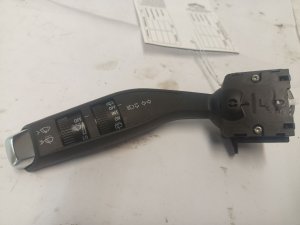
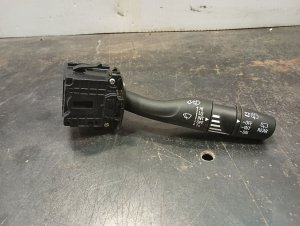
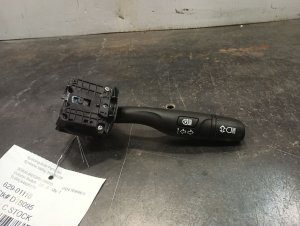
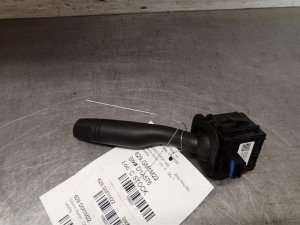
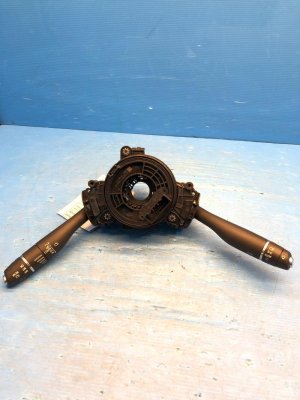
Once you know your options, you can find the correct part number. While there are many part numbers for this switch family, you can verify compatibility by checking the markings on the switch itself. Compare the icons printed on the stalks of the used switch to your original one. Make sure the headlight settings, wiper speeds, and any automatic function symbols are an exact match.
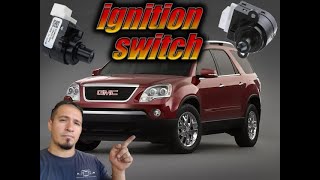
🎬 See how to identify and replace the wiper and signal switch.3. Inspect the Physical Condition
When inspecting a used switch, check for the following:
- Connectors: Ensure the electrical connector pins are straight, clean, and free of any corrosion.
- Stalks: The stalks should move smoothly with a positive click-feel. They should not feel loose or sloppy.
- Wiring: Check the short wiring pigtail (if present) for any cuts, frays, or damage.
Replacement Difficulty & Procedure
- Difficulty: 2/5 (Easy to Moderate)
- Estimated Time: 0.75 hours
- DIY Feasible: Yes
Replacing the combination switch is a straightforward job that most DIYers can handle with basic tools. Unlike older vehicles, this procedure on these modern GM platforms does not require removing the steering wheel or airbag, making it much safer and faster.
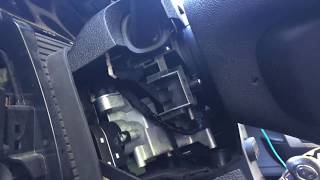
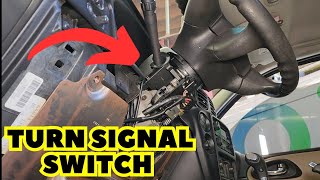
🎬 Watch this step-by-step guide for replacing the multifunction switch.General Replacement Steps:
- Disconnect the Battery: Always disconnect the negative battery terminal before working on any electrical components.
- Remove Steering Column Shrouds: Remove the plastic covers surrounding the steering column. This usually involves removing a few screws (often 7mm or Torx head) from the bottom and then carefully unsnapping the top and bottom halves. You may need to adjust the tilt/telescoping steering wheel to get better access.
- Unplug Electrical Connectors: Locate the electrical connectors on the back of the combination switch and carefully unplug them. There are typically small release tabs you need to press.
- Remove the Switch: The switch is usually held in place by two Torx screws (often T25). Remove these screws and the old switch will slide out from the column.
- Install the New Switch: Slide the new switch into place, tighten the mounting screws, and reconnect the electrical connectors.
- Reassemble and Test: Snap the steering column shrouds back together and reinstall the screws. Reconnect the battery and test all functions of the new switch—turn signals, high/low beams, wipers, and washers—to ensure everything works correctly. 🎬 Follow this video walkthrough to ensure a successful DIY installation.
Cost of Replacing a Combination Switch
The cost can vary significantly depending on the part source and whether you perform the labor yourself.
| Item | Estimated Cost |
|---|---|
| New OEM Part | $30 - $60 |
| New Aftermarket Part | $25 - $75 |
| Used OEM Part | $25 - $50 |
| Shop Labor | $95 - $170 |
| DIY Total (Used OEM) | $25 - $50 |
| Shop Total (New OEM) | $125 - $230 |
Frequently Asked Questions (FAQ)
Is programming required after installing a new combination switch?
No. The combination switch is a direct input device to the Body Control Module (BCM). It is a plug-and-play part and does not require any special programming or calibration after installation.
How do I find my vehicle's RPO codes?
Look for the Service Parts Identification sticker, which is a silver label listing many three-character codes. It is most commonly found inside the glove box. It may also be located on the driver's door or door jamb.
Can I install a switch with more features (like IntelliBeam) than my car originally had?
Generally, no. Even if the switch fits physically, the features will not work. The vehicle's Body Control Module (BCM) is not programmed to recognize the inputs for options it wasn't built with, and it will be missing the necessary sensors (like the forward-facing camera for IntelliBeam).
My turn signals blink fast on one side. Is the combination switch bad?
A fast-blinking turn signal (hyperflash) is almost always caused by a burnt-out turn signal bulb on that side of the vehicle, not a bad combination switch. The change in electrical resistance from the dead bulb causes the flasher relay to blink faster. Replace the bulb first.
Helpful Videos
Technical Specifications
OEM Part Numbers: 39136229 39136230 84614547 84532291 84925176 84925179 23150275 23150276 23218433 39136242 39136243 84008741 23328819 84117375 84234657 84486487 86595775
Varies based on vehicle options. Key differentiating features are controls for Rain-Sensing Wipers (RPO: CE1) and Automatic High Beams / IntelliBeam (RPO: TQ5).
We Have This Part in Stock

The information in this article is provided for general reference and educational purposes only. Vehicle specifications, procedures, and part compatibility can vary by production date, trim level, and region. Always consult your vehicle's factory service manual and verify part numbers before purchasing or performing repairs. Safety-critical components such as airbags, seat belts, and braking systems should be installed by a qualified professional.
- Cadillac XT5:
- Cadillac XT6:
- Buick Enclave:
- Cadillac XT4:
- Cadillac CT6:
- GMC Acadia:
- CHEVROLET BLAZER:
- GMC Terrain:
- 🎬 Helpful Videos
- 🛍️ Shop This Part
- Symptoms of a Failing Combination Switch
- Known Issues, Recalls, and Technical Service Bulletins (TSBs)
- Recall for Cadillac XT5 & XT6 Instrument Cluster
- Common Misdiagnosis: "Shift to Park" Message
- Buying a Used Combination Switch: A Buyer's Guide
- 1. Identify Your Vehicle's Options (RPO Codes)
- 2. Match Part Numbers and Visuals
- 3. Inspect the Physical Condition
- Replacement Difficulty & Procedure
- General Replacement Steps:
- Cost of Replacing a Combination Switch
- Frequently Asked Questions (FAQ)
- 🎟️ Get 5% Off