

2020-2025 Genesis G90 & GV60 Steering Wheel Controls: Diagnosing Switch Failures and Software Glitches
This guide explains the difference between a faulty combination switch and common software issues that affect the steering wheel controls and displays on the Genesis G90 and GV60.
- Many electrical issues in the G90 and GV60, like intermittent steering wheel controls or a blank dashboard, are caused by software glitches, not a bad combination switch.
- A true hardware failure of the switch will cause consistent problems with turn signals, wipers, or headlights that are not fixed by restarting the car.
- There is a recall (027G) for the G90/GV60 for a blank instrument panel and a service campaign (T35G) for the GV60 for failing steering wheel controls; both require a dealer software update.
- The OEM part number is 934B2-CU580-4X, and it is an expensive integrated assembly including the clockspring; buying a used OEM part is a smart way to save money on a physical repair.
Symptoms of Failure
Diagnosing issues with the combination switch in a Genesis G90 or GV60 can be tricky, as symptoms of a true hardware failure can be similar to software glitches known to affect these vehicles. It's important to distinguish between the two.
Symptoms of a Physically Failing Switch
A physical defect or wear inside the combination switch assembly typically results in consistent, repeatable problems. These symptoms will likely not be fixed by restarting the car.
- Turn Signal Problems: The turn signals may not activate, may not cancel after a turn, or the indicator on the dash might stay on. This is often one of the first signs of failure because the turn signal contacts are used most frequently.
- Headlight and High Beam Issues: You might experience headlights that flicker, fail to turn on, or get stuck on one setting. An inability to switch between high and low beams is also a common symptom.
- Windshield Wiper Malfunctions: The wipers may not turn on, might only work on a single speed, or could operate intermittently without being switched on.
- Loose or Sticking Stalks: The control stalks may feel loose, wobbly, or make grinding sounds. They might not return to their center position smoothly after use.
Symptoms Related to Known Software Issues
Unlike a physical failure, software-related problems on these specific models often appear intermittently and can be temporarily resolved by turning the vehicle off and on again.
- Intermittent Steering Wheel Controls (GV60): Owners of the 2023-2024 Genesis GV60 have reported that all steering wheel buttons (cruise control, audio volume, lane monitoring) can suddenly stop working. This is a known issue addressed by a software update.
- Blank Instrument Panel on Startup (G90 & GV60): A more serious issue, covered by a recall, can cause the entire instrument panel display to remain blank upon starting the vehicle. This prevents you from seeing the speedometer, warning lights, and other critical information. This is also a software error, not a fault with the combination switch itself.
Pro Tip: If your steering wheel controls or display act up, the first step is to park safely, turn the vehicle completely off, open and close the driver's door to ensure all modules power down, and then restart. If the problem disappears, it is almost certainly a software glitch that a dealer needs to address, not a bad combination switch.
Known Issues, Recalls, and Technical Service Bulletins (TSBs)
As of early 2026, there are no widespread reports, recalls, or TSBs for the physical failure of the combination switch on the 2020-2025 G90 or 2023-2025 GV60. However, several significant software campaigns exist that mimic switch failure symptoms.
Genesis Service Campaign T35G (GV60)
NHTSA ID: 23-01-087G
Vehicles: Certain 2023-2024 Genesis GV60 models.
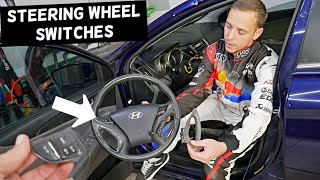
Problem: The Steering Wheel Remote Control (SWRC) switch may not work intermittently. Owners report a temporary loss of all steering wheel button functions. 🎬 See how steering wheel control switches are typically removed.
Solution: Dealers perform a software update for the SWRC system to improve switch operation. This is not a parts replacement.
Genesis Recall 027G (G90 & GV60)
NHTSA Campaign Number: 25V474000
Vehicles: 2023-2025 Genesis G90 and 2023-2025 Genesis GV60.
Problem: Due to a software error, the instrument panel cluster display may be temporarily blank upon vehicle start-up. This is a safety hazard as it hides the speedometer and other essential information.
Solution: Dealers will update the instrument panel cluster software at no charge. Genesis also plans to offer an Over-The-Air (OTA) update for eligible vehicles.
Buying a Used Combination Switch: What to Look For
If you have confirmed that your combination switch has a physical fault (e.g., a broken stalk or consistent, non-software-related failure), buying a used OEM unit is a cost-effective solution, especially given the high price of a new part. Here’s what to check:
- Verify the Part Number: The most important step. You must match the OEM part number exactly. The primary number for these vehicles is 934B2-CU580-4X. Using an incompatible switch can cause features to malfunction.
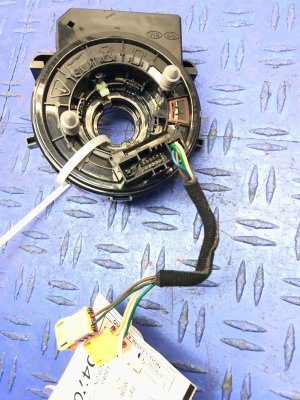
- Physical Inspection: Carefully examine photos or the part in person. Check for any cracks in the plastic housing, damage to the wiring connectors, or bent pins. Ensure the stalks move freely without binding and have a solid, positive click-feel.
- Check the Clockspring Ribbon: Since this is an integrated unit, inspect the clockspring ribbon cable if it's visible. Look for any creases, tears, or damage that could cause airbag or button failures down the line.
- Understand the Limitations: Remember, a used combination switch is a hardware fix. It will not solve the software issues described in the TSBs and recalls. Your vehicle will still need the appropriate software updates from a Genesis dealer to fix those problems.
- Why Used OEM is a Good Choice: For a complex electronic part like this, a used original equipment (OEM) part is often more reliable than a new, unproven aftermarket version. You get the same quality and fitment as the original part at a fraction of the cost.
Cost of Replacement
Replacing the combination switch assembly is an expensive repair if you buy a new part from the dealer. A used OEM part offers significant savings.
| Part/Service | Estimated Cost | Notes |
|---|---|---|
| New OEM Part | $650 - $930 | Price from Genesis/Hyundai dealer parts websites. |
| New Aftermarket Part | Not Widely Available | Aftermarket options for these new models are not yet common. |
| Used OEM Part | $250 - $450 | Estimated price based on new cost. Varies by supplier and condition. |
| Shop Labor | $150 - $250 | Estimated 1.0-1.5 hours of labor at a typical independent shop rate. |
Replacement Overview (DIY Difficulty: 3/5)
Replacing the combination switch requires removing the steering wheel and handling the airbag module, which carries risk if not done correctly. This is a moderately difficult job for an experienced DIYer.
Warning: The airbag is an explosive device. You MUST disconnect the vehicle's 12-volt battery and wait at least 15 minutes for the system to discharge before attempting to remove the airbag or steering wheel. Failure to do so can result in accidental deployment, causing serious injury.
General Steps:
- Disconnect the Battery: Disconnect the negative terminal of the 12V battery and wait 15 minutes.
- Remove the Airbag: Release the airbag module from the steering wheel. This is typically done by inserting a tool into small access holes on the sides or bottom of the steering wheel to release spring clips.
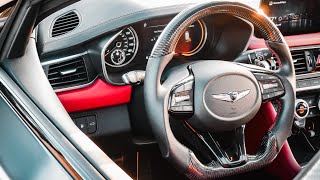
- Disconnect and Remove Steering Wheel: Carefully disconnect the airbag and steering wheel button connectors. Use a large socket to remove the center nut holding the steering wheel, and then pull the wheel straight off the column. 🎬 Watch a demonstration of removing a Genesis steering wheel.
- Remove Steering Column Covers: Unscrew and unclip the plastic covers from around the steering column to access the switch assembly.
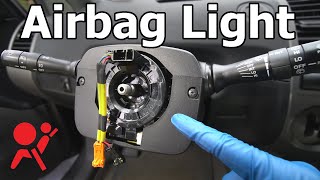
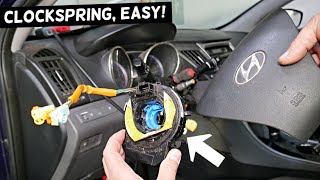
- Replace the Switch Assembly: Disconnect the electrical connectors from the old switch. Unbolt or unclip the old assembly and install the new one, ensuring the clockspring is centered. 🎬 Watch this guide on how to properly replace a clockspring.
- Reassemble: Follow the steps in reverse. Torque the steering wheel nut to the manufacturer's specification. Reconnect the battery and test all functions (turn signals, lights, wipers, horn, and all steering wheel buttons).
Frequently Asked Questions (FAQ)
Why do my GV60 steering wheel buttons stop working but fix themselves after a restart?
This is a classic symptom of the software glitch described in Genesis Service Campaign T35G. The hardware is likely fine, but the software controlling the Steering Wheel Remote Control (SWRC) module intermittently fails. Restarting the car reboots the module, temporarily restoring function. The permanent fix is a software update from a Genesis dealer.
I replaced the combination switch, but my instrument panel is still sometimes blank on startup. Why?
The blank instrument panel is not caused by the combination switch. It is a separate software issue covered by Genesis Recall 027G. Replacing the switch will not fix this problem. Your vehicle needs the software update specified in the recall to correct the blank display issue.
Can I just replace the turn signal stalk instead of the whole assembly?
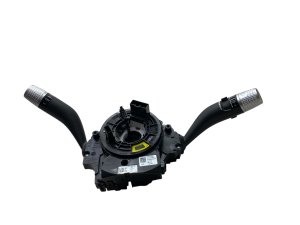
No. On the Genesis G90 and GV60, the turn signal stalk, wiper stalk, and clockspring are all part of a single, integrated assembly. They cannot be replaced individually. You must replace the entire unit.
Is it safe to drive with a faulty combination switch?
It is not recommended. A faulty switch can lead to the failure of turn signals, headlights, or wipers, all of which are critical for safety and are legally required to be functional. If your vehicle is exhibiting these symptoms, it should be repaired promptly.
Helpful Videos
Technical Specifications
OEM Part Numbers: 934B2-CU580 934B2-CU580-4X
Integrated assembly including clockspring, turn signal switch, headlight switch, and wiper switch.
We Have This Part in Stock

The information in this article is provided for general reference and educational purposes only. Vehicle specifications, procedures, and part compatibility can vary by production date, trim level, and region. Always consult your vehicle's factory service manual and verify part numbers before purchasing or performing repairs. Safety-critical components such as airbags, seat belts, and braking systems should be installed by a qualified professional.
- Genesis G90:
- Genesis GV60:
- 🎬 Helpful Videos
- 🛍️ Shop This Part
- Symptoms of Failure
- Symptoms of a Physically Failing Switch
- Symptoms Related to Known Software Issues
- Known Issues, Recalls, and Technical Service Bulletins (TSBs)
- Genesis Service Campaign T35G (GV60)
- Genesis Recall 027G (G90 & GV60)
- Buying a Used Combination Switch: What to Look For
- Cost of Replacement
- Replacement Overview (DIY Difficulty: 3/5)
- Frequently Asked Questions (FAQ)
- 🎟️ Get 5% Off