

Audi Console Problems (2015-2025): Fixing MMI Controls, Peeling Buttons, and Sunroof Switches
This guide clarifies the common failures of Audi center and overhead consoles, helping you diagnose issues with MMI controllers, sticky buttons, and faulty sunroof switches across A3, A4, S3, R8, e-tron & more.
- "Console Panel" is not one part; it can be the Center Console (with MMI) or the Overhead Console (with sunroof switch). Identify the correct part before searching.
- The most common failures are electronic: unresponsive MMI knobs, sticky buttons from spills, and dead sunroof switches.
- Compatibility is critical. Always match part numbers exactly, as consoles vary based on options like panoramic roofs, lighting packages, and MMI features.
- A used OEM console is a good value, but inspect carefully for peeling buttons and signs of liquid damage before buying. Some components like HomeLink may require dealer programming.
A Critical Clarification: Center Console vs. Overhead Console

Before diagnosing a problem, it's important to know which 'console' you're dealing with. The issues, replacement procedures, and part numbers are completely different for each.
- Center Console: The large assembly between the front seats. It holds the MMI control panel, shifter, armrest, and cupholders. Failures here usually affect infotainment and vehicle settings.
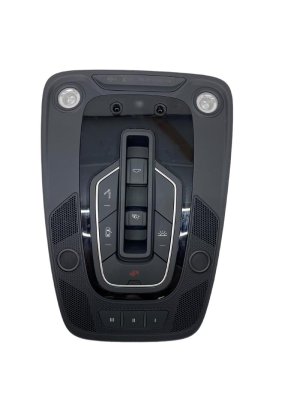
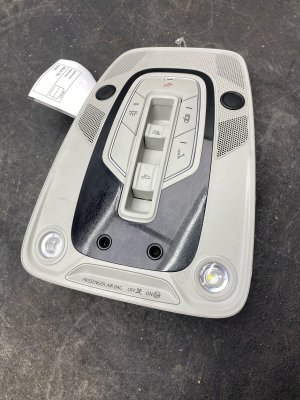
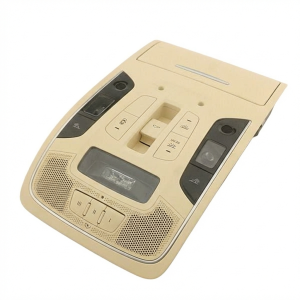
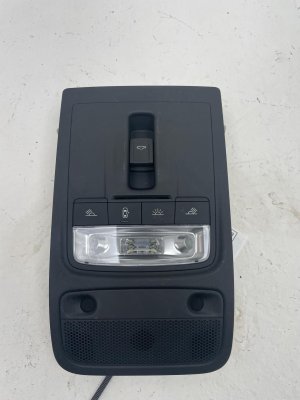
- Overhead Console: The smaller unit on the ceiling. It holds dome lights, sunroof controls, and often the HomeLink buttons. Failures here typically affect lighting and roof functions.
Center Console: The Hub of Your Audi's Interior

The center console is the most frequently used interface in your Audi. Due to its complexity and location, it's prone to several common issues, from electronic glitches to physical wear and tear.
Most Common Symptoms of Failure
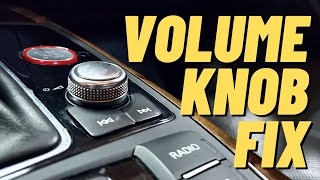
- MMI Control Knob Not Working: The main rotary knob may become unresponsive, jump between menu items erratically, or scroll in the wrong direction. This is often caused by dust and debris accumulating in the optical sensors inside the control module.
- Sticky or Unresponsive Buttons: Spilled drinks are a primary cause of MMI buttons sticking or failing to register a press. The buttons around the cupholders are especially vulnerable.
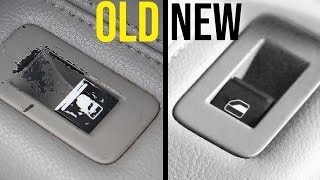
- Peeling Button Surfaces: The soft-touch coating on the MMI control knob and surrounding buttons can bubble, peel, or wear off over time, creating a worn appearance. 🎬 Learn how to fix peeling buttons without replacing the unit.
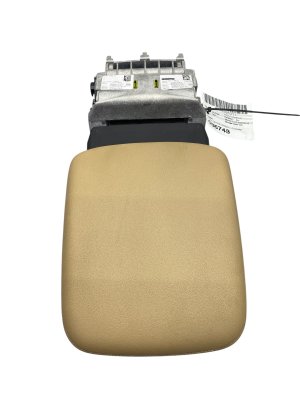
- Armrest Stuck or Broken: The ratcheting height-adjustment mechanism inside the armrest can fail, causing it to get stuck in the upright position.
- Electronic Glitches: Many owners report sporadic issues like the MMI screen freezing, settings resetting overnight, or lost navigation favorites. These are often software-related.
- Squeaks and Rattles: The plastic trim pieces of the console can develop squeaks and rattles over time, especially over rough roads.
- Console Gets Hot: In some models, the side of the center console can become unusually hot to the touch, sometimes related to the wireless phone charger or heat from the exhaust and transmission tunnel.
Known Issues by Vehicle Platform
- A3, S3, RS3 (8V Platform, 2015-2020): These models are well-known for MMI controller failures. The specific MMI control unit is part number 8V0919614BR. General electrical issues are also common.
- A4, A5, Allroad (B9 Platform, 2017+): Sticky buttons from spills and failing armrest ratchet mechanisms are frequently reported by owners.
- e-tron Models (2019+): The e-tron is particularly susceptible to a wide range of software and electronic issues, including complete MMI freezes, connection problems, and phantom warning lights. Some owners also report significant squeaks and rattles from the center console assembly.
- R8 (2017-2023): Like other models, the R8 can suffer from MMI system glitches and other electronic failures. Due to the car's construction, removing the center console is a particularly complex job.
Overhead Console: Controlling Sun, Light, and Home

The overhead console is less complex than the center console, but its components can still fail, leading to frustrating issues with lighting and the sunroof.
Most Common Symptoms of Failure
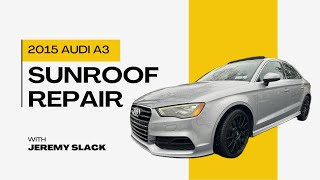
- Sunroof/Panoramic Roof Switch Failure: This is a very common problem, especially in the A3/S3/RS3 family. The switch may become completely unresponsive, preventing the roof from opening, closing, or tilting. Often, the internal plastic mechanism of the switch itself breaks. 🎬 See how to repair a broken panoramic sunroof switch mechanism.
- Inoperative Dome Lights: The main interior lights may flicker, become dim, or stop working entirely. This usually requires replacing the entire overhead console assembly.
- HomeLink Not Working: The garage door opener buttons may fail to program or operate. This can be a failure of the button itself or the HomeLink control module.
- Sunroof Leaks: While not a console failure itself, some models like the e-tron have known issues with water leaking from the sunroof drains through the overhead console area.
Variant Differences & Compatibility
Warning: Overhead consoles are NOT one-size-fits-all. A part from a vehicle with a panoramic sunroof will not work in a vehicle without one. Always match part numbers exactly.
- Roof Type: Consoles are different for vehicles with a standard sunroof, a panoramic sunroof, or no sunroof at all.
- Body Style: Convertible (Cabriolet/Roadster) models use a completely different overhead console than Sedan or Coupe models.
- Lighting Package: Vehicles equipped with the optional interior lighting package have a different console with more features than base models. Part number 8V0947135L is a common part for A3/S3 models with the lighting package.
Pro Tip: If your sunroof is stuck open and the switch is dead, you may be able to manually trigger the motor. On some models like the A3, you can remove the overhead console, unplug the switch, and use a small tool to press the buttons directly on the circuit board to close the roof.
Buying a Used Audi Console Panel: What to Check
A used OEM console is often a smart, cost-effective alternative to an expensive new part. However, you must inspect it carefully to ensure you're getting a good one.
- Verify the Part Number: This is the most critical step. Electronics like the MMI controller and overhead console are specific to vehicle options. Find the part number on your original unit and match it exactly. For example, an MMI controller for an A3 is 8V0919614BR. An overhead console for an A3 with the lighting package is 8V0947135L. Do not rely on visual appearance alone.
- Inspect for Peeling and Scratches: Check all button surfaces for the common peeling issue. While cosmetic, it indicates age and wear. Check trim pieces for deep scratches or broken mounting tabs.
- Test All Buttons and Knobs: Physically press every single button. They should click cleanly without sticking. Rotate the MMI knob; it should have distinct detents for each click and not feel loose or gritty.
- Check for Liquid Damage: Look for any sticky residue, discoloration, or corrosion on the circuit boards, especially around the MMI controller and cupholders. Spills are the number one killer of these units.
- Ask About Programming: Be aware that some components, particularly the HomeLink garage door opener module, may need to be programmed by a dealer or a qualified technician with specialized tools to sync with your vehicle.
Cost of Replacement
Prices can vary significantly based on the specific part and vehicle model. Here are some typical cost ranges to help you understand the value of a used OEM part.
| Component | New OEM (Dealer) | Used OEM (Recycled) | Shop Labor |
|---|---|---|---|
| Center Console MMI Control Unit (e.g., A3/S3) | $600 - $900+ | $150 - $350 | $150 - $300 |
| Overhead Console w/ Sunroof Switch (e.g., A3) | $350 - $500 | $75 - $200 | $80 - $150 |
| Center Armrest Assembly | $400 - $600 | $100 - $250 | $100 - $200 |
| HomeLink Control Module | $250 - $400 | $20 - $75 | $100 - $200 (incl. programming) |
Replacement Difficulty & Procedure Overview

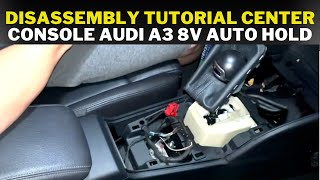
- Center Console: Replacement is considered moderately difficult and very time-consuming. It requires careful removal of multiple trim pieces, the shifter surround, the armrest, and various electrical connectors. Expect this to take 3-5 hours for a first-timer. Difficulty: 4/5.
- Overhead Console: This is much simpler. It is typically held in by a few clips and screws. You can usually pry it down, disconnect the wiring harness, and install the new one in under 30 minutes. Difficulty: 2/5.
Technical Service Bulletins (TSBs) & Recalls
While there are no widespread recalls specifically for console panels, Audi has issued numerous TSBs for software-related MMI problems. These bulletins provide dealers with procedures to reset the system or apply software updates to fix issues like lost favorites, installation errors, or connectivity problems. If you are experiencing electronic glitches, check with a dealer to see if a software update applies before replacing any hardware.
Frequently Asked Questions (FAQ)
Can I fix the peeling buttons on my MMI controller myself?
Yes, this is a common DIY repair. Some owners use acetone to carefully remove all the remaining soft-touch paint, leaving a clean black plastic button underneath. Others have had success repainting the buttons with a product like Plasti-Dip for a factory-like matte finish. Repair kits with vinyl decals are also available online.
Why is my MMI control knob jumping around or not responding?
The most common cause is dust and dirt interfering with the optical sensors inside the control unit that track the knob's rotation. Sometimes, a thorough cleaning with compressed air or electronics cleaner can help. However, if liquid was spilled on the unit, the internal circuit board is likely damaged and the entire MMI control panel will need to be replaced.
My panoramic sunroof won't close. Is it the motor or the switch?
On many Audis, especially the A3/S3, the switch in the overhead console is the most common point of failure. The internal plastic parts of the switch break, making it inoperable. It is much less common for the motor itself to fail. Replacing the overhead console switch assembly is the most likely solution.
Do I need to program a used console part?
It depends on the part. A simple overhead console with just lights and a sunroof switch is usually plug-and-play. However, the main MMI control unit may require basic settings to be configured. A used HomeLink garage door opener module will almost always need to be programmed by a dealer or a specialized shop to work with your vehicle and garage door.
Helpful Videos
Technical Specifications
OEM Part Numbers: 4M0907410A 4N0907410 4N0907410A 4N0907410B 4N0907410C 4N0907410D 8V0864283A 8V0864376B 8V0919614BR 8V0947135 8V0947135L 8V0947135L6PS 8V1863240 8V1864261C 8V1864261F 8X0959613
Part functionality varies widely based on part number and vehicle options. Key components include the MMI control module, shifter assembly, armrest, and various switches. Overhead consoles vary based on presence of panoramic roof, interior lighting package, and convertible options.
We Have This Part in Stock

The information in this article is provided for general reference and educational purposes only. Vehicle specifications, procedures, and part compatibility can vary by production date, trim level, and region. Always consult your vehicle's factory service manual and verify part numbers before purchasing or performing repairs. Safety-critical components such as airbags, seat belts, and braking systems should be installed by a qualified professional.
- Audi A3:
- Audi S3:
- Audi RS3:
- Audi TT:
- Audi R8:
- Audi A4:
- Audi A5:
- Audi A6:
- Audi Allroad:
- Audi e-tron:
- Audi Q3:
- Audi Q5:
- Audi Q7:
- Audi Q8:
- Audi Q8 e-tron:
- Audi RS5:
- Audi S5:
- Audi SQ5:
- Audi TT RS:
- Audi TTS:
- 🎬 Helpful Videos
- 🛍️ Shop This Part
- A Critical Clarification: Center Console vs. Overhead Console
- Center Console: The Hub of Your Audi's Interior
- Most Common Symptoms of Failure
- Known Issues by Vehicle Platform
- Overhead Console: Controlling Sun, Light, and Home
- Most Common Symptoms of Failure
- Variant Differences & Compatibility
- Buying a Used Audi Console Panel: What to Check
- Cost of Replacement
- Replacement Difficulty & Procedure Overview
- Technical Service Bulletins (TSBs) & Recalls
- Frequently Asked Questions (FAQ)
- 🎟️ Get 5% Off