

2017-2025 Audi HomeLink Programming Issues & Module Failures: A4, A5, Q8 & More
This guide explains the common failures of the HomeLink garage door opener module in many 2017-2025 Audi models and walks through diagnosis, programming, and replacement.
- The most common reason HomeLink fails to program is interference from the Side Assist system; temporarily pulling the correct fuse often resolves this.
- A used HomeLink module is not plug-and-play. It requires professional programming by a dealer or specialist to remove Component Protection.
- An "SOS Malfunction" warning is often related to the same control module and can be caused by a failing internal backup battery or a software issue.
- Always verify the part number (e.g., 4N0907410D) before buying a used module, as different versions exist.
Common Symptoms of Failure

When the HomeLink module or its related systems fail, you'll notice specific issues, most of which are related to programming and operation rather than a complete breakdown.
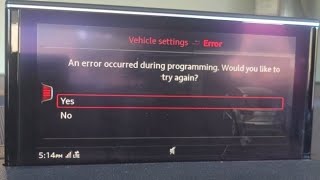
- Failure to Program: The most common complaint is the inability to program the HomeLink system. You may go through the steps, but the car never learns the remote's signal, often ending with an error message on the MMI screen.
- SOS Malfunction Light: In many modern Audis, the HomeLink module is tied into the same telematics system as the emergency call (SOS) feature. A failure in this system, sometimes due to a weak internal backup battery or a software glitch, can trigger an "SOS Malfunction" warning on the dashboard and may disable HomeLink functions.
- Buttons Don't Work: The programmed buttons may stop working intermittently or altogether. You press the button, the indicator light may or may not flash, but the garage door or gate does not respond.
- System Loses Programming: You may successfully program the buttons only to find they have forgotten the codes a few days or weeks later, requiring you to reprogram them frequently.
Known Issues, TSBs, and Recalls

Several known issues can prevent the HomeLink system from working correctly in these Audi models.
TSB: Interference from Side Assist Module
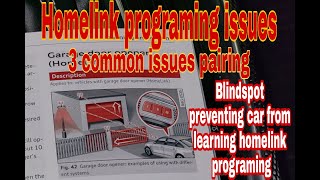
Audi has issued Technical Service Bulletin (TSB) 2051239/1 for vehicles where the HomeLink system fails to program. This issue is often caused by radio frequency interference from the Side Assist (blind spot monitoring) system, particularly with garage door openers that operate on the 315MHz frequency.
The official fix involves temporarily disabling the Side Assist module by pulling its specific fuse, programming the HomeLink remote, and then reinstalling the fuse. 🎬 Watch: How to disable Side Assist to fix programming interference. This procedure allows the HomeLink module to learn the remote's signal without interference.
SOS System Faults (J949 Module)
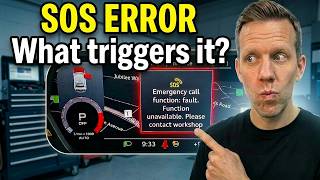
Many owners report an "SOS Malfunction" warning light, which is often related to the J949 Telematics Control Module. This module handles emergency calls, and its failure can impact other connected functions, including HomeLink. Common causes for this fault include:
- Internal Backup Battery Failure: The module has its own small backup battery that can degrade over time (typically 4-5 years), causing the system to report a fault.
- Software Glitches: Corrupted software or a failed over-the-air update can cause the module to malfunction. In some cases, a dealer can perform a software update or a hard reset by disconnecting the module's backup battery to resolve the issue.
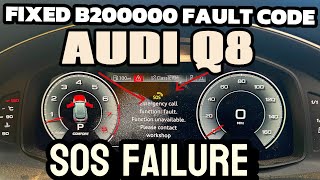
- Module Failure: The control unit itself can fail, requiring a complete replacement. This is often indicated by fault code B200000. 🎬 See this breakdown of the most common SOS error causes. These modules have been on backorder at times, leading to long repair waits.
Component Protection and Programming
Many electronic modules in modern Audis, including the telematics/HomeLink module, are subject to "Component Protection." This is an anti-theft feature that links a module to the car's original Vehicle Identification Number (VIN). If you install a used module, it will not function correctly until Component Protection is removed and the module is coded to your vehicle's specific options. This process must be done by an Audi dealer or a qualified independent shop with online access to Audi's servers.
Warning: A used HomeLink module will likely require professional programming to work in your vehicle due to Component Protection. Do not expect it to be a simple plug-and-play replacement.
Buying a Used Audi HomeLink Module

Buying a used HomeLink module can be a cost-effective solution, but it requires careful consideration to ensure you get the right part and understand the necessary follow-up steps.
1. Verify the Part Number
This is the most critical step. The same models can use different modules depending on the year and options. The primary part numbers for this generation of vehicles are in the 4M0907410 and 4N0907410 series, with various letter revisions (A, B, C, D). Always match the part number from your original module if possible. If you are retrofitting the system, consult a parts catalog or dealer with your VIN to find the correct number.
2. Physical Inspection
When buying a used module, inspect it for:
- No Physical Damage: Check the housing for cracks and ensure the connector pins are straight and free of corrosion.
- Intact Connectors: The plastic connector housings should be complete and not brittle.
- Source Vehicle Information: If possible, get the VIN or model/year of the car it came from. This can help verify compatibility.
3. Understand What You're Buying
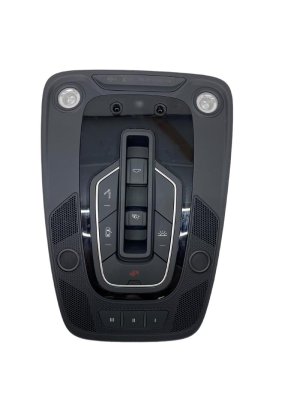
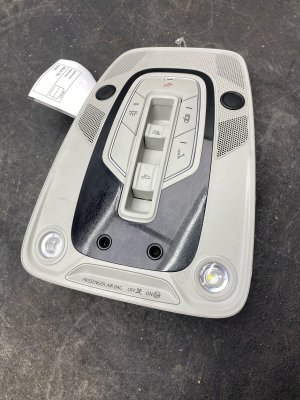
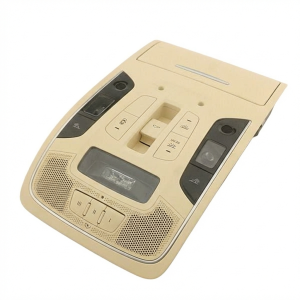
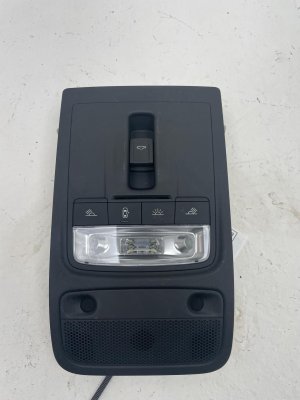
The "HomeLink module" is a small electronic box. It is often sold separately but may also be included as part of a larger assembly, like a complete overhead console with lights and switches. Clarify with the seller exactly what is included. You may only need the module itself.
4. Factor in Programming Costs
Remember to budget for professional programming. A used module that costs $50 could require $150-$300 in labor at a dealership or specialist to remove component protection and code it to your car. Call local shops for a quote before you buy the part.
Cost Comparison
Prices can vary significantly based on the source and condition of the part.
| Part Type | Estimated Cost | Notes |
|---|---|---|
| New OEM Module | $800 - $1,200 | Purchased from an Audi dealership. Carries a full warranty but is the most expensive option. |
| Used OEM Module | $40 - $100 | Sourced from a salvage vehicle. The most affordable parts cost, but requires programming and carries a higher risk. |
| Shop Labor (Installation & Programming) | $150 - $400 | Includes physical installation and the necessary online coding/Component Protection removal. |
Installation and Replacement

Difficulty: 3 out of 5 (Physical installation is moderate; programming requires special tools)
The physical replacement of the HomeLink module varies depending on its location. In many of the listed vehicles, the module is located within or near the overhead console.
- Disconnect the Battery: As a safety precaution, always disconnect the negative battery terminal before working on vehicle electronics.
- Remove Trim Panels: Accessing the module requires removing trim. For an overhead console location, this involves using plastic trim removal tools to carefully pry the console down. These are often held by strong metal clips that require a significant, unnerving amount of force to release. Some models may have a Torx screw hidden in the sunglasses compartment.
- Locate and Swap the Module: Once the console is lowered, you can see the various components. The HomeLink module is a small box with an electrical connector. Disconnect the wiring harness and unbolt or unclip it from its mounting point.
- Reassemble and Reconnect: Install the new (or used) module, reconnect its wiring, and carefully snap the overhead console back into place. Reconnect the vehicle's battery.
- Programming: The final, mandatory step is to have the module programmed by a professional to integrate it with your vehicle's systems.
Pro Tip: When removing the overhead console, use plastic trim tools and pull straight down. The clips can be very tight; applying firm, steady pressure is key to avoiding damage to the headliner 🎬 Watch: A quick walkthrough of the HomeLink programming process. or console itself.
Frequently Asked Questions
Why won't my Audi HomeLink program?
The most common reason is radio frequency interference from the car's own Side Assist (blind spot monitoring) system. A known fix is to temporarily pull the fuse for the Side Assist module while you perform the programming steps. Other causes include an incompatible or old garage door opener or a faulty HomeLink module itself.
What does the "SOS Malfunction" warning mean?
This warning indicates a fault in the emergency call telematics system. Common causes are a failing internal backup battery in the control module, a software glitch, or a complete failure of the module (J949). Since this system is linked with HomeLink, a fault here can disable your garage door opener buttons.
Can I install a used HomeLink module myself?
You can physically install it, but it will not work until it is electronically paired to your car. This process, which involves removing Component Protection, must be done by an Audi dealer or a specialist with the proper diagnostic tools and online server access. The cost of this programming should be factored into your budget.
How do I perform the HomeLink programming procedure?
First, clear the system by holding the two outer buttons until the light flashes green. Then, hold your garage remote near the HomeLink buttons and simultaneously press the remote button and the HomeLink button you wish to program until the car's indicator light flashes rapidly. For rolling code openers, you must then press the 'Learn' or 'Sync' button on your garage door motor unit and, within 30 seconds, press the programmed HomeLink button in the car up to three times.
Helpful Videos

Technical Specifications
OEM Part Numbers: 4M0907410A 4N0907410 4N0907410A 4N0907410B 4N0907410C 4N0907410D 8K0907410B
The module is a radio frequency (RF) transmitter that supports multiple frequencies, including 315MHz, and rolling code security technology.
We Have This Part in Stock

The information in this article is provided for general reference and educational purposes only. Vehicle specifications, procedures, and part compatibility can vary by production date, trim level, and region. Always consult your vehicle's factory service manual and verify part numbers before purchasing or performing repairs. Safety-critical components such as airbags, seat belts, and braking systems should be installed by a qualified professional.
- Audi Q8 e-tron:
- Audi A5:
- Audi Q8:
- Audi RS5:
- Audi S5:
- Audi A3:
- Audi A4:
- Audi A6:
- Audi Allroad:
- Audi e-tron:
- Audi Q3:
- Audi Q5:
- Audi Q7:
- Audi Q8 Sportback e-tron:
- Audi RS Q8:
- Audi RS3:
- Audi S3:
- Audi SQ5:
- Audi SQ8:
- 🎬 Helpful Videos
- 🛍️ Shop This Part
- Common Symptoms of Failure
- Known Issues, TSBs, and Recalls
- TSB: Interference from Side Assist Module
- SOS System Faults (J949 Module)
- Component Protection and Programming
- Buying a Used Audi HomeLink Module
- 1. Verify the Part Number
- 2. Physical Inspection
- 3. Understand What You're Buying
- 4. Factor in Programming Costs
- Cost Comparison
- Installation and Replacement
- Frequently Asked Questions
- 🎟️ Get 5% Off