

2020-2023 Land Rover Defender HVAC Control: Blank Screens, Software Fixes, and Replacement Guide
This guide explains common climate control failures, from software glitches to blank screens, and details how to diagnose and replace the HVAC module in your 2020-2023 Defender.
- Many 'failures' are software glitches. Always perform a system reset and check for software updates before replacing the part.
- A replacement module MUST be programmed by a dealer or qualified shop to work with your vehicle's specific features.
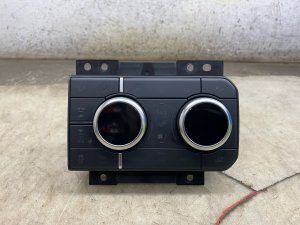
- Part number matching is essential. This specific panel is for Defenders with both a heated windshield and air suspension.
- A blank screen is a known issue addressed by a recall-related software update for some 2023-2024 models.
Symptoms of a Failing HVAC Control Module

Problems with the Defender's climate control often point to software issues or a failure within the control module itself. Here are the most common symptoms owners report:
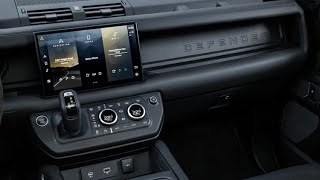
- Blank or Unresponsive Screen: The most frequent complaint is the climate control display, which is part of the main Pivi Pro touchscreen, going completely black or freezing. This can happen intermittently or become permanent, leaving you unable to see or adjust any climate settings.
- Physical Knobs/Buttons Not Working: The rotary dials or physical buttons for temperature, fan speed, or heated/cooled seats may stop responding, even if the screen is working.
- Incorrect Temperature Output: The system may blow hot air when set to cool, or cold air when set to heat. This can indicate a failure in the control module's logic or its inability to command the blend doors correctly.
- Blower Fan Issues: The fan may not turn on, get stuck on a single speed, or operate erratically. While this can also be a sign of a bad blower motor or resistor, the control module is often the starting point for diagnosis.
- Inability to Change Airflow Direction: You may be unable to switch the airflow between the defrost, dash vents, and floor vents. This suggests the module is failing to send signals to the mode door actuators.
Pro Tip: Before assuming the module is bad, perform a Pivi Pro system reset. For most models, you can do this by pressing and holding the volume knob for 20-30 seconds 🎬 See how to reset Pivi Pro without an audio button until the screen reboots. Many climate control glitches are software-related and can be resolved with this simple step or by ensuring your vehicle has the latest over-the-air (OTA) software updates from Land Rover.
Known Issues, TSBs, and Recalls

While there are no specific recalls for the HVAC control module itself as of early 2026, several Technical Service Bulletins (TSBs) and related recalls address symptoms that affect its operation.
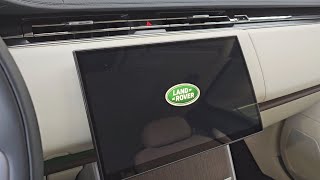
- NHTSA Recall 25V016: Issued in early 2025, this recall addresses an issue where the center touchscreen may go blank on startup on certain 2023-2024 Defenders. While the primary safety concern is the loss of the rearview camera, this also results in a loss of all climate controls. 🎬 Watch: How to fix a black screen on your Defender The fix is a software update performed by a dealer.
- SSM 75418: This Special Service Message addresses customer reports of the air conditioning not achieving the selected temperature on vehicles with 3-zone climate control. The cause was identified as an excessive refrigerant charge from the factory.
- General Software Glitches: Many owner complaints on forums are related to software bugs in the Pivi Pro system that cause the climate controls to become unresponsive or behave erratically. Land Rover 🎬 Watch: Troubleshooting common software and hardware issues on the Defender frequently releases software updates to address these problems.
Buying a Used HVAC Control: What to Check

A used OEM HVAC control module can be a cost-effective solution, but careful inspection and verification are crucial.
1. Physical Inspection
- Connectors are Key: Carefully inspect all electrical connector ports for signs of corrosion, discoloration, or bent pins. A module from a water-damaged vehicle is a major red flag.
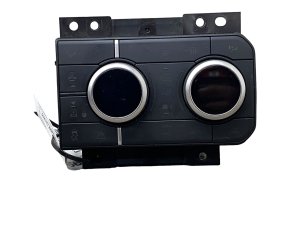
- Check the Dials and Buttons: Ensure the rotary knobs turn smoothly with a distinct click. Press all physical buttons to make sure they move freely and don't stick.
- Casing and Mounting Points: Look for cracks in the plastic housing or broken mounting tabs. This could indicate the part was handled roughly during removal and may have internal damage.
2. Part Number Verification is Critical
Warning: You must match the OEM part number exactly. Land Rover uses many different versions of this controller based on vehicle options. Using the wrong part number can result in certain features not working.
Check the part number on your original module and compare it to the replacement. Known compatible part numbers for the 2020-2023 Defender include L8B213D734BD, L8B213D734KD, LR133063, and LR145078. This climate control panel is specifically for vehicles equipped with both a heated windshield and air suspension. Do not purchase a unit if you cannot verify the part number and its compatibility with your vehicle's features.
3. Programming Requirements
This is not a plug-and-play part. A replacement HVAC control module, whether new or used, will likely need to be programmed to your vehicle's specific configuration. This requires specialized diagnostic equipment, such as Land Rover's SDD or Pathfinder software, to sync the module with the car's central computer. This step is essential to ensure all features, like multi-zone climate control, heated seats, and air suspension controls, function correctly.
Replacement Overview & Difficulty
Physically replacing the HVAC control module is relatively straightforward for a DIYer with experience in removing interior trim panels.
- Difficulty: 2/5 (Physical installation), 5/5 (Programming)
- Estimated Time: 1 hour for physical swap, plus time for professional programming.
- Tools Needed: Plastic trim removal tools, Torx screwdriver set.
The process generally involves carefully prying away the lower dash trim, removing a few Torx screws that secure the module, disconnecting the electrical connectors, and then reversing the process. The main challenge is the mandatory programming, which typically requires a visit to a Land Rover dealer or a qualified independent shop with the proper equipment.
Cost Comparison
Prices can vary, but here is a general cost breakdown:
| Part Type | Estimated Cost |
|---|---|
| New OEM | $700 - $1,100 |
| New Aftermarket | Not commonly available |
| Used OEM | $250 - $500 |
| Shop Labor (Installation & Programming) | $250 - $500 |
Frequently Asked Questions (FAQ)
Do I have to program a replacement HVAC control module?
Yes, in almost all cases. The module needs to be configured to your vehicle's specific options (VIN, trim level, features). Failure to program the module will likely result in partial or complete loss of climate control functionality.
Why is my screen blank but the fan is still blowing?
This often points to a software glitch or a failure of the Pivi Pro display itself, rather than the HVAC module's core logic. The system may retain its last settings. Try a soft reset by holding the volume knob for 30 seconds before seeking repairs.
Can I fix my climate control by just getting a software update?
It's possible. Many issues, including blank screens and unresponsive controls, have been addressed by Land Rover through software updates. Always check with a dealer if your vehicle has the latest software version before replacing any hardware.
Why is only one of my rear vents blowing hot/cold air?
This could be a problem with a blend door actuator, which is a small motor that directs airflow. However, some owners have reported finding disconnected electrical connectors behind the dash that were missed during factory assembly, which can cause this exact issue.
Helpful Videos


Technical Specifications
OEM Part Numbers: L8B213D734BD L8B213D734KD LR133063 LR145078
Integrates with Pivi Pro infotainment system. Controls heating, ventilation, air conditioning, heated/cooled seats, heated windshield, and air suspension settings.
We Have This Part in Stock

The information in this article is provided for general reference and educational purposes only. Vehicle specifications, procedures, and part compatibility can vary by production date, trim level, and region. Always consult your vehicle's factory service manual and verify part numbers before purchasing or performing repairs. Safety-critical components such as airbags, seat belts, and braking systems should be installed by a qualified professional.
- Land Rover Defender:
- 🎬 Helpful Videos
- 🛍️ Shop This Part
- Symptoms of a Failing HVAC Control Module
- Known Issues, TSBs, and Recalls
- Buying a Used HVAC Control: What to Check
- 1. Physical Inspection
- 2. Part Number Verification is Critical
- 3. Programming Requirements
- Replacement Overview & Difficulty
- Cost Comparison
- Frequently Asked Questions (FAQ)
- 🎟️ Get 5% Off