

2020-2023 Cadillac XT6 Infotainment Display: Black Screens, Failure, and Mandatory Programming
Diagnose a failing screen in your XT6 and understand the critical programming steps required for a successful replacement.
- Mandatory Programming: Any replacement display (new or used) MUST be programmed to your vehicle's VIN by a GM dealer or a specialized shop with GM's Techline Connect software.
- Verify Part Number: Before buying, remove your original unit to confirm the exact OEM part number on its label to ensure compatibility.
- Software vs. Hardware: Many issues like black screens can be caused by software glitches. Check for available TSBs or software updates at a dealer before assuming the hardware is bad.
- Used OEM is the Best Value: A used OEM display is the most affordable way to get a factory-correct repair, but you must factor in the additional cost of professional programming.
Symptoms of a Failing XT6 Infotainment Display
When the infotainment display in the Cadillac XT6 begins to fail, it can manifest in several ways, ranging from minor annoyances to a complete loss of function. Because the screen controls so many vehicle features, failure can be very disruptive.
- Completely Black or Blank Screen: The most common and serious symptom is a screen that will not turn on at all. It remains black, even when the vehicle is started. This can be intermittent at first, especially in cold weather, but often becomes permanent.
- Freezing or Unresponsiveness: The display may power on but becomes frozen on a single screen, such as the Cadillac logo. It will not respond to touch inputs or button presses, making it impossible to use.
- Intermittent Blackouts or Reboots: The system may work correctly for a period before suddenly shutting off and rebooting itself. This can happen randomly while driving.
- Loss of Audio and Chimes: A failing display module can lead to a complete loss of audio from all sources (radio, Bluetooth, etc.) and the loss of important vehicle warning chimes.
- Ghost Touches or Erratic Behavior: Though more common on older CUE systems, some screens may register "phantom" touches, causing menus to change, the radio to switch stations, or navigation destinations to be entered without user input.
- Delamination or "Spider Webbing": A physical defect where the top layer of the screen appears to bubble, peel, or develop fine cracks that look like a spider web. This is caused by the breakdown of an adhesive gel layer from heat and UV exposure and was a well-known flaw in earlier Cadillac CUE screens.
In many cases, these symptoms may be accompanied by Diagnostic Trouble Codes (DTCs), most notably network communication codes like U0184 (Lost Communication With Radio).
Warning: A blank screen will prevent you from using the backup camera, which is a critical safety feature. You will also lose access to many climate and vehicle setting controls.
Programming and Anti-Theft Requirements: The Most Critical Step
Replacing the infotainment display in a 2020-2023 Cadillac XT6 is not a simple plug-and-play procedure. These vehicles are built on GM's modern Global B electrical architecture, also known as the Vehicle Intelligence Platform (VIP). This system features advanced cybersecurity and anti-theft measures.
VIN Locking is standard. The infotainment display module is electronically locked to the original vehicle's Vehicle Identification Number (VIN). If you install a used or new display, it will detect a VIN mismatch and enter a theft-locked state. In this state, the unit will not function correctly, often displaying a lock message or remaining completely blank.
Professional Programming is Mandatory. To make a replacement display work, it must be programmed to your vehicle's VIN. This procedure requires:
- A subscription to GM's Techline Connect software suite.
- The Service Programming System (SPS2) application.
- A compatible J2534 diagnostic interface tool to connect the vehicle to a computer.
This service can only be performed by a GM dealership or a well-equipped independent repair shop that pays for the expensive GM software subscription. A DIY mechanic or a typical repair shop cannot perform this programming. You must factor in the cost and logistics of programming when purchasing a replacement screen.
Pro Tip: You can typically install the replacement display yourself to save on labor costs and then drive the vehicle to a dealer for the final programming. The vehicle will be drivable, but you will not have a functional infotainment system until the programming is complete.
Known Issues, Recalls, and Technical Service Bulletins (TSBs)
Several official communications from GM address issues with the infotainment and related systems in the XT6.
- Service Bulletin for Black/Frozen Screens (2021 Models): In July 2021, Cadillac issued a service update for 2021 XT6, XT5, and XT4 models to address screens going black or freezing. The fix is a radio software update that could be performed over-the-air (OTA) or by a dealer.
- TSB 21-NA-188 (Software Update V158): Released in June 2022, this bulletin details a comprehensive software update for 2021-2022 XT6 models (among others) that fixes over 40 different software anomalies, improving stability and performance. This indicates many issues are software-based and can be resolved with an update rather than hardware replacement.
- Recall 22V709000 (Rearview Camera): Affects 2020-2021 XT6 models. Improperly crimped coaxial cable connectors for the rearview camera can cause an intermittent or failed camera image. This could be mistaken for a screen failure, but the root cause is the camera's wiring.
- Recall N242447940 (Instrument Cluster): This recall is for 2024-2025 models and concerns the separate driver's instrument cluster, not the main infotainment screen. A software bug can prevent turn signal and high beam indicators from illuminating. It highlights the complex, software-driven nature of the vehicle's electronics.
Buying a Used 2020-2023 XT6 Infotainment Display
Purchasing a used OEM display is the most cost-effective way to restore your system. Since aftermarket options are limited to complete system overhauls with Android-based units, a recycled OEM part is the best choice for a factory-correct repair.
1. Verify Your Part Number
This is the most important step. Different part numbers exist for what may appear to be the same screen. The initial data specifies that for 2022-2023 models, part number 84848671 is a common replacement, but other screens were used. The only way to be certain of compatibility is to remove the original unit and find the part number on the sticker on its housing. Do not buy a replacement until you have verified your exact part number.
Known OEM Part Numbers: 84666207, 84719996, 84752892, 84808682, 84848671.
2. Physical Inspection
When buying a used unit, carefully inspect the photos or the part itself for:
- Screen Condition: Look for deep scratches, cracks, or any signs of delamination (bubbling/peeling).
- Connectors: Ensure all electrical connector ports on the back are clean and free of bent or broken pins.
- Housing: Check for cracks or damage to the plastic housing and mounting tabs.
3. Plan for Programming
Remember that a used display will not work until it is programmed. Contact your local Cadillac dealer or a specialized independent shop beforehand to confirm they can program a customer-supplied used module and to get a price quote for the service.
Replacement Cost Comparison
The cost to replace the infotainment display can vary significantly based on the source of the part and labor rates.
| Part/Service | Estimated Cost | Notes |
|---|---|---|
| New OEM Display (Part Only) | $1,000 - $1,500+ | Purchased from a GM/Cadillac dealership. Price can be very high. |
| Used OEM Display (Part Only) | $250 - $450 | Most cost-effective option. Prices vary based on condition and seller. |
| Aftermarket Unit | $700 - $1,100+ | Typically large Android-based screens that change the factory interface. May have integration issues. |
| Shop Labor (Installation) | $200 - $400 | Estimated 2-3 hours of labor to physically swap the unit. |
| Dealer Programming | $125 - $250 | Mandatory for new or used units. Typically equivalent to one hour of labor. |
Frequently Asked Questions (FAQ)
Does a replacement infotainment screen for a 2020-2023 XT6 need to be programmed?
Yes, absolutely. All replacement screens, whether new or used, must be professionally programmed to your vehicle's VIN using GM's official software. Without this step, the unit will be theft-locked and will not work.
Can I install the screen myself and drive to the dealer for programming?
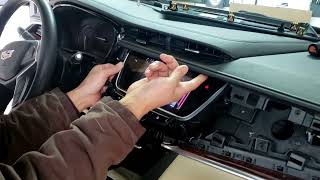
Yes. The physical installation can be done by a capable DIYer. 🎬 Watch this video to see how to remove the display. The vehicle will drive normally without a functional screen, allowing you to take it to a dealership or qualified shop for the final, mandatory programming step.
My screen is black. Does that mean it needs to be replaced?
Not always. First, try a system reset by holding the power button for 10-15 seconds. Also, check the fuses for the radio and display. The issue could be a software glitch that a dealer can fix with an update, as noted in TSB 21-NA-188. A weak vehicle battery can also cause screen issues. If these steps don't work, hardware failure is likely.
Will a used screen show the mileage or settings from the donor car?
No. During the programming process, the module is configured to your vehicle's VIN. It will adopt your car's specific features, settings, and will not display any information from the vehicle it came from.
Helpful Videos
Technical Specifications
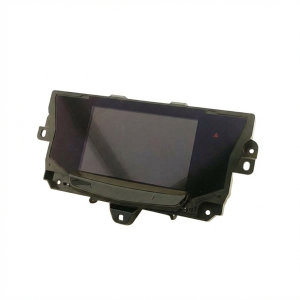
OEM Part Numbers: 84666207 84719996 84752892 84808682 84848671
8.00-inch diagonal LCD touchscreen display. Integrated into GM's Global B (VIP) electrical architecture. Requires VIN-specific programming via GM SPS2.
We Have This Part in Stock

The information in this article is provided for general reference and educational purposes only. Vehicle specifications, procedures, and part compatibility can vary by production date, trim level, and region. Always consult your vehicle's factory service manual and verify part numbers before purchasing or performing repairs. Safety-critical components such as airbags, seat belts, and braking systems should be installed by a qualified professional.
- Cadillac XT6:
- 🎬 Helpful Videos
- 🛍️ Shop This Part
- Symptoms of a Failing XT6 Infotainment Display
- Programming and Anti-Theft Requirements: The Most Critical Step
- Known Issues, Recalls, and Technical Service Bulletins (TSBs)
- Buying a Used 2020-2023 XT6 Infotainment Display
- 1. Verify Your Part Number
- 2. Physical Inspection
- 3. Plan for Programming
- Replacement Cost Comparison
- Frequently Asked Questions (FAQ)
- 🎟️ Get 5% Off