

2006-2015 Honda Accord Blank Display Screen: Navigation Faults, Anti-Theft Codes & Replacement
This guide covers the distinct infotainment display issues across three Accord generations, from failed trunk-mounted DVD players to software glitches and critical anti-theft code procedures.
- The 2006-2015 range covers three different Accord generations with completely different infotainment systems and common failures.
- For 2006-2007 models, a blank screen is almost always caused by the DVD drive in the trunk, not the dashboard display.
- A replacement unit WILL require an anti-theft code to function. You must get this code from the seller or retrieve it from Honda using the VIN and the unit's serial number.
- These navigation displays are NOT interchangeable with non-navigation models. You must replace like-for-like.
Three Generations, Three Different Problems: 2006-2015 Accord Displays

The 2006-2015 Honda Accord spans three distinct generations, each with a unique infotainment system and its own set of common problems. It is crucial to identify your vehicle's generation before diagnosing issues or buying a replacement part.
2006-2007 (7th Generation)
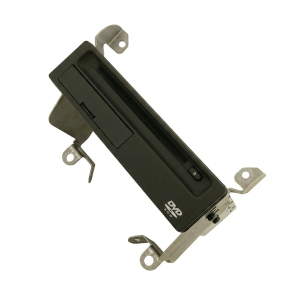
These models use a navigation system that relies on a separate DVD reader unit located in the trunk. The most common point of failure is not the screen itself, but this trunk-mounted drive. When it fails, the screen in the dash will often go blank or display an error message like "No DVD Disc Installed" or "Navigation unit door is open."
2008-2012 (8th Generation)
This generation switched to a hard-drive-based navigation system. Its most notorious issue is the "Y2K22 bug," a software glitch that caused the system's clock to roll back to the year 2002 in January 2022, making it impossible to set the correct time. Intermittent blank screens and frozen displays are also reported by owners.
2013-2015 (9th Generation)
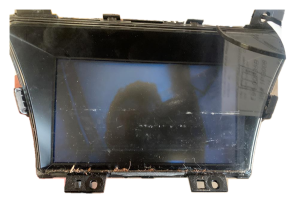
The 9th generation introduced a more complex dual-screen system in many trims, with an upper "i-MID" (intelligent Multi-Information Display) and a lower touchscreen for audio and other controls. Common complaints include the system freezing, lagging, refusing to pair with phones, or the screen going completely blank. In some cases, these issues have been traced to a loose electrical connector on the back of the upper display screen.
Symptoms of a Failing Infotainment Display

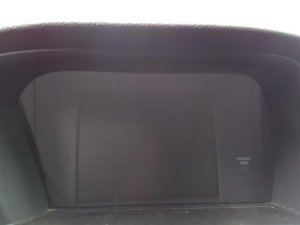
- Blank or Black Screen: The display fails to turn on, though it may still have a faint backlight glow. This is the most common symptom across all generations.
- Frozen or Unresponsive Screen: The display is stuck on a single image, and touch inputs or physical button presses do nothing.
- "DVD Error" Message (2006-2007): The screen displays an error related to the navigation DVD or the trunk-mounted drive unit.
- Incorrect Clock/Date (2008-2012): The clock is stuck in the past (typically 2002) and cannot be adjusted due to a software bug.
- Random Rebooting: The system shuts down and restarts on its own while driving.
- Bluetooth and Connectivity Failures: The system fails to pair with a phone, or connections drop frequently.
- No Audio: The display may work, but there is no sound from the speakers.
Diagnosis and Troubleshooting

Before replacing the display, try these simple diagnostic steps:
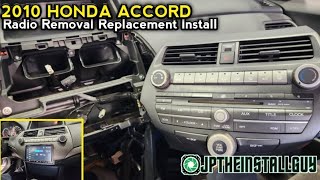
- Check the Fuses: A blown fuse is a simple fix. For the 2008-2012 models, there are up to three fuses for the navigation system located in both the interior and under-hood fuse boxes. 🎬 Watch: How to remove and replace the 8th gen factory radio
- Perform a Soft Reset: Press and hold the radio's power/volume knob for about 10-15 seconds until the system reboots. This can clear temporary software glitches.
- Perform a Hard Reset: Disconnect the negative terminal of the car's 12-volt battery for 10-15 minutes. This forces a complete reset of the vehicle's electronic modules. Note: You will need the anti-theft code to reactivate the radio after doing this.
- Check the Trunk Unit (2006-2007): For 7th generation models, inspect the DVD navigation unit in the trunk. Ensure the disc is clean and inserted correctly, and that the small door on the unit is fully closed.
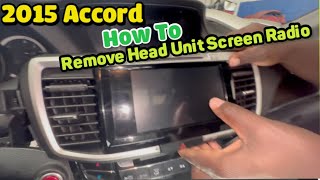
- Check Connectors (2013-2015): For 9th generation models experiencing a flickering or intermittently blank upper screen, the issue may be a loose main connector on the back of the display unit itself. 🎬 See this walkthrough for removing the 9th gen upper display screen
Warning: These displays are only for Honda Accords originally equipped with the factory navigation system. They are not compatible and will not work as an upgrade in vehicles that came with a standard, non-navigation radio.
The Anti-Theft Code: What You MUST Know

After the battery is disconnected or a replacement display/radio unit is installed, the system will enter an anti-theft mode and display the word "CODE" on the screen. The radio will not function until you enter the correct 4 or 5-digit security code.
How to Find Your Radio Code:
- Check the Vehicle: Look for a small white sticker inside the glove box or on its side. The code may also be written in the owner's manual.
- Retrieve the Serial Number: If you can't find the code, you can get it from Honda's website. First, you need the radio's serial number. With the ignition on and the radio off, press and hold the number 1 and 6 preset buttons. While holding them, turn the radio on. An 8-digit serial number will appear on the display.
- Look Up Online: Go to Honda's official Radio/Navigation Code website (radio-navicode.honda.com). You will need your VIN, the radio serial number, your phone number, and email address to retrieve the code online.
- Contact a Dealer: A Honda dealership can also retrieve the code for you.
Pro Tip: Before buying a used display, ask the seller if the anti-theft code is included. If not, be prepared to go through the retrieval process yourself.
Buying a Used Infotainment Display: What to Look For
A used OEM display can be a cost-effective solution, but careful inspection is key. Used OEM units are often more reliable than cheap, unbranded aftermarket alternatives, as they are designed to integrate perfectly with the vehicle's electronics.
- Verify the Part Number: Match the part number from your old unit to the replacement. Part numbers are generation-specific. For example, 7th gen numbers often contain "SDR", 8th gen contain "TA0", and 9th gen contain "T2A".
- Check Compatibility: Ensure the display is from a vehicle with the same options. A display from a non-Hybrid will not work in a Hybrid model, and vice-versa. Also, confirm it is from a navigation-equipped car.
- Inspect the Screen: Look for deep scratches, delamination (peeling of the top layer), or dead pixels. Ask the seller for clear photos of the screen while it is powered on if possible.
- Ask About the Code: Confirm if the anti-theft code is provided. While you can retrieve it yourself, having it upfront saves a significant amount of hassle.
- Check the Trunk Unit (2006-2007): If you have a 7th generation Accord with a blank screen, the problem is very likely the DVD drive in the trunk, not the display itself. Make sure you are buying the correct component.
Cost of Replacement
The cost to replace a Honda Accord infotainment display can vary significantly based on the generation and the type of part you choose.
| Part Type | Estimated Cost | Notes |
|---|---|---|
| New OEM | $1100 - $1500+ | Extremely expensive and often unnecessary. |
| Remanufactured OEM | $170 - $220 | A good option from Honda, but may have a core charge. |
| Used OEM | $70 - $150 | The most cost-effective option for a direct replacement. |
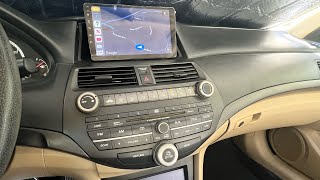
| New Aftermarket | $200 - $650+ | Android-based units that add features like Apple CarPlay, but may have integration quirks. Requires a separate dash kit. | 🎬 Watch: Step-by-step guide for installing an aftermarket Android head unit
| Shop Labor | $150 - $300 | Based on 1-2 hours of labor at a typical independent shop rate of $120-$159/hr. |
Frequently Asked Questions (FAQ)
Do I need to program a replacement infotainment display?
No, a direct OEM replacement display does not need to be programmed or flashed by a dealer to function. However, you will need to enter the anti-theft security code to make it work after installation.
Can I upgrade my non-navigation Accord with a factory navigation screen?
No, this is not a simple plug-and-play swap. The wiring harnesses and other vehicle modules are different. To add navigation, you would need to use a dedicated aftermarket system.
My 2007 Accord screen is blank. Should I replace the screen or the trunk DVD player?
In almost all cases for the 2006-2007 models, a blank screen or a DVD error message is caused by a failure of the DVD navigation drive located in the trunk, not the display in the dashboard. You should diagnose or replace the trunk unit first.
Why is the clock on my 2010 Accord stuck in 2002?
This is a known software bug called the "Y2K22" glitch that affected 2008-2012 Accords and other Honda models. The system's internal calendar could not handle the date change to 2022 and defaulted to 2002. Unfortunately, there is no simple fix for the owner; it is a fundamental software issue within the unit.
Can I install an aftermarket radio and keep the factory screen?
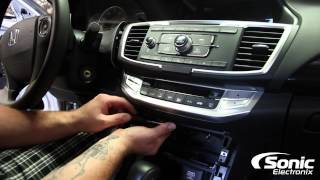
For the 2013-2015 models with the dual-screen setup, companies like Metra make special dash kits that allow you to install an aftermarket radio in the lower position while retaining the functionality of the upper i-MID screen.
Helpful Videos
Technical Specifications
OEM Part Numbers: 39540SDRA41 39540SDRA410M1 39710-T2A-A01RM 39710T2AA01 39710T2AA010 39710T2AA010M1 39713T2AA01 39810-TA0-A01 39810TA0305 39810TA0315 39810TA0A02 39810TA0A02RM
Varies by generation. 7th Gen (2006-2007) uses an external DVD-ROM drive. 8th Gen (2008-2012) uses an internal hard drive. 9th Gen (2013-2015) uses a dual-screen i-MID system.
We Have This Part in Stock

The information in this article is provided for general reference and educational purposes only. Vehicle specifications, procedures, and part compatibility can vary by production date, trim level, and region. Always consult your vehicle's factory service manual and verify part numbers before purchasing or performing repairs. Safety-critical components such as airbags, seat belts, and braking systems should be installed by a qualified professional.
- Honda Accord:
- 🎬 Helpful Videos
- 🛍️ Shop This Part
- Three Generations, Three Different Problems: 2006-2015 Accord Displays
- 2006-2007 (7th Generation)
- 2008-2012 (8th Generation)
- 2013-2015 (9th Generation)
- Symptoms of a Failing Infotainment Display
- Diagnosis and Troubleshooting
- The Anti-Theft Code: What You MUST Know
- How to Find Your Radio Code:
- Buying a Used Infotainment Display: What to Look For
- Cost of Replacement
- Frequently Asked Questions (FAQ)
- 🎟️ Get 5% Off