

2015-2016 Kia Soul Infotainment Display: Solving Black Screens and Programming Puzzles
This guide covers common failures, programming requirements, and how to choose the right used replacement for your Soul's 8-inch navigation system.
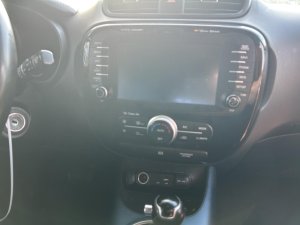
- This display is only for 2015-2016 gasoline Kia Soul models originally equipped with the 8-inch navigation system.
- A replacement unit, even a used OEM one, will almost certainly require programming by a Kia dealer to ensure full functionality.
- The most common failures are a completely black screen or an unresponsive touchscreen.
- Before replacing the unit, always try a pinhole reset and check the audio system fuse.
- A new OEM unit is prohibitively expensive (over $4,000), making a used OEM part the most logical choice for replacement.
Symptoms of a Failing Infotainment Display
When the infotainment head unit in a 2015-2016 Kia Soul begins to fail, it can cause a range of frustrating issues. While a complete failure is obvious, many problems start intermittently. Here are the most common symptoms reported by owners.
- Blank or Black Screen: The most common failure is a screen that will not turn on at all, even though the backlights on the buttons may be lit. Sometimes this happens intermittently, while other times it is a permanent failure. The audio may or may not work when the screen is black.
- Unresponsive Touchscreen: The display may power on and show the correct information, but it does not respond to any touch inputs. This makes it impossible to use navigation, change settings, or select media sources.
- Ghost Touches or Phantom Inputs: The system may act on its own, randomly changing radio stations, making calls, or accessing menus without any user input. This is often a sign of a failing digitizer, the touch-sensitive layer of the screen.
- System Freezing or Constantly Rebooting: The unit may freeze on a single screen or get stuck in a continuous boot loop where the Kia logo appears and then the system restarts. This can be caused by software glitches or internal hardware problems.
- Bluetooth and Connectivity Problems: Difficulty pairing a phone, frequent disconnections, or poor voice recognition quality were common enough that Kia issued service bulletins to address them with software updates.
Known Issues, Recalls, and Technical Service Bulletins (TSBs)
While there have been no formal recalls for the infotainment display itself, Kia has acknowledged issues through several Technical Service Bulletins (TSBs) and Service Actions (SAs).
- Service Action SA195: Kia issued this service action for some 2015 Soul models to replace the entire Audio Assembly (UVO) unit due to unspecified problems. This indicates a known hardware issue from the factory.
- TSB ELE078: This bulletin addresses a condition where the head unit intermittently fails to power on due to an internal fault. The official dealer repair is to replace the head unit.
- TSB ELE100R2 / SA276 / SA277: These bulletins provide procedures for dealers to perform software upgrades on the infotainment system. The updates were designed to fix issues with loud incoming call ringing, poor Bluetooth connectivity, and voice recognition performance. The existence of these updates highlights the importance of the unit's software.
- TSB ELE091R1: This bulletin instructs dealers on how to identify the specific software version on a head unit before ordering a replacement. This confirms that software compatibility is critical when swapping units.
Pro Tip: Before assuming the unit is dead, try a simple reset. Locate the small pinhole reset button (often near the CD slot or knobs), and gently press it with a pen or paperclip for a few seconds. If that doesn't work, disconnecting the car's 12V battery for 15-30 minutes can perform a hard reset and sometimes resolve software-related freezes.
Programming and Installation Requirements
This is the most critical area of concern when replacing the infotainment display in a 2015-2016 Kia Soul.
Does a Replacement Unit Need to be Programmed?
Yes, it is highly likely. While the unit may power on after a direct swap, full functionality is not guaranteed without programming by a Kia dealership. Modern infotainment systems are integrated with the vehicle's main computer and are configured to the specific Vehicle Identification Number (VIN). Programming is often required to ensure features like the backup camera, steering wheel controls, and the correct audio amplifier settings (for standard vs. premium sound systems) work correctly. Kia's own service documents require technicians to verify software versions when ordering replacements, underscoring the importance of software and configuration.
Can an Independent Shop or Locksmith Program It?
It is unlikely. This type of programming typically requires Kia's proprietary diagnostic tool (KDS - Kia Diagnostic System) and access to their service network. While some advanced independent shops may have this capability, it is not common. You should plan for a dealership visit to complete the installation. The programming cost is usually equivalent to one hour of shop labor.
Warning: Do not attempt to upgrade a base model Soul (with the smaller, non-touchscreen radio) to this 8-inch navigation unit simply by swapping the display. The wiring harnesses and vehicle configurations are different, and it will not be a plug-and-play installation.
Buying a Used 2015-2016 Kia Soul Infotainment Display
Given that a new OEM replacement display can cost over $4,000, a used unit is the only practical option for most owners. Here’s what to look for.
1. Verify Compatibility Before You Buy
Compatibility is everything. Make sure the unit you are buying meets these criteria:
- Vehicle Match: It must come from a 2015-2016 Kia Soul.
- System Match: It must be the 8-inch navigation unit, not the smaller base audio display.
- Engine Match: The unit is specified for gasoline models, not the Soul EV.
- Part Number Match: The best way to ensure compatibility is to match the OEM part number. Remove your original unit first to find the number printed on its label. Known part numbers include 96560B2210CA, 96560B2211CA, and 96560B2212CA.
2. Physical Inspection
When the used part arrives, inspect it carefully. Check for deep scratches on the screen, damage to the plastic bezel, and any bent or broken connector pins on the back. Ensure all buttons have a solid, tactile click and are not stuck. A reputable seller should guarantee the unit is tested and functional.
3. Why a Used OEM Unit is a Good Choice
For a complex, integrated part like this, a used OEM unit is often superior to a new aftermarket one. An OEM unit is designed to work seamlessly with your car's existing systems, including steering wheel controls and vehicle settings menus. While aftermarket systems from brands like Pioneer or Kenwood are an option, they require installation kits, wiring adapters, and often result in the loss of some factory features. A used OEM display, once programmed, restores the original factory functionality.
Replacement Cost Comparison
The cost to replace a faulty infotainment display can vary dramatically based on the source of the part.
| Part Source | Estimated Cost | Notes |
|---|---|---|
| New OEM | $4,300 - $6,600+ | Extremely expensive and not a practical option for most repairs. |
| Used OEM | $250 - $550 | The most cost-effective solution. Prices vary based on condition and availability. |
| Remanufactured / Repaired | $300 - $600 | Mail-in services can repair your original unit, fixing common issues like a bad touchscreen digitizer. |
| New Aftermarket | $200 - $700+ | This involves replacing the entire system with a non-OEM brand. Requires extra parts and may result in loss of some factory functions. |
| Shop Labor (Physical Swap) | $100 - $200 | The physical replacement is relatively simple and takes about 1-1.5 hours. |
| Shop Labor (Programming) | $120 - $225 | Typically a separate, one-hour charge at a dealership to configure the unit to the vehicle. |
Frequently Asked Questions (FAQ)
Is a black screen always a sign of a failed display?
Not always. Before condemning the unit, check the fuse for the audio/infotainment system in the vehicle's fuse panel. Also, try the pinhole reset button. If these simple checks don't work, the problem is likely with the head unit itself.
Will my backup camera and steering wheel controls work with a used replacement?
They should, but only after the replacement unit is properly programmed to your vehicle's VIN by a Kia dealer. Without programming, these features may not function correctly.
Can I just replace the touchscreen part and not the whole radio?
Yes, this is possible. The glass and touch-sensitive digitizer can fail separately from the main radio computer. Several mail-in repair services specialize in this component-level repair, which can be a cost-effective alternative to replacing the entire unit. This is a delicate repair that is difficult for most DIYers.
Are there any OBD-II codes associated with a failing infotainment display?
Generally, no. Standard OBD-II scanners do not typically read fault codes from the infotainment system. These systems use proprietary manufacturer-specific codes that can only be accessed with a dealership-level diagnostic tool like the Kia KDS. A failing display will usually not cause the Check Engine Light to illuminate.
Technical Specifications
OEM Part Numbers: 96560B2210CA 96560B2211CA 96560B2212CA
8-inch Touchscreen with Navigation (UVO System)
We Have This Part in Stock

The information in this article is provided for general reference and educational purposes only. Vehicle specifications, procedures, and part compatibility can vary by production date, trim level, and region. Always consult your vehicle's factory service manual and verify part numbers before purchasing or performing repairs. Safety-critical components such as airbags, seat belts, and braking systems should be installed by a qualified professional.
- Kia Soul:
- 🛍️ Shop This Part
- Symptoms of a Failing Infotainment Display
- Known Issues, Recalls, and Technical Service Bulletins (TSBs)
- Programming and Installation Requirements
- Does a Replacement Unit Need to be Programmed?
- Can an Independent Shop or Locksmith Program It?
- Buying a Used 2015-2016 Kia Soul Infotainment Display
- 1. Verify Compatibility Before You Buy
- 2. Physical Inspection
- 3. Why a Used OEM Unit is a Good Choice
- Replacement Cost Comparison
- Frequently Asked Questions (FAQ)
- 🎟️ Get 5% Off