

2010-2013 Mazda 3 Information Display: Fading Screens, Compatibility, and Replacement
This guide covers common failures, compatibility issues, and replacement costs for the upper information display in the 2010-2013 Mazda 3.
- This display is ONLY for Mazda 3 models without the factory navigation system.
- Replacement is plug-and-play and does NOT require any dealer programming.
- Common failure symptoms include a blank screen, fading pixels, and flickering.
- A used OEM display is the most economical repair option, as aftermarket versions are not readily available.
Symptoms of a Failing Information Display

When the information display in a 2010-2013 Mazda 3 begins to fail, the symptoms are almost always visual. Since this is a simple display screen and not a complex computer, it typically does not generate OBD-II trouble codes. Here are the most common signs of failure:
- Blank or Black Screen: The most common symptom is the screen not turning on at all. This could be a failure of the unit itself, a wiring issue, or a blown fuse. Before assuming the display is broken, check that it wasn't accidentally turned off, as the power button is often integrated with the volume knob.
- Fading or Dim Pixels: The display may become difficult to read, especially in direct sunlight or extreme temperatures. The liquid crystal elements can degrade over time, causing parts of the screen or the entire display to appear dim or lose contrast.
- Flickering or Intermittent Operation: The screen might flicker, or turn on and off randomly. This often points to a loose electrical connection behind the unit or failing internal components.
- Distorted or Garbled Text: Characters and numbers may appear scrambled or incomplete, making it impossible to read the information. This indicates a failure of the display's internal processing hardware.
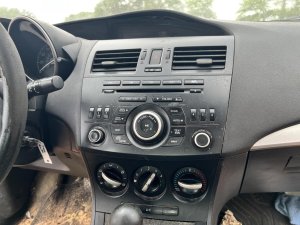
Compatibility Warning: This information display is for models WITHOUT the factory navigation system. It is a single, monochrome screen. It will not work as a replacement in vehicles originally equipped with the larger, color navigation display. Attempting to install it in a navigation-equipped car will result in incompatibility.
Known Issues, TSBs, and Recalls

While there are no specific recalls for the information display itself, Mazda issued a warranty extension and a related Technical Service Bulletin (TSB) for a common related problem.
- TSB 09-050/16 (supersedes 09-038/14): This bulletin addresses warping of the dashboard panel directly above the information display.
- Warranty Extension Program (SSP A9): Mazda extended the warranty to cover the replacement of the instrument panel if it warps and creates a gap above the information display, a condition often caused by exposure to heat. This issue does not affect the function of the display but is a common cosmetic problem in this generation of Mazda 3.
- Warranty Extension Program (SSP 99): For 2010 models, Mazda also extended the warranty to cover dashboards that developed a sticky surface due to heat and humidity.
Programming and Installation

The standard information display in the 2010-2013 Mazda 3 is a straightforward, plug-and-play component. No programming, flashing, or dealer visit is required after installation. It does not have an anti-theft link or connect to the vehicle's immobilizer system. The replacement process is relatively simple and involves removing dashboard trim pieces to access the mounting screws and electrical connector.
Pro Tip: When replacing the display, it's a good time to inspect the plastic dashboard surround for any signs of warping or stickiness, as addressed in Mazda's warranty extension programs.
Buying a Used Infotainment Display

Purchasing a used OEM display is the most cost-effective way to restore function to your Mazda 3. Since aftermarket versions of this specific part are not common, a recycled original part is often the best choice.
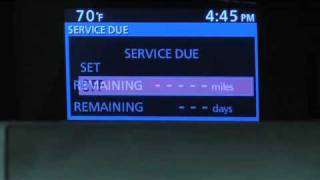
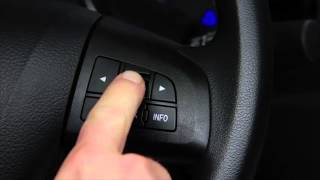
- Verify Compatibility: The most critical step is ensuring the part is from a non-navigation vehicle. Cross-reference the OEM part number from your original unit if possible. Known part numbers for 2010-2011 models include BBM2611J0B through BBM2611J0F. 🎬 Watch: A helpful walkthrough of the 2010-2011 display features. For 2012-2013 models, the part number is typically BGV4611J0. 🎬 See this video for a 2013 display interface demonstration.
- Physical Inspection: When buying online, look for clear photos of the screen. Check for deep scratches, cracks in the housing, or broken mounting tabs. If possible, ask the seller if the screen was tested and is known to power on without dead pixels.
- Mileage and Age: While mileage isn't a direct factor for a display, age is. LCDs can fade with time and exposure to UV light. A part from a lower-mileage vehicle stored indoors is likely to be in better condition.
- Why Used OEM is a Good Choice: A used original Mazda part guarantees perfect fitment and compatibility with the factory wiring harness. It maintains the original look and feel of the interior, and for a simple component like this, its reliability is well-established.
Cost Comparison
| Part Type | Estimated Cost |
|---|---|
| New OEM | $400 - $600 |
| New Aftermarket | Not commonly available |
| Used OEM | $75 - $150 |
| Shop Labor | $100 - $200 |
Frequently Asked Questions (FAQ)
Does the replacement display need to be programmed by a dealer?
No. The 2010-2013 Mazda 3 information display is a plug-and-play part. It does not require any special programming or calibration after installation.
Can I upgrade this single screen to the factory navigation screen?
This is not a simple swap. Upgrading to the factory navigation system requires changing the display, the head unit, wiring harnesses, and adding a GPS antenna. It is generally not considered a practical or cost-effective modification.
Why is my display blank after replacing the car battery?
In some cases, a power interruption can cause a logic freeze in the audio or display system. While less common on non-navigation models, if the screen is blank after a battery change, first check the related fuses. If fuses are good, you can try a hard reset by disconnecting the negative battery terminal for about 15-20 minutes to clear any temporary glitches.
Is a flickering display dangerous?
No, a failing information display does not pose a safety risk and will not affect the vehicle's ability to drive. However, it can be a significant annoyance as it prevents you from seeing radio, clock, and climate information.
Helpful Videos
Technical Specifications
OEM Part Numbers: BBM2611J0B BBM2611J0C BBM2611J0D BBM2611J0E BBM2611J0F BGV4611J0
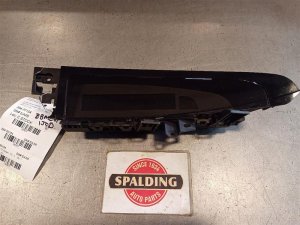
Upper center dash-mounted single information screen for non-navigation models.
We Have This Part in Stock

The information in this article is provided for general reference and educational purposes only. Vehicle specifications, procedures, and part compatibility can vary by production date, trim level, and region. Always consult your vehicle's factory service manual and verify part numbers before purchasing or performing repairs. Safety-critical components such as airbags, seat belts, and braking systems should be installed by a qualified professional.
- Mazda MAZDA3: