

2009-2012 Toyota Venza Navigation Display: Troubleshooting and Replacement Guide
A complete guide to diagnosing common failures, understanding compatibility, and replacing the JBL navigation display in your 2009-2012 Toyota Venza.
- This display is ONLY for Venza models that came with the JBL Navigation system from the factory; it is not an upgrade for base models.
- A used OEM replacement unit does NOT require dealer programming or anti-theft codes, making it a true plug-and-play swap.
- Common failures include a frozen screen, constant rebooting, or a black screen, which can sometimes be fixed with a system reset.
- Replacement is a feasible DIY job, but requires care when removing trim and a long socket extension with a swivel to reach two of the mounting bolts.
Symptoms of a Failing Infotainment Display
When the navigation display in a 2009-2012 Toyota Venza begins to fail, it can cause a variety of frustrating issues. These problems are often caused by internal software glitches, hardware failures, or even issues with the vehicle's electrical system. Here are the most common symptoms owners report:
- Unresponsive or Frozen Screen: The most common complaint is a touch screen that stops responding to input. You may be unable to change radio stations, access menus, or input a navigation destination. Sometimes this is a temporary software glitch that a simple restart can fix.
- Constant Rebooting or Boot Loop: The unit may power on, show the Toyota logo, and then immediately shut down and restart in an endless cycle. This can be caused by corrupted software, firmware issues, or an internal hardware fault.
- Black or Blank Screen: The display may fail to turn on entirely, remaining black even when the car is running. This could be due to a blown fuse, a loose connection behind the unit, or a complete internal failure of the display or mainboard.
- Bluetooth Connectivity Problems: Difficulty pairing a phone or frequent disconnection of an already paired device is a known issue. This can sometimes be caused by software incompatibility between the phone and the older head unit.
- Laggy and Slow Performance: The system may become very slow to respond, with significant delays when switching between functions like radio, navigation, and settings. This is often a sign of aging hardware or overwhelmed system memory.
Pro Tip: Before assuming the unit is broken, try a simple reset. Turn the vehicle completely off, wait a few minutes, and restart it. If that doesn't work, try a 'soft reset' by pressing and holding the power/volume knob for 10-20 seconds until the system reboots. 🎬 Watch: How to troubleshoot and reset a frozen Toyota screen As a last resort, a 'hard reset' by disconnecting the vehicle's negative battery terminal for 10-15 minutes can clear deeper electronic glitches.
Known Issues, Recalls, and Technical Service Bulletins (TSBs)
As of early 2026, there are no active recalls or widespread Technical Service Bulletins from Toyota or the NHTSA specifically for failure of the navigation display unit in the 2009-2012 Venza. Recalls for this vehicle generation typically involve other systems, such as airbag wiring, brake light switches, or incorrect load labels. While many owners experience the common failures listed above, these have been treated as individual repairs rather than a recall campaign.
Buying a Used Infotainment Display: What You Need to Know
Purchasing a used OEM navigation display is a popular and cost-effective solution. Because these units are often plug-and-play, a used original part is frequently a better choice than a complex aftermarket installation. Here’s what to look for:
Warning: This part is NOT an upgrade for a standard Venza radio. It is only compatible with vehicles originally equipped from the factory with both the navigation system and the premium JBL 13-speaker sound system. The wiring harnesses are different, and a base model vehicle will not have the necessary connections for the GPS antenna or the JBL amplifier.
Compatibility Verification
- Match the Part Number: The most critical step is to match the part number. The primary OEM part numbers are 86120-0T060, 86120-0T061, and faceplate ID code E7021. A unit with a different part number may have different internal software or data streams and will likely not work correctly.
- Confirm JBL System: Ensure the donor vehicle and your vehicle both have the JBL audio system. The amplifier and speaker configuration are completely different from the standard audio system.
- Physical Inspection: When buying from a local seller, ask to see the unit powered on if possible. Check for dead pixels, flickering, or discoloration on the screen. Test the touch screen's responsiveness across its entire surface.
Programming and Anti-Theft
One of the biggest advantages of replacing this specific unit with a used OEM part is the lack of complex programming. For the 2009-2012 Venza, the JBL navigation unit is considered plug-and-play. It does not need to be programmed to the vehicle's VIN and does not have an anti-theft code that needs to be unlocked by a dealer. This is a significant difference from newer Toyota models which often have VIN-locked head units.
Cost of Replacement
The cost to replace a Venza navigation display can vary significantly depending on the source of the part and who performs the labor.
| Part/Service | Estimated Cost | Notes |
|---|---|---|
| New OEM | $1,000+ (if available) | May no longer be available new from dealers. Toyota sometimes offers a remanufactured exchange program for a lower cost. |
| Used OEM | $250 - $450 | Prices vary based on condition and seller. A common price for a tested, working unit from a salvage yard or online marketplace. |
| Remanufactured OEM | $500 - $650 | A professionally repaired and tested original unit, often comes with a warranty. |
| Shop Labor | $120 - $250 | The job takes approximately 1-1.5 hours. Two of the mounting bolts are difficult to access, which can increase labor time slightly. |
Frequently Asked Questions (FAQ)
Does a used 2009-2012 Venza navigation unit need to be programmed by a dealer?
No. This specific head unit is plug-and-play and does not require dealer programming, VIN-linking, or an anti-theft code when installed in a vehicle that was originally equipped with the same JBL navigation system.
Can I upgrade my standard Venza radio to this navigation unit?
No, this is not a direct swap. The wiring harnesses are different, and your vehicle will be missing the GPS antenna and the specific connections for the JBL amplifier. You are better off purchasing an aftermarket head unit designed for non-JBL models.
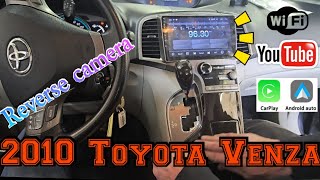
🎬 Watch: How to upgrade your Venza head unitIs replacing the Venza infotainment display a feasible DIY job?
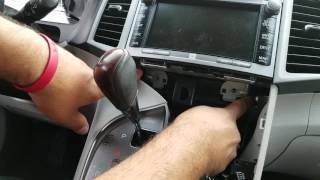
Yes, for a moderately skilled DIYer. The process involves carefully prying off several trim pieces and removing four 10mm bolts. However, two of the bolts are located deep within the dash and can be difficult to reach without a long extension and a universal/swivel joint for your socket wrench.
🎬 See this walkthrough on removing the Venza navigation unitMy screen is black but I can still hear the radio. What's the problem?
This usually points to a failure of the screen itself or its direct power supply, rather than the entire radio unit. It could be a loose connection behind the dash or a failure of the screen's backlight. While the entire unit is typically replaced, a specialized electronics repair shop may be able to repair just the screen component.
Helpful Videos
Technical Specifications
OEM Part Numbers: 86120-0T060 86120-0T061 E7021
Designed for 2009-2012 Toyota Venza with factory JBL premium audio and navigation system.
We Have This Part in Stock

The information in this article is provided for general reference and educational purposes only. Vehicle specifications, procedures, and part compatibility can vary by production date, trim level, and region. Always consult your vehicle's factory service manual and verify part numbers before purchasing or performing repairs. Safety-critical components such as airbags, seat belts, and braking systems should be installed by a qualified professional.
- Toyota Venza:
- 🎬 Helpful Videos
- 🛍️ Shop This Part
- Symptoms of a Failing Infotainment Display
- Known Issues, Recalls, and Technical Service Bulletins (TSBs)
- Buying a Used Infotainment Display: What You Need to Know
- Compatibility Verification
- Programming and Anti-Theft
- Cost of Replacement
- Frequently Asked Questions (FAQ)
- 🎟️ Get 5% Off