

2024 Tesla Model 3 'Highland' Key Fob: DIY Programming and Compatibility Explained
Learn how to pair a new or used key fob to your 2024 'Highland' Model 3 yourself and avoid the common compatibility trap with older models.
- You can easily program a new or used key fob yourself using the car's touchscreen, as long as you have another working key to authorize it.
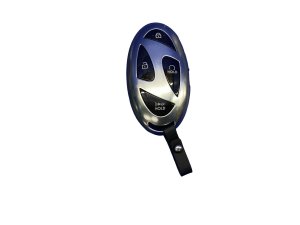
- This key fob, part number 1819445-00-B, is specifically for the 2024 'Highland' Model 3. Do not trust sellers who claim it is universally compatible with older 2017-2023 models.
- Nearly all 'failure' symptoms are caused by a dead CR2032 battery, which is a simple and inexpensive DIY replacement.
- For 2024 models, the key pairing scan location is the wireless phone charger pad, a change from the cupholder area on previous model years.
Key Fob Programming: DIY vs. Tesla Service
One of the most common questions is whether this key fob requires a visit to a Tesla Service Center for programming. For most owners, the answer is no. You can add a new or even a used key fob to your vehicle yourself, provided you have at least one existing, functional key (like a key card or another fob) to authorize the pairing.
The process is done directly on the vehicle's main touchscreen:
- On the touchscreen, navigate to Controls > Locks > Keys > Add Key.
- The screen will instruct you to scan the new key fob. For 2024 'Highland' Model 3 vehicles (manufactured from approximately January 2024 onward), you scan the new fob on one of the wireless phone charging cradles in the center console. For earlier models, this spot was behind the cupholders.
- Next, to authorize the new key, the car will ask you to scan an existing, already-paired key card or key fob on the same spot.
- Once confirmed, the new key fob will be added to your vehicle's key list and is ready to use. The entire process takes only a minute. 🎬 Watch: Step-by-step walkthrough of the key fob programming process.
Pro Tip: This simple, do-it-yourself pairing process makes buying a used key fob a viable option, as you do not need the previous owner to un-pair it. As long as the fob is functional, you can add it to your car.
A visit to a Tesla Service Center is typically only required if you have lost all of your keys and have no way to authorize a new one.
Symptoms of a Failing Key Fob
Most issues with the Model 3 key fob are related to its internal battery, not a defect in the fob itself. Common symptoms include:
- Intermittent or No Response: The vehicle fails to lock or unlock when you press the buttons on the fob.
- Reduced Signal Range: You have to be much closer to the vehicle than usual for the fob to work.
- Delayed Response: There is a noticeable lag between pressing a button and the car responding.
- 'Key Not Detected' Message: The car may display a message on the screen indicating the key is not detected when you try to drive.
- Requires Reseating the Battery: Some owners report the fob randomly stops working and only functions again after the battery is popped out and put back in. 🎬 Watch: Troubleshooting tips for a key fob that isn't working.
In almost all cases, these problems are solved by replacing the CR2032 battery inside the fob.
Compatibility Warning: 2024 'Highland' vs. Older Models
The key fob for the 2024 Tesla Model 3, often called the 'Highland' refresh, is OEM part number 1819445-00-B. While many online sellers and third-party sites claim this part is compatible with all Model 3 vehicles from 2017 to 2024, this information can be misleading. The 'Highland' refresh introduced numerous changes, and using parts not specifically designed for it can lead to unpredictable behavior. To ensure proper function, you should only purchase a key fob with the exact part number 1819445-00-B for your 2024 Model 3 and be skeptical of claims that it is backward-compatible with 2017-2023 models.
Buying a Used 2024 Model 3 Key Fob
Purchasing a used OEM key fob is a great way to save money, as they can be programmed to your vehicle without dealer intervention. However, there are a few things to keep in mind:
- Verify the Part Number: Ensure you are buying part number 1819445-00-B for your 2024 Model 3.
- Physical Inspection: Check the casing for cracks or significant wear. While durable, damage could allow moisture inside and harm the electronics.
- Assume the Battery is Dead: Plan on installing a fresh CR2032 battery upon receipt. This eliminates the most common point of failure.
- Authorization Key Required: Remember that you cannot program the used fob unless you have a working key card or phone key to authorize it in the car's menu.
Known Issues, Recalls, and Service Bulletins
As of early 2026, there are no specific NHTSA recalls or Technical Service Bulletins (TSBs) related to the failure of the keyless entry transmitter for the 2024 Tesla Model 3. Several software-related recalls have been issued for the 2024 Model 3 concerning issues like warning light font sizes or seat belt reminders, but these do not affect the function of the key fob itself. Any widespread pairing issues are typically resolved via over-the-air (OTA) software updates from Tesla.
Cost of Replacement
| Type | Estimated Cost | Notes |
|---|---|---|
| New OEM (from Tesla) | $175 | Price directly from the Tesla online shop. Battery is not included. |
| Used OEM (Online) | $95 - $150 | Prices vary based on condition from sellers on platforms like eBay. |
| New Aftermarket | $50 - $80 | These are typically NFC-only fobs that function like a key card in a different shape, lacking the remote button functions of the OEM fob. |
| Shop Labor / Programming | $0 | Programming can be done by the owner for free using the vehicle's touchscreen, as long as an existing key is present. A service visit would only be needed if all keys are lost. |
Frequently Asked Questions (FAQ)
Can I program a new Tesla key fob myself?
Yes. If you have at least one working key card or phone key, you can add a new or used key fob yourself in minutes using the 'Controls > Locks > Keys > Add Key' menu on the car's touchscreen.
Will a key fob from an older 2017-2023 Model 3 work with my 2024 'Highland' model?
It is not recommended. The 2024 'Highland' refresh has specific components. To ensure full compatibility and avoid issues, you should use the correct part number for your vehicle, which is 1819445-00-B.
How do I replace the battery in the key fob?
The key fob uses one standard CR2032 3V battery. To replace it, place the fob button-side down on a soft surface and use a small, flat tool to pry open the bottom cover. Lift out the old battery and insert the new one with the '+' side facing up. Snap the cover back on. Interestingly, some older fob shells were misprinted with 'CR2330', but the correct battery has always been the CR2032.
🎬 See this quick DIY guide for replacing your fob battery.Can a locksmith program a Tesla key fob?
Generally, no. Unlike traditional car keys, Tesla key pairing is handled through the vehicle's secure software. It either requires the owner's authorization with an existing key via the touchscreen or access to Tesla's proprietary 'Toolbox' diagnostic software, which is restricted to Tesla service personnel and authorized partners.
Helpful Videos

Technical Specifications
OEM Part Numbers: 1819445-00-B
Battery Type: CR2032 3V
We Have This Part in Stock

The information in this article is provided for general reference and educational purposes only. Vehicle specifications, procedures, and part compatibility can vary by production date, trim level, and region. Always consult your vehicle's factory service manual and verify part numbers before purchasing or performing repairs. Safety-critical components such as airbags, seat belts, and braking systems should be installed by a qualified professional.
- TESLA Model 3: