

B1000 on 2008-2015 Buick Enclave: OnStar Module Failure and Fixes
On a 2008-2015 Enclave, code B1000 almost always means the OnStar module (VCIM) has failed internally. This typically causes a 'Phone Unavailable' message and can create a parasitic battery drain. The fix is to replace and program the module, or simply disconnect it to solve the battery drain, which many owners choose as the 2G/3G cellular service is obsolete anyway.
- For the 2008-2015 Enclave, B1000 is not a generic code; it specifically points to a failed OnStar (VCIM) module.
- The most common symptoms are a 'Phone Unavailable' message and a parasitic battery drain, often measuring between 300-500mA.
- Diagnosis can be confirmed by listening for the message or by performing a parasitic draw test and pulling the OnStar fuse.
- The official fix is to replace the module and have it programmed, but a practical fix for the battery drain is to simply disconnect the faulty module, especially since the original cellular service is obsolete.
- Ignoring the code won't affect driving safety, but it will leave you without OnStar emergency services and risks a dead battery.
What's Unique About the 2008-2015 Buick ENCLAVE

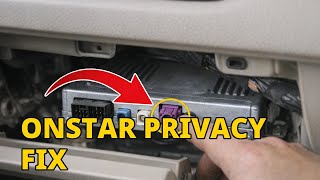
For this specific GM platform (Lambda), which includes the Enclave, Chevrolet Traverse, GMC Acadia, and Saturn Outlook, the B1000 code is not a vague mystery. GM released specific service bulletins (PIC3278F and PIC3278G) identifying a common failure pattern in the OnStar module that causes this code. [TSB #PIC3278F, TSB #PIC3278G] Unlike on other vehicles where B1000 could point to the airbag system or Body Control Module, on the Enclave and its platform mates the diagnosis is much more direct, almost always leading to the OnStar system. 🎬 Watch: A quick breakdown of the B1000 code on this platform. [TSB #PIC3278F, TSB #PIC3278G, 20]
Diagnostic Flowchart

Tap your situation to follow the diagnostic path that matches what you're seeing on this vehicle.
Symptoms You May Notice

- An audio message saying 'Phone Unavailable' when pressing an OnStar button. [TSB #PIC3278F, TSB #PIC3278G]
- Parasitic battery drain, leading to a dead battery after the vehicle sits for a day or two.
- The OnStar status indicator light (by the rearview mirror) may be red, off, or stuck on green even when the vehicle is off.
- Inability to use any OnStar services, including emergency calling and remote diagnostics.
- Failure of the GM mobile app to connect to the vehicle for remote start or status checks.
- Replacing the Body Control Module (BCM). While B1000 can mean a BCM failure on other cars, on this platform it's almost always the OnStar module. [TSB #PIC3278F, TSB #PIC3278G, 21]
- Replacing the battery. A new battery will also be drained if the root cause (the faulty OnStar module) is not addressed.
- Blaming other accessories. Owners may suspect aftermarket chargers or other devices, but the OnStar module is the well-documented cause of this specific drain.
Most Likely Causes

- Internal Failure of the OnStar Module (VCIM) 🔴 High Probability → Shop Telematics Interface Module As documented in GM Technical Service Bulletins PIC3278F and PIC3278G, these specific modules are known to have internal faults that lead to this code and associated symptoms. [TSB #PIC3278F, TSB #PIC3278G] The failure is often due to the module not entering 'sleep' mode correctly, causing a continuous power draw.
How to confirm: Perform a parasitic draw test. Connect an ammeter in series with the negative battery cable. Wait for all vehicle modules to go to sleep (this can take up to 30 minutes). A reading above the normal 25-50mA (0.025-0.050A) indicates a problem; faulty OnStar modules have been known to draw 300-500mA (0.3-0.5A). Pull the fuse for the OnStar module (often labeled 'INFO' or 'OnStar' in the fuse box located under the passenger side dash). If the draw drops to a normal level, the VCIM is confirmed as the culprit. A GM-specific scan tool can also confirm the B1000 code is stored specifically in the Telematics module. [TSB #PIC3278F, TSB #PIC3278G]
Typical fix: Replace the OnStar/VCIM module and have it programmed by a dealer or qualified shop. A common and practical alternative is to simply disconnect the module to prevent battery drain, forgoing OnStar services. This is a popular option as the 2G/3G cellular technology in these modules is obsolete.
Est. part cost: $50-$250
Diagnosis Steps
- Verify the symptoms. Press the blue OnStar button. If you hear 'Phone Unavailable,' the diagnosis is strongly pointing to the VCIM. [TSB #PIC3278F, TSB #PIC3278G]
- If the complaint is a dead battery, perform a parasitic draw test. Disconnect the negative battery cable and connect an ammeter in series. Wait for all vehicle modules to go to sleep (up to 30 minutes). A reading above 50mA (0.05A) indicates a problem.
- If the draw is high, begin pulling fuses. Locate the interior fuse panel (typically on the passenger side of the dashboard). Pull the fuse for the OnStar/Telematics module (may be labeled 'INFO' or 'OnStar'). If pulling this fuse causes the amperage to drop to a normal level (e.g., below 50mA), you have confirmed the faulty module.
- If available, use a professional scan tool (like a GM Tech 2 or GDS2) to attempt to communicate with the 'Telematics Communication Interface Control Module'. A failure to communicate or the presence of code B1000 within that module is definitive. [TSB #PIC3278F, TSB #PIC3278G, 27]
- Locate the OnStar module. On the Buick Enclave, it is typically located behind the glove box assembly. You will need to remove the glove box to access it. Inspect the connector for any signs of corrosion or damage, though an internal fault is more likely.
- Once located, the simplest fix for the battery drain is to disconnect the electrical connectors from the module and secure them to prevent rattling.
Parts You'll Likely Need
- OnStar Module / Telematics Communication Interface Control Module (VCIM)
(OEM #20827036, 25984444, 20783877, 15935016 (Part numbers supersede; always verify with VIN))— This is the component that fails internally, causing the B1000 code, 'Phone Unavailable' message, and potential battery drain. [TSB #PIC3278F, TSB #PIC3278G, 20]
Trusted brands: ACDelco, GM Genuine
OEM price range: $150-$400
Aftermarket price range: $50-$200 (Used/Refurbished)
Related Codes That Often Appear With This One
- U1500 — TSBs PIC3278F and PIC3278G explicitly state that either B1000 or U1500 can be set by the same internal OnStar module fault. [TSB #PIC3278F, TSB #PIC3278G]
Technical Service Bulletins (TSBs) & Recalls
- PIC3278F: States that an internal fault in the OnStar module can produce a 'Phone Unavailable' audio message and set a B1000 or U1500 code. [TSB #PIC3278F]
- PIC3278G: A later revision of the same bulletin, confirming the same issue on a 2008 model. [TSB #PIC3278G]
- PI1540: Discusses OnStar systems becoming inoperative after a failed over-the-air update, requiring VCIM replacement.
Platform-Specific Known Issues
- The 2G/3G CDMA cellular technology used by the OnStar modules in this era is now obsolete. Even a brand new, functioning module may not be able to connect to the OnStar network for services. Many owners opt to simply disconnect the old module rather than replace it.
- A user on the GM-Trucks.com forum, 'jkg007', documented a parasitic draw of 0.30 amps on their 2011 Enclave. After initially suspecting the battery current sensor, they discovered the inline fuse was for the OnStar system and found a TSB related to the drain, ultimately deciding to unplug the module.
Mechanic-Grade Diagnostic Values
- Normal Parasitic Draw — expected: 20-50 mA (0.020-0.050A). Failure: A reading significantly above 50mA after all modules have entered sleep mode (approx. 30 mins). Faulty VCIMs often cause a draw of 300-500mA.
Hidden / Shadow Codes Worth Checking
- B1000 39: Electronic Control Unit (ECU) Performance Internal Electronic Failure. This is a general hardware failure code indicating the module detected an internal malfunction upon power-up. (see via GM Tech 2, GDS2, or other professional scan tool capable of reading manufacturer-specific symptom bytes.)
- B1000 43: Electronic Control Unit Performance EEPROM Error. This indicates a failure in the module's non-volatile memory. (see via GM Tech 2, GDS2, or other professional scan tool capable of reading manufacturer-specific symptom bytes.)
- B1000 04: Electronic Control Unit RAM Failure. This indicates a failure in the module's active memory. (see via GM Tech 2, GDS2, or other professional scan tool capable of reading manufacturer-specific symptom bytes.)
Scan Tool Commands That Help
- GDS2 / Tech2Win: Module Replacement/Setup — After physically installing a new VCIM, the 'Setup New Module' function must be run. This programs the vehicle's VIN and configuration into the new OnStar module, linking it to the vehicle's other systems. This is required for the module to function correctly.
- GDS2 / Tech2Win: Clear DTCs — After disconnecting the old module or installing and programming a new one, all DTCs should be cleared from the Telematics module and other related ECUs to ensure the fault does not reappear.
Wiring & Ground Locations
- VCIM Location — On the 2008-2015 Buick Enclave, the VCIM is located behind the glove box assembly. For some other Lambda platform vehicles, it may be in the left rear quarter panel.. This is the physical location of the module that needs to be disconnected or replaced to fix the B1000 code and associated parasitic drain.
- G301 — Located behind the left kick panel.. This is a primary interior ground point that serves multiple modules, including the Body Control Module (BCM) and Data Link Connector (DLC), which communicate with the VCIM. A poor ground here could cause various communication errors.
- G302 — Located near the base of the right 'B' pillar.. This ground point is associated with the radio amplifier and other components on the right side of the vehicle. While less likely to be the primary cause, checking it is part of a thorough diagnosis for any electrical issue in the cabin.
- INFO Fuse — Located in the instrument panel fuse block, typically on the passenger side of the dashboard.. This is the specific fuse that powers the OnStar module. Pulling this fuse is the quickest way to confirm if the VCIM is the source of a parasitic battery drain.
Real Owner Repair Stories
- Reddit user deadhorsegaming (2012 Chevrolet Volt (similar GM platform issue)) — Battery draining every 2-3 days, disabling of Bluetooth and compass after pulling OnStar fuse.
❌ Tried (didn't work) Initially pulled the OnStar fuse, which stopped the drain but caused loss of other functions (Bluetooth, compass).
✅ What actually fixed it Pulled a used OnStar module from a Buick at a junkyard and swapped it into the vehicle. This restored Bluetooth and compass functionality and eliminated the battery drain without needing dealer programming, as the OnStar service itself was obsolete.
OEM Part Supersession History
25984444→20827036— Standard part revision and update by GM.
Heads up: Part number 20783877 is also in this family. While these parts often supersede one another, it is critical to verify the correct part number for the specific vehicle's VIN, as there were known bad batches and slight variations in functionality (e.g., Bluetooth integration).
Model Year Variations Within This Range
- 2008-2012: These earlier models primarily used OnStar modules with 2G cellular technology. The diagnostic tool of choice for dealers was the Tech2.
- 2013-2015: Later models in this range may have modules with 3G technology. The 2013 model year was a facelift for the Enclave. The primary diagnostic tool shifted from the Tech2 to the GDS2 (Global Diagnostic System 2) software platform.
Helpful Videos

The information in this article is provided for general reference and educational purposes only. Vehicle specifications, procedures, and part compatibility can vary by production date, trim level, and region. Always consult your vehicle's factory service manual and verify part numbers before purchasing or performing repairs. Safety-critical components such as airbags, seat belts, and braking systems should be installed by a qualified professional.
- Buick ENCLAVE:
- 🧭 Diagnostic Flowchart
- 🎬 Helpful Videos
- What's Unique About the 2008-2015 Buick ENCLAVE
- Symptoms You May Notice
- Most Likely Causes
- Diagnosis Steps
- Parts You'll Likely Need
- Related Codes That Often Appear With This One
- Technical Service Bulletins (TSBs) & Recalls
- Platform-Specific Known Issues
- Mechanic-Grade Diagnostic Values
- Hidden / Shadow Codes Worth Checking
- Scan Tool Commands That Help
- Wiring & Ground Locations
- Real Owner Repair Stories
- OEM Part Supersession History
- Model Year Variations Within This Range
- 🎟️ Get 5% Off