

B3000 on 2020-2021 Mazda CX-30: Understanding This Vague Manufacturer Code
Code B3000 on a 2020-2021 Mazda CX-30 is a generic, non-specific fault code indicating an internal error in an electronic module. It is most commonly a symptom of a U3000 code stored in the Telematics Communication Unit (TCU) or Body Control Module (BCM). A well-known software glitch in the TCU, triggered by an expired Connected Services subscription, is the most frequent cause and is fixable with a dealer software update. A professional scan is required to find the source; the fix could be a si
- B3000 is a generic code for an internal module fault; it does not name a specific broken part.
- Do not replace any parts. The first and most important step is a professional scan to find out which module is reporting the error, which will almost certainly be a U3000 code with a specific suffix.
- The most common cause is a known software bug in the Telematics Control Unit (TCU) that appears after your 3-year connected services trial expires. The fix is a software update from a Mazda dealer.
- This code is unrelated to the old 'Mazda B3000' pickup truck mentioned in some TSBs.
What's Unique About the 2020-2021 Mazda CX-30
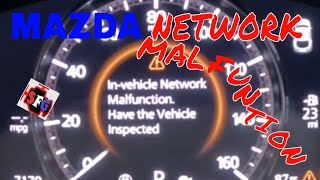
The 2020-2021 Mazda CX-30 is built on the same modern electronic architecture as the fourth-generation Mazda3. On these vehicles, generic fault codes like B3000 or the related U3000 are often triggered by software glitches that can be resolved with a dealer-performed update. A widely documented issue covered by Mazda TSB 09-001-23a is the TCU logging a U3000:04 fault and displaying an "In-Vehicle Network Malfunction" message simply because the complimentary 3-year connected service plan has expired. This is a software logic flaw, not a hardware failure. 🎬 Watch: A real-world fix for the CX-30 network malfunction message. Another known issue on the platform involves a U3000:49 in the BCM after a battery drain event, which also has a specific TSB repair procedure.
Diagnostic Flowchart
Tap your situation to follow the diagnostic path that matches what you're seeing on this vehicle.
Symptoms You May Notice
- Multiple, seemingly unrelated warning lights on the instrument cluster
- "In-Vehicle Network Malfunction" message on the multi-information display
- Malfunction of the i-Stop or M-Hybrid system, or i-Stop light flashing
- Unpredictable behavior of electronic accessories (lights, wipers, radio, power locks)
- Intermittent or complete no-start condition
- Flashing security indicator light on the dashboard
- Parasitic battery drain leading to a dead battery
- Replacing the battery without performing a load test first or without realizing a TCU software update is the actual required fix.
- Replacing parts based on symptoms (e.g., a new light switch, a new TCU) before confirming the root cause with a proper scan and checking for applicable TSBs.
- Assuming the TCU is faulty and needs replacement, when it only requires a software update per the TSB.
Most Likely Causes
- Outdated Telematics Communication Unit (TCU) Software 🔴 High Probability → Shop Telematics Interface Module A known software bug causes the TCU to set a U3000:04 code and trigger an "In-Vehicle Network Malfunction" message when the vehicle's complimentary 3-year connected service contract expires. Mazda has issued multiple TSBs for this exact issue (e.g., 09-001-23a, SA-027-23c).
How to confirm: A Mazda dealer or specialist with MDARS can confirm the U3000:04-TCU code is present and check the vehicle's VIN against the affected range in the TSB. The symptom often appears after the 3-year ownership mark or after a battery replacement.
Typical fix: Updating the TCU's software to the latest version using a USB stick and the dealer's diagnostic tool. This is a warranty repair if the vehicle is still covered.
Est. part cost: $0 - Internal Failure or Software Glitch in the Body Control Module (BCM) 🟡 Medium Probability → Shop Body Control Module The BCM is a central hub for body electronics. On this platform, it is known to be sensitive to low voltage events. TSB 01-018/19 documents a scenario where a drained battery can cause a U3000:49 code in the BCM, leading to a no-start condition.
How to confirm: A professional scan tool will show a specific code like U3000:49 [BCM]. The TSB procedure involves attempting to clear the code up to 10 times after ensuring the battery is fully charged. If it cannot be cleared, the BCM is faulty.
Typical fix: First, attempt the code clearing procedure from TSB 01-018/19. If that fails, replacement of the faulty BCM, followed by programming to sync it with the vehicle.
Est. part cost: $400-$1000 - Low Battery Voltage or Poor Ground Connection ⚪ Low Probability → Shop Vehicle Battery Modern Mazdas are sensitive to low voltage, which can cause communication errors between modules, mimicking a module failure. A weak battery is a known cause for i-Stop system malfunctions and can trigger various electronic glitches.
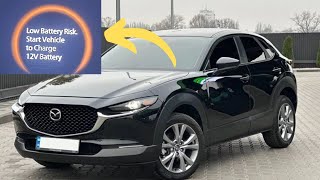
How to confirm: Perform a load test on the battery. A simple voltage check is insufficient. Inspect and clean the main battery terminals, chassis ground, and any grounds connected to the suspect module. Many owners report that the OEM Panasonic battery fails prematurely. 🎬 See how to handle the low battery risk warning on your Mazda.
Typical fix: Replace a weak battery or clean/tighten corroded or loose ground connections. An i-Stop system reset procedure may be required after battery replacement.
Est. part cost: $0-$350
Rare But Worth Checking
- Start Stop Unit (SSU) / DC-DC Converter Failure:
Diagnosis Steps
- Connect a professional, Mazda-compatible scan tool (MDARS is the OEM tool) capable of reading manufacturer-specific Body (B) and Communication (U) codes from all modules.
- Perform a full network scan to identify which specific module has stored the B3000 or, more importantly, any related U3000 codes.
- Record the specific sub-code (failure type byte), such as U3000:04 [TCU] or U3000:49 [BCM], as this is critical for diagnosis.
- Check for any available Technical Service Bulletins (TSBs) related to the identified module and DTC. For U3000:04 in the TCU, reference TSB 09-001-23a or newer. 🎬 Watch this breakdown of the causes and solutions for network malfunctions. For U3000:49 in the BCM, reference TSB 01-018/19.
- If a TCU software update is indicated, follow the TSB procedure to reprogram the module. This is the most common fix.
- If a BCM fault is indicated after a battery drain, perform a full battery load test. If the battery is good, attempt the code-clearing procedure from TSB 01-018/19 before condemning the module.
- If wiring, grounds, and software are all confirmed to be good, the module itself is likely faulty and requires replacement and programming.
Parts You'll Likely Need
- Body Control Module (BCM)
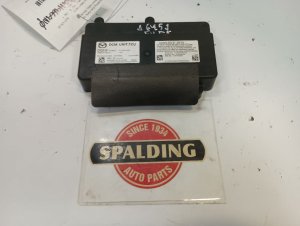
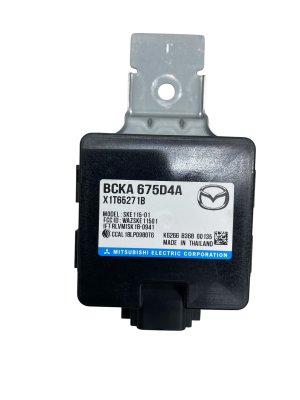
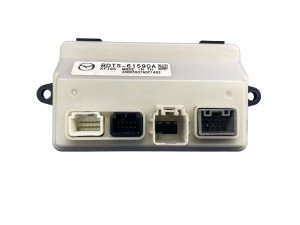
(OEM #BDTS-67-560-C, BCKA-67-560D, BDTS-67-560-F)— The BCM is the central computer for most body electronics and is a common source for generic internal fault codes like B3000, especially after low-voltage events.
Trusted brands: Mazda (OEM)
OEM price range: $600-$900 - Telematics Communication Unit (TCU)
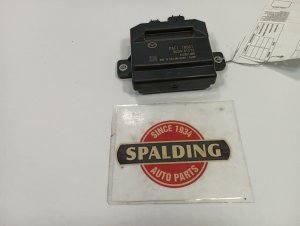
(OEM #DGH9-67-CM0, DHTV-67-CM0)— This module controls Mazda Connected Services and is the most common source of network malfunction codes due to a well-documented software glitch that requires an update. Hardware failure is rare.
Trusted brands: Mazda (OEM)
OEM price range: $500-$800
Related Codes That Often Appear With This One
- U3000 — U3000 is the more common primary code for 'Control Module Malfunction'. B3000 is often logged as a secondary, less-specific code. A professional scan will almost always reveal a U3000 code with a suffix (e.g., :04, :49) that points to the true problem.
- U3000:04 — This is the specific sub-code for 'Internal Malfunction' stored in the Telematics Communication Unit (TCU) due to the software glitch related to expired connected services, as detailed in multiple TSBs.
- U3000:49 — This sub-code for 'Internal Electronic Failure' is specifically associated with the Body Control Module (BCM) after a low voltage event, as documented in TSB 01-018/19.
- U0140 — This code means 'Lost Communication With Body Control Module'. It can appear alongside B3000 if the BCM has failed completely and is no longer communicating on the vehicle's network.
Technical Service Bulletins (TSBs) & Recalls
- 09-001-23a: 'IN-VEHICLE NETWORK MALFUNCTION' WITH DTC U3000:04-TCU STORED. Details the TCU software issue after a connected service contract is discontinued and provides the repair procedure.
- 01-018/19: 'NO START AFTER DRAINED BATTERY AND IGNITION WILL NOT TURN OFF'. Details the BCM issue causing U3000:49 after a low voltage event on the platform-mate Mazda3.
- TSB for TCU update file TCU_7000T11-0601_8007.kwi: A specific software file mentioned in a TSB for updating the CX-30's TCU to fix the U3000:04 bug.
Platform-Specific Known Issues
- TCU Software Glitch After Connected Services Expiration: The most common cause for a B3000/U3000 code on this platform. After the 3-year complimentary Mazda Connected Services plan ends, a software flaw in the TCU causes it to incorrectly report an internal failure (U3000:04), triggering the 'In-Vehicle Network Malfunction' warning. The fix is a simple software update covered by Mazda TSB 09-001-23a and subsequent revisions.
- BCM 'No Start' Condition After Battery Drain: → Shop Vehicle Battery Per TSB 01-018/19 for the related Mazda3, a drained battery can c
Mechanic-Grade Diagnostic Values
- CAN Bus Network Resistance — expected: Approximately 60 Ohms when measured between CAN High and CAN Low pins at the OBD-II connector (pins 6 and 14) with the battery disconnected.. Failure: A reading of 120 Ohms indicates one of the two terminating resistors is missing or the circuit is open. A reading near 0 Ohms indicates a short between the CAN High and Low wires.
- CAN Bus Voltage (Key On, Engine Off) — expected: CAN High (Pin 6) to ground should be between 2.5 and 3.0 VDC. CAN Low (Pin 14) to ground should be between 2.0 and 2.5 VDC.. Failure: Voltages outside these ranges, or a voltage that is stuck high or low, indicates a short to power, a short to ground, or a faulty module pulling the bus voltage down.
- TCU GNSS Status PID — expected: Using MDARS, the PID 'GNSS_STAT' should read '2D Fix' or '3D Fix', indicating a good GPS signal lock.. Failure: A status of 'No Fix' or 'Antenna not properly connected' points towards a fault with the telematics antenna or its circuit, rather than an internal TCU fault.
Hidden / Shadow Codes Worth Checking
- U3000 with Failure Type Byte: The generic U3000 code is always accompanied by a two-digit suffix (failure type byte) that specifies the nature of the fault. Common examples include :04 (Internal Malfunction), :49 (Internal Electronic Failure), and :98 (Component Over Temperature). (see via A professional scan tool like the Mazda MDARS or a high-end aftermarket scanner capable of reading manufacturer-specific codes from all modules.)
- B119F:01: This code for 'TCU - Tel antenna No. 1 malfunction' can also trigger the 'In-Vehicle Network Malfunction' message. It points to a problem with the GPS/telematics antenna circuit. (see via Mazda MDARS or equivalent professional scan tool.)
Scan Tool Commands That Help
- Mazda MDARS: Configuration [BCM] — This function is mandatory after replacing the Body Control Module (BCM). It reads data from the old module (if possible) and writes the vehicle's configuration, including key programming and personalization settings, to the new module.
- Mazda MDARS: Activating TCU (links TCU to server) — This command must be run after installing a new Telematics Communication Unit (TCU). It registers the new module with Mazda's servers to enable Connected Services.
- Mazda MDARS: Activating Remote Control by Smart Phone (links TCU to BCM) — This is the second step after TCU replacement, performed after linking the TCU to the server. It establishes communication between the newly activated TCU and the BCM.
- Mazda Connect Infotainment: Factory/Service Inspection Screen — Accessed by pressing and holding the Volume knob + Music button + Favorites button for 3-5 seconds. This hidden menu is used by technicians to initiate the TCU software update from a USB stick as prescribed by TSBs.
Wiring & Ground Locations
- Body Control Module (BCM) — Located behind the driver's side (LH) kick panel, under the dashboard.. As a central hub for multiple CAN buses, any physical damage, water intrusion, or poor connection at the BCM can cause widespread network faults, including B3000.
- BCM Connector 0940-101B (Body CAN) — The large white connector on the face of the BCM, oriented toward the inside of the car.. This connector carries the Body CAN bus signals (Pins 2J and 2L). A fault here would affect communication with the instrument cluster, climate control, keyless entry, and door modules.
- BCM Connector 0940-101C (Vehicle CAN) — The black connector on the BCM, oriented toward the driver's door.. This connector carries the Vehicle CAN bus signals (Pins 3W and 3X), which is the high-speed network for critical powertrain and safety modules like the PCM, TCM, ABS, and steering. A fault here can cause major drivability and safety system issues.
- Telematics Communication Unit (TCU) — The TCU is a separate module, and TSBs provide instructions for its removal and replacement, indicating it is accessible for service, though its exact location is not specified in the search results.. This module is the most common source of the 'In-Vehicle Network Malfunction' message and related U3000/B3000 codes due to a software flaw.
Real Owner Repair Stories
- Reddit user on r/mazda (2021 Mazda CX-30) — 'In-vehicle Network Malfunction' message, which eventually led to a parasitic battery drain and a no-start condition.
❌ Tried (didn't work) A dealer-performed software update based on a TSB failed during the installation process.
✅ What actually fixed it The failed software update 'bricked' the module. The dealer then determined the Telematics Communication Unit (TCU) itself was faulty and required replacement. The final fix was a new TCU at a cost of $1600. - Reddit user on r/MazdaCX30 (Used 2020-2021 Mazda CX-30 with 40k miles) — 'In vehicle network malfunction' error message.
❌ Tried (didn't work) Initial owner research suggested it could be many different things.
✅ What actually fixed it The owner used a code reader and found a specific fault pointing to the Forward Facing Camera (FSC). The dealer confirmed the diagnosis and replaced the FSC under warranty, which took about 4 hours. - Reddit user on r/mazda (Mazda CX-50 (shares similar electronic architecture)) — 'In vehicle network malfunction' message appeared.
❌ Tried (didn't work) Calling the dealership, who wanted a $180 diagnostic fee.
✅ What actually fixed it As a temporary fix, the owner disconnected the negative battery terminal for one hour. After reconnecting, the error message was gone. This suggests a hard reset can sometimes clear the software glitch, though it may not be a permanent solution.
"I Checked Everything" — The Actual Cause
- The diagnostic equivalent for this electronic fault is 'all wiring and connections test good'. The most common reason for a B3000/U3000 code to persist despite all physical checks being normal is the well-documented software flaw in the Telematics Communication Unit (TCU). The wiring, connectors, and module itself are perfectly functional, but a logical error in the software incorrectly flags an internal fault when the Connected Services subscription expires. The only fix is a software update, not physical repair.
OEM Part Supersession History
BCYA-67-560A, BDTS-67-560-C→BCYA-67-560K, BDTS-67-560-F— Mazda has updated the Body Control Module (BCM) several times. Later versions contain hardware and software revisions to improve reliability and fix bugs, such as those related to parasitic battery drain.
Heads up: While modules may be physically interchangeable, they must be programmed to the specific vehicle's VIN and configuration using MDARS. Using the latest available part number is recommended.
Model Year Variations Within This Range
- 2020-2021: There are no significant differences in the core electronic architecture, control modules (BCM, TCU), or CAN bus network between the 2020 and 2021 Mazda CX-30 models that would alter the diagnosis for a B3000 code. The primary causes and repair procedures are identical for both model years.
Helpful Videos


We Have This Part in Stock

The information in this article is provided for general reference and educational purposes only. Vehicle specifications, procedures, and part compatibility can vary by production date, trim level, and region. Always consult your vehicle's factory service manual and verify part numbers before purchasing or performing repairs. Safety-critical components such as airbags, seat belts, and braking systems should be installed by a qualified professional.
- Mazda CX-30:
- 🧭 Diagnostic Flowchart
- 🎬 Helpful Videos
- 🛍️ Shop This Part
- What's Unique About the 2020-2021 Mazda CX-30
- Symptoms You May Notice
- Most Likely Causes
- Rare But Worth Checking
- Diagnosis Steps
- Parts You'll Likely Need
- Related Codes That Often Appear With This One
- Technical Service Bulletins (TSBs) & Recalls
- Platform-Specific Known Issues
- Mechanic-Grade Diagnostic Values
- Hidden / Shadow Codes Worth Checking
- Scan Tool Commands That Help
- Wiring & Ground Locations
- Real Owner Repair Stories
- "I Checked Everything" — The Actual Cause
- OEM Part Supersession History
- Model Year Variations Within This Range
- 🎟️ Get 5% Off