

B3055 on 2007-2011 Saab 9-3: Key Not Recognized, No-Start Causes and Fixes
On a 2007-2011 Saab 9-3, code B3055 means the car's security system does not recognize the key, causing a no-start condition. The most common causes are a faulty Ignition Switch Module (ISM) or a failing Column Integration Module (CIM). Trying a spare key is the first step. Cleaning or replacing the ISM is a common DIY fix as it's plug-and-play, but CIM issues often require professional tools for programming.
- B3055 means your Saab 9-3 doesn't recognize your key and will not start.
- Always try your spare key first to rule out a simple key failure.
- The most likely culprits are the Ignition Switch Module (ISM) or the Column Integration Module (CIM).
- Replacing the ISM is simpler and cheaper, while replacing the CIM is a complex job requiring professional programming with a Tech 2 tool.
- Do not waste money on a new starter or battery; this is a security system communication error.
What's Unique About the 2007-2011 Saab 9-3
The Saab 9-3 uses a unique, often misunderstood security architecture centered around the Column Integration Module (CIM) and the center-console-mounted Ignition Switch Module (ISM). Unlike many vehicles where the ignition switch is a simple mechanical part, the ISM is an electronic receiver that reads the key's transponder and communicates with the CIM. Failures in either of these modules are common on this platform and can be misdiagnosed as a bad key or starter motor. Repair often requires a Saab-specific 'Tech 2' diagnostic tool for programming new keys or a replacement CIM, making it more complex than on typical GM vehicles of the era.
Diagnostic Flowchart
Tap your situation to follow the diagnostic path that matches what you're seeing on this vehicle.
Symptoms You May Notice
- Engine will not crank or start.
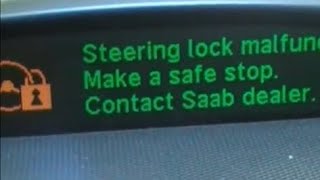
- Message on the display such as 'Steering Lock Malfunction' or 'Key Not Accepted'.
- Security or immobilizer warning light is illuminated.
- Key cannot be turned in the ignition switch.
- Engine starts but stalls immediately.
- Remote lock/unlock functions may also fail intermittently.
- Replacing the starter motor. A no-crank symptom is caused by the immobilizer preventing the starter from being commanded, not a faulty starter itself.
- Replacing the main vehicle battery. While a weak battery can cause many electrical issues and is known to make the 9-3's electronics act erratically, it will not specifically trigger a B3055 code. However, a healthy battery is required for proper diagnosis.
Most Likely Causes
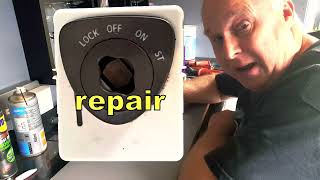
- Faulty Ignition Switch Module (ISM) 🔴 High Probability → Shop Ignition Switch The ISM is located in the center console and contains contacts and electronics that can become dirty or fail over time, preventing it from reading the key's transponder chip correctly. Forum users and video tutorials frequently report success after cleaning the internal contacts with electronics cleaner or a fiberglass pen.
How to confirm: A technician with a Tech 2 scanner can monitor the key data. A common DIY approach is to remove the ISM, open it, and clean the circuit board contacts. If cleaning provides a temporary or permanent fix, the ISM was the issue. If a known-good ISM is swapped in and the problem resolves, the original ISM is faulty.
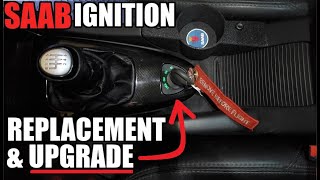
Typical fix: Replacement of the Ignition Switch Module. This part is confirmed by numerous owner accounts and repair videos to be 'plug-and-play' and does not require programming 🎬 Watch: Detailed ISM replacement and upgrade walkthrough ('marrying') to the car.
Est. part cost: $75-$200 - Failing Column Integration Module (CIM) 🟡 Medium Probability → Shop Steering Column Switch Fuse The CIM is the central computer for security and steering column functions. Internal electronic failures, particularly cold solder joints or component degradation on the circuit board, are a known weakness on the 9-3 platform.
How to confirm: Diagnosis requires a Tech 2 scanner to check for communication errors and internal CIM faults. A common related code is B1000 36 - 'Control Module, Internal Fault'. Other symptoms of CIM failure often appear, such as the horn, steering wheel buttons, or turn signals malfunctioning.
Typical fix: Replacement of the CIM unit. The new module must be programmed ('married') to the vehicle using a Tech 2 with security access. Alternatively, many owners use specialized repair services that rebuild the original CIM, which can be a plug-and-play solution. Saab also offers a 'repair kit' (Part #32021812) which includes the internal electronics, reusing your original plastic housing.
Est. part cost: $300-$700 - Defective Key Transponder ⚪ Low Probability The electronic chip inside the key fob can be damaged from being dropped or from internal failure. A weak battery in the key fob does not cause this specific B3055 code, as the transponder chip is powered passively by the car's antenna coil in the ISM.
How to confirm: The easiest test is to try starting the car with a known-good spare key. If the spare key works consistently, the original key is the problem.
Typical fix: The faulty key must be replaced and the new key programmed to the car using a Tech 2.
Est. part cost: $80-$250 - Radio Frequency Interference (RFI) ⚪ Low Probability As noted in GM TSB PIC5650M, aftermarket electronic devices (like phone chargers, toll passes, or even other keys on the same ring) can interfere with the 125 kHz signal between the ISM and the key.
How to confirm: Remove all other keys and electronic devices from the keychain and from the immediate vicinity of the center console. If the car starts reliably, RFI was the cause.
Typical fix: Keep other electronic fobs and devices away from the ignition key when starting the car.
Est. part cost: $0
Rare But Worth Checking
- Blown Fuse for CIM/SCL: A blown fuse can cut power to the security modules. Specifically, check fuse #15 (20A) in the fuse box on the driver's side of the dashboard, which often powers the Steering Column Lock (SCL) and is involved in the security chain. It's a simple check that can save a lot of diagnostic time.
- Incorrect Key Usage: A related GM TSB (PIT5030E) for flip-keys notes that if the key is not fully extended and locked straight, it can cause an intermittent no-crank and set a B3055. Ensure the key is fully open before inserting it.
- Temporary Power-Reset Fix: Many owners on forums report a temporary fix for the 'Steering Lock Malfunction' by disconnecting the car battery for 5-10 minutes to reset the modules. Some have even wired a toggle switch to the relevant fuse to make this reset easier, 🎬 Watch this video for a steering lock malfunction fix though this is a workaround, not a permanent repair.
Diagnosis Steps
- Scan for codes with a tool capable of reading Saab body ('B') codes to confirm B3055 is present. A GM Tech 2 is highly recommended.
- Try starting the vehicle with a known-good spare key. If it works, the primary key is faulty.
- Remove all other keys, fobs, and electronic devices from the keychain and near the center console to rule out Radio Frequency Interference (RFI).
- Check fuse #15 (20A) in the dashboard fuse panel to ensure the security modules have power.
- Observe the security light on the dashboard. Note its behavior (flashing, solid, off) when trying to start the car.
- If the key still won't turn, consider a DIY cleaning of the Ignition Switch Module (ISM) contacts as detailed in many online forums and videos.
- If the above steps do not resolve the issue, the vehicle needs professional diagnosis with a Saab Tech 2 scanner.
- A technician will use the Tech 2 to monitor data from the ISM and CIM (e.g., 'Key status: OK / Not OK') to determine if the key is being seen and if the modules are communicating correctly.
- Based on the Tech 2 data and presence of other codes (like CIM internal faults), the technician will pinpoint the failure to the ISM, CIM, or the wiring between them.
Parts You'll Likely Need
- Ignition Switch Module (ISM)
(OEM #12769673)— This is a very common failure point. Its internal contacts get dirty or the electronics fail, preventing it from reading the key. It's often replaced first as it does not require programming and is a known DIY-friendly fix.
Trusted brands: Saab Genuine
OEM price range: $150-$250
Aftermarket price range: $75-$150 - Column Integration Module (CIM)
(OEM #12847563)— This is the brain of the security system and another common point of failure. Replacement is more complex and expensive as it requires programming. A CIM repair kit (32021812) is also available.
Trusted brands: Saab Genuine, OES
OEM price range: $500-$850
Aftermarket price range: $300-$500 (Used/Remanufactured/Repair Kit)
Related Codes That Often Appear With This One
- B3060 — This code for 'Unprogrammed Transponder' often appears with B3055 when the system detects a key but cannot validate its programming, pointing directly to a key or CIM issue.
- B3935 — Indicates a 'Transponder Authentication Error', which is a failure in the security handshake process, often logged alongside B3055 as part of the same event.
- Steering Lock Malfunction Message — This dashboard message is the most common user-facing symptom of the same system failure (CIM/ISM/SCL communication) that triggers B3055.
- B3056 — This code means 'No Transponders Learned to CIM', indicating the module has lost its memory of all programmed keys. It strongly suggests a critical failure within the CIM itself.
Technical Service Bulletins (TSBs) & Recalls
- PIC5650M: Addresses intermittent no-start conditions caused by Radio Frequency Interference (RFI) from devices on the keychain.
- PIT5030E: Notes that an improperly extended flip-key can cause intermittent no-crank conditions and set a B3055 code.
Platform-Specific Known Issues
- The CIM module is a well-documented weak point on the 2003-2011 Saab 9-3, leading to a variety of electrical issues, including the B3055 code.
Mechanic-Grade Diagnostic Values
- Wiring Harness Continuity — expected: Less than 1.0 Ω. Failure: A reading higher than 1.0 Ω or an open circuit (OL) indicates a break or high resistance in the wire being tested.
Hidden / Shadow Codes Worth Checking
- B3055 00: This is the full code with a symptom byte of '00', which indicates 'No additional symptom information'. It is the most common variant seen on a Tech 2 scanner for this fault. (see via GM Tech 2 or equivalent advanced diagnostic scanner.)
Scan Tool Commands That Help
- Tech 2: Add/Remove > Control Modules > CIM Module > Add — This function is required to 'marry' a new or used CIM to the vehicle. The car will not start until this programming is performed. It requires security access obtained via TIS2000 or GlobalTIS.
- Tech 2: Add/Remove > Add Keys — Used to program new keys to the car. All existing and new keys must be present during this procedure. The process starts with a working key to gain access, then each key is added in sequence. This also requires security access.
Wiring & Ground Locations
- G2 — On the side of the left-hand structure strut in the engine bay, near the connector bracket.. This is a primary chassis ground point. Poor connection here can cause a host of unpredictable electrical issues for modules throughout the car.
- G4 — On the center console tunnel, behind the airbag control module.. Its location on the center console makes it a potentially relevant ground for the Ignition Switch Module (ISM), which is located nearby.
- CIM (703) — Located on the steering column, beneath the steering wheel, integrating the stalks and steering wheel electronics.. This is the central module for the fault. Knowing its location is key for inspection of its connectors and for replacement.
Real Owner Repair Stories
- SAAB Fever YouTube Channel (Saab 9-3 (YS3F generation)) — Key Not Recognised & Steering Lock Malfunction messages, car would not start.
❌ Tried (didn't work) The video tests a suspected faulty ISM module sent from a garage.
✅ What actually fixed it The ISM was disassembled and the internal copper contacts, which were visibly dirty and oxidized, were cleaned using a fiberglass pen. After cleaning, the module functioned correctly. - Weakest of Weeks YouTube Channel (2003-2012 Saab 9-3) — Common ignition or key-related problems like 'steering column lock' error.
✅ What actually fixed it The video demonstrates a complete replacement of the ISM. It confirms the ISM is plug-and-play and does not require a Tech 2 for programming, unlike the CIM. The user also upgrades to an illuminated version (part 12786386).
OEM Part Supersession History
12847563 (CIM)→This part number is part of a large, complex group of compatible or superseded parts. Other numbers in this group include 12810984, 12760545, 12777263, 12779247, 12805558, and 12842078.— Revisions and updates by the manufacturer over the vehicle's production life.
Heads up: When replacing the CIM, the part number must be compatible. Using a salvage part requires it to be 'divorced' from the donor car with a Tech 2 or cloned by a specialist service. A new CIM must be 'married' to the car with a Tech 2.N/A (CIM Repair Kit)→32021812— Provides a cost-effective repair by replacing the internal electronics of a failed CIM module while reusing the plastic housing.
Heads up: This kit replaces the internals for a wide range of CIM part numbers, including 12847563 and others.
Model Year Variations Within This Range
- 2007 (specifically): An optional, illuminated version of the Ignition Switch Module (ISM), part number 12786386, was available. This is a direct swap for the standard non-illuminated ISM and offers a cosmetic and functional upgrade.
Helpful Videos
We Have This Part in Stock

The information in this article is provided for general reference and educational purposes only. Vehicle specifications, procedures, and part compatibility can vary by production date, trim level, and region. Always consult your vehicle's factory service manual and verify part numbers before purchasing or performing repairs. Safety-critical components such as airbags, seat belts, and braking systems should be installed by a qualified professional.
- Saab 9-3:
- 🧭 Diagnostic Flowchart
- 🎬 Helpful Videos
- 🛍️ Shop This Part
- What's Unique About the 2007-2011 Saab 9-3
- Symptoms You May Notice
- Most Likely Causes
- Rare But Worth Checking
- Diagnosis Steps
- Parts You'll Likely Need
- Related Codes That Often Appear With This One
- Technical Service Bulletins (TSBs) & Recalls
- Platform-Specific Known Issues
- Mechanic-Grade Diagnostic Values
- Hidden / Shadow Codes Worth Checking
- Scan Tool Commands That Help
- Wiring & Ground Locations
- Real Owner Repair Stories
- OEM Part Supersession History
- Model Year Variations Within This Range
- 🎟️ Get 5% Off