

B3935 on 2007-2013 Cadillac Escalade EXT: Security System Fault Causes and Fixes
This code means your truck's security system can't verify your key. Most often, it's caused by radio frequency (RF) interference from other items on your keychain. Before replacing parts, remove all other fobs and cards from your keychain and try again.
- B3935 means your Escalade's security system is preventing it from starting because it can't authenticate your key.
- The most common cause is NOT a broken part, but radio frequency interference. Isolate your key from other fobs and cards on your keychain before doing anything else.
- If isolating the key doesn't work, try your spare key. If the spare works, your primary key is likely faulty and needs replacement.
- Do not rush to replace expensive modules like the BCM or TDM. These are rarely the cause for this specific code on this vehicle.
- In some cases, a 30-minute security relearn procedure or a dealer-installed BCM software update may be required.
What's Unique About the 2007-2013 Cadillac ESCALADE EXT
On this generation of GM trucks and SUVs (the GMT900 platform), this code is very frequently caused by external factors rather than a failed part. Manufacturer Technical Service Bulletins (TSBs) specifically warn technicians not to replace modules for this code until Radio Frequency (RF) interference is ruled out. This is because other fobs, access cards, or even some gas station payment devices on the keychain can disrupt the 125 kHz signal between the ignition key and the vehicle's security antenna.
Diagnostic Flowchart
Tap your situation to follow the diagnostic path that matches what you're seeing on this vehicle.
Symptoms You May Notice
- Intermittent no-crank, no-start condition.
- Engine starts and immediately stalls.
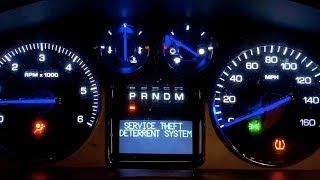
- The security indicator light on the instrument cluster is illuminated or flashing.
- A "Service Theft Deterrent System" message may appear on the driver information center. 🎬 See how to diagnose the Service Theft Deterrent System message.
- Replacing the Body Control Module (BCM) or Theft Deterrent Module (TDM) without first ruling out RF interference or a bad key.
- Replacing the starter motor, thinking it's a starting system issue, when it's actually the security system preventing the starter from engaging.
- Confusing a faulty ignition switch with a faulty ignition lock cylinder. The lock cylinder is the mechanical part the key turns, while the switch is the electronic component behind it that sends power to the vehicle.
Most Likely Causes
- Radio Frequency (RF) Interference 🔴 High Probability The vehicle's immobilizer system operates at 125 kHz, and other electronic devices on a keychain (like other key fobs, office key cards, or payment tags) can operate in a similar frequency range, causing signal disruption. This is noted in multiple versions of GM TSB PIC5650, which explicitly lists devices like toll passes, building access cards, and even other vehicle keys as potential sources of interference.
How to confirm: Remove all other keys, fobs, and RFID cards from the keychain. Attempt to start the vehicle using only the single Escalade key. If the vehicle starts reliably, interference was the cause. GM advises inspecting all of the customer's keychains if the issue is intermittent.
Typical fix: Keep the vehicle key isolated from other electronic devices. Instruct the owner to remove the offending device from their keychain.
Est. part cost: $0 - Defective or Damaged Ignition Key 🟡 Medium Probability → Shop Ignition Switch The Passkey III+ transponder chip embedded in the key head is passive (no internal battery) but can be damaged from being dropped or from normal wear and tear, causing it to fail the authentication check.
How to confirm: Attempt to start the vehicle with a known-good spare key. If the spare key works every time, the original key is faulty. If both keys fail, this is not the cause.
Typical fix: Replace the faulty key. A new key will need to be cut and programmed to the vehicle by a dealership or an automotive locksmith.
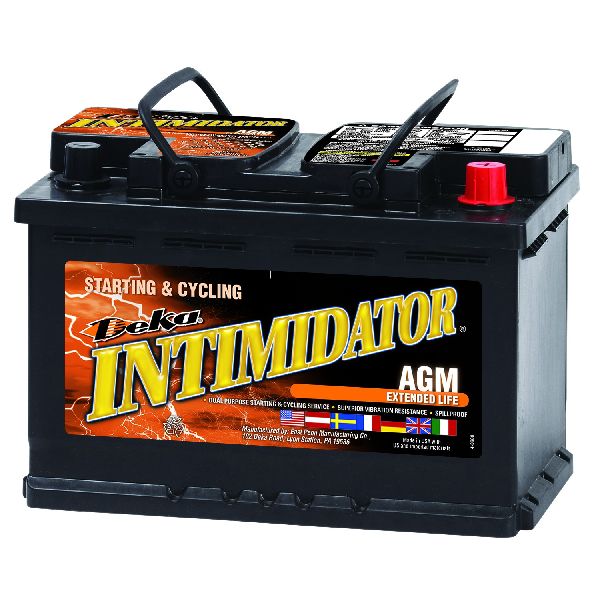
Est. part cost: $75-$250 - Weak Vehicle Battery ⚪ Low Probability → Shop Vehicle Battery While the transponder chip is passive, the security relearn procedure requires significant battery power for 30+ minutes without the engine running. A weak or failing vehicle battery can drop voltage during this process, causing the relearn to fail and making it seem like a component is bad.
How to confirm: Before attempting a security relearn, ensure the vehicle battery is fully charged. Connect a battery charger during the 30-minute relearn procedure to guarantee stable voltage.
Typical fix: Charge or replace the vehicle battery before proceeding with further diagnostics.
Est. part cost: $0 - $250
Rare But Worth Checking
- Body Control Module (BCM) Software Glitch: → Shop Body Control Module In some cases, particularly when seen with code B2955, an updated software calibration for the BCM is required to fix a no-start condition. This requires a dealer or equipped shop to reprogram the module using the Service Programming System (SPS). TSB PI1180A addresses this specific scenario, though it primarily lists 2014-2015 models, the underlying issue can affect earlier platforms.
- Faulty Theft Deterrent Module (TDM) or Antenna: → Shop Anti-Theft Control Module The module itself or the antenna ring around the ignition lock cylinder can fail, but this is uncommon. TSBs specifically advise ruling out all other causes before replacing these parts. Diagnostic procedures state that if a new, known-good key still sets B3935, only then should the TDM be considered for replacement.
- Faulty Ignition Switch: → Shop Ignition Switch A failing ignition switch can cause a host of electrical problems, including no-start conditions and security system faults. This is a separate part from the lock cylinder where the key is inserted. Symptoms can include intermittent stalling or flickering dash lights. An ACDelco D1432D is a common replacement part for related platforms, but part number should be verified by VIN.
Diagnosis Steps
- Check for a "Service Theft Deterrent System" message and an illuminated security light on the dash.
- Isolate the key: Remove the Escalade key from the keychain, ensuring no other keys, fobs, or RFID cards are nearby. Attempt to start the engine. If it starts, the problem is RF interference.
- Test with a spare key: If the vehicle starts and runs with the spare key, the primary key is the issue and needs replacement.
- Check Vehicle Battery: Ensure the main vehicle battery is fully charged before proceeding, as low voltage can cause security system errors.
- Perform the 30-Minute Security Relearn Procedure: Insert a key and turn it to the 'ON' position (do not start). The security light will illuminate. Wait for approximately 10-11 minutes until the light turns off. Turn the key 'OFF' for 30 seconds. Repeat this cycle two more times for a total of three 10-minute 'ON' cycles. After the third cycle, turn the key off, then attempt to start the engine. 🎬 Watch: A walkthrough of the 30-minute security relearn procedure. This procedure erases all previously learned keys and learns the current key.
- If the relearn fails, scan the BCM for other codes, specifically B3055, B3060, or B2955.
- If B2955 is also present, the BCM may need a software update from a GM dealer per TSB PI1180A.
- If diagnostics still point to a hardware issue, a professional will need to test the circuits for the Theft Deterrent Module (TDM) and the ignition lock cylinder antenna before considering replacement of the TDM or BCM.
Parts You'll Likely Need
- Ignition Key — If the internal transponder chip fails, the key itself must be replaced and programmed. All existing keys will be erased during the relearn process for the new key.
Trusted brands: ACDelco, Strattec
OEM price range: $150-$250
Aftermarket price range: $75-$150 - Key Fob Battery
(OEM #CR2032)— A simple and inexpensive first step. While the transponder is passive, a weak fob battery can cause other unpredictable electronic behavior that can be misdiagnosed.
Trusted brands: Duracell, Energizer
OEM price range: $5-$10
Aftermarket price range: $2-$5 - Ignition Switch
(OEM #25832757 (Verify by VIN))— If the vehicle exhibits other electrical issues like stalling or flickering lights in addition to the no-start, the electronic ignition switch may be failing. This is distinct from the lock cylinder.
Trusted brands: ACDelco (D1432D is a related part), Dorman
OEM price range: $70-$81
Aftermarket price range: $20-$50
Related Codes That Often Appear With This One
- B3055 — Relates to a problem with the key transponder. Often set together with B3935 when there is RF interference or a key issue.
- B3060 — Indicates an issue with the transponder antenna circuit. Can be triggered by the same RF interference that causes B3935.
- B2955 — Often seen with B3935 when a BCM software update is needed to resolve a no-start condition, as outlined in TSB PI1180A.
Technical Service Bulletins (TSBs) & Recalls
- PIC5650M: Mentions B3935 in the context of an intermittent no-crank/no-start or stall with the security light on.
- PIC5650J/K/C: Warns against replacing parts for B3935 and points to Radio Frequency Identification (RFID) interference as a likely cause. Lists common interfering items like other car keys, toll passes, and building access cards.
- PI1180A: Recommends a BCM software update when B3935 and B2955 are set to
Platform-Specific Known Issues
- GM issued TSB #PIC5650J specifically to address this code, advising technicians to check for RF interference from devices on the customer's keychain before replacing any parts.
- A separate TSB, #PI1180A, notes that a BCM software update is the fix for a no-start condition when B3935 is found along with B2955, primarily on slightly newer but related platforms.
- Owner experiences on forums frequently confirm that isolating the key from other fobs or access cards resolves the intermittent no-start problem without any cost.
Scan Tool Commands That Help
- GDS2/Tech2: Setup SDM Primary Key in BCM — This is a required procedure after replacing the BCM to synchronize it with the airbag system (SDM) and extinguish the airbag warning light.
- GDS2/Tech2: Brake Pedal Position (BPP) Sensor Relearn — Required after a new BCM is installed to ensure proper function of the brake lights and traction control system.
- GDS2/Tech2: Add/Replace Key Fobs — Used to program new or additional keys into the Remote Control Door Lock Receiver module after a key replacement or when adding spares.
Wiring & Ground Locations
- BCM Location — Under the driver's side dashboard, near the steering column.. Knowing the location is the first step for any physical inspection, voltage/ground checks, or replacement of the Body Control Module, which integrates the Theft Deterrent Module on this platform.
- G201 — On the top of the dash near the VIN plate.. This is a primary ground location for the Body Control Module (BCM). A poor connection at G201 can cause a wide range of electrical issues, including security system faults that can mimic a failed BCM.
- G103 — On the right front of the cylinder head surface.. This is a secondary ground for the BCM. If G103 and G201 have different voltage potentials due to a bad connection, current can flow through the BCM's internal wiring, causing unpredictable behavior and potential damage.
- BCM Ground Path Warning (TSB 07-08-47-004D) — N/A. GM issued a specific bulletin warning technicians that the BCM can be internally damaged if a ground path is removed while the module is still powered. The negative battery cable MUST be disconnected before servicing any BCM ground connections to prevent frying the module.
OEM Part Supersession History
Multiple (e.g., 25844480, 25934763)→Multiple (e.g., 20939137, 22860591)— Standard part evolution and consolidation for the GMT900 platform.
Heads up: While many BCMs are physically interchangeable across the 2007-2013 GMT900 lineup, they are not plug-and-play. A replacement BCM must be programmed with the vehicle's specific VIN and options (RPO codes) to function correctly. Failure to program will result in a no-start condition and multiple system failures.
Helpful Videos

We Have This Part in Stock




The information in this article is provided for general reference and educational purposes only. Vehicle specifications, procedures, and part compatibility can vary by production date, trim level, and region. Always consult your vehicle's factory service manual and verify part numbers before purchasing or performing repairs. Safety-critical components such as airbags, seat belts, and braking systems should be installed by a qualified professional.
- Cadillac ESCALADE EXT:
- 🧭 Diagnostic Flowchart
- 🎬 Helpful Videos
- 🛍️ Shop This Part
- What's Unique About the 2007-2013 Cadillac ESCALADE EXT
- Symptoms You May Notice
- Most Likely Causes
- Rare But Worth Checking
- Diagnosis Steps
- Parts You'll Likely Need
- Related Codes That Often Appear With This One
- Technical Service Bulletins (TSBs) & Recalls
- Platform-Specific Known Issues
- Scan Tool Commands That Help
- Wiring & Ground Locations
- OEM Part Supersession History
- 🎟️ Get 5% Off