

C0050 on 2019-2026 GMC Sierra 1500: Right Rear Wheel Speed Sensor Fault Causes and Fixes
Code C0050 on a 2019-2026 GMC Sierra 1500 means there is a fault in the right rear wheel speed sensor circuit. This is most often caused by a failed sensor or damaged wiring near the wheel. Expect to pay $40-$90 for a new sensor and about one hour of labor to replace it.
- C0050 means your ABS and StabiliTrak systems are off due to a fault with the right rear wheel speed sensor circuit.
- The most likely cause is a failed wheel speed sensor itself, which is a relatively simple and inexpensive DIY or professional repair.
- Before replacing any parts, carefully inspect the wiring harness near the right rear wheel for any visible damage, as this is another common point of failure.
- Check your vehicle's VIN for open recalls related to the Electronic Brake Control Module (EBCM) software, as a dealer update may be required for your 2019+ Sierra.
What's Unique About the 2019-2026 GMC Sierra 1500
For the 2019+ Sierra 1500 (T1 platform), this code is often a straightforward sensor or wiring issue. However, this generation has also been subject to multiple recalls for the Electronic Brake Control Module (EBCM) software. Recall N192268091, in particular, addressed a software error where an EBCM fault might not illuminate the ABS/StabiliTrak warning lights. Complicating matters, the initial fix for this recall was also flawed and could cause brake system failure after a remote start, requiring a second re-flash. It's crucial to ensure all EBCM-related recalls have been performed by a dealer, as these software issues can complicate diagnosis or even be the root cause of the warning lights. A key diagnostic quirk on some GM trucks is that the rear wheel speed sensors may not show a signal on a scan tool unless the engine is running and the transmission is in gear; simply spinning the wheel with the key on may show 0 MPH and mislead a technician into thinking the sensor is dead.
Symptoms You May Notice
- ABS warning light is on
- StabiliTrak / Traction Control warning light is on
- "Service StabiliTrak" or "Service Brake System" message on the driver information center
- Parking Assist may be disabled
- Service Trailer Brake System message may appear
- Replacing the wheel hub assembly when only the external, bolt-on speed sensor has failed.
- Replacing the speed sensor when the actual problem is a broken wire further up the harness.
- Replacing the sensor or hub when the root cause is corrosion at the main EBCM connector on the frame rail, a known issue on GM trucks.
- Misdiagnosing a bad sensor because the wheel was spun with the key-on-engine-off, which may not produce a speed signal on the rear wheels of some GM trucks; the engine must be running and in gear.
Most Likely Causes
- Failed Right Rear Wheel Speed Sensor 🔴 High Probability → Shop ABS Wheel Speed Sensor Wheel speed sensors are exposed to harsh conditions (heat, water, vibration, road debris) and can fail electronically over time or suffer from internal corrosion. A common failure mode is for the sensor to fail when it gets hot, causing an intermittent ABS light that appears after driving for some time.
How to confirm: Using an ABS-capable scan tool, monitor live data for all four wheel speed sensors while driving. The right rear sensor will read 0 MPH or show erratic, jumpy readings compared to the others. A multimeter can be used to check for ~12V power at the harness connector with the key on. An oscilloscope can check for a clean square wave signal while spinning the wheel (engine may need to be running and in gear). 🎬 See this guide on how to test wheel speed sensors.
Typical fix: Replace the right rear wheel speed sensor. The sensor is typically a single bolt-on part with an integrated wiring pigtail.
Est. part cost: $40-$90 - Damaged Wiring Harness or Connector 🟡 Medium Probability The wiring harness runs along the frame and axle, where it is vulnerable to chafing, corrosion, or damage from road debris or improper servicing. Breaks often occur within a few inches of the sensor connector or at points where the harness flexes with suspension travel. Internal wire corrosion inside the insulation is common. Manufacturer Bulletin #PIT5427B notes that technicians should specifically inspect the X411 connector for damage or corrosion when C0050 and other communication codes are present.
How to confirm: Visually inspect the wiring harness from the right rear wheel up to where it joins the main body harness. Look for any cuts, chafing, or swollen sections. A user on GM-Trucks.com found their wire completely severed between the frame and truck bed. Disconnect the sensor and check the connector terminals for corrosion, moisture, or pushed-out pins. A definitive test is to check for continuity (less than 1 ohm) on each wire between the EBCM connector and the sensor connector.
Typical fix: Repair the damaged section of wire or replace the pigtail connector. In severe cases, the entire axle harness may need replacement.
Est. part cost: $20-$150 - Damaged or Contaminated Hub Magnetic Encoder Ring ⚪ Low Probability The magnetic ring is integrated into the wheel bearing/hub assembly. While durable, it can become contaminated with metallic brake dust or get cracked, which disrupts the sensor's signal.
How to confirm: After removing the wheel speed sensor, use a flashlight to look inside the mounting hole. Slowly rotate the axle and inspect the magnetic ring on the hub for cracks, missing chunks, or a heavy buildup of metallic debris. TSB PIC5428G (on other GM models) specifically warns that ferrous debris on the ring is a common cause for these codes and provides a cleaning procedure.
Typical fix: If the ring is damaged, the entire wheel hub bearing assembly must be replaced. If it's just contaminated, cleaning it with a non-magnetic tool and brake cleaner may resolve the issue.
Est. part cost: $150-$350
Rare But Worth Checking
- Faulty Electronic Brake Control Module (EBCM): → Shop ABS Control Module This is rare. An EBCM failure usually triggers multiple wheel speed sensor codes or communication codes. Before condemning the module, ensure all wiring and the sensor itself have been thoroughly tested. Also, verify all related software recalls have been completed and inspect the main EBCM connector on the frame rail for corrosion as noted in TSB PIT5499B.
Diagnosis Steps
- Connect an ABS-capable scan tool and confirm C0050 is the active or stored code. Note any symptom bytes (e.g., 0F, 18, 5A, 06) which provide crucial diagnostic clues.
- View live data from all four wheel speed sensors. On some GM trucks, this requires the engine to be running and the transmission in gear (vehicle safely on a lift). Confirm that the right rear sensor reads 0 MPH or provides an erratic signal while the others read correctly.
- Raise the vehicle and visually inspect the right rear wheel speed sensor and its wiring harness. Look for obvious damage, chafing against the frame or suspension, or corrosion at the connector. Pay close attention to the harness section between the frame and truck bed.
- If no visual damage is found, disconnect the sensor. Test the harness side of theconnector for approximately 12V reference voltage with the key on.
- If power is present, use an oscilloscope to check for a proper square wave form from the sensor while spinning the wheel. A heat gun can be applied to the sensor to check for heat-related intermittent failures.
- If the sensor and wiring test good, remove the sensor and inspect the magnetic encoder ring on the wheel hub assembly for cracks or heavy metallic debris.
- Inspect the main EBCM connector on the driver-side frame rail for any signs of water intrusion or corrosion (green or white powder), as highlighted in TSB PIT5499B. This bulletin notes that corrosion here can lead to a "Service Trailer Brake" message and codes like C0050.
- If the encoder ring is damaged, the hub assembly needs replacement. If the sensor is bad, replace the sensor. If the wiring is bad, repair the harness.
Parts You'll Likely Need
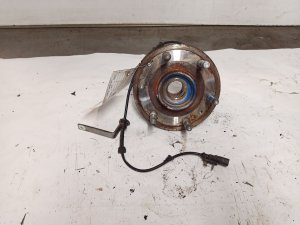
- Rear Wheel Speed Sensor
(OEM #84051224)— This is the most common point of failure. The sensor is a self-contained electronic component that fails from heat and vibration over time. 🎬 Watch: How to remove a rear wheel speed sensor. Note: GM part number 22871878 was superseded by 84051224. A newer number, 85583391, may also be applicable. Always verify with a dealer using your VIN.
Trusted brands: ACDelco, GM Genuine Parts, Standard Motor Products
OEM price range: $60-$90
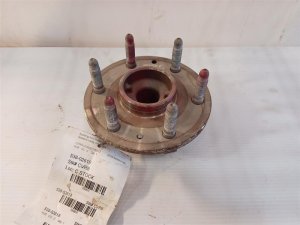
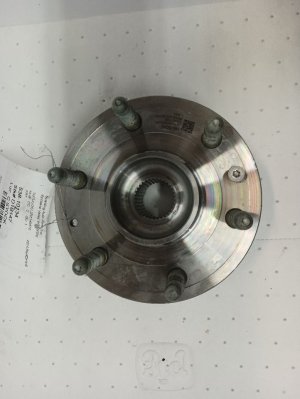
Aftermarket price range: $40-$70 - Rear Wheel Hub and Bearing Assembly — This part is only needed if the integrated magnetic encoder ring is found to be cracked or damaged, which is a less common cause.
Trusted brands: ACDelco, Timken, MOOG
OEM price range: $250-$350
Aftermarket price range: $150-$250
Related Codes That Often Appear With This One
- C0045 — Left Rear Wheel Speed Sensor Circuit. If both C0045 and C0050 are present, it strongly suggests a problem with the shared wiring harness, a connector, or the EBCM, rather than two failed sensors.
- U0415 — Invalid Data Received From Electronic Brake Control Module. This code can appear alongside a C-code when the EBCM's ability to communicate valid data is compromised by a sensor fault. TSB PIC5428G notes this can occur with wheel speed sensor faults.
Technical Service Bulletins (TSBs) & Recalls
- PIT5499B - (Referenced for similar GM platforms) ABS Light On, Multiple ABS DTCs including C0050 due to EBCM connector corrosion. A manufacturer service bulletin notes that technicians should inspect the Electronic Brake Control Module connector for water intrusion or corrosion if a Service Trailer Brake message is displayed.
- PIT5427B - (Referenced for similar GM platforms) Notes that C0050 may be stored alongside communication codes like U0415; technicians should inspect the X411 connector for damage or corrosion.
- N192268091 - Recall for EBCM software error that could disable ABS/ESC without warning, and a faulty fix that caused further issues.
- N192261050 - Recall for EBCM software causing unintended braking after a wheel speed sensor failure.
- PIC5428G - (Referenced for similar GM platforms) Advises that C0035-C0050 with symptom bytes 18, 5A, or 0F are often caused by ferrous debris on the magnetic encoder ring and provides a cleaning procedure.
Platform-Specific Known Issues
- Recall N192268091 / NHTSA 20V055000: Affects 2019 Sierra 1500s. A software error in the EBCM could disable ABS and stability control without illuminating the warning lights. A subsequent fix for this recall was also faulty, causing brake failures after remote start, necessitating a second dealer reprogram.
- Recall N192261050: Affects some 2014-2018 models but may have implications for early 2019s. A wheel speed sensor failure could cause unintended braking from the driveline-protection system. A dealer reprogram of the EBCM is the fix.
- TSB PIT5499B (on related platforms): Points to water intrusion and corrosion at the main EBCM connector on the driver-side frame rail as a potential cause for wheel speed sensor codes. This is a critical inspection point if the sensor and its local wiring check out.
Mechanic-Grade Diagnostic Values
- Active Wheel Speed Sensor Signal (Oscilloscope) — expected: A digital square wave that switches between a low (~1.6V) and high (~10.6V) voltage, or between ~7mA and ~14mA current. Frequency increases with wheel speed.. Failure: Signal is flat, erratic, has dropouts, or is missing entirely while the wheel is spinning.
- Sensor Harness Voltage (at sensor connector) — expected: Approximately 10.5-12 Volts (battery voltage) on the power supply wire with key on, engine off.. Failure: No voltage or very low voltage, indicating an open wire or a fault in the EBCM.
- Wiring Harness Continuity — expected: Less than 1.0 Ohm of resistance on each wire between the EBCM connector and the wheel speed sensor connector.. Failure: High resistance or an Open Loop (OL) reading indicates a broken wire.
Hidden / Shadow Codes Worth Checking
- C0050 0F: Erratic Signal. The EBCM is receiving an inconsistent or choppy signal, often caused by a failing sensor, debris on the tone ring, or a cracked ring. (see via GM GDS2 or other professional scan tool capable of reading manufacturer-specific symptom bytes.)
- C0050 18: Signal Amplitude Less Than Minimum. The signal from the sensor is too weak. This can be caused by a large air gap, a severely damaged ring, internal sensor failure, or debris. (see via GM GDS2 or other professional scan tool capable of reading manufacturer-specific symptom bytes.)
- C0050 5A: Signal Plausibility Failure. The signal is present but illogical compared to other vehicle sensors (e.g., reading 5 mph while others read 50 mph). Often points to a damaged/cracked encoder ring or intermittent wiring fault. (see via GM GDS2 or other professional scan tool capable of reading manufacturer-specific symptom bytes.)
- C0050 06: Circuit Low Voltage/Open. This points directly to a likely break in the wiring, a bad connector pin, or a complete internal sensor failure. (see via GM GDS2 or other professional scan tool capable of reading manufacturer-specific symptom bytes.)
Scan Tool Commands That Help
- GDS2 / High-End Scan Tool: Live Data Graphing (All 4 WSS) — This is the primary diagnostic step. Graphing all four wheel speed sensors on one screen while driving allows for instant identification of the faulty sensor, which will show a line that is erratic, dropping to zero, or not matching the other three.
- Heat Gun (used with Scan Tool): Induce Thermal Failure — If a C0050 is intermittent, raise the vehicle, run it in gear to get a signal, and apply heat from a heat gun directly to the sensor body while watching live data. If the signal drops out when the sensor gets hot, it confirms the sensor has an internal electronic failure.
Wiring & Ground Locations
- EBCM (Electronic Brake Control Module) — On the inside of the driver-side frame rail, located roughly below the driver's seat area, beside the transmission.. This module is the computer for the ABS system. The wiring from the right rear sensor terminates here. The main connector (X1) is a known point for corrosion per TSB PIT5499B, which can cause this code.
- G400 / G401 — Mounted to the left rear body mount, behind the left rear tire on the frame.. These are the primary chassis ground points for the rear of the vehicle. A poor connection here could potentially introduce electrical noise or resistance into the rear sensor circuits, although a direct failure is more likely to cause multiple rear-end electrical issues.
- Right Rear WSS Connector — Directly at the wheel speed sensor, which bolts into the rear axle housing or wheel hub assembly.. This is the most common location for wiring issues. The connector itself can get contaminated, and the wires within the first 6-12 inches are prone to flexing, chafing, and internal corrosion.
Real Owner Repair Stories
- YouTube channel 'Diagnostic Derreck' (2007 GMC Sierra 1500 4x4 (similar platform/logic)) — ABS light comes on randomly, C0050 stored in history.
❌ Tried (didn't work) Spinning the rear wheels with the key on, engine off produced no signal from either rear sensor, causing initial confusion.
✅ What actually fixed it The technician discovered the truck MUST have the engine running and be in gear for the rear sensors to report speed. After confirming this, he used a heat gun on the right rear sensor, which caused the signal to drop out on the scan tool. Replacing the faulty, heat-sensitive wheel speed sensor fixed the problem. - YouTube channel 'Motor City Mechanic' (2017 GMC Sierra (similar platform/components)) — ABS light on, active C0050 code.
❌ Tried (didn't work) Visual inspection of the harness., Replacing the wheel speed sensor.
✅ What actually fixed it Using a multimeter to test resistance between the EBCM connector and the sensor connector revealed an open circuit. The technician found a corroded wire inside the harness near the sensor connector. Repairing the wire fixed the code.
OEM Part Supersession History
22871878→84051224— Standard part number update/revision by GM.
Heads up: These parts are generally interchangeable for the specified model years. However, always verify with a VIN as running changes can occur.
Model Year Variations Within This Range
- 2022-2026 (Refresh models): The 2022 model year refresh introduced the GM Vehicle Intelligence Platform (VIP), also known as Global B electrical architecture. This is a significant change from the 2019-2021 models. While the fundamental operation of the WSS is the same, the EBCM and other related modules are different and not cross-compatible. When diagnosing, ensure wiring diagrams and part numbers are specific to the pre-refresh (2019-2021) or post-refresh (2022+) vehicle.
Diagnostic Flowchart
Other Known Issues on This Vehicle
Issues unrelated to this code that are worth knowing about as an owner of this generation:
- V8 Engine Lifter Failure (5.3L & 6.2L) 🔴 High — Common on 2019-2022 models, can occur at low mileage (under 60k miles). Caused by the Dynamic Fuel Management (DFM) system. Symptoms include a ticking noise, misfires, and check engine light. (Ref: TSB 19-NA-218)
- Transmission Shudder/Harsh Shifting (8-speed & 10-speed) 🟠 Medium — Prevalent in 2019-2021 models. Owners report a shudder or jerking during light acceleration, often described as driving over a rumble strip. Can sometimes be resolved with a fluid flush to an updated fluid type (Mobil 1 Synthetic LV HP). (Ref: TSB 18-NA-355)
- Brake System Control Module (EBCM) Software Faults 🔴 High → Shop ABS Control Module — Primarily affects 2019 models. Multiple recalls were issued for software that could disable ABS/StabiliTrak, sometimes without warning, or cause total brake system failure. (Ref: Recall N192268091 / NHTSA 20V055000)
- Cracked Dashboard (near passenger airbag/instrument cluster) 🟡 Low — A cosmetic but common issue where the plastic dashboard develops cracks, particularly in hotter climates. This was a very common issue on the previous generation and continues to be reported on the T1 platform.
Used vs. New Parts: Buying Guide for This Vehicle
When a used part is the smart pick: A used wiring harness pigtail or a section of harness from a junkyard is a smart choice if the failure is a physically damaged connector or a localized wiring break. This can be much cheaper than replacing an entire harness.
Donor-vehicle mileage cap: roughly under 80000 miles for the part to have meaningful remaining life.
What to inspect on the donor part:
- For wiring/connectors: Inspect for clean, corrosion-free pins. Ensure the plastic connector body is not cracked and the locking tabs are intact. The wire insulation should be flexible, not brittle or cracked.
- For sensors/hubs: Prioritize donors from dry, non-salt-belt climates to minimize corrosion risk. Check the magnetic encoder ring on the hub for any visible cracks or chips.
OEM-only on this vehicle (don't cheap out):
- Electronic Brake Control Module (EBCM). Due to specific software programming tied to the vehicle's VIN and options, a used module will likely not function correctly without expensive dealer reprogramming. It is best to use a new GM part or a professionally remanufactured unit programmed for your vehicle.
Aftermarket brands forum-validated for this vehicle:
- ACDelco (GM's own parts brand)
- Standard Motor Products (SMP)
- Timken (for hub assemblies)
- MOOG (for hub assemblies)
Brands owners have reported issues with on this vehicle:
- No-name, unbranded sensors from online marketplaces. While cheap, they have a high failure rate and may have incorrect signal outputs, leading to persistent codes.
Real Owner Stories
Aggregated from forums and TSBs cited above. Mileages and costs reflect what owners reported in those sources.
2018 GMC Sierra / Chevrolet Silverado
Symptoms: ABS light on, StabiliTrak warning, and Trailer Brake service message. Found the C0050-40 code for right rear wheel sensor open circuit.
What fixed it: Repaired a wire that was completely severed in the harness between the truck bed and the frame.
Source hint: GM-Trucks.com thread titled 'C0050-40 right rear wheel sensor open trailer brakes stabilitrak abs'
Related OBD-II Codes
Frequently Asked Questions
My 2019 Sierra 1500 has an ABS light, but I heard there was a recall for the EBCM software. Does this apply to C0050?
I'm seeing a 'Service Trailer Brake System' message along with my ABS light. Is this related to the right rear sensor?
Could the main EBCM connector be the problem instead of the sensor itself?
Is it true that the 2019 Sierra had a 'faulty fix' for its brake recall?
Can I just clean the sensor, or do I have to replace the whole hub assembly?
Why does my ABS light only come on after driving for a while?
Helpful Videos

We Have This Part in Stock

The information in this article is provided for general reference and educational purposes only. Vehicle specifications, procedures, and part compatibility can vary by production date, trim level, and region. Always consult your vehicle's factory service manual and verify part numbers before purchasing or performing repairs. Safety-critical components such as airbags, seat belts, and braking systems should be installed by a qualified professional.
- GMC Sierra 1500:
- 🧭 Diagnostic Flowchart
- 🎬 Helpful Videos
- 🛍️ Shop This Part
- What's Unique About the 2019-2026 GMC Sierra 1500
- Symptoms You May Notice
- Most Likely Causes
- Rare But Worth Checking
- Diagnosis Steps
- Parts You'll Likely Need
- Related Codes That Often Appear With This One
- Technical Service Bulletins (TSBs) & Recalls
- Platform-Specific Known Issues
- Mechanic-Grade Diagnostic Values
- Hidden / Shadow Codes Worth Checking
- Scan Tool Commands That Help
- Wiring & Ground Locations
- Real Owner Repair Stories
- OEM Part Supersession History
- Model Year Variations Within This Range
- Other Known Issues on This Vehicle
- Used vs. New Parts: Buying Guide for This Vehicle
- Real Owner Stories
- 2018 GMC Sierra / Chevrolet Silverado
- Related OBD-II Codes
- Frequently Asked Questions
- 🎟️ Get 5% Off