

C0750 on 2016-2023 Buick Envision: Left Front TPMS Fault Causes and Fixes
Code C0750 on a 2016-2023 Buick Envision means there's a fault with the left front tire pressure sensor. Most often, the sensor's internal battery has died after 7-10 years of service. Replacing the sensor and performing a relearn procedure is the typical fix. However, if your key fob is also malfunctioning intermittently, the problem is very likely a faulty Remote Control Door Lock Receiver (RCDLR) module, a known issue on this platform.
- C0750 means the left front TPMS sensor is faulty, most likely due to a dead battery.
- Before buying a sensor, check your key fob. If it's also acting up, the problem is likely the RCDLR module, not the sensor.
- Replacing a sensor requires breaking the bead of the tire. Many tire shops can do this quickly.
- After replacing a sensor or the RCDLR, a specific 'relearn' or programming procedure is required for the system to function.
What's Unique About the 2016-2023 Buick ENVISION
On many GM platforms from this era, including the Envision, the TPMS sensors communicate through the same module that receives signals from your key fob—the Remote Control Door Lock Receiver (RCDLR). A failure in this module can cause both TPMS codes like C0750 and seemingly unrelated issues like the key fob not working or even a no-start condition where the remote is not detected. A GM Technical Service Bulletin (PIC5650M) specifically links C0750 with no-start or start-stall problems, making it more serious than a simple TPMS light on other vehicles. Another TSB, 16-NA-061, notes that a disconnected coax cable to the RCDLR can also cause these symptoms, with the sensors farthest from the receiver (like the left front) being the first to lose signal.
Diagnostic Flowchart
Tap your situation to follow the diagnostic path that matches what you're seeing on this vehicle.
Generation note: The 2016-2023 model years span two generations of the Buick Envision: the first (2016-2020) and the second (2021-2023). While the underlying TPMS technology is similar (operating at 315 MHz or 433 MHz depending on the year/region), part numbers for sensors and modules differ. Always verify parts using your vehicle's VIN. The first generation was manufactured in China, which can sometimes affect parts availability.
Symptoms You May Notice
- TPMS warning light flashing for about a minute, then staying on solid.
- "Service Tire Monitor System" message on the Driver Information Center (DIC).
- The pressure reading for the left front tire shows as "--" or is blank on the DIC.
- Intermittent or complete failure of the key fob (remote lock/unlock/start). 🎬 See how to replace your Buick Envision key fob battery.
- Rarely, a "No Remote Detected" message and a no-start or start-stall condition. [⭐ MANUFACTURER TSB — highest authority: Bulletin #PIC5650M, 16-NA-396]
- Reduced operating range for the key fob.
- Replacing the TPMS sensor when the actual fault lies with the RCDLR module. If key fob issues are also present, the RCDLR should be the primary suspect.
- Replacing the BCM when the issue is with the RCDLR. The RCDLR is the primary receiver for these signals.
Most Likely Causes
- Dead TPMS Sensor Battery 🔴 High Probability → Shop Tire Pressure Monitoring System (TPMS) Sensor TPMS sensors use sealed, non-replaceable batteries with a finite lifespan, typically 7-10 years. For early models in this year range (2016-2018), battery failure is becoming very common as of the mid-2020s.
How to confirm: A professional TPMS diagnostic tool can test the sensor's battery level and signal output. If the tool cannot 'wake up' the sensor or read its battery status, and other sensors respond, the battery is almost certainly dead. A GM-specific scan tool can also check the sensor battery condition in the RCDLR data list.
Typical fix: Replace the left front TPMS sensor and perform the TPMS relearn procedure. 🎬 Watch: How to reprogram and relearn your TPMS sensors. The tire must be dismounted for sensor replacement.
Est. part cost: $30-$70 - Faulty Remote Control Door Lock Receiver (RCDLR) 🟡 Medium Probability → Shop Keyless Entry Receiver This module is a known weak point on many GM vehicles of this era, as documented in TSB 16-NA-396. It processes signals from both TPMS sensors and key fobs, and internal failure is common.
How to confirm: The strongest indicator is having TPMS codes (especially C0750, C0755, C0760, C0765) along with intermittent or total failure of the key fobs. A professional scan tool may show a specific symptom code like ':29 – Too Few Pulses'. If the key fobs work perfectly but the C0750 code persists, the RCDLR is less likely to be the cause.
Typical fix: Replace the RCDLR module. This requires programming by a dealer or a well-equipped independent shop with GM's Service Programming System (SPS).
Est. part cost: $50-$120 - Damaged TPMS Sensor ⚪ Low Probability → Shop Tire Pressure Monitoring System (TPMS) Sensor Sensors can be physically damaged during tire installation, removal, or from hitting a severe pothole. This is not specific to the Envision but is a general risk.
How to confirm: Visual inspection after dismounting the tire from the wheel. The sensor housing may be cracked or broken.
Typical fix: Replace the damaged TPMS sensor and perform the relearn procedure.
Est. part cost: $30-$70
Rare But Worth Checking
- Radio Frequency (RF) Interference: Aftermarket electronic devices like dash cams, phone chargers, toll passes, or even certain LED bulbs can interfere with the low-power signal from the TPMS sensor to the receiver. TSB PIC5650K provides an extensive list of potential sources. Before replacing parts, try unplugging all aftermarket accessories to see if the code clears.
- Loose RCDLR Antenna Connection: GM TSB 16-NA-061 describes how a poor or disconnected coaxial antenna cable at the RCDLR module or antenna amplifier can cause intermittent loss of signal, particularly from sensors farthest away (like the left front). A technician can inspect these connections, which are often located in the rear of the vehicle.
Diagnosis Steps
- Verify Symptoms: Check if the TPMS light is on and if the key fobs are working correctly. Note any "Service Tire Monitor" or "No Remote Detected" messages. Test both key fobs if available.
- Attempt Relearn Procedure: Follow the owner's manual to put the vehicle in TPMS learn mode. If the horn chirps for the other three wheels but not the left front, the sensor is the most likely problem.
- Scan with TPMS Tool: Use a dedicated TPMS tool to attempt to read the sensor directly. This can confirm if the sensor is transmitting and check its battery status. No signal indicates a dead or faulty sensor.
- Check for RF Interference: Unplug all aftermarket 12V accessories (phone chargers, dash cams, etc.) and remove any metallic sunshades or aftermarket keychains with other fobs. Retest the system.
- Scan for All DTCs: Use an OBD-II scanner capable of reading Body (B) and Chassis (C) codes. If codes for other TPMS sensors (C0755, etc.) or key fob/security issues (B3055, etc.) are present, suspect the RCDLR module.
- Inspect RCDLR and Antenna Wiring: If a central module is suspected, a technician should access the RCDLR to check its connections, especially the coaxial antenna cable, for looseness or damage as per TSB 16-NA-061 before recommending replacement.
Parts You'll Likely Need
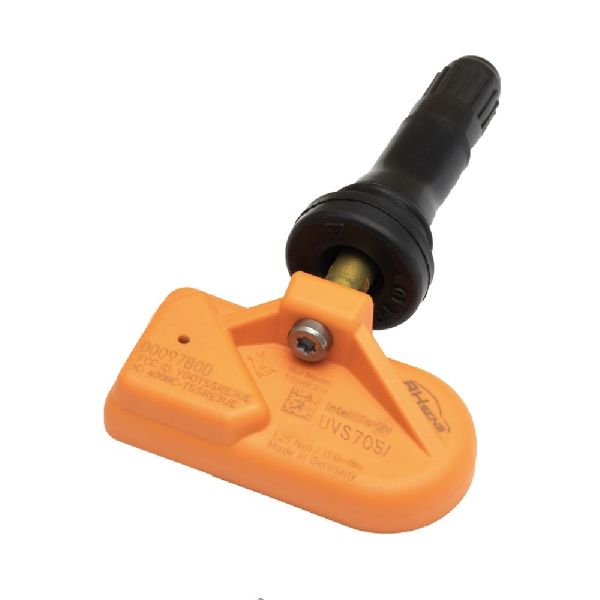
- Tire Pressure Monitoring System (TPMS) Sensor
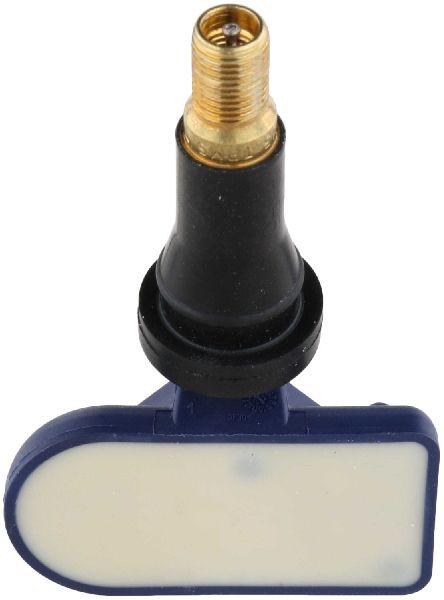
(OEM #13598771 (Gen 1, 315MHz), 13598772 (Gen 1, 433MHz), 13593957 (Gen 2, 433MHz))— This is the most common failure point, typically due to the internal battery's 7-10 year lifespan. Part numbers vary by generation and frequency.
Trusted brands: ACDelco, Schrader, Continental, Huf
OEM price range: $50-$90
Aftermarket price range: $30-$60 - Remote Control Door Lock Receiver (RCDLR)
(OEM #13595511 (supercedes 13509518), 13595510 (supercedes 13509517))— This module is the next most likely cause, especially if key fob problems are also occurring. It's a known issue on related GM platforms. Part number depends on the frequency required for the vehicle.
Trusted brands: ACDelco (OEM)
OEM price range: $50-$120
Aftermarket price range: N/A
Related Codes That Often Appear With This One
- C0755, C0760, C0765 — These are the codes for the other three tire pressure sensors. If they appear together, it strongly points to a central issue like a failing RCDLR module or its antenna connection, rather than all four sensors failing simultaneously.
- B3055, B3060, B3935 — These are key and security-related codes. Their presence alongside C0750 is a strong indicator of an RCDLR or BCM issue, as noted in TSB PIC5650M. [⭐ MANUFACTURER TSB — highest authority: Bulletin #PIC5650M]
Technical Service Bulletins (TSBs) & Recalls
- PIC5650M (and subsequent revisions like K): Addresses intermittent no crank, no start, or start stall concerns that may be accompanied by DTC C0750 and other security or TPMS codes, often due to Radio Frequency Interference (RFI).
- 16-NA-396: Details how an internal RCDLR fault can cause TPMS codes (C0750, C0755, C0760, C0765) along with intermittent or total loss of key fob functionality on many 2016-2017 GM models.
- 16-NA-061: Outlines diagnostic steps for TPMS and key fob issues that could be caused by a poor or disconnected antenna connection to the RCDLR module, before replacing the module itself.
Platform-Specific Known Issues
- A documented link exists between TPMS codes (including C0750) and intermittent no-start/start-stall conditions with security light activation, as per TSB PIC5650M. [⭐ MANUFACTURER TSB — highest authority: Bulletin #PIC5650M]
- Failures of the Remote Control Door Lock Receiver (RCDLR) are common on this GM platform, causing simultaneous TPMS and key fob issues. TSB 16-NA-396 details this issue for many similar GM vehicles.
- A loose coaxial antenna cable leading to the RCDLR can mimic a failed RCDLR or sensor, causing intermittent signal loss from the farthest sensors first (TSB 16-NA-061).
Hidden / Shadow Codes Worth Checking
- C0750 03: Voltage Below Threshold. This indicates the RCDLR has detected the sensor's internal battery voltage is too low for reliable operation. (see via A GM-specific scan tool like GDS2 or a high-end aftermarket scanner capable of reading BCM/RCDLR symptom bytes.)
- C0750 29: Too Few Pulses. This means the RCDLR is not receiving the complete data transmission from the sensor, indicating a communication failure. This is a strong pointer towards an RCDLR module fault as noted in TSB 16-NA-396. (see via A GM-specific scan tool like GDS2.)
- C0750 08: Bus Signal/Message Failure / Signal Invalid. This indicates a general failure in the data message received from the sensor. (see via A GM-specific scan tool like GDS2.)
Scan Tool Commands That Help
- GM GDS2 / Tech2: RCDLR Data List — Use this to check the reported battery status ('OK' or 'Low Battery') of each individual TPMS sensor directly from the module's perspective. This can confirm a dead sensor battery without needing a separate TPMS trigger tool.
- GM GDS2 / Tech2: Tire Pressure Sensor Learn — This is the dealer-level command to initiate the TPMS relearn procedure after replacing a sensor or the RCDLR module. It is a more reliable method than the manual procedure.
- GM GDS2 / Tech2: Module Health / DTC Check — Performing a full vehicle scan can reveal if there is a 'No Communication' status with the RCDLR itself, which immediately points to a module, power, or ground issue rather than a sensor problem.
Wiring & Ground Locations
- RCDLR Module (Gen 1: 2016-2020) — In the rear of the vehicle, located in the driver's side D-pillar (the rearmost pillar behind the rear door), accessible by removing the interior trim panel in the cargo area.. This is the physical location of the module that receives the signal from the left front TPMS sensor. Access is required to check for loose antenna connections (per TSB 16-NA-061) or to replace the module.
- RCDLR Module (Gen 2: 2021-2023) — Behind the passenger side of the dashboard, often accessible after removing the glove compartment.. The location changed for the second generation. Knowing the correct location is critical for diagnosis and replacement on newer models.
- RCDLR Power Fuse — In the instrument panel fuse block, often labeled 'DSM' (Driver Seat Module) or similar. On 2016-2019 models, this is on the passenger side, accessible by opening the glove compartment.. A loss of power to the RCDLR will cause it to stop communicating, setting codes for all sensors. Checking for 12V at the module's power wire (often Red/White) is a key diagnostic step before replacing the module.
Real Owner Repair Stories
- Enclave Forum (related GM platform) (2017 Buick Enclave) — TPMS light on, "Service Tire Monitor System" message, all four tire pressure readings showed dashes ("--"), and both key fobs stopped working completely.
❌ Tried (didn't work) Replacing TPMS sensor batteries, Attempting TPMS relearn procedure
✅ What actually fixed it The owner took the vehicle to the dealer, who diagnosed a failed Remote Control Door Lock Receiver (RCDLR) based on the combined symptoms and TSB 16-NA-396. Replacing and programming the RCDLR module resolved both the TPMS and key fob issues.
OEM Part Supersession History
13509518→13595511— Part update/revision by GM.13595511→13540045— Part update/revision by GM.
Heads up: Always verify the correct part number for your specific vehicle's VIN and frequency (315MHz or 433MHz) as multiple versions exist.
Model Year Variations Within This Range
- 2016-2020 (Gen 1): These models primarily use 315 MHz TPMS sensors (e.g., ACDelco P/N 13598771). The RCDLR is located in the rear driver's side D-pillar. The base engine was a 2.5L 4-cylinder.
- 2021-2023 (Gen 2): Following the 2021 redesign, these models use 433 MHz TPMS sensors (e.g., ACDelco P/N 13593957). The RCDLR location moved to behind the passenger side dashboard. A 2.0L Turbo engine became standard.
Helpful Videos
We Have This Part in Stock


The information in this article is provided for general reference and educational purposes only. Vehicle specifications, procedures, and part compatibility can vary by production date, trim level, and region. Always consult your vehicle's factory service manual and verify part numbers before purchasing or performing repairs. Safety-critical components such as airbags, seat belts, and braking systems should be installed by a qualified professional.
- Buick ENVISION:
- 🧭 Diagnostic Flowchart
- 🎬 Helpful Videos
- 🛍️ Shop This Part
- What's Unique About the 2016-2023 Buick ENVISION
- Symptoms You May Notice
- Most Likely Causes
- Rare But Worth Checking
- Diagnosis Steps
- Parts You'll Likely Need
- Related Codes That Often Appear With This One
- Technical Service Bulletins (TSBs) & Recalls
- Platform-Specific Known Issues
- Hidden / Shadow Codes Worth Checking
- Scan Tool Commands That Help
- Wiring & Ground Locations
- Real Owner Repair Stories
- OEM Part Supersession History
- Model Year Variations Within This Range
- 🎟️ Get 5% Off