

C0755 on 2007-2014 Chevrolet Express 1500: TPMS Fault and No-Start Guide
C0755 indicates a fault with the right front tire pressure (TPMS) sensor. On these vans, it can be linked to a no-start condition if the module that reads the sensor (the RCDLR) also fails, as this module handles key fob security functions. The most common fix is replacing the dead TPMS sensor; if a no-start occurs, the RCDLR module is the likely cause.
- C0755 points to the right front TPMS sensor, but on the Express van, it can be a symptom of a larger issue.
- If your van won't start and has this code, the problem is likely the RCDLR module or radio frequency interference, not the ignition switch.
- Always check for other TPMS codes and test your key fob range before replacing the individual wheel sensor.
- Unplugging all aftermarket chargers and accessories is a crucial and free first diagnostic step.
What's Unique About the 2007-2014 Chevrolet EXPRESS 1500
What's unusual about the Express van and its platform mates is how this simple tire pressure code can be linked to a severe no-start or start-and-stall problem. This happens because the same module, the Remote Control Door Lock Receiver (RCDLR), is responsible for receiving signals from both the TPMS sensors and the key fob for the anti-theft system. In many of these vans, the RCDLR is located above the headliner near the dome light, making it a single point of failure. A fault in this module or significant radio frequency interference can trigger TPMS codes like C0755 and security-related codes (like B3055), leading to a confusing set of symptoms that go beyond a simple tire light, as documented in GM Technical Service Bulletin PIC5650M.
Diagnostic Flowchart
Tap your situation to follow the diagnostic path that matches what you're seeing on this vehicle.
Symptoms You May Notice
- TPMS warning light flashing for 60-90 seconds, then staying on solid.
- "Service Tire Monitor System" message on the Driver Information Center (DIC).
- Inability to read the right front tire pressure on the DIC (may show as "--").
- Intermittent no-crank, no-start, or start-and-stall condition (when seen with security codes).
- Security/theft warning light illuminated or flashing on the dash.
- Poor or inoperative remote keyless entry (RKE) range.
- Vehicle may fail to enter TPMS relearn mode.
- Replacing the ignition switch or performing a Passlock relearn procedure for a no-start condition when the root cause is a faulty RCDLR module or RFI.
- Replacing only the C0755-related TPMS sensor when the RCDLR is the actual point of failure causing all four sensors to report errors intermittently.
- Assuming the battery is the cause of a no-start without checking for security-related trouble codes.
Most Likely Causes
- Dead Battery in Right Front TPMS Sensor 🔴 High Probability → Shop Tire Pressure Monitoring System (TPMS) Sensor TPMS sensor batteries have a finite lifespan of 5-10 years. Vehicles in the 2007-2014 range are at or beyond the typical life expectancy of the original sensors.
How to confirm: Use a TPMS diagnostic tool to attempt to activate the right front sensor. If the tool cannot get a response or shows a low battery status, the sensor has failed.
Typical fix: Replace the right front TPMS sensor. It is highly recommended to replace all four sensors at the same time, especially if they are original, to prevent future failures.
Est. part cost: $25-$75 per sensor - Faulty Remote Control Door Lock Receiver (RCDLR) 🟡 Medium Probability → Shop Keyless Entry Receiver This module is a single point of failure for multiple systems (TPMS, Key Fob, Anti-Theft). Its location above the headliner can make it vulnerable to water damage from roof leaks or a poorly sealed antenna. Its failure can cause a wide range of electrical issues, as noted in GM service bulletins.
How to confirm: Diagnose with a professional scan tool. Look for multiple TPMS codes (C0750, C0755, C0760, C0765) and/or security codes (B3055, B3060) stored simultaneously. Confirm poor or no key fob range. A technician can also check for a disconnected coaxial antenna cable at the RCDLR.
Typical fix: Replace the RCDLR module. This requires programming with a GM-specific scan tool after installation to learn key fob and vehicle data.
Est. part cost: $80-$150 - Radio Frequency Interference (RFI) ⚪ Low Probability As described in TSB PIC5650, aftermarket electronics like cheap USB phone chargers, dash cams, aftermarket LED lights, or even building access cards can emit radio frequencies that "jam" the RCDLR's ability to receive signals from the TPMS sensors and key fob.
How to confirm: Remove all aftermarket plug-in devices (chargers, dash cams, power inverters, etc.) from the vehicle's power outlets. Unplug any non-factory lighting. If the problem disappears, reintroduce them one by one to find the culprit.
Typical fix: Remove or replace the interfering aftermarket device with a higher-quality, better-shielded one.
Est. part cost: $0-$50
Diagnosis Steps
- Scan for all stored DTCs in all modules (BCM, ECM, RCDLR). Note if C0755 appears alone or with other TPMS (C07xx) and/or security (B-prefix) codes.
- If C0755 is the only code, the problem is almost certainly the right front TPMS sensor. Use a TPMS tool to confirm it's not transmitting or has a dead battery.
- If multiple TPMS codes (C0750, C0755, etc.) are present, suspect a wider system issue. Test the key fob range. If it's poor or inoperative, the RCDLR module is a strong suspect.
- If TPMS codes are present along with security codes (like B3055 or B2960) and a no-start symptom, focus diagnosis on the RCDLR module and potential Radio Frequency Interference (RFI) as per TSB PIC5650.
- To check for RFI, unplug ALL aftermarket devices (phone chargers, GPS, LED lights, dash cams, etc.) and remove items like toll passes from the vehicle. See if the issue resolves.
- If the RCDLR is suspected, a technician should inspect its location (typically above the headliner) for water damage and verify the coaxial antenna cable is securely connected. A scan tool should be used to check for communication and verify power and ground to the module before condemning it.
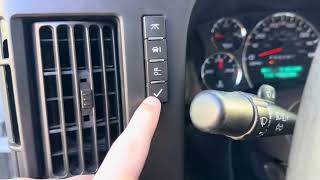
- After replacing a TPMS sensor or the RCDLR, a TPMS relearn procedure must be performed. If the RCDLR was replaced, it must be programmed by a dealer or qualified shop first. 🎬 Watch: How to perform the TPMS and tire position relearn procedure.
Parts You'll Likely Need
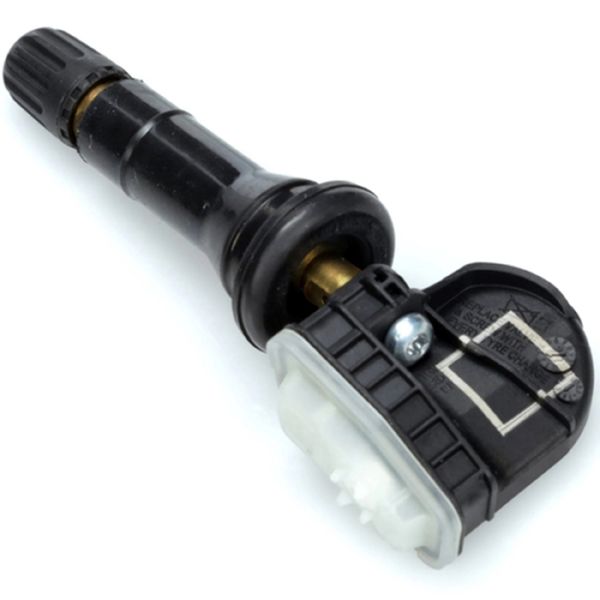
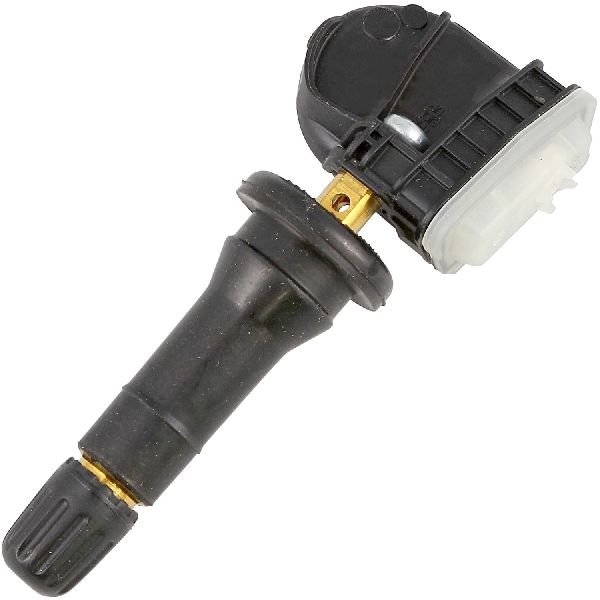
- Tire Pressure Monitoring System (TPMS) Sensor
(OEM #13598771)— This is the most common failure point for an isolated C0755 code, usually due to an expired internal battery. This part number supersedes older numbers like 13586335 and 22853741.
Trusted brands: ACDelco, Schrader, Dorman
OEM price range: $40-$80
Aftermarket price range: $25-$50 - Remote Control Door Lock Receiver (RCDLR)
(OEM #13503205)— This module is the cause when multiple TPMS codes appear, especially when accompanied by key fob or no-start security issues. It is located above the headliner. This part number may supersede 13582364.
Trusted brands: ACDelco GM Original Equipment
OEM price range: $80-$150
Aftermarket price range: $60-$120
Related Codes That Often Appear With This One
- C0750 — Relates to the Left Front TPMS sensor. Often appears with C0755 if there is a systemic issue like a bad RCDLR or RFI.
- C0760 — Relates to the Left Rear TPMS sensor. Often appears with C0755 if there is a systemic issue like a bad RCDLR or RFI.
- C0765 — Relates to the Right Rear TPMS sensor. Often appears with C0755 if there is a systemic issue like a bad RCDLR or RFI.
- B3055 — A GM-specific security code related to the key transponder. It can be set by the same RCDLR fault that causes C0755, leading to a no-start condition.
- B2960 — A security code indicating a mismatch in security data, often seen with a flashing security light and crank-no-start symptom, which can be related to RCDLR issues.
Technical Service Bulletins (TSBs) & Recalls
- PIC5650M: Addresses intermittent no-crank/no-start or start/stall issues with security light, which can be accompanied by DTCs C0750, C0755, C0760, C0765. It points to Radio Frequency Interference from aftermarket devices as a primary diagnostic step.
- 16-NA-396: This bulletin addresses intermittent loss of key fob functions and TPMS codes (including C0755) by recommending the replacement of the RCDLR due to internal faults.
- 01-00-89-010S: A general diagnostic guide that repeatedly references PIC5650, advising technicians to ask customers about aftermarket electronic devices as a first step for intermittent electrical issues.
Platform-Specific Known Issues
- RCDLR Water Damage: Owners have reported that the RCDLR module, being located directly under the roof panel above the headliner, can be susceptible to damage from water intrusion. Leaks from the roof seams, clearance lights, or a roof-mounted antenna can drip onto the module, causing corrosion and failure that leads to TPMS and security faults.
- Difficulty with Manual TPMS Relearn: Some owners of Express and Savana vans report that the vehicle will not enter the TPMS relearn mode using the DIC buttons, or the screen goes blank, preventing a DIY relearn. This can be a symptom of a failing RCDLR or may require a specific TPMS activation tool to complete the process.
Mechanic-Grade Diagnostic Values
- RCDLR Module Power Supply — expected: Battery Positive Voltage (typically 12.6V KOEO, ~14V engine running) at the appropriate pin on the connector.. Failure: Low or no voltage indicates a wiring or fuse issue before the module.
- RCDLR Module Ground — expected: Near 0 Ohms resistance between the ground pin on the RCDLR connector and a known-good chassis ground.. Failure: High resistance indicates a corroded or broken ground connection, a common source of intermittent electronic issues.
Hidden / Shadow Codes Worth Checking
- C0755 with Symptom Byte 03: Indicates 'Low Voltage' and specifically points to the RCDLR detecting that the sensor's internal battery is weak or dying. (see via GM GDS2 (Global Diagnostic System 2) or equivalent professional-grade scan tool.)
- C0755 with Symptom Byte 29: Indicates 'Too Few Pulses' were received from the sensor. TSB #16-NA-396 directly links this symptom code to an internal failure of the RCDLR module. (see via GM GDS2 (Global Diagnostic System 2) or equivalent professional-grade scan tool.)
- C0755 with Symptom Byte 39: Indicates an 'Internal Malfunction' within the TPMS sensor itself, such as a failed pressure transducer or accelerometer. (see via GM GDS2 (Global Diagnostic System 2) or equivalent professional-grade scan tool.)
Scan Tool Commands That Help
- GDS2 / Tech2Win: Module Diagnostics > RCDLR > Configuration/Reset Functions > Add/Replace Key Fobs — This function is required after replacing the RCDLR to program the existing (or new) key fobs to the new module.
- GDS2 / Tech2Win: Special Functions > TPMS Learn Mode — To command the vehicle into TPMS relearn mode when the manual DIC method fails or is not available. This is often necessary after replacing sensors or the RCDLR.
- Tech2 / GDS2: Replace and Reprogram ECU (for RCDLR) — When installing a new RCDLR, this function, used via the TIS2Web service, flashes the module with the correct vehicle-specific software and enables security learning.
- Tech2Win: Erase All Fobs — Before programming fobs to a newly installed RCDLR, it's a required step to clear any stored data, which can take up to 30 minutes as part of the security procedure.
Wiring & Ground Locations
- RCDLR Module — Typically located above the headliner, often near the center interior dome light assembly.. This is the central receiver for all TPMS signals. Its location makes it prone to water damage from roof leaks, and its antenna connection is a critical point of failure.
- G302 / G303 — Located behind the left (driver's side) kick panel.. These are primary interior body grounds. A poor connection at these points can cause intermittent and difficult-to-diagnose issues with various interior modules, including the RCDLR and BCM, which process TPMS data.
- RCDLR Connector — The multi-pin plug connecting to the RCDLR module itself, above the headliner.. Technicians must test for battery voltage and ground at this connector's pins to confirm the module is receiving power before condemning it. A loose or corroded pin can mimic a failed module.
Real Owner Repair Stories
- Reddit user, r/Cartalk (2008 Chevy Express) — After changing the vehicle battery, all TPMS sensors stopped reporting and the van would not enter the TPMS learn procedure.
❌ Tried (didn't work) Standard TPMS relearn procedure.
✅ What actually fixed it The user noted they had installed an aftermarket radio without the proper chime-retention harness. The resolution was not posted, but the implication was that the aftermarket radio installation interfered with the vehicle's data bus, preventing the TPMS relearn function from working correctly. - YouTube user @Crowbirdvideos (Chevrolet Express Van (year not specified, but relevant body style)) — Intermittent crank-no-start with a flashing security light. A solid security light would allow the van to run.
❌ Tried (didn't work) Taking it to GM/Chevrolet dealers who were unable to fix it., Replacing the anti-theft deterrent module (Passlock module) with a rebuilt unit did not solve the problem long-term.
✅ What actually fixed it The owner's final, permanent solution was replacing the original ECM with a reprogrammed one that had the vehicle's immobilizer function (VATS/Passlock) completely deleted. This bypasses the security system that was causing the no-start, though it does not fix the underlying RCDLR/TPMS issue.
OEM Part Supersession History
13586335, 22853741, 25920615→13598771— Consolidation of part numbers and potential minor revisions for reliability.
Heads up: The latest part number, 13598771, is generally backward compatible for the specified vehicle range. However, it has also been superseded by 13540600 for some newer applications, but 13598771 remains the correct service part for this van generation.13582364→13503205— Internal hardware/software update to address reliability issues that caused TPMS and key fob dropouts, as referenced in TSBs like 16-NA-396.
Model Year Variations Within This Range
- 2007-2014: For base model vans without Remote Keyless Entry (RKE) or Driver Information Center (DIC) buttons, the TPMS relearn mode may need to be initiated by pressing the trip odometer reset stem until the 'RELEARN TIRE POSITIONS' message appears. Some work vans may even require cycling the headlamp switch to enter learn mode, though this is less common.
Helpful Videos
We Have This Part in Stock


The information in this article is provided for general reference and educational purposes only. Vehicle specifications, procedures, and part compatibility can vary by production date, trim level, and region. Always consult your vehicle's factory service manual and verify part numbers before purchasing or performing repairs. Safety-critical components such as airbags, seat belts, and braking systems should be installed by a qualified professional.
- Chevrolet EXPRESS 1500:
- 🧭 Diagnostic Flowchart
- 🎬 Helpful Videos
- 🛍️ Shop This Part
- What's Unique About the 2007-2014 Chevrolet EXPRESS 1500
- Symptoms You May Notice
- Most Likely Causes
- Diagnosis Steps
- Parts You'll Likely Need
- Related Codes That Often Appear With This One
- Technical Service Bulletins (TSBs) & Recalls
- Platform-Specific Known Issues
- Mechanic-Grade Diagnostic Values
- Hidden / Shadow Codes Worth Checking
- Scan Tool Commands That Help
- Wiring & Ground Locations
- Real Owner Repair Stories
- OEM Part Supersession History
- Model Year Variations Within This Range
- 🎟️ Get 5% Off