

C0760 on 2015-2022 Cadillac Escalade: Left Rear TPMS Fault Causes and Fixes
Code C0760 indicates a fault with the left rear Tire Pressure Monitoring System (TPMS) sensor. The most common cause is a dead battery in the sensor itself. However, on these Escalades and their platform mates (Tahoe, Yukon, Suburban), the issue can also stem from the Remote Control Door Lock Receiver (RCDLR) or its antenna wiring, which processes TPMS signals. A single sensor costs about $25-$70, but diagnosis should include checking the RCDLR antenna connections before replacing the sensor.
- C0760 specifically points to a fault with the left rear TPMS sensor signal.
- While a bad sensor is the most likely cause, always consider a fault with the Remote Control Door Lock Receiver (RCDLR) antenna or module, a known issue on these Escalades.
- If you also have issues with your key fobs or experience a 'No Remote Detected' message, the problem is almost certainly with the RCDLR system, not the tire sensor.
- Before replacing any parts, unplug all aftermarket accessories (phone chargers, dash cams) to rule out radio frequency interference.
- A TPMS relearn tool is required to program a new sensor to the vehicle after replacement.
What's Unique About the 2015-2022 Cadillac ESCALADE
On the 2015-2022 Escalade and its GM K2XX/T1XX platform mates, the TPMS sensors communicate with the Remote Control Door Lock Receiver (RCDLR), the same module that handles key fob signals for locking and starting the vehicle. This integration is a common source of complex issues. Technical Service Bulletins (TSBs) from GM, like #16-NA-061, confirm that problems with the RCDLR or its antenna can cause TPMS codes like C0760, even when the sensor itself is good. The RCDLR is typically located behind the rear driver's side (D-pillar) trim, and its antenna is in the right rear quarter glass, making the wiring susceptible to disconnection. This can lead to misdiagnosis if a technician only focuses on the tire sensor. Furthermore, TSB #PIC5650M links this TPMS code to severe no-start conditions, highlighting how a fault in this shared system can cascade into the vehicle's security and immobilizer functions.
Diagnostic Flowchart
Tap your situation to follow the diagnostic path that matches what you're seeing on this vehicle.
Generation note: This range covers the 4th generation (2015-2020) and the 5th generation (2021-2022) Escalade. Both generations integrate TPMS and keyless entry functions into the RCDLR module. However, the key fob battery type and emergency start procedures differ. 4th-gen models use a CR2032 battery and have a transmitter pocket in the center console for emergency starts. 🎬 Watch: Easy TPMS sensor relearn for 2015-2020 Escalade models 5th-gen models use a CR2450 battery, and the emergency slot is in the front cupholder. TPMS sensor part numbers also differ between generations, with the 2021+ models potentially using a different sensor frequency or protocol.
Symptoms You May Notice
- TPMS warning light illuminated on the dashboard
- "Service Tire Monitor System" message on the Driver Information Center (DIC)
- Pressure reading for the left rear tire shows dashes (--) on the DIC
- In rare cases, may be accompanied by a "No Remote Detected" message, poor key fob range, or a no-start/start-stall condition with the security light on, as noted in TSB #PIC5650M and #16-NA-061.
- Replacing the TPMS sensor when the actual fault is a disconnected RCDLR antenna cable. TSB #16-NA-061 specifically warns about this scenario, making an inspection of the antenna system a critical diagnostic step before spending money on a sensor and tire service.
Most Likely Causes
- Failed Left Rear TPMS Sensor 🔴 High Probability → Shop Tire Pressure Monitoring System (TPMS) Sensor TPMS sensors contain a non-rechargeable battery with a finite lifespan, typically lasting 5-10 years. As the vehicle ages, battery failure becomes the most common reason for this code. Forum users on tahoeyukonforum.com frequently report sensor failure due to age on these platforms.
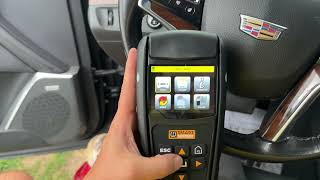
How to confirm: Use a TPMS activation tool to try and read the sensor. If the tool cannot get a response from the left rear sensor but can from the others, the sensor has failed. Some tools can also read the sensor's battery status directly. A good signal strength is considered anything more than 1/4 of the graph displayed on the tool.
Typical fix: Replace the left rear TPMS sensor and perform the TPMS relearn procedure. 🎬 See this helpful guide for performing a TPMS relearn
Est. part cost: $25-$70 - RCDLR Antenna or Coax Cable Disconnection/Damage 🟡 Medium Probability GM TSB #16-NA-061 (superseding PIT5446A) specifically calls out issues with the RCDLR antenna system. The coax cable can become disconnected from the RCDLR module (behind driver rear trim), the antenna amplifier, or the antenna itself (at the right rear glass), causing intermittent signal loss from the sensors, especially those furthest away like the left rear.
How to confirm: Visually inspect the three connection points for the RCDLR antenna coax cable as detailed in TSB #16-NA-061. This requires removing the rear D-pillar trim to access the RCDLR and potentially other trim to trace the cable to the antenna amplifier and glass antenna. A loose connection at the module is a common culprit.
Typical fix: Securely reconnect the coax cable. If the cable or antenna amplifier is damaged, it will need to be replaced. After any repair, perform a Tire Pressure Learn procedure.
Est. part cost: $50-$150 for an antenna or cable - Faulty Remote Control Door Lock Receiver (RCDLR) Module ⚪ Low Probability → Shop Keyless Entry Receiver The RCDLR module can fail internally, causing it to stop processing signals from one or more TPMS sensors and/or key fobs. This is a known issue across many GM platforms, as detailed in TSB #16-NA-396, which recommends replacing the module for these symptoms. A user on Tahoe Yukon Forum solved a persistent TPMS issue that wouldn't retain learned sensors by rewriting the tire type and pressure settings to the RCDLR using a bidirectional scan tool, indicating a module memory issue.
How to confirm: This is a diagnosis of exclusion. If the sensor is confirmed to be transmitting and the antenna/wiring is intact, the RCDLR is the likely culprit. A GM-specific scan tool may show internal fault codes for the module or a failure to retain programming. A bidirectional scan tool can also be used to simulate sensor transmissions; if the RCDLR does not receive the simulated signals, it is likely faulty.
Typical fix: Replace the RCDLR module. This requires programming by a dealer or a qualified shop with GM software (SPS/Techline Connect).
Est. part cost: $80-$200 for the part, plus programming costs.
Rare But Worth Checking
- Radio Frequency (RF) Interference: TSB #PIC5650M mentions that aftermarket electronics, like dash cams, LED lighting, or cheap phone chargers, can emit RF interference that jams the 315/433 MHz signals from the TPMS sensors or key fobs. Before replacing parts, unplug all aftermarket devices and see if the code clears.
- Body Control Module (BCM) Issue: The BCM receives the final data from the RCDLR. While rare, a software glitch or internal failure in the BCM can cause it to misinterpret the data and set this code. This is less likely than an RCDLR or sensor issue.
Diagnosis Steps
- Read the codes with a scan tool capable of reading GM-specific 'C' (Chassis) codes and their symptom bytes.
- Check the tire pressures manually to rule out an actual low tire.
- Using a TPMS activation tool, attempt to trigger the left rear sensor. If it does not respond, or the signal strength is very low (less than 1/4 on the tool's graph), the sensor battery is likely dead or the sensor has failed.
- If the sensor responds, attempt a TPMS relearn procedure. On these vehicles, this can often be initiated through the DIC menu and then using a tool to trigger each sensor in sequence, or sometimes just by driving. If the left rear sensor fails to learn, it confirms the issue is in that corner.
- Unplug any aftermarket 12V or USB devices (phone chargers, dash cams, LED lights) to eliminate potential RF interference as per TSB #PIC5650M.
- Inspect the RCDLR antenna and its coax cable connections. Per TSB #16-NA-061, check the connection at the RCDLR module (behind the rear driver-side D-pillar trim), at the antenna amplifier, and at the antenna in the right rear quarter glass. A video on a 2017 GM truck with the same issue showed the fix was a loose coax cable at the RCDLR module.
- If the sensor, relearn, and antenna checks pass, the RCDLR module itself is the most likely remaining cause. This requires professional diagnosis with a GM scan tool (GDS2) to check for internal module faults or memory issues.
Parts You'll Likely Need
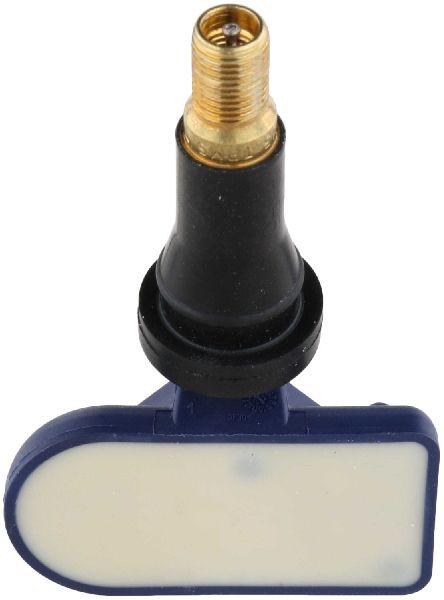
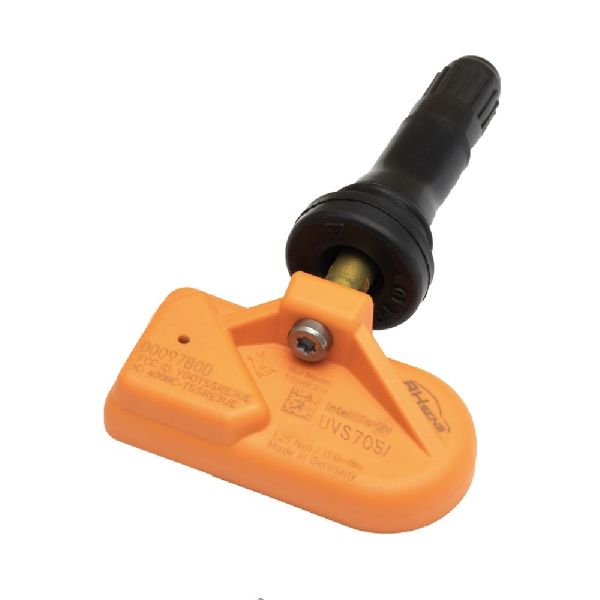
- Tire Pressure Monitoring System (TPMS) Sensor
(OEM #13598773)— This is the most common failure point due to the internal battery's limited lifespan of 5-10 years. This part operates at 433MHz.
Trusted brands: ACDelco, Schrader
OEM price range: $40-$70
Aftermarket price range: $25-$50 - Remote Control Door Lock Receiver (RCDLR) Antenna
(OEM #23445326)— The antenna or its amplifier can be damaged or disconnected, causing signal loss as described in GM TSBs.
Trusted brands: ACDelco
OEM price range: $50-$90
Aftermarket price range: N/A - Remote Control Door Lock Receiver (RCDLR)
(OEM #13595511 (example, verify by VIN))— Internal failure of the module can cause TPMS and keyless entry issues. TSB #16-NA-396 recommends replacement for these symptoms. Requires programming after installation.
Trusted brands: ACDelco
OEM price range: $80-$200
Aftermarket price range: N/A
Related Codes That Often Appear With This One
- C0750, C0755, C0765 — These are the codes for the other three tire pressure sensors (LF, RF, RR). If multiple TPMS codes are present, it strongly suggests a central problem like the RCDLR or its antenna, rather than multiple sensors failing simultaneously.
- B3055, B3060, B3935 — These are security and key-related codes. TSB #PIC5650M notes they can appear with C0760, indicating a system-wide issue related to the RCDLR, which handles both TPMS and vehicle security functions.
- B3101 — This code indicates a fault in the keyless entry data link. Its presence alongside TPMS codes further points to a problem with the RCDLR or its associated wiring.
Technical Service Bulletins (TSBs) & Recalls
- PIC5650M: Notes C0760 can appear with security codes during a no-start condition, often due to RF interference.
- PIT5446A / 16-NA-061: Identifies the Remote Control Door Lock Receiver antenna connections as a primary cause for TPMS codes and advises checking them before replacing sensors.
- 16-NA-396: Recommends replacing the RCDLR module for intermittent TPMS and key fob issues.
Platform-Specific Known Issues
- TSB #PIC5650M: Links C0760 to no-start or start-stall conditions with the security light on, pointing to a fault in the shared RCDLR module that handles both TPMS and vehicle security.
Mechanic-Grade Diagnostic Values
- TPMS Sensor Signal Strength — expected: Greater than 1/4 of the signal graph displayed on a TPMS activation tool.. Failure: No response or a very weak signal (less than 1/4 of the graph).
- Scan Tool 'Pressure Sensor Mode' Parameter — expected: Should change from 'Wake' or 'Stationary' to 'Drive' or 'Rolling' when the vehicle is driven above 25 mph.. Failure: The parameter for the suspect sensor does not change, indicating it is not activating correctly.
Hidden / Shadow Codes Worth Checking
- C0760 03: Left Rear Tire Pressure Sensor Low Voltage. This indicates the sensor's internal battery is failing. (see via A professional scan tool like the GM GDS2 is required to read symptom bytes.)
- C0760 08: Left Rear Tire Pressure Sensor Signal Invalid / Bus Signal or Message Failure. This points to a data transmission or communication error. (see via A professional scan tool like the GM GDS2 is required to read symptom bytes.)
- C0760 29: Left Rear Tire Pressure Sensor Too Few Pulses. The RCDLR is not receiving the expected number of signal transmissions from the sensor. (see via A professional scan tool like the GM GDS2 is required to read symptom bytes.)
- C0760 39: Left Rear Tire Pressure Sensor Internal Malfunction. The sensor has detected an internal failure and has reported it. (see via A professional scan tool like the GM GDS2 is required to read symptom bytes.)
Scan Tool Commands That Help
- GM GDS2 / Tech2: RCDLR Module Setup — This function is required after replacing the Remote Control Door Lock Receiver (RCDLR) to integrate the new module with the vehicle's systems.
- GM GDS2 / Tech2: Theft Deterrent System Learn — Must be performed after RCDLR replacement, as the RCDLR is a critical part of the vehicle's anti-theft system.
- GM GDS2 / Tech2: TPM Sensor Learn — To teach the RCDLR the unique ID codes of new or existing TPMS sensors after a replacement or tire rotation.
- GM GDS2 / Tech2: Data Display: 'Pressure Sensor Mode' — Used during a test drive to confirm if a specific sensor is correctly switching to its 'Drive' or 'Rolling' state, which is necessary for it to transmit pressure data.
Wiring & Ground Locations
- RCDLR Coax Connector — At the RCDLR module, located behind the driver's side rear D-pillar interior trim panel.. This is the most common point of failure according to GM TSB #16-NA-061. A disconnected coax cable here will cause all TPMS sensors to stop reporting.
- Antenna Amplifier Coax Connector — The coax cable runs from the RCDLR to an antenna amplifier module, which is also located in the rear of the vehicle.. A disconnect here may cause intermittent loss of signal from the sensors furthest away, such as the left front and left rear.
- Antenna Connection at Glass — The final antenna connection is at the right rear quarter glass.. This connection can also become disconnected or the solder joint can fail, leading to poor reception. This is a less common but possible failure point.
- Ground G103 — Located on the left side of the instrument panel.. While not exclusively for the RCDLR, this ground serves multiple modules in the area, including the BCM. A poor connection here can cause a variety of communication issues, including those that could affect the RCDLR and trigger TPMS codes.
Real Owner Repair Stories
- GM Technical Service Bulletin #16-NA-061 (2015-2018 Cadillac Escalade, Chevrolet Suburban/Tahoe, GMC Yukon) — One or more tire pressure readings show dashes, 'Service Tire Monitor System' message, poor key fob range.
❌ Tried (didn't work) Replacing the TPMS sensor(s) for the affected wheel(s).
✅ What actually fixed it The root cause was a disconnected coaxial antenna cable for the Remote Control Door Lock Receiver (RCDLR). The bulletin instructs technicians to inspect the three connection points (at the RCDLR module, at the antenna amplifier, and at the glass antenna) and reconnect the cable securely before replacing any parts.
"I Checked Everything" — The Actual Cause
- A common scenario for C0760 is that a technician uses a TPMS activation tool and successfully reads the left rear sensor's pressure, battery status, and ID. This test 'passes', suggesting the sensor is working perfectly. However, the code remains because the signal, while being transmitted by the sensor, is not being received by the RCDLR due to a disconnected antenna coax cable elsewhere in the vehicle, as detailed in TSB #16-NA-061.
OEM Part Supersession History
13598773→86363053— Standard part lifecycle update by GM.
Heads up: This 433MHz sensor is for the 4th generation (2015-2020) Escalade. It is not compatible with 2021+ models which use the Global B electrical architecture.13533166→13542523— Standard part lifecycle update by GM.
Heads up: This 433MHz sensor is for the 5th generation (2021-2022) Escalade with the Global B architecture. It is not backward-compatible with pre-2021 models.
Model Year Variations Within This Range
- 2015-2020 (4th Gen / K2XX Platform): These models use TPMS sensor P/N 13598773 (or its successor 86363053). The RCDLR antenna disconnection issue described in TSB #16-NA-061 is well-documented for this generation.
- 2021-2022 (5th Gen / T1XX Platform): These models use GM's Vehicle Intelligence Platform (Global B) electrical architecture. They require a different 433MHz TPMS sensor, such as P/N 13533166 or 13542523. While the RCDLR still handles TPMS signals, the module and antenna locations/designs may differ from the previous generation.
Helpful Videos

We Have This Part in Stock


The information in this article is provided for general reference and educational purposes only. Vehicle specifications, procedures, and part compatibility can vary by production date, trim level, and region. Always consult your vehicle's factory service manual and verify part numbers before purchasing or performing repairs. Safety-critical components such as airbags, seat belts, and braking systems should be installed by a qualified professional.
- Cadillac ESCALADE:
- 🧭 Diagnostic Flowchart
- 🎬 Helpful Videos
- 🛍️ Shop This Part
- What's Unique About the 2015-2022 Cadillac ESCALADE
- Symptoms You May Notice
- Most Likely Causes
- Rare But Worth Checking
- Diagnosis Steps
- Parts You'll Likely Need
- Related Codes That Often Appear With This One
- Technical Service Bulletins (TSBs) & Recalls
- Platform-Specific Known Issues
- Mechanic-Grade Diagnostic Values
- Hidden / Shadow Codes Worth Checking
- Scan Tool Commands That Help
- Wiring & Ground Locations
- Real Owner Repair Stories
- "I Checked Everything" — The Actual Cause
- OEM Part Supersession History
- Model Year Variations Within This Range
- 🎟️ Get 5% Off