

C0765 on 2018-2025 GMC Terrain: TPMS Fault or Key Fob Problem?
Code C0765 indicates a fault with the right rear tire pressure (TPMS) sensor. However, on 2018-2025 GMC Terrains, this code is very often caused by a failing Remote Control Door Lock Receiver (RCDLR), especially if you're also having key fob issues like 'No Remote Detected'. The fix is typically replacing the RCDLR module, which requires programming.
- C0765 points to the right rear TPMS sensor, but don't assume the sensor is bad.
- First, check your key fob. If it's also acting up, the problem is almost certainly the Remote Control Door Lock Receiver (RCDLR).
- If the key fob works perfectly, the issue is likely the TPMS sensor itself, probably due to a dead battery.
- Replacing the RCDLR requires programming by a shop with the right tools.
- Always check tire pressures manually with a gauge when you see a TPMS warning.
What's Unique About the 2018-2025 Gmc TERRAIN
On this generation of GMC Terrain and its platform-mates (like the Chevy Equinox), the C0765 code is more than just a simple tire sensor issue. The Remote Control Door Lock Receiver (RCDLR) is the central module for both the TPMS and the keyless entry/start system. A widely known issue, documented in GM Technical Service Bulletin 16-NA-396, is the internal failure of this RCDLR module. This failure causes the module to stop receiving signals properly, leading to simultaneous TPMS warnings (often for all four wheels) and key fob problems, a situation that can confuse diagnosis if you only focus on the single tire sensor code.
Diagnostic Flowchart
Tap your situation to follow the diagnostic path that matches what you're seeing on this vehicle.
Symptoms You May Notice
- "Service Tire Monitor System" message on the Driver Information Center (DIC)
- TPMS warning light flashing for about a minute and then staying on
- Pressure reading for the right rear tire shows as dashes (--) on the DIC
- "No Remote Detected" message on the DIC
- Key fob intermittently or completely unresponsive (lock, unlock, remote start)
- Passive entry (door handle button) does not work
- Push-button start fails, requiring you to place the fob in the transmitter pocket (often in the center console or a cupholder) to start the car
- Alarm may sound when using the physical key to enter, as the security system doesn't recognize the fob.
- Replacing only the C0765-flagged TPMS sensor when the RCDLR is the actual fault. If key fob issues are also present, the RCDLR is the primary suspect. This often leads to the problem recurring shortly after the sensor replacement.
Most Likely Causes
- Failing Remote Control Door Lock Receiver (RCDLR) 🔴 High Probability → Shop Keyless Entry Receiver This is a well-documented failure on this GM platform, as noted in TSB 16-NA-396. The module fails internally, affecting both TPMS and key fob reception. The module essentially 'goes to sleep' and doesn't wake up to receive signals.
How to confirm: Check for simultaneous key fob problems. A professional scan tool can check for DTC C0765 with a symptom code of ':29 - Too Few Pulses,' which strongly points to the RCDLR. The presence of all four TPMS codes (C0750, C0755, C0760, C0765) is another very strong indicator.
Typical fix: Replace the RCDLR module and have it programmed to the vehicle by a dealer or qualified shop. A temporary fix can sometimes be achieved by disconnecting the vehicle's battery for a few minutes to reset the module.
Est. part cost: $50-$150 - Dead TPMS Sensor Battery 🟡 Medium Probability → Shop Tire Pressure Monitoring System (TPMS) Sensor TPMS sensor batteries have a finite lifespan, typically 5-10 years. Vehicles from the 2018 model year are now at an age where battery failure is increasingly common.
How to confirm: Use a TPMS diagnostic tool to attempt to read the sensor. The tool can often display the battery status as 'OK' or 'Low'. If the tool cannot get any reading and key fobs are working perfectly, the battery is likely dead.
Typical fix: Replace the right rear TPMS sensor. 🎬 Watch this walkthrough for replacing a GMC Terrain TPMS sensor. It's often recommended to replace all four at once if they are original, as the others are likely to fail soon. A relearn procedure is required after replacement.
Est. part cost: $30-$80 per sensor - Faulty or Damaged TPMS Sensor ⚪ Low Probability → Shop Tire Pressure Monitoring System (TPMS) Sensor Sensors can be damaged during tire changes or by road hazards. Corrosion of the valve stem can also cause failure. Use of unapproved tire sealants can also clog and damage the sensor.
How to confirm: If the sensor battery is reported as OK by a TPMS tool but the sensor will not respond or cannot be relearned to the vehicle, the sensor itself has likely failed. A scan tool may show symptom code ':39 - Internal Malfunction'.
Typical fix: Replace the right rear TPMS sensor and perform the TPMS relearn procedure.
Est. part cost: $30-$80 - RCDLR Antenna Circuit Issue ⚪ Low Probability As described in TSB 16-NA-061, the coaxial cable connecting the RCDLR to its antenna (located in the rear quarter glass) can become disconnected. There are three potential points of failure: the connection at the RCDLR module, at the antenna amplifier, or at the glass itself.
How to confirm: Visually inspect the three connection points of the RCDLR antenna system. A disconnected cable at the RCDLR will likely cause all TPMS sensors and key fobs to stop working. A disconnect further down the line (e.g., at the glass) may only cause intermittent issues or reduced key fob range.
Typical fix: Securely reconnect the disconnected coaxial cable.
Est. part cost: $0
Diagnosis Steps
- Verify the complaint. Note the TPMS warning light and check for a 'Service Tire Monitor System' message. Manually check and adjust all tire pressures to the placard specification.
- Check for related symptoms. Test all functions of the key fob (lock, unlock, remote start) and the passive entry system. If they are also malfunctioning, the RCDLR is the primary suspect.
- Scan for codes. Use a professional-grade scan tool to read codes from the BCM. Look for C0765 and note if it has a symptom code like ':29'. Also check for the other three TPMS codes (C0750, C0755, C0760). A full set of codes strongly suggests an RCDLR failure.
- If key fob is working correctly, focus on the TPMS sensor. Use a TPMS diagnostic tool to try and activate the right rear sensor. Check the sensor's reported battery status.
- If the sensor does not activate or shows a low battery, the sensor needs to be replaced. Consider replacing all four if they are original and over 5 years old.
- If the sensor activates but the code persists, attempt a TPMS relearn procedure as described in the owner's manual or with a TPMS tool.
- If key fob is NOT working, investigate the RCDLR. Following TSB 16-NA-061, inspect the coaxial antenna cable connections between the RCDLR module and the rear window glass antenna.
- If wiring is secure and symptoms (C0765 with :29, key fob failure, multiple TPMS codes) point to the RCDLR, replace the module. Note that the new module must be programmed to the vehicle using dealer-level software.
Parts You'll Likely Need
- Remote Control Door Lock Receiver (RCDLR)
(OEM #13595510)— This module is a common failure point on this platform that causes code C0765 along with key fob issues, as documented in TSB 16-NA-396.
Trusted brands: ACDelco, GM Genuine Parts
OEM price range: $70-$150
Aftermarket price range: $50-$100 - Tire Pressure Monitoring System (TPMS) Sensor
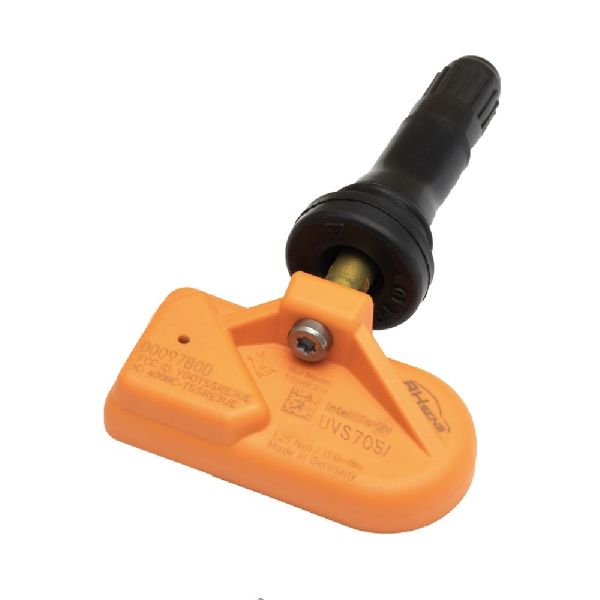
(OEM #13598773 or 13586335)— If the RCDLR is working correctly, the cause is a failed TPMS sensor, most often due to a dead battery after 5+ years of service. The system operates at 315 MHz.
Trusted brands: ACDelco, Schrader, Continental
OEM price range: $50-$80
Aftermarket price range: $30-$60 - Key Fob
(OEM #13584502)— While not a direct cause of C0765, a weak fob battery can cause similar 'No Remote Detected' symptoms, leading to confusion. It's a cheap and easy item to rule out first.
Trusted brands: GM Genuine Parts
OEM price range: $75-$150
Aftermarket price range: $25-$60
Related Codes That Often Appear With This One
- C0750 — Fault in the Left Front TPMS sensor circuit. Often set along with other TPMS codes when the RCDLR module or its antenna is failing.
- C0755 — Fault in the Right Front TPMS sensor circuit. Often set along with other TPMS codes when the RCDLR module or its antenna is failing.
- C0760 — Fault in the Left Rear TPMS sensor circuit. Often set along with other TPMS codes when the RCDLR module or its antenna is failing.
- B3055 — No Transponder Modulation or No Transponder. This security code can appear with C0765 during a no-start condition, as seen in TSB PIC5650M, pointing to a wider security system communication issue.
Technical Service Bulletins (TSBs) & Recalls
- PIC5650M: Mentions C0765 in a list of security-related DTCs that can cause a no-crank or start-stall condition.
- 16-NA-396: The primary bulletin for this issue. Details the connection between a faulty RCDLR, multiple TPMS codes, and key fob failures.
- 16-NA-061: Details the RCDLR antenna system and how a disconnected coax cable can cause TPMS and key fob symptoms.
Platform-Specific Known Issues
- A known issue documented in TSB 16-NA-396 involves internal failure of the RCDLR, causing TPMS codes (specifically with symptom code :29) and simultaneous failure of keyless entry and start functions.
- Loose antenna connections for the RCDLR can mimic sensor or module failure, as detailed in TSB 16-NA-061.
Mechanic-Grade Diagnostic Values
- RCDLR Ground Circuit Resistance — expected: < 0.5 Ω. Failure: Resistance higher than 0.5 Ω indicates a poor ground connection, which can cause intermittent module operation and communication faults.
- RCDLR Power Supply Voltage — expected: 12.0V - 12.6V (with ignition on). Failure: Low or no voltage at the RCDLR connector's power pin points to a problem with the fuse or supply wiring, not necessarily the module itself.
Hidden / Shadow Codes Worth Checking
- C0765 :29: Too Few Pulses. This symptom code is a strong indicator of an internal RCDLR fault, as the module is not receiving the expected number of signal transmissions from the sensor. (see via GM GDS2, Tech2Win, or other professional scan tool capable of reading manufacturer-specific symptom codes.)
- C0765 :39: Internal Malfunction. This points to a failure within the TPMS sensor itself, rather than a communication or receiver issue. (see via GM GDS2, Tech2Win, or other professional scan tool.)
- C0765 :03: Low Voltage. This typically indicates the TPMS sensor's internal battery is failing. (see via GM GDS2, Tech2Win, or other professional scan tool.)
Scan Tool Commands That Help
- GM GDS2 / Techline Connect: Service Programming System (SPS2) - RCDLR Programming — This function is mandatory after replacing the RCDLR. It uses a VIN-based subscription to download the correct software and security information into the new module, allowing it to communicate with the vehicle and key fobs.
- GM GDS2 / Techline Connect: Module Diagnostics > RCDLR > Data Display — Used to view live data from the RCDLR, such as the reported battery status of each TPMS sensor and the rolling count of received transmissions, which can help confirm if a sensor has stopped communicating.
- GM GDS2 / Techline Connect: Module Diagnostics > BCM > Control Functions — Allows for bidirectional control tests of various systems controlled by the Body Control Module, which can help rule out BCM issues when diagnosing communication problems with the RCDLR.
Wiring & Ground Locations
- RCDLR Module — On the GMC Terrain, the RCDLR is typically located behind the trim panel in the rear luggage compartment, often on the driver's side.. This is the central receiving module for all TPMS and key fob signals. Physical access is required for replacement or to check its direct coaxial antenna connection.
- RCDLR Antenna — The antenna is often integrated into the right rear quarter glass. A coaxial cable runs from the RCDLR, via an amplifier, to the glass.. A disconnected or damaged antenna cable is a known cause of TPMS/key fob failure, as documented in TSB 16-NA-061. Checking connections here is a key diagnostic step before replacing the module.
- Ground G301 / G401 / G403 — Various ground points are located in the rear of the vehicle: G301 under the driver's seat, G401 on the left side of the luggage compartment, and G403 on the right side.. The RCDLR is located in the rear of the vehicle. A poor ground connection at one of these nearby points can cause intermittent power and communication issues for the module, mimicking an internal failure.
- Rear Compartment Fuse Block — Located behind a trim panel on the side of the rear luggage/cargo area.. This fuse block likely contains the fuse that supplies power to the RCDLR module. Checking for a blown fuse here is a preliminary step in diagnosing a completely unresponsive module.
Real Owner Repair Stories
- CorvetteForum user (Corvette C6 (similar GM RCDLR architecture)) — Message "Keyfob not detected". The engine would only start when the fob was placed in the emergency slot. A single click was heard from the RCDLR instead of a series of clicks.
❌ Tried (didn't work) Initial diagnosis pointed to a bad fob.
✅ What actually fixed it The user identified a faulty transistor inside the RCDLR. The final fix was to replace the RCDLR module and have it programmed to the car. In some cases, re-soldering the header pins on the RCDLR's circuit board can fix cold solder joints and resolve the issue without replacement.
OEM Part Supersession History
13509517→13595510— Standard part revision, likely for improved reliability or manufacturing process changes.
Heads up: The new part number (13595510) is the correct replacement for the original and requires programming to the vehicle via SPS2 upon installation.
Helpful Videos
We Have This Part in Stock

The information in this article is provided for general reference and educational purposes only. Vehicle specifications, procedures, and part compatibility can vary by production date, trim level, and region. Always consult your vehicle's factory service manual and verify part numbers before purchasing or performing repairs. Safety-critical components such as airbags, seat belts, and braking systems should be installed by a qualified professional.
- Gmc TERRAIN:
- 🧭 Diagnostic Flowchart
- 🎬 Helpful Videos
- 🛍️ Shop This Part
- What's Unique About the 2018-2025 Gmc TERRAIN
- Symptoms You May Notice
- Most Likely Causes
- Diagnosis Steps
- Parts You'll Likely Need
- Related Codes That Often Appear With This One
- Technical Service Bulletins (TSBs) & Recalls
- Platform-Specific Known Issues
- Mechanic-Grade Diagnostic Values
- Hidden / Shadow Codes Worth Checking
- Scan Tool Commands That Help
- Wiring & Ground Locations
- Real Owner Repair Stories
- OEM Part Supersession History
- 🎟️ Get 5% Off