

C1709 on 2005-2012 Nissan Frontier: Front Right TPMS Sensor Failure Explained
Code C1709 on a Nissan Frontier means the Tire Pressure Monitoring System (TPMS) isn't receiving data from the front right wheel sensor. This is almost always due to a dead battery in the 315 MHz sensor, which requires replacing the entire sensor unit. Aftermarket sensors cost $30-$60 each, but a tire shop is needed for installation. A DIY 'paper clip' relearn procedure can help avoid dealer programming fees.
- C1709 means the front right TPMS sensor is not communicating with your truck, almost always due to its internal battery dying.
- The most likely cause is a dead battery in the sensor, which is an expected failure on a vehicle of this age.
- Before replacing parts, unplug all aftermarket electronics from your power outlets to rule out radio frequency interference from things like phone chargers.
- It is strongly recommended to replace all four TPMS sensors at once, as they have similar lifespans.
- While a tire shop is needed to mount the sensor, programming can be done by an advanced DIYer using a 'paper clip' trick to save money.
What's Unique About the 2005-2012 Nissan FRONTIER
The 2005-2012 Nissan Frontier belongs to the long-running D40 generation, which also includes the Nissan Xterra and Suzuki Equator. Like many vehicles from this era, its TPMS sensors use non-replaceable batteries with a finite lifespan of 7-10 years. As these trucks are now well over a decade old, widespread sensor battery failure is a very common and expected maintenance issue across the entire platform. While the system is generally reliable, Nissan issued a technical service bulletin (NTB13088A) noting that radio frequency (RF) interference from aftermarket electronics like 'smart cell phone chargers' can also cause this 'no data' condition.
Diagnostic Flowchart
Tap your situation to follow the diagnostic path that matches what you're seeing on this vehicle.
Symptoms You May Notice
- TPMS warning light flashes for approximately one minute at startup, then stays illuminated continuously.
- Inability to read the front right tire pressure with a professional scan tool.
- A scan tool will read DTC C1709 stored in the Body Control Module (BCM).
- Replacing the BCM when the issue is a simple dead sensor.
- Assuming the tire is low on air without checking for the flashing TPMS light, which indicates a system fault, not low pressure.
- Replacing only one sensor when all four are the same age, leading to another service visit a few months later when the next one fails.
Most Likely Causes
- Dead TPMS Sensor Battery 🔴 High Probability → Shop Tire Pressure Monitoring System (TPMS) Sensor The original sensors have batteries with a 7-10 year lifespan. For the 2005-2012 model years, all original sensors are now at or beyond their expected end-of-life. This is the most common failure mode.
How to confirm: Use a TPMS diagnostic tool to attempt to 'wake' or read the sensor. A failure to get a reading, or a reading showing low/no battery voltage, confirms the issue. Often, the only confirmation is replacing the sensor and seeing if the problem is resolved.
Typical fix: Replace the front right TPMS sensor. It is highly recommended to replace all four sensors at the same time, as the others are the same age and likely to fail soon, saving on future labor costs.
Est. part cost: $30-$60 per aftermarket sensor - Damaged TPMS Sensor 🟡 Medium Probability → Shop Tire Pressure Monitoring System (TPMS) Sensor Sensors can be damaged during tire changes if the technician is not careful, or by using aerosol tire sealants which can clog the sensor port and damage electronics. The plastic or aluminum valve stems can also become brittle and break.
How to confirm: A visual inspection during a tire dismount may reveal physical damage, corrosion, or residue from tire sealants on the sensor body or valve stem.
Typical fix: Replace the damaged TPMS sensor.
Est. part cost: $30-$60 per aftermarket sensor - Radio Frequency (RF) Interference ⚪ Low Probability As noted in Nissan TSB NTB13088A, aftermarket devices like 'smart cell phone chargers', dash cams, or DVD players can transmit on a frequency that interferes with the 315 MHz TPMS signals, causing the BCM to lose communication with a sensor.
How to confirm: Unplug all aftermarket electronic devices from the vehicle's 12V power outlets. Clear the codes (if possible) and drive the vehicle to see if the code returns. If it does not, one of the devices was the cause.
Typical fix: Remove or replace the interfering electronic device.
Est. part cost: $0
Rare But Worth Checking
- Faulty Body Control Module (BCM): This is extremely rare. Before suspecting the BCM, all other possibilities, especially the sensors and RF interference, should be exhausted. A BCM failure would likely be accompanied by other seemingly unrelated electrical issues. There are no widespread reports of BCM failure causing this specific code on these trucks.
- Faulty TPMS Receiver: Also very rare. The receiver is the component that listens for the signals from the four tire sensors. A failure here would typically cause codes for all four sensors to appear at once, not just C1709. It is located behind the glove box.
Diagnosis Steps
- Verify the symptom: Start the truck and confirm the TPMS warning light flashes for about a minute before staying on solid. This confirms a system fault.
- Rule out RF Interference: Unplug any and all aftermarket 12V accessories (phone chargers, dash cams, etc.) to rule out Radio Frequency interference as mentioned in TSB NTB13088A.
- Scan for Codes: Use a TPMS-specific scan tool to attempt to read the data from all four tire sensors. Note that C1709 points specifically to the front right sensor being unresponsive.
- Confirm Sensor Failure: If RF interference is ruled out and a TPMS tool cannot get a signal from the front right sensor, the sensor has failed and must be replaced.
- DIY Relearn Procedure (Paper Clip Method): For the advanced DIYer, this avoids dealer programming fees. You will need a paper clip or a short piece of wire.
- Locate the TPMS service connector. It is a single white plug with one wire, usually taped to a harness near the OBD-II port under the driver's side dash.
- Insert the paper clip into the back of the connector to make contact with the metal pin.
- Turn the ignition to 'ON' (engine off). Within 10-30 seconds, rapidly tap the other end of the paper clip to a known metal ground (like the OBD-II port bracket) 6 times.
- If successful, the TPMS light on the dash will begin to flash slowly, indicating it is in 'learn mode'.
- Method A (Drive Relearn): Before starting, set tire pressures to a specific sequence (e.g., FL: 36, FR: 33, RR: 30, RL: 27 psi). Start the engine and drive above 15 MPH for about 10 minutes. The BCM will identify the sensors by their unique pressure readings. The light will turn off, then come back on solid because of the low pressure. Re-inflate all tires to the correct pressure, and the light will go out.
- Method B (Tool Relearn): With tires at normal pressure and the system in 'learn mode', use a basic TPMS activation tool (approx. $15 online) at each wheel 🎬 See how to use a basic tool for a faster relearn., starting with the front right and proceeding counter-clockwise. The vehicle's horn or lights may flash to confirm each sensor is registered.
- Professional Repair: Have a tire shop dismount the front right tire, replace the TPMS sensor, and use their professional TPMS tool to register the new sensor ID to the vehicle's BCM.
- Final Check: After either method, clear any stored trouble codes and drive the vehicle above 25 MPH for a few minutes to confirm the light stays off.
Parts You'll Likely Need
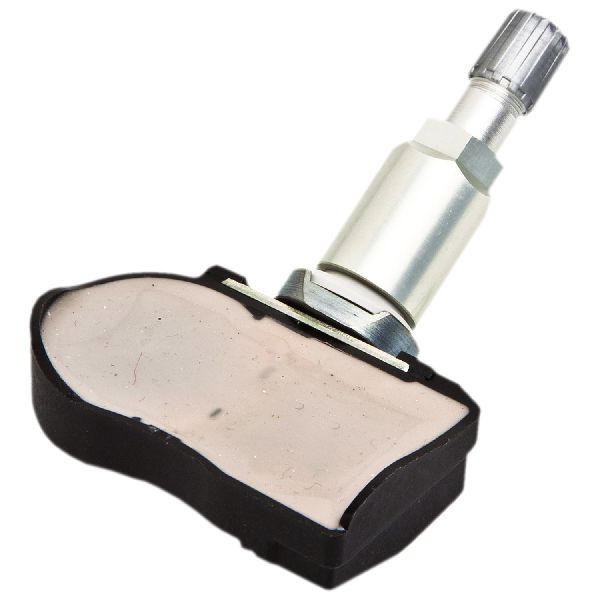
- Tire Pressure Monitoring System (TPMS) Sensor
(OEM #40700-3AN0B (supersedes 40700-3AN0A))— The internal battery of the original sensor fails, requiring replacement of the entire unit. This is the direct cause of the C1709 code.
Trusted brands: Schrader (often the OEM manufacturer), Denso, Dorman, Autel, VDO
OEM price range: $70-$100
Aftermarket price range: $30-$60
Related Codes That Often Appear With This One
- C1708 — This code indicates a 'No Data' condition from the Front Left TPMS sensor. It's common to see multiple TPMS codes together as all sensor batteries tend to fail around the same time.
- C1710 — This code indicates a 'No Data' condition from the Rear Right TPMS sensor. It's common to see multiple TPMS codes together as all sensor batteries tend to fail around the same time.
- C1711 — This code indicates a 'No Data' condition from the Rear Left TPMS sensor. It's common to see multiple TPMS codes together as all sensor batteries tend to fail around the same time.
Technical Service Bulletins (TSBs) & Recalls
- NTB13088A / ITB13-088: This bulletin provides a summary of information for the Low Tire Pressure Warning System (LTPWS), including diagnosin
Platform-Specific Known Issues
- Nissan TSB NTB13088A specifically calls out that radio frequency interference from devices like 'smart cell phone chargers' can cause a 'No Data' condition, triggering codes C1708, C1709, C1710, or C1711.
- The DIY 'paper clip' relearn method is a well-documented quirk of this platform (Frontier/Xterra), allowing savvy owners to register new sensors without expensive dealer tools.
Scan Tool Commands That Help
- Nissan CONSULT-II / CONSULT-III: SELF-DIAG RESULTS — To read the specific TPMS trouble codes like C1709 from the BCM.
- Nissan CONSULT-II / CONSULT-III: DATA MONITOR — To view live data from the TPMS, such as individual tire pressures reported by the sensors that are still communicating. This can confirm which sensors are offline.
- Nissan CONSULT-II / CONSULT-III: Tire Pressure Sensor ID Registration — This is the official dealer-level function used to write the unique ID of a new TPMS sensor to the vehicle's BCM after replacement.
Wiring & Ground Locations
- TPMS Receiver — Located behind the glove box assembly.. This is the module that listens for the radio frequency signals from all four tire sensors. In the extremely rare event of a receiver failure (which would typically set codes for all sensors, not just one), this is its location for testing or replacement.
- Body Control Module (BCM) — Located under the driver's side dashboard, often behind the kick panel and fuse box area. Access requires removing lower dash trim panels.. The BCM is the central computer that receives data from the TPMS receiver, interprets it, stores the C1709 trouble code, and commands the TPMS warning light on the dashboard. All sensor registration and system logic resides here.
- TPMS Service Connector — A single white plastic connector with one wire, typically taped to the main wiring harness near the OBD-II port under the driver's side dash.. This connector is intentionally placed for diagnostics and is the key to the DIY 'paper clip' relearn method. Grounding this wire in a specific sequence puts the BCM into 'learn mode' to register new sensors.
Real Owner Repair Stories
- Project:Keira blog post (Nissan Frontier (D40 generation)) — TPMS light on after a sensor was broken during a tire change.
❌ Tried (didn't work) An initial replacement sensor purchased from eBay, despite having the correct OEM part number, was found to be faulty and would not communicate with the dealer's TPMS diagnostic tool.
✅ What actually fixed it A new, genuine OEM Nissan TPMS sensor was purchased from a dealership. After installation, the owner successfully programmed it themselves using the 'paper clip' relearn method: adjusting tire pressures to specific values, grounding the TPMS service connector 6 times to enter learn mode, and then driving the vehicle until the light turned off.
OEM Part Supersession History
40700-3AN0A→40700-3AN0B— Standard part revision and consolidation.
Heads up: 40700-3AN0B is the correct and current replacement for 40700-3AN0A and is fully compatible. This part also supersedes a wide range of older Nissan TPMS sensor part numbers, such as 40700-CK001 and 40700-JA01B.
Model Year Variations Within This Range
- 2005-2007: For these model years, the Tire Pressure Monitoring System (TPMS) was optional and typically included on higher trim levels. Base models may not be equipped with the system at all.
- 2008-2012: TPMS became standard equipment on all Nissan Frontiers starting in the 2008 model year to comply with the US TREAD Act. All trucks in this range will have the system.
Helpful Videos

We Have This Part in Stock




The information in this article is provided for general reference and educational purposes only. Vehicle specifications, procedures, and part compatibility can vary by production date, trim level, and region. Always consult your vehicle's factory service manual and verify part numbers before purchasing or performing repairs. Safety-critical components such as airbags, seat belts, and braking systems should be installed by a qualified professional.
- Nissan FRONTIER:
- 🧭 Diagnostic Flowchart
- 🎬 Helpful Videos
- 🛍️ Shop This Part
- What's Unique About the 2005-2012 Nissan FRONTIER
- Symptoms You May Notice
- Most Likely Causes
- Rare But Worth Checking
- Diagnosis Steps
- Parts You'll Likely Need
- Related Codes That Often Appear With This One
- Technical Service Bulletins (TSBs) & Recalls
- Platform-Specific Known Issues
- Scan Tool Commands That Help
- Wiring & Ground Locations
- Real Owner Repair Stories
- OEM Part Supersession History
- Model Year Variations Within This Range
- 🎟️ Get 5% Off