

C1711 Nissan Pathfinder (2005-2012) Guide: Rear Left TPMS Fault
Code C1711 on a 2005-2012 Nissan Pathfinder means the system is not receiving a signal from the rear left tire pressure sensor. The most common cause is a dead battery inside the sensor, requiring sensor replacement for about $40-$80 per aftermarket part. Before replacing, always check for radio frequency (RF) interference from phone chargers or dash cams, a known issue for this platform.
- C1711 points directly to a communication failure with the rear left TPMS sensor.
- Before buying parts, unplug all aftermarket accessories (phone chargers, dash cams, etc.) from your power outlets to rule out radio frequency interference, a known issue on this vehicle.
- The most likely cause on a vehicle of this age is a dead battery in the original sensor, which requires replacing the entire sensor unit.
- After replacing a sensor, you must perform a relearn procedure. This can be done with a specialized tool or via a DIY method by grounding a connector under the dashboard.
What's Unique About the 2005-2012 Nissan PATHFINDER
For the third-generation (R51) Pathfinder and its platform mates (Frontier, Xterra), Nissan has specifically acknowledged that this code can be triggered by radio frequency (RF) interference from aftermarket electronics like phone chargers or dash cams. Before assuming the sensor has failed, Nissan's own Technical Service Bulletins (TSBs) recommend first unplugging all non-factory devices from the power outlets to see if the fault clears. This simple check can prevent an unnecessary repair, as confirmed by numerous owner experiences.
Diagnostic Flowchart
Tap your situation to follow the diagnostic path that matches what you're seeing on this vehicle.
Symptoms You May Notice
- TPMS warning light flashing for approximately one minute upon startup, then staying on solid.
- TPMS warning light is on continuously.
- Inability to read the rear left tire pressure with a scan tool or TPMS tool.
- A 'Check Tire Pressure' message may appear on the vehicle information display.
- Replacing the BCM when the issue is a single dead sensor or RF interference.
- Replacing the wrong wheel's sensor because the tire positions were not verified with a TPMS tool before diagnosis.
- Assuming the sensor is bad when it's just RF interference from a new phone charger.
Most Likely Causes
- Dead TPMS Sensor Battery 🔴 High Probability → Shop Tire Pressure Monitoring System (TPMS) Sensor The sensor's internal, non-replaceable battery has a typical lifespan of 5-10 years. Vehicles in the 2005-2012 range are at or beyond the expected life of the original sensors.
How to confirm: Use a TPMS activation tool to attempt to 'wake up' or read the sensor. If the tool gets no response from the rear left sensor but reads the other three, the sensor has failed. This is the most definitive test.
Typical fix: Replace the rear left TPMS sensor. This requires having the tire dismounted and remounted. 🎬 See how to replace the sensor without a tire machine. It is often recommended to replace all four sensors at once if they are original, as the others are likely to fail soon.
Est. part cost: $35-$85 - Radio Frequency (RF) Interference 🟡 Medium Probability As noted in Nissan TSB NTB13088A, aftermarket devices (especially cheap phone chargers, power inverters, or dash cams) plugged into the vehicle's power outlets can transmit RF signals that interfere with the 315 MHz TPMS sensor frequency. Owners on forums frequently report this exact issue.
How to confirm: Unplug all aftermarket electronic devices from the vehicle's 12V power ports. Drive the vehicle for several minutes (above 16 mph) to see if the TPMS light turns off and the code clears.
Typical fix: Remove the interfering device. If the device is necessary, replace it with a higher-quality, well-shielded version. Sometimes using a ferrite choke on the device's power cord can also solve the problem.
Est. part cost: $0-$50 - Damaged TPMS Sensor ⚪ Low Probability → Shop Tire Pressure Monitoring System (TPMS) Sensor Sensors can be damaged during tire changes or by impact. Using aerosol tire sealants like Fix-a-Flat can also clog and ruin the sensor's pressure port.
How to confirm: Visual inspection after dismounting the tire. If the sensor is physically broken or covered in sealant, it has failed.
Typical fix: Replace the damaged TPMS sensor.
Est. part cost: $35-$85
Rare But Worth Checking
- Faulty Body Control Module (BCM) or TPMS Receiver: This is uncommon. Before suspecting the BCM, all other possibilities, especially the sensor itself and RF interference, should be thoroughly ruled out. Diagnostic steps in the service manual point to this only if all sensors fail to register or communicate.
- Faulty Audio Unit (Non-NAVI): A specific TSB for the 2014 Frontier (NTB14-119) notes that an intermittent C1710 or C1711 can be caused by an issue with the non-navigation audio unit with a color monitor. The fix is to replace all four TPMS sensors with an updated part. While this TSB is for a slightly newer platform mate, it points to a potential, though rare, related issue.
Diagnosis Steps
- Check for RF Interference: Unplug all aftermarket devices from the 12V power outlets (phone chargers, dash cams, etc.). Drive the vehicle above 16 mph for a few minutes to see if the light goes out.
- Scan for Codes: Use an OBD-II scanner to confirm C1711 is the active or stored code.
- Activate Sensors: Use a dedicated TPMS tool to test each of the four wheel sensors. 🎬 Watch this guide on finding and programming a new sensor. Start with the rear left wheel.
- Analyze Results: If the rear left sensor does not respond but the other three do, the sensor has failed and needs replacement.
- Check for Receiver Issues: If NONE of the sensors respond, and you have ruled out RF interference, the problem may lie with the vehicle's TPMS receiver or the BCM. This requires more advanced diagnostics.
- Replace Sensor: If the sensor is confirmed bad, have it replaced. This requires breaking the tire bead and removing the old sensor from the wheel.
- Register New Sensor: After installation, the new sensor's unique ID must be registered to the BCM. This can be done with a TPMS relearn/registration tool. A popular DIY method also exists: locate the single-wire TPMS reset connector near the OBD-II port, turn the ignition ON (engine off), and ground the wire to a metal bracket six times within 10 seconds. 🎬 Watch: How to perform this free DIY TPMS reset procedure. The TPMS light will begin to flash, indicating it's in learn mode. Then drive the vehicle to complete the registration. This step is critical; the system will not recognize the new sensor without it.
Parts You'll Likely Need
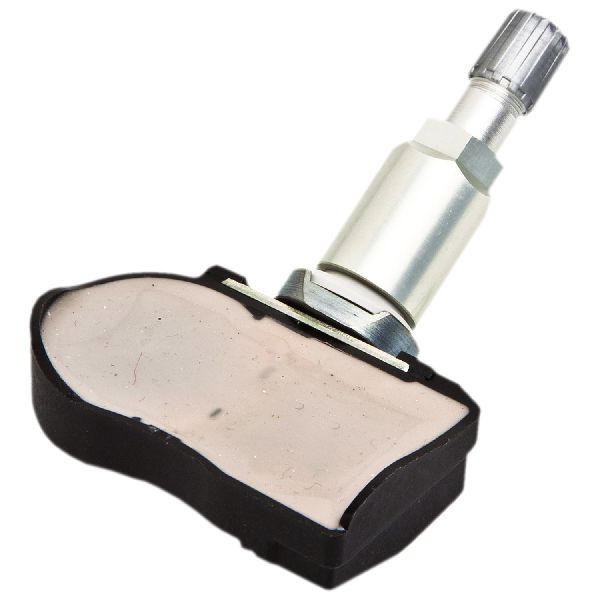
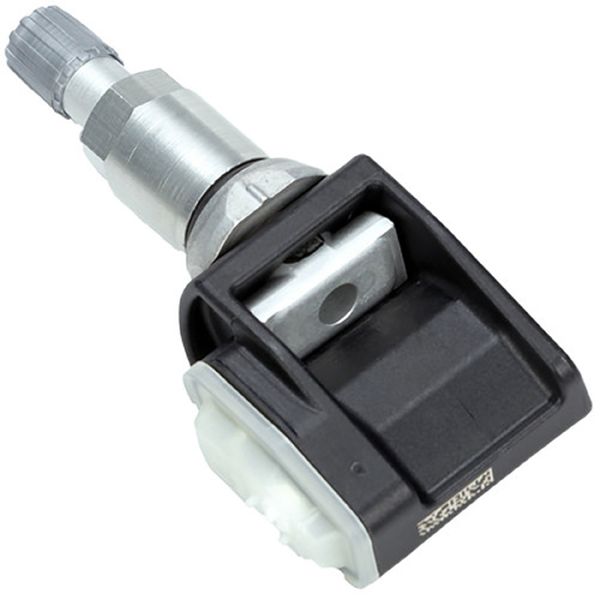
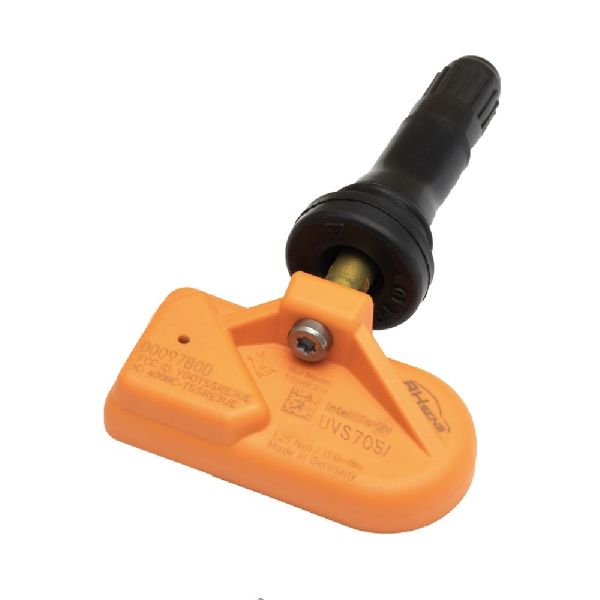
- Tire Pressure Monitoring System (TPMS) Sensor
(OEM #40700-3AN0C)— This is the direct cause of the fault when the internal battery dies or the unit fails. It's the most commonly replaced part for this code. Note that this part number may be superseded by 40700-3AN0B or 40700-3AN1B.
Trusted brands: Schrader, Continental, Hitachi, Denso, VDO
OEM price range: $90-$150
Aftermarket price range: $35-$85
Related Codes That Often Appear With This One
- C1708 — This code indicates a signal loss from the Front Left TPMS sensor. It's common to see multiple TPMS codes appear as the sensor batteries fail around the same time.
- C1709 — This code indicates a signal loss from the Front Right TPMS sensor. It is often recommended to replace all four sensors if they are original, as their batteries will likely fail in succession.
- C1710 — This code indicates a signal loss from the Rear Right TPMS sensor. Seeing it with C1711 points to multiple sensor failures.
Technical Service Bulletins (TSBs) & Recalls
- NTB13088A: Mentions that radio frequency interference can cause a 'No Data' condition for codes C1708, C1709, C1710, and C1711.
- NTB14-119: Although for a 2014 Nissan Frontier, this TSB explicitly defines C1711 as '[NO-DATA]-RL' (Rear Left) and links it to a potential issue with the audio head unit, requiring replacement of all four sensors. This corroborates the wheel location and points to a rare alternative cause.
Platform-Specific Known Issues
- As documented in Nissan TSB NTB13088A, this platform is known to be sensitive to radio frequency interference from accessories plugged into the power outlets, which can cause a 'No Data' condition and trigger codes C1708, C1709, C1710, or C1711.
- A DIY relearn procedure is possible and well-documented by owners. It involves grounding a specific connector under the dash, saving a trip to the dealer for registration after sensor replacement.
Mechanic-Grade Diagnostic Values
- BCM Power Supply and Ground Circuit Check — expected: Battery voltage (approx. 12V) should be present at specific pins with the ignition in different states.. Failure: No voltage or significantly lower voltage at the specified pins indicates a wiring or fuse issue upstream of the BCM.
- BCM Pin M18, Terminal 11 (ACC Power) — expected: Battery voltage with ignition switch ACC or ON.. Failure: No voltage suggests an issue with the ACC relay or associated fuse.
- BCM Pin M18, Terminal 38 (Ignition Power) — expected: Battery voltage with ignition switch ON or START.. Failure: No voltage points to a problem with the ignition switch or main ignition fuse.
- BCM Pin M20, Terminal 70 (Battery Power) — expected: Battery voltage at all times (ignition OFF).. Failure: No voltage indicates a blown fuse or a break in the constant power wire to the BCM.
- TPMS Sensor Signal Frequency — expected: 315 MHz. Failure: A TPMS tool will show 'No Signal' or 'Trigger Failed' if the sensor is not transmitting. RF interference can also mask this signal.
Scan Tool Commands That Help
- Nissan CONSULT-II / CONSULT-III: Work Support > ID Registration — This is the dealership-level method to register new TPMS sensor IDs to the BCM after replacement. The tool guides the technician to activate each sensor in sequence (LF, RF, RR, LR) to write their unique IDs to the vehicle's memory.
- Nissan CONSULT-II / CONSULT-III: Self-Diagnostic Results (for BCM) — To check for any other BCM-related DTCs that might be causing communication issues with the TPMS receiver, which is integrated into the BCM.
- Aftermarket TPMS Tool (e.g., Autel TS508): TPMS Diagnose / Trigger Sensor — This is the primary step to confirm a dead sensor. The tool attempts to wake up and read data (ID, pressure, temp, battery status) from the sensor. If it fails to trigger the rear-left sensor but reads the others, the sensor is confirmed bad.
Wiring & Ground Locations
- BCM (Body Control Module) — Located behind the combination meter (instrument cluster). Access requires removing the cluster.. The BCM integrates the TPMS receiver. All sensor signals are sent wirelessly to the BCM. A fault with the BCM's power, ground, or internal receiver can mimic a failed sensor, although this is rare.
- TPMS Reset Connector — A single-wire white connector, typically found taped to the wiring harness near the OBD-II port under the driver's side dashboard.. This connector is used for the manual DIY relearn procedure. Grounding this wire's pin to the chassis puts the BCM into TPMS learning mode, allowing it to register sensor IDs without a scan tool.
- Ground E72 — A short, braided strap from the passenger-side exhaust manifold heat shield to the firewall.. While not directly for the BCM, this is a critical engine and sensor ground. It is a known failure point that can fray or break, causing a host of difficult-to-diagnose electrical issues due to unstable sensor references. While unlikely to cause a single TPMS code, it's a key ground to check for any widespread electrical gremlins.
Real Owner Repair Stories
- Project:Keira blog post (Nissan Frontier (same platform)) — TPMS fault light after a tire shop damaged the original sensor.
❌ Tried (didn't work) A cheap replacement TPMS sensor purchased from eBay., A Nissan dealership's attempt to program the faulty eBay sensor with their professional TPMS tool failed; the tool could not get a reading from the new sensor.
✅ What actually fixed it Replacing the faulty eBay sensor with a new, genuine OEM Nissan TPMS sensor ($40 through a shop connection). The new OEM sensor was then successfully programmed by the owner using the manual grounding-plug relearn procedure. - The Nissan Path forum user (2006 Nissan Pathfinder) — TPMS light on, unable to complete relearn procedure.
❌ Tried (didn't work) Multiple attempts at the DIY relearn procedure.
✅ What actually fixed it The user bought a cheap external TPMS system with valve cap sensors and a display that plugs into the cigarette lighter. This bypassed the factory system entirely, providing live pressure readings for about $65. This is a workaround, not a fix, and the factory TPMS light remains on.
Model Year Variations Within This Range
- 2005-2007 vs 2008-2012: While the fundamental TPMS system is the same, the 2008 model year introduced the optional 5.6L V8 engine. More importantly, the R51 platform received a minor facelift for 2008 with interior and exterior updates. While no specific changes to the TPMS system itself are documented as part of the facelift, it's a notable point of variation within the generation.
Helpful Videos
We Have This Part in Stock




The information in this article is provided for general reference and educational purposes only. Vehicle specifications, procedures, and part compatibility can vary by production date, trim level, and region. Always consult your vehicle's factory service manual and verify part numbers before purchasing or performing repairs. Safety-critical components such as airbags, seat belts, and braking systems should be installed by a qualified professional.
- Nissan PATHFINDER:
- 🧭 Diagnostic Flowchart
- 🎬 Helpful Videos
- 🛍️ Shop This Part
- What's Unique About the 2005-2012 Nissan PATHFINDER
- Symptoms You May Notice
- Most Likely Causes
- Rare But Worth Checking
- Diagnosis Steps
- Parts You'll Likely Need
- Related Codes That Often Appear With This One
- Technical Service Bulletins (TSBs) & Recalls
- Platform-Specific Known Issues
- Mechanic-Grade Diagnostic Values
- Scan Tool Commands That Help
- Wiring & Ground Locations
- Real Owner Repair Stories
- Model Year Variations Within This Range
- 🎟️ Get 5% Off