

P0513 on 2019-2020 Buick Envision: Incorrect Immobilizer Key Causes and Fixes
On a 2019-2020 Buick Envision, code P0513 means the anti-theft system doesn't recognize the key, which will prevent the car from starting. The most common causes are a dead key fob battery or a faulty key fob. GM has also issued technical service bulletins related to control module software glitches that can cause this code, often after a low battery event like a jump start.
- P0513 on your Envision means you have an anti-theft system problem that will prevent the car from starting.
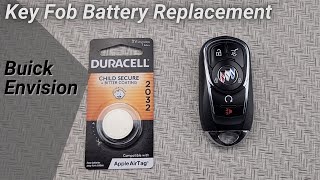
- Before calling a mechanic, try your spare key and replace the battery (CR2032) in the non-working key fob.
- Due to known software issues documented in GM TSBs, the fix may require a special dealer-only software reset, especially if the problem occurred after a battery change or jump-start. Do not let a shop replace the BCM without trying this first.
What's Unique About the 2019-2020 Buick ENVISION
For the 2019-2020 Buick Envision and related GM platforms, P0513 is specifically addressed in multiple Technical Service Bulletins 🎬 Watch: Step-by-step guide to fixing fault code P0513 (TSBs). These bulletins acknowledge customer concerns of no-crank/no-start conditions and key fobs becoming inoperative, often after a low voltage event like a battery replacement or jump start. The TSBs point towards a BCM memory corruption issue that can be resolved with a specific dealer procedure called a "Special Data Reset A" using the GM Service Programming System (SPS), rather than immediate hardware replacement. This highlights a known software sensitivity in the vehicle's security system.
Diagnostic Flowchart
Tap your situation to follow the diagnostic path that matches what you're seeing on this vehicle.
Symptoms You May Notice
- Engine will not crank or start.
- Engine starts and then immediately stalls.
- Key fob functions like lock/unlock do not work (Loss of Active Functions).
- "Key Not Detected" or similar message on the driver information center.
- Flashing security light on the instrument panel.
- Check Engine Light is on.
- Replacing the vehicle's main 12V battery without addressing the underlying security system fault, which is often the trigger for the BCM glitch.
- Replacing the starter motor when the no-crank condition is actually caused by the immobilizer system preventing startup.
- Replacing the Body Control Module (BCM) before performing the software reset procedure outlined in GM TSBs.
Most Likely Causes
- Dead or Weak Key Fob Battery 🔴 High Probability → Shop Vehicle Battery Key fobs require battery power to transmit their security code. This is a common failure point for all vehicles with a passive keyless entry system.
How to confirm: Try using the spare key fob. If the vehicle starts with the spare key, the battery in the primary key is the most likely culprit. You can also try placing the non-working fob in the designated backup pocket in the center console, which can sometimes allow the car to start with a weak fob battery.
Typical fix: Replace the CR2032 battery inside the key fob.
Est. part cost: $2-$10 - Faulty Key Fob 🟡 Medium Probability → Shop Keyless Entry Transmitter The internal transponder chip or circuitry within the key fob can fail from being dropped or from internal component failure, preventing it from communicating with the vehicle.
How to confirm: If replacing the battery does not work and the spare key functions correctly, the original key fob is likely defective.
Typical fix: The key fob must be replaced and programmed to the vehicle by a dealer or a qualified automotive locksmith.
Est. part cost: $75-$250 - Body Control Module (BCM) or Immobilizer Software Glitch 🟡 Medium Probability → Shop Body Control Module GM has issued TSBs (#23-NA-165, #21-NA-277) for this specific issue, indicating a known software problem. This can sometimes be triggered by a low voltage event, like a weak car battery, a jump start, or battery replacement, which can cause memory corruption in the BCM.
How to confirm: This requires a professional diagnosis with a GM-compatible scan tool (GDS2). A technician will check for specific DTCs (like B389A and multiple B392x codes) and follow the diagnostic procedures outlined in the relevant TSBs. The TSBs explicitly warn technicians NOT to replace the BCM before attempting the software fix.
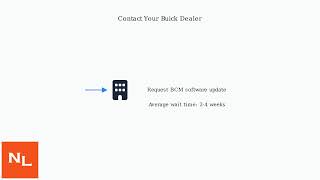
Typical fix: A dealer or qualified shop must perform a special data reset or reprogram the Body Control Module using the GM Service Programming System (SPS), as described in TSB #23-NA-165 and #21-NA-277. This procedure is sometimes called "Special Data Reset A" or involves a special VCI number from GM TAC and is designed to restore the corrupted BCM memory.
Est. part cost: $0 (if under warranty) - $200 (for labor)
Rare But Worth Checking
- Faulty Immobilizer Antenna: → Shop Antenna The antenna ring, typically located around the ignition switch or start button, reads the signal from the key fob. If this component fails, it cannot detect a valid key, even if the key itself is working.
- Wiring Issue: A poor electrical connection or damaged wire between the BCM, immobilizer antenna, and other related components can cause intermittent communication loss and trigger P0513. Poor grounds, such as G103, G105, or G106, can also cause a variety of electrical issues, including no-start conditions.
- Faulty Underhood Fuse Box: On related GM platforms, internal failures within the underhood fuse box have been found to cause intermittent no-crank conditions accompanied by a P0513 code, even when the theft-deterrent system itself is functional.
Diagnosis Steps
- Attempt to start the vehicle with your spare key fob. If it works, the issue is with your primary key.
- If the spare key also fails, replace the battery (typically a CR2032) in one of the key fobs and try again.
- If a new battery doesn't help, try placing the key fob in the vehicle's transmitter pocket and attempt to start the engine. For the 2019-2020 Envision, this pocket is located in the front cupholder. This is a backup method for a low fob battery.
- Check for any active recalls or TSBs related to your vehicle's VIN. Inform the service advisor about TSB #21-NA-277 and #23-NA-165 if the symptoms match.
- If the vehicle still won't start, a professional diagnosis is required. A technician will use a scan tool to read codes from all modules, specifically looking for P0513 in the ECM and B389A/B392x codes in the BCM.
- The technician will follow the diagnostic steps outlined in GM TSBs #23-NA-165 or #21-NA-277 if the symptoms and accompanying codes match.
- This will involve verifying the BCM is a GEN3 or GEN3R module and performing a special BCM programming event using GM's SPS software, which may require contacting the Technical Assistance Center (TAC) for a Vehicle Control Index (VCI) number. This is followed by an immobilizer learn procedure.
Parts You'll Likely Need
- Key Fob Battery
(OEM #CR2032)— This is the most common and simplest fix. The fob's transmitter requires power to communicate with the car.
Trusted brands: Energizer, Duracell
OEM price range: $5-$10
Aftermarket price range: $2-$5 - Key Fob (Transmitter)
(OEM #13532385 (supersedes 13508406, 13584500))— If the internal electronics of the key fob fail, it will need to be replaced and programmed. This part has FCC ID HYQ4AA.
Trusted brands: ACDelco, GM Genuine Parts, Strattec
OEM price range: $150-$250
Aftermarket price range: $75-$150
Related Codes That Often Appear With This One
- B2924, B3925, B3926, B3927 — These manufacturer-specific codes are cited alongside P0513 in GM TSB #21-NA-277 and relate to key fob and immobilizer system communication errors, specifically 'Environment ID' DTCs.
- B389A — TSB #21-NA-277 and #23-NA-163 mention this code may be set in the BCM and is part of the diagnostic criteria for the specific software issue causing P0513.
Technical Service Bulletins (TSBs) & Recalls
- 23-NA-165: Vehicle Will Not Lock and Unlock (Loss of Active Functions) Crank or Start (Loss of Passive Functions) with DTC P0513 Set.
- 21-NA-277 / 21NA277: No Crank, No Start, Quick Start/Stall, Key Fobs Inoperative with DTCs B2924 00, B3925 00, B3926 00, B3927 00, or P0513 set.
Platform-Specific Known Issues
- GM issued TSB #23-NA-165 for 2019-2020 Buick Envision models experiencing a no-crank/no-start condition with P0513 set. This TSB addresses both 'Loss of Active Functions' (remote lock/unlock buttons fail) and 'Loss of Passive Functions' (passive entry and push-to-start fail). The fix involves a specific BCM data reset and key relearn procedure, not module replacement.
- GM TSB #21-NA-277 also covers no-start conditions with P0513 and other B-codes, noting the issue may occur after a low voltage event, jump start, or battery replacement. It explicitly warns dealers not to perform a standard immobilizer learn or replace modules before attempting the special VCI/SPS recovery process, which applies only to specific Gen III BCMs.
Hidden / Shadow Codes Worth Checking
- B389A 00: A Body Control Module (BCM) code that, when current, is a key indicator for the software corruption issue described in TSBs 21-NA-277 and 23-NA-163. The TSB may require disconnecting the battery for 30 seconds to see if this code becomes current. (see via GM GDS2 or equivalent professional scan tool capable of reading manufacturer-specific BCM codes.)
- B3924 00, B3925 00, B3926 00, B3927 00: These are 'Environment ID' DTCs. TSB 21-NA-277 states that having three or more of these codes current in the BCM is a primary condition for its special software recovery procedure to apply. (see via GM GDS2 or equivalent professional scan tool.)
- B3978 00, B3979 00, B3980 00, B3981 00: Alternate 'Environment ID' DTCs also listed in TSB 21-NA-277. The presence of three or more of these codes is also a trigger for the special recovery procedure. (see via GM GDS2 or equivalent professional scan tool.)
Scan Tool Commands That Help
- GM Service Programming System (SPS): BCM Programming A Per Bulletin 23-NA-163 and 23-NA-165 Only — This is a specific programming function to be used when following TSB 23-NA-165 to correct the BCM memory corruption that causes P0513.
- GM Service Programming System (SPS): Body Control Module IMMO Learn with Existing Transponder or Remote Key — This is the immobilizer relearn procedure that must be performed immediately after the special BCM programming to re-associate the existing keys with the now-restored BCM.
- GM Service Programming System (SPS) with special VCI: BCM Recovery/Reprogramming — Per TSB 21-NA-277, if the specific conditions are met (P0513, multiple Environment ID codes), the technician must contact GM TAC to obtain a special two-part VCI (Vehicle Configuration Index) number to perform a unique BCM recovery, rather than a standard programming event.
Wiring & Ground Locations
- Body Control Module (BCM) — Located in the center console, accessible by removing the lower panel on the passenger side footwell.. The BCM is the central module for the immobilizer system. All related wiring and programming centers on this component. The TSBs for P0513 specifically target the BCM for a software reset.
- G103 — Located at the left rear of the engine compartment on the cowl, above the brake booster.. This point grounds the Body Control Module (BCM), Instrument Panel Cluster (IPC), and Data Link Connector (DLC). A poor connection here can directly cause BCM malfunctions and communication errors leading to P0513.
- G105 / G106 — G105 is at the left front of the engine compartment. G106 is often on the front frame cross rail. These are main chassis and engine grounds.. Improper battery grounding is a known cause of various module communication DTCs. TSBs for other issues specifically call out ensuring G105 and G106 are clean and secure to prevent electrical problems that could mimic or cause module glitches.
- OBD-II Port — Located below the dashboard to the left of the steering wheel, often behind a small change drawer or panel.. This is the connection point for the GDS2 scan tool required to diagnose the BCM codes and perform the SPS programming fixes outlined in the TSBs.
Helpful Videos


We Have This Part in Stock



The information in this article is provided for general reference and educational purposes only. Vehicle specifications, procedures, and part compatibility can vary by production date, trim level, and region. Always consult your vehicle's factory service manual and verify part numbers before purchasing or performing repairs. Safety-critical components such as airbags, seat belts, and braking systems should be installed by a qualified professional.
- Buick ENVISION:
- 🧭 Diagnostic Flowchart
- 🎬 Helpful Videos
- 🛍️ Shop This Part
- What's Unique About the 2019-2020 Buick ENVISION
- Symptoms You May Notice
- Most Likely Causes
- Rare But Worth Checking
- Diagnosis Steps
- Parts You'll Likely Need
- Related Codes That Often Appear With This One
- Technical Service Bulletins (TSBs) & Recalls
- Platform-Specific Known Issues
- Hidden / Shadow Codes Worth Checking
- Scan Tool Commands That Help
- Wiring & Ground Locations
- 🎟️ Get 5% Off