

OBD-II Code U1549: LIN Bus Communication Failure
The Ultimate Guide to What U1549 Means, Why It Triggers, and How to Fix It for Good
- On 2014-2020 GM trucks and SUVs, a pinched dash wiring harness (TSB PIT5288H) or a faulty G218 ground (TSB 18-NA-161) causes 90% of U1549 codes.
- Do not drive the vehicle; the U1549 network failure causes sudden engine stalling and complete loss of power steering assist at low speeds.
- Never replace the Body Control Module (BCM) or radio without first physically inspecting the dash wiring harness and G218 ground for damage.
- Expect a parasitic battery drain exceeding 500mA, which will permanently destroy a new battery within weeks if the shorted wiring is not repaired.
- Budget $450 to $1,000 for a professional wiring repair, as fixing the pinched harness requires 3 to 5 hours of meticulous labor under the dashboard.
What Does U1549 Mean?
U1549 indicates a severe communication breakdown on a Local Interconnect Network (LIN) bus. This network connects essential modules controlling the radio, windows, wipers, and keyless entry. The master module (usually the Body Control Module or BCM) has lost contact with one or more slave devices, triggering a cascade of electrical failures.
Technical definition: U1549 is a manufacturer-specific Diagnostic Trouble Code (DTC) indicating a loss of communication on a single-wire Local Interconnect Network (LIN) bus. The master control module sets this code when it fails to receive expected signals from slave modules. This points to a physical network wiring fault (short to ground, short to power, or open circuit) rather than an individual component failure.
Can I Drive With U1549?
No, not recommended Driving is not recommended. You risk sudden and dangerous failures, including engine stalling during low-speed turns or a complete loss of electric power steering assist. This requires significant physical effort to control the vehicle and causes crashes. Additionally, a persistent parasitic battery drain will leave you stranded.
Common Causes
- Pinched or Chafed Dash Wiring Harness (Very Common) — On GM K2XX platform trucks and SUVs (2014-2020), the main instrument panel harness is pinched between a sharp metal mounting bracket and the vehicle's body during factory assembly. Vibration causes the bracket to chafe through the wire insulation, leading to shorts or breaks in the LIN and CAN bus circuits. This is the definitive cause in 90% of cases for these vehicles.
- Poor or Loose Ground Connection (G218) (Common) — A critical ground point for the BCM, G218, is located near the driver's side A-pillar. Factory-installed sound-deadening foam gets trapped under the ground nut, preventing a solid metal-to-metal connection. This high-resistance ground causes intermittent electrical behavior identical to a wiring short, documented in GM TSB 18-NA-161.
- Water Intrusion and Connector Corrosion (Less Common) — Water leaking from a poorly sealed windshield, sunroof drain, or A-pillar grommet drips onto critical wiring connectors like the X223 junction under the dash. This moisture causes pin corrosion and terminal fretting, creating high resistance that disrupts network communication.
- Aftermarket Device Interference (Less Common) — Improperly installed aftermarket devices like remote starters, alarms, or insurance telematics trackers tap into the vehicle's data network wires. Using the wrong wires or poor connections corrupts data signals and brings the entire network down.
- Faulty Control Module (Rare) — An internal failure of a module like the Body Control Module (BCM) or Serial Data Gateway Module (SDGM) is extremely unlikely on affected GM vehicles. Consider this only after definitively ruling out wiring, ground, and connector issues through physical inspection.
- Failed CAN Bus Termination Resistor (Very Rare) — The High-Speed GMLAN data bus is terminated at each end by a 120-ohm resistor. If one resistor fails, the total bus resistance changes from 60 ohms to 120 ohms, disrupting communication across the entire network.
Symptoms
- Dead Battery / Parasitic Drain — The battery repeatedly dies overnight. A short circuit in the communication wiring prevents modules from going to 'sleep', causing a constant power drain exceeding 500mA.
- Loss of Power Steering Assist — The electric power steering suddenly stops working, making the vehicle extremely difficult to steer, especially at low speeds.
- Engine Stalls While Driving — The engine stalls unexpectedly during low-speed maneuvers like turning into a parking space due to loss of communication with powertrain modules.
- Widespread Accessory Failure — The rear power windows, radio, infotainment screen, and keyless entry system stop working simultaneously or behave erratically.
- Multiple Warning Messages (also visible on scanner) — The dashboard displays a flood of warning messages like "Service Stabilitrak," "Service Tire Pressure System," or "No Fob Detected."
Diagnostic Flowchart
Tap your situation to follow the diagnostic path that matches what you're seeing on this code.
Common Fixes & Costs
- Repair and Reroute Pinched Dash Wiring Harness — Parts: $15-$50, Labor: $450-$1000, ~4.0 hr book time (Professional)
- Clean and Secure Ground Connection G218 — Parts: $0-$5, Labor: $150-$200, ~1.0 hr book time (DIY)
- Harness Protection and Rerouting (Preventative) — Parts: $10-$20, Labor: $225-$300, ~1.5 hr book time (DIY)
- Replace Body Control Module (BCM) — Parts: $300-$600, Labor: $150-$300, ~1.2 hr book time (Professional)
- Replace Radio or HMI Module — Parts: $500-$1500, Labor: $100-$250, ~0.8 hr book time (Professional)
Used vs. New Parts: Buying Guide
When a used part is worth it: For misdiagnosed parts replaced in error (BCM, HMI Module), a used part makes sense only if you confirm your original module is faulty after definitively ruling out wiring issues.
Donor-vehicle mileage cap: roughly under 100000 miles for the part to have meaningful remaining life.
Donor quality checklist:
- Verify the exact part number matches; superseded numbers require different programming.
- Ensure the donor vehicle did not have electrical or flood damage.
- Ask for a warranty (typically 30-90 days) and return policy.
Decision logic:
- If The problem is U1549 on an affected GM truck → Do NOT buy a BCM or HMI. Spend the money diagnosing and repairing the known wiring harness issue first.
- If A module (BCM/HMI) is confirmed bad after wiring is fixed → A used module is a cost-effective option, but requires added cost and complexity for VIN programming.
- If The part is simple wiring repair supplies (connectors, tape) → Always buy new, high-quality materials. Do not reuse old connectors or tape.
Warranty tradeoff: Used modules typically have a 30-90 day warranty covering only the part itself. New OEM modules installed at a dealer carry a 1-2 year parts and labor warranty.
Worst-case if a used part fails: $300-$600. If a used BCM requires complex programming that fails, you pay for diagnostic labor and still need to buy another module.
What Happens If You Wait — Timeline
- 0-1 month: Intermittent, single-symptom events. The rear driver's side window fails once, then works fine. A single 'Service Stabilitrak' message appears and vanishes. These are the first signs of wires making momentary contact. (MPG impact: 0%% · Added cost: $0)
- 1-4 months: Symptoms become frequent and grouped. The radio screen goes blank while the rear windows stop working. The parasitic drain begins, weakening the battery and causing slow cranking in the morning. (MPG impact: 0-2%% · Added cost: $0-$50 (Wasted fuel from inefficient charging cycles))
- 4-8 months: The parasitic drain reliably kills the battery overnight, requiring jump starts. Critical failures like loss of power steering or engine stalling during low-speed turns occur, creating a serious safety risk. (MPG impact: 2-5%% · Added cost: $250-$450 (Cost of a new AGM battery prematurely destroyed by repeated deep discharging))
- 8+ months: The vehicle is undrivable. Constant electrical shorts send incorrect voltage signals through the network, damaging the internal circuits of connected modules like the BCM or Radio/HMI. (MPG impact: 5-10%% · Added cost: $800-$2000+ (Cost to replace a damaged BCM or other module on top of the initial wiring repair))
Cost of Not Fixing It
- Immediate (1-7 Days): Stranded due to a dead battery. The parasitic drain caused by the short kills a fully charged battery overnight, requiring jump starts or towing. (Added cost: $75-$250 (Towing, service call))
- Short-Term (1-4 Weeks): Repeated deep-cycling permanently damages the battery, requiring premature replacement. Unpredictable stalling creates a significant safety hazard. (Added cost: $250-$450 (New AGM battery))
- Long-Term (1-6+ Months): Continued electrical stress damages sensitive electronics within the BCM or other modules, turning a wiring repair into a complex module replacement. (Added cost: $800-$2000+ (BCM replacement, further diagnostics))
Diagnosis Steps
- Perform a Full Vehicle DTC Scan
Use a professional OBD-II scanner capable of reading codes from ALL vehicle modules (BCM, SDGM, ABS, etc.). A flood of 'U' (network) codes alongside U1549 confirms a network-wide wiring or ground fault, ruling out a single bad part.
Tools: Professional OBD-II Scanner (Beginner) - Visually Inspect the Dash Harness and Ground G218
Remove the driver's side dash end panel. Look under the dash, above and to the left of the parking brake pedal. Locate the large wiring harness passing a sharp metal bracket and check for crushing or chafing. Simultaneously, inspect ground G218 on the A-pillar support frame for trapped foam insulation under the nut.
Tools: Flashlight, Trim Removal Tool (Intermediate) - Perform the Harness 'Tug Test'
Carefully try to move the dash harness away from the metal bracket. If the harness is stuck and cannot be moved freely, it is pinched, confirming the fault even without visible external damage.
Tools: Hands, Flashlight (Intermediate) - Disconnect the Battery
Before performing any wiring repairs or exposing bare wires, ALWAYS disconnect the negative terminal of the vehicle's battery to prevent electrical shorts and protect control modules.
Tools: Wrench (typically 10mm) (Beginner) - Free the Harness and Expose Wires
Loosen the 10mm bolts holding the metal instrument panel bracket to relieve pressure. Gently pull the harness free. Carefully cut the protective tape with a utility knife to expose the individual wires and inspect each for crushed insulation or broken copper strands.
Tools: Socket Set, Utility Knife (Advanced) - Measure Parasitic Draw
With the vehicle off and doors closed for 20 minutes, measure the amperage draw at the battery. A draw over 85mA confirms modules are not sleeping. Wiggling the pinched harness area while monitoring the ammeter causes the draw to drop to normal, confirming the short's location.
Tools: Multimeter with 10A Amperage Setting (Advanced) - Measure CAN Bus Resistance
With the battery disconnected, measure the resistance between Pin 6 and Pin 14 on the OBD-II port. A healthy network reads 60 ohms. A reading of 120 ohms indicates an open circuit in the main harness; a reading near 0 ohms indicates a short circuit.
Tools: High-Quality Multimeter (Advanced) - Test LIN Bus Voltage
Reconnect the battery and turn the key 'On'. Back-probe the LIN bus wire (often Green/Violet on GM). A healthy bus toggles between ~1V and ~11.5V. A flat line at 0V indicates a short to ground; a steady ~12V indicates a short to power or an open circuit.
Tools: Multimeter with Min/Max, Back-probe kit (Advanced) - Repair and Protect Damaged Wires
Repair broken wires using sealed butt connectors or solder and heat shrink. Wrap the repaired section with Tesa 51608 anti-abrasion tape. Crucially, reroute the harness away from the sharp bracket and secure it with zip ties before re-tightening the bracket.
Tools: Wire Strippers, Butt Connectors, Heat Gun, Tesa Tape, Zip Ties (Advanced)
When This Code Triggers (Freeze-Frame Conditions)
- Fault Trigger Event: Physical Disturbance (The code sets when vibration from driving, closing a door, or going over a bump causes the chafed wires in the harness to momentarily short or open.)
- Battery Voltage: 9V - 11V (During a low-voltage event, such as attempting to start with a battery drained by the parasitic draw, modules fail to initialize correctly and post communication codes.)
- Ambient Temperature: During/After Fluctuation (Temperature swings cause expansion and contraction of the dash components, triggering an intermittent short or open at the damaged harness location.)
- Ignition Status: Key-On or Cranking (The fault is detected when the BCM attempts to communicate with all slave modules during vehicle startup and fails to receive a response.)
Related Codes
- U0140, U0121, U0100, U0077 — Generic network codes for loss of communication with the BCM, ABS, or ECM. A flood of these codes appearing with U1549 confirms a network-wide physical layer fault (wiring, ground) and rules out a single faulty module.
- Bxxxx or Cxxxx codes — Body (B) and Chassis (C) codes are symptoms, not the cause. They point to the end-devices (power windows, Stabilitrak) that stopped working because of the network failure.
- P2138 — An Accelerator Pedal Position (APP) sensor error triggered by the U1549 network failure. The BCM can't validate the pedal's signal, causing a 'Reduced Power' mode as a safety precaution.
- U1549-71 — The '-71' is a GM-specific symptom byte meaning 'Invalid Data.' It indicates a module is online but receiving corrupt information, confirming a data integrity problem on the physical wiring.
Climate & Environmental Factors
- High Humidity / Water Intrusion: Moisture accelerates corrosion. Water entering the cabin through leaking seals drips onto connectors, promoting pin corrosion. It also worsens the electrical connection at ground points like G218 and wicks into chafed wires, causing internal copper corrosion.
- Cold Weather / Temperature Fluctuation: Extreme temperature cycles cause materials to expand and contract, putting additional stress on the pinched wiring harness and accelerating the chafing process against the sharp metal bracket.
How to Talk to a Mechanic About This Code
Say this: "I have a GM vehicle with a U1549 code and multiple other communication codes, plus a parasitic battery drain. I need to schedule a diagnostic appointment to specifically inspect the dash wiring harness for chafing near the driver's side bracket, as detailed in TSB PIT5288H, and also to check ground G218 for a bad connection."
This language immediately signals to the service advisor that you are informed about the common manufacturing flaws causing this exact code. It directs the technician to the most probable cause, preventing them from suggesting an expensive, unnecessary replacement of the BCM.
Avoid saying:
- 'My check engine light is on, can you look at it?'
- 'My radio and windows stopped working.'
- 'Just fix whatever is wrong with it.'
Questions to ask before authorizing the repair:
- Did you physically inspect the harness at the pinch point described in TSB PIT5288H and find damage?
- Can you show me a picture of the chafed or broken wires you found?
- Did you inspect ground G218 to ensure it's clean and tight?
- If you are recommending a module replacement, why have you ruled out the common wiring and ground faults documented in the GM service bulletins?
Where to Take It: Dealer vs Independent vs Chain
- Dealer:
Recommended only if the vehicle is under warranty. For out-of-warranty repairs, an independent shop is a more cost-effective choice.
Best for: Vehicles still under the original bumper-to-bumper warranty., Repairs where a GM-specific tool (MDI/GDS2) is required for programming.
Downsides: Highest labor rates., Defaults to replacing modules if the technician is not familiar with the specific TSBs for this wiring issue. (Typical cost: +50% vs. baseline) - Independent Shop:
Best fit for most owners. An experienced independent technician is familiar with this common GM pattern failure and performs the labor-intensive wiring repair more affordably than a dealer.
Best for: Out-of-warranty vehicles where cost is a factor., Shops that specialize in electrical diagnostics or specific vehicle makes (e.g., GM).
Downsides: Quality and experience vary greatly. It's crucial to find a shop with good reviews for electrical work. (Typical cost: +0% vs. baseline) - Chain Shop:
AVOID. This is not a simple parts-swap repair. It requires specific diagnostic knowledge of GM TSBs and intricate wiring repair skills not typically found at chain shops.
Best for: Simple, routine maintenance like oil changes, tires, and brakes.
Downsides: Technicians lack the specialized diagnostic experience for complex network issues., High risk of misdiagnosis, leading to unnecessary replacement of batteries or alternators. (Typical cost: -10% vs. baseline)
When to Walk Away From the Repair
If the estimated repair cost exceeds 40-50% of the car's current private-party value, pause and consider your options.
- Car worth $18000, fix is $800: Fix it. The repair cost is a small fraction of the vehicle's value and resolves a major reliability and safety issue.
- Car worth $6000, fix is $800: Fix it. Even on an older, higher-mileage truck, this repair is well below the threshold and fixes a known, common flaw.
- Car worth $4000, fix is $2500: Walk away. If the U1549 issue is combined with other major problems (engine, transmission) that drive the total repair cost this high, it's no longer economical.
What Scan Tool You Need for This Code
Minimum: A scanner that reads codes from ALL vehicle modules, not just the engine computer. This includes the Body Control Module (BCM) and ABS.
A cheap, generic code reader only checks for powertrain ('P') codes and misses the flood of 'U' codes from the BCM that are the key indicator of this network fault.
Budget: BlueDriver Pro (~$100) — Performs a full system scan on GM vehicles to read and clear codes from the BCM, ABS, and other modules, confirming the network-wide fault.
Mid-range: Foxwell NT510 Elite (with GM software) (~$180) — Provides full system diagnostics and bi-directional control to command components, verifying if a module is responsive after the wiring repair.
Professional: Autel MaxiCOM MK808BT (~$450) — Offers OE-level, all-system diagnostics, extensive live data graphing, and bi-directional active tests. This is a professional-level tool providing deep insight for complex diagnostics.
Rent vs buy: For a one-time confirmation of the code flood, many auto parts stores rent scanners for free. If you plan to DIY the repair, buying a capable scanner is recommended to verify the fix and properly clear codes.
How to Clear the Code After You Fix It
- Reconnect the negative battery terminal.
- Use a professional OBD-II scan tool to perform a 'Clear All DTCs' command from the BCM or gateway module.
- Perform a GM-specific drive cycle to allow all readiness monitors to run.
Drive cycle (~20 minutes): Cold start (coolant temp below 122°F). Idle for 2-3 minutes with electrical loads on. Accelerate to 55 mph and hold steady speed for 3-5 minutes. Coast down to 20 mph without braking. Accelerate to 55-60 mph and hold steady speed for 5 minutes. Decelerate and stop.
Readiness monitors affected: Comprehensive Component Monitor, EVAP System Monitor, Catalyst Monitor
Before emissions retest: drive at least 50 miles to fully set monitors.
Watch out for:
- Disconnecting the battery clears the code but resets all readiness monitors to 'Not Ready', causing an automatic emissions test failure.
- The code returns immediately upon the next key cycle if the underlying physical wiring fault is not completely repaired.
- Using a basic code reader fails to clear the code from all affected modules; a professional tool is required.
Will This Fail Emissions / State Inspection?
Yes — this code typically fails an OBD-II emissions inspection.
- California: Automatic failure. The presence of a 'U' code and an illuminated Check Engine Light causes the vehicle to fail the OBD-II portion of the smog check.
- New York: Automatic failure. NYVIP3 inspection checks for any active diagnostic trouble codes. A U1549 code results in a failed emissions inspection.
- Texas: Automatic failure in the 17 counties requiring emissions testing. An illuminated Check Engine Light and stored trouble codes are grounds for immediate failure.
Most Commonly Affected Vehicles
- GMC Sierra, Yukon, Yukon XL (2014-2020) — Built on the GM K2XX platform, these are the primary subjects of TSB #PIT5288H for the pinched harness.
- Chevrolet Silverado, Tahoe, Suburban (2014-2020) — Identical to the GMC models, sharing the K2XX platform and the exact same pinched dash wiring harness flaw.
- Cadillac Escalade, Escalade ESV (2015-2020) — The luxury version of the K2XX platform suffers from the identical pinched dash wiring harness flaw.
- Ford F-150 (2015-2022) — Exhibits similar network failure symptoms (code U0140). Common causes include corrosion at ground G401 under the driver's door rail and wiring chafing near the driver's kick panel.
- Chrysler/Dodge/Jeep Grand Cherokee, Ram 1500 (2010-2021) — Experience similar widespread electrical failures due to issues with the Totally Integrated Power Module (TIPM), which disrupts communication across the entire vehicle.
Manufacturer-Specific Notes
- General Motors (Chevrolet, GMC, Cadillac): The U1549 code is overwhelmingly linked to two specific manufacturing defects. TSB #PIT5288H details the pinched dash harness, and TSB #18-NA-161 details the faulty G218 ground. Diagnosis MUST start with these two known points of failure.
- Ford: On F-150s, the equivalent issue (code U0140) is caused by corrosion on ground G401, located on the frame under the driver's door. On 2021-2022 models, a software bug in the Trailer Module (TRM) requires a dealer update per TSB 22-2256.
- Honda: Hondas are highly sensitive to battery voltage. A slightly weak battery causes the computer to lose calibration memory, triggering a cascade of driver-assist warnings. The fix is performing a specific 'Initialization Drive Cycle' above 25 mph.
Real Owner Stories
2014 Chevrolet Silverado - Intermittent chaos
Owner experienced flickering headlights and the truck completely shut off at low speeds while turning, with 'power steering disabled' messages appearing.
Outcome: The actual cause was a poor connection at ground G218. Factory-installed sound-deadening foam was trapped under the ground nut. Cleaning the contact surfaces to bare metal and retightening the nut resolved all symptoms.
Lesson: Identical symptoms to the pinched harness are caused by the faulty G218 ground. Always check both known failure points before assuming a more complex issue.
2015 Silverado - Dealer Misdiagnosis
The entire dashboard went dark and all electronics shut down while driving, often triggered by using a turn signal or the brake pedal.
Outcome: The owner insisted the technician inspect the dash harness per TSB PIT5288H. The technician found several chafed wires, repaired them, and rerouted the harness. The problem was solved for the cost of labor.
Lesson: Be your own advocate. Insist the shop inspects the known TSB-documented wiring and ground issues before replacing any modules.
2019 GMC Sierra at 90K miles - Post-Battery Replacement Woes
After replacing the original battery, a slew of communication codes appeared and could not be cleared with a professional scan tool.
Outcome: The voltage change during the battery swap exacerbated an underlying network fault (the pinched harness). The next step is a dealer visit to diagnose the physical network layer.
Lesson: If communication codes appear immediately after a battery replacement, the voltage interruption likely revealed an underlying wiring problem requiring diagnosis.
How to Prevent This Code From Triggering
- Proactively inspect and protect the dash harness. (Once, especially for 2014-2020 GM K2XX platform owners.) — Even if symptoms aren't present, the harness is likely routed incorrectly. A shop wraps it in anti-abrasion tape and zip-ties it away from the sharp metal bracket to prevent the failure.
- Inspect and clean the G218 ground. (Once, during other interior maintenance.) — Proactively accessing the ground behind the driver's kick panel, cleaning the contact surfaces, and ensuring the nut is tight prevents a future no-start or a cascade of electrical failures.
- Avoid installing aftermarket electronics by tapping into data wires. (During vehicle ownership.) — Improperly tapping into CAN or LIN bus wires introduces noise and instability onto the network, causing communication codes. Professional installation using proper adapters is crucial.
Frequently Asked Questions
Why did my battery die when the code is for communication?
The damaged harness causes a short circuit between wires. This prevents control modules from entering their low-power 'sleep' mode when the vehicle is off. This creates a constant parasitic draw exceeding 500mA that kills the battery overnight.
Can I fix U1549 myself?
Fixing the G218 ground is a manageable DIY task. However, repairing the pinched harness is an advanced job requiring you to remove dash panels and meticulously repair small wires in a tight space. Take the vehicle to an independent shop specializing in electrical diagnostics if you lack wiring repair experience.
The shop wants to replace my BCM for $800. Is that correct?
It is almost certainly incorrect. The BCM is the module reporting the network error; it is rarely the cause. Insist the shop physically inspects the wiring harness per TSB #PIT5288H and checks ground G218 before authorizing module replacement.
Is this problem covered by a recall?
No, this is a Technical Service Bulletin (TSB), not a safety recall. Repairs are only free if your vehicle is under its original bumper-to-bumper warranty. Outside of warranty, the owner pays for the repair.
My truck is in 'Reduced Power' mode with a P2138 code, but also has U1549. Should I replace the gas pedal?
No. The P2138 code is a direct symptom of the U1549 network failure causing the engine computer to trigger a limp mode. Fix the pinched wiring harness first, and the P2138 code will resolve itself.
Why do my radio, windows, and power steering all fail at the same time?
These systems are controlled by different computers communicating over the same network. When the wiring for that network is damaged, it cuts the data cable connecting them. They all stop communicating at once, causing simultaneous failures.
What is the difference between a TSB and a recall?
A recall is issued for a safety-related defect and the manufacturer is legally required to fix it for free. A TSB informs dealers about a common problem and provides a standardized repair procedure, but is only free under warranty.
The dealer fixed the harness, but the problems came back. What now?
First, inspect ground G218, as a bad ground causes identical symptoms and is often overlooked. Second, the initial wire repair may have been incomplete or the harness was not properly rerouted away from the sharp bracket, allowing new damage.
Key Takeaways
- On 2014-2020 GM trucks and SUVs, a pinched dash wiring harness (TSB PIT5288H) or a faulty G218 ground (TSB 18-NA-161) causes 90% of U1549 codes.
- Do not drive the vehicle; the U1549 network failure causes sudden engine stalling and complete loss of power steering assist at low speeds.
- Never replace the Body Control Module (BCM) or radio without first physically inspecting the dash wiring harness and G218 ground for damage.
- Expect a parasitic battery drain exceeding 500mA, which will permanently destroy a new battery within weeks if the shorted wiring is not repaired.
- Budget $450 to $1,000 for a professional wiring repair, as fixing the pinched harness requires 3 to 5 hours of meticulous labor under the dashboard.
Shop the Parts Behind U1549
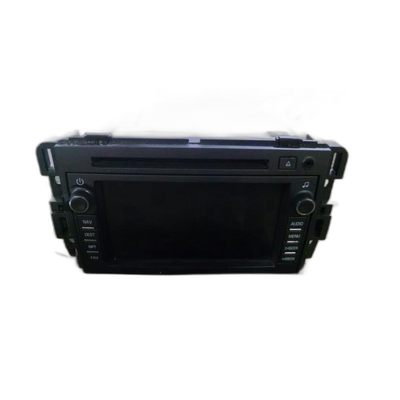
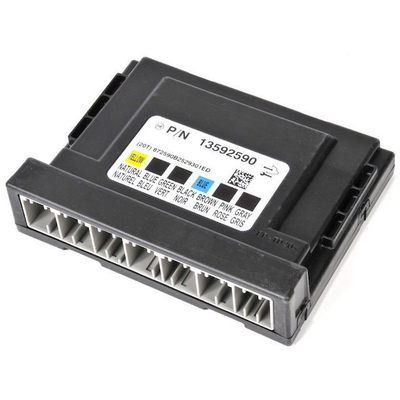
Below are the parts most often responsible for code U1549, ranked by how frequently each one is the actual culprit (per the diagnosis above). Tap any to see what we have for your vehicle.


The information in this article is provided for general reference and educational purposes only. Vehicle specifications, procedures, and part compatibility can vary by production date, trim level, and region. Always consult your vehicle's factory service manual and verify part numbers before purchasing or performing repairs. Safety-critical components such as airbags, seat belts, and braking systems should be installed by a qualified professional.
- 🧭 Diagnostic Flowchart
- 🛍️ Shop This Part
- What Does U1549 Mean?
- Can I Drive With U1549?
- Common Causes
- Symptoms
- Common Fixes & Costs
- Used vs. New Parts: Buying Guide
- What Happens If You Wait — Timeline
- Cost of Not Fixing It
- Diagnosis Steps
- When This Code Triggers (Freeze-Frame Conditions)
- Related Codes
- Climate & Environmental Factors
- How to Talk to a Mechanic About This Code
- Where to Take It: Dealer vs Independent vs Chain
- When to Walk Away From the Repair
- What Scan Tool You Need for This Code
- How to Clear the Code After You Fix It
- Will This Fail Emissions / State Inspection?
- Most Commonly Affected Vehicles
- Manufacturer-Specific Notes
- Real Owner Stories
- 2014 Chevrolet Silverado - Intermittent chaos
- 2015 Silverado - Dealer Misdiagnosis
- 2019 GMC Sierra at 90K miles - Post-Battery Replacement Woes
- How to Prevent This Code From Triggering
- Frequently Asked Questions
- Why did my battery die when the code is for communication?
- Can I fix U1549 myself?
- The shop wants to replace my BCM for $800. Is that correct?
- Is this problem covered by a recall?
- My truck is in 'Reduced Power' mode with a P2138 code, but also has U1549. Should I replace the gas pedal?
- Why do my radio, windows, and power steering all fail at the same time?
- What is the difference between a TSB and a recall?
- The dealer fixed the harness, but the problems came back. What now?
- Key Takeaways
- 🎟️ Get 5% Off