

U2109 on 2014-2018 Jaguar F-TYPE: 'SOS Limited' and Telematics Battery Fixes
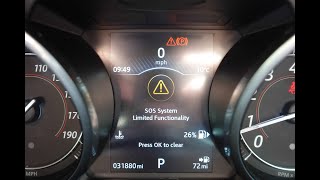
On a 2014-2018 Jaguar F-TYPE, code U2109 almost always means the internal backup battery for the Telematics Control Unit (TCU) has failed, triggering an 'SOS Limited' warning on the dashboard. This is a common wear-and-tear item with a finite lifespan. The fix is to replace this small, relatively inexpensive battery located between the seats.
- Code U2109 on an F-TYPE is almost certainly caused by a failed or discharged telematics backup battery.
- The main symptom is the 'SOS Limited functionality' warning message on the dashboard.
- Before replacing the battery, try driving the car for an hour to see if the battery simply needs recharging, then clear the code.
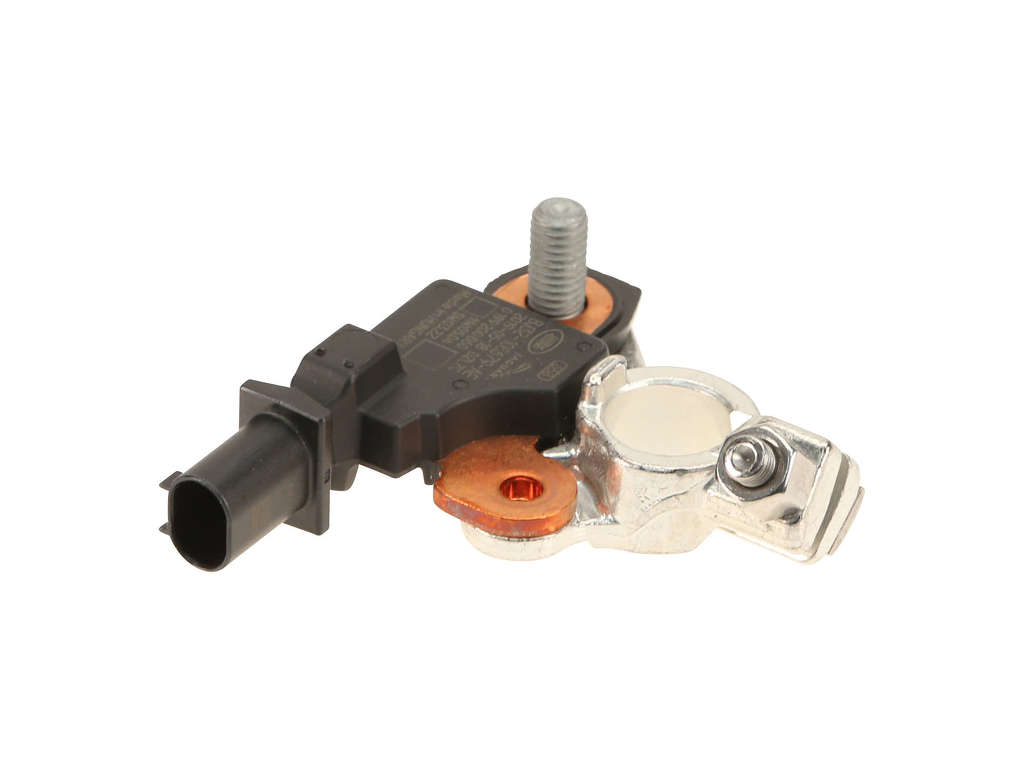
- The replacement part is the battery itself (T2R23864), not the entire telematics module, making for an inexpensive fix.
- The repair is DIY-friendly, located under a trim panel between the seats, though you may need to loosen the TCU module to access the battery door.
What's Unique About the 2014-2018 Jaguar F-TYPE
The Jaguar F-TYPE, like many modern JLR vehicles, has a sophisticated telematics system for its InControl and emergency services. This system's reliance on a small, consumable backup battery makes the U2109 code a very common and well-documented issue as these vehicles age. Jaguar even issued a Technical Service Bulletin (SSM73298) acknowledging that the battery can have a low state of charge even on new vehicles, causing this exact code and the corresponding 'SOS Limited functionality' message. The location of the TCU between the seats makes for a relatively easy DIY replacement compared to other JLR models where it can be buried under rear seats.
Diagnostic Flowchart
Tap your situation to follow the diagnostic path that matches what you're seeing on this vehicle.
Symptoms You May Notice
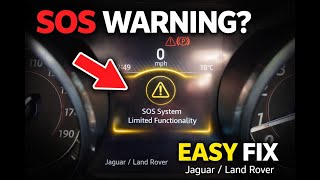
- "SOS Limited functionality" or "SOS System Not Available" message in the instrument cluster.
- The orange 'i' (information) symbol may remain lit on the dash.
- Inability to use the vehicle's emergency call (SOS) or breakdown call (B-Call) buttons.
- Failure to activate telematics services, sometimes during a new vehicle's Pre-Delivery Inspection (PDI).
- On some models, the car may fail to start if the TCU is completely disconnected.
- Replacing the main 12V vehicle battery. While a weak main battery can contribute to the backup battery discharging, it is rarely the root cause of a persistent U2109 code if the main battery otherwise functions correctly.
- Replacing GPS antennas. Some dealers have attempted this repair first, only for the fault to return, indicating the root cause was the battery.
Most Likely Causes
- Failed Telematics Backup Battery 🔴 High Probability → Shop Vehicle Battery This small lithium-ion battery has a finite lifespan of 5-8 years and fails from normal aging and charge cycles, much like a cell phone battery. It is a known consumable part.
How to confirm: The presence of code U2109-09 is a direct indicator. The battery is located inside the TCU module, which on the F-TYPE is found between the seats, under a small trim panel. A diagnostic tool may report the battery voltage as below the required threshold (e.g., under 3.9V).
Typical fix: Replace the telematics backup battery. The OEM part number is T2R23864. 🎬 See how to replace the telematics battery in this video. Some have a 3-wire connector, so it's wise to visually inspect the original before ordering.
Est. part cost: $30-$80, with some owners reporting higher prices from dealers. - Discharged Telematics Backup Battery 🟡 Medium Probability → Shop Vehicle Battery If the main vehicle battery is disconnected or goes flat, the telematics backup battery can become deeply discharged, triggering the fault even if the battery itself isn't faulty yet. This is also common on new vehicles that have been in storage, as noted in TSBs.
How to confirm: As per TSB SSM73298 and SSM75647, the first step is to attempt to recharge the battery. This involves fully charging the main 12V battery and then running the engine (not just ignition on) for at least 40-60 minutes, then clearing the code.
Typical fix: Fully charge the main vehicle battery, then drive the car for an hour to allow the system to recharge the telematics battery. Clear the code. If it returns promptly, the battery has failed and needs replacement.
Est. part cost: $0 - Faulty Telematics Control Unit (TCU) ⚪ Low Probability → Shop Telematics Interface Module While less common, the TCU module itself can fail electronically. This should only be considered after battery replacement has failed.
How to confirm: If replacing the backup battery and attempting a recharge cycle does not clear the code, the module itself is the next likely culprit. This requires advanced diagnostics with a JLR-specific tool like SDD/Pathfinder to confirm.
Typical fix: Replace the entire Telematics Control Module and have it programmed by a dealer or specialist. The old module must be deregistered and the new one registered with JLR's systems.
Est. part cost: $550-$800 plus programming.
Rare But Worth Checking
- Water Ingress at Roof 'Shark Fin' Antenna: The roof antenna houses the cellular and GPS components for the telematics system. If the seal fails, water can leak in and corrode the antenna's circuit board or connectors, causing communication issues that can sometimes trigger this fault. Check for any dampness in the headliner. This is mentioned in multiple forum discussions as a secondary possibility if a battery fix fails.
- Software Glitch / Reset Needed: Jaguar's TSB (SSM73298) mentions updating the TCU software as part of the diagnostic process. Some owners report success by performing a system reset after battery replacement by holding the overhead 'B-Call' (wrench icon) or SOS button for 10-15 seconds until the indicator light changes its blinking pattern.
- Disconnected Center Speaker (2018+ models): A forum user with a 2018 model noted that from MY2018 onwards, the system uses the center dashboard speaker for SOS calls and runs a continuity check. If this speaker is disconnected (e.g., during other dash work), it can reportedly trigger the 'SOS Limited Functionality' message.
Diagnosis Steps
- Confirm the primary symptom is the 'SOS Limited functionality' message on the dash.
- Use a JLR-compatible scanner to confirm the presence of code U2109, specifically the sub-code U2109-09.
- First, attempt to recharge the system per JLR TSBs. Ensure the main vehicle battery is fully charged. Start and run the engine for at least 40-60 minutes (ignition-on only may not be sufficient on some models).
- Clear the trouble code. If the code and message do not return after a drive cycle, the issue was a discharged battery.
- If the code returns, the backup battery has likely failed. Purchase a replacement battery (Part No. T2R23864). Visually confirm your existing battery's wire/connector count before ordering.
- Locate the TCU. On both the F-TYPE Coupe and Convertible, remove the trim panel located between the seats, above the center cubby. 🎬 Watch this walkthrough to see how to access the TCU. Pull from the top sides to release clips, then lift up.
- The TCU is the module visible under this panel. Remove the single T10 Torx screw on the small access door to expose the battery.
- On some F-TYPEs, a structural cross-car brace may block the access door. If so, loosen the three 10mm nuts holding the TCU bracket (two on one side, one on the other) to tilt the module for clearance. A deep well 10mm socket is recommended.
- Carefully disconnect the old battery's wiring plug by pinching the latch and remove it. Install the new battery.
- Reassemble everything in reverse order. After starting the car, the warning message should be gone. Some guides suggest pressing the overhead B-Call (wrench) or SOS button for 10-15 seconds to reset the system and confirm function.
Parts You'll Likely Need
- Telematics Backup Battery
(OEM #T2R23864)— This is the direct cause of code U2109-09. It is a consumable part that fails due to age.
Trusted brands: Jaguar (OEM), Aftermarket from sources like Cut Rate Batteries
OEM price range: $40-$80.
Aftermarket price range: $25-$40.
Technical Service Bulletins (TSBs) & Recalls
- SSM73298 / SSM73299: Addresses DTC U2109-09 ('Back up Battery Component Failures') and the 'SOS Limited functionality' message, noting the cause as the backup battery having a low state of charge. The recommended initial action is to clear the DTC and run the vehicle (or have ignition on with a battery maintainer) for 40 continuous minutes to recharge the battery before considering replacement.
- SSM75647: A similar TSB for Land Rover models that reiterates the diagnostic process. It specifies checking if the backup battery voltage is below 3.9V and explicitly states the engine must be running to charge it, as 'Ignition On' will not.
Platform-Specific Known Issues
- As documented in Jaguar Technical Service Bulletin SSM73298, this code is a known issue related to the telematics backup battery having a low state of charge, sometimes occurring even during the pre-delivery inspection of a new vehicle.
- On some F-TYPE models, a structural cross-car brace partially obstructs the battery access door on the TCU, requiring the technician to loosen the entire module's mounting nuts (three 10mm nuts) to gain enough clearance to replace the battery.
Mechanic-Grade Diagnostic Values
- TCU Backup Battery Nominal Voltage — expected: 3.6V. Failure: A significantly lower voltage reading after a full charge cycle, or inability to hold a charge above the system's minimum threshold (approx. 3.8V-3.9V).
Hidden / Shadow Codes Worth Checking
- U2109-09: This is the specific sub-code for 'Back up Battery Component Failures' logged in the Telematics Control Module (TCU). While not truly hidden, it is module-specific and may not be visible to generic OBD-II scanners that only read powertrain codes. (see via A JLR-specific diagnostic tool (like SDD or Pathfinder) or a high-end scanner with JLR software is required to reliably read DTCs from the TCU.)
Scan Tool Commands That Help
- JLR SDD / Pathfinder: Update TCU Software — Per TSB SSM73298, this should be attempted as a first step, especially on new vehicles or if the fault appears after service. It ensures the module has the latest logic for managing the battery's state of charge before replacing parts.
- JLR Pathfinder: ECU Diagnostics -> Telematic control unit module -> ECU Functions -> Telematics server communication check — This function can be used to verify if the TCU is able to communicate with the JLR servers, helping to diagnose whether the fault lies with the module's internal components (like the battery) or its external communication path.
- Manual Procedure (No Scan Tool): TCU Reset via B-Call Button — After replacing the TCU backup battery, this procedure is often required to clear the 'SOS Limited' message. With the ignition on (engine off), press and hold the overhead 'B-Call' (wrench/spanner icon) button until the amber indicator light changes from a fast blink to a slow blink, then release.
Real Owner Repair Stories
- JaguarForums.com user 'DJS' (2016 F-Type R Coupe) — 'SOS Limited Functionality' warning message.
✅ What actually fixed it The user replaced the TCU backup battery. Critically, a structural cross-car brace blocked the battery access door. The fix required loosening the three 10mm nuts holding the TCU mounting bracket (using a deep well socket) to tilt the module and gain clearance. After battery replacement, the warning was resolved. - JaguarForums.com user 'giblet' (2018 F-Type R) — 'SOS Limited Functionality' message persisted even after replacing the TCU backup battery.
❌ Tried (didn't work) Replacing the TCU backup battery (OEM Part LR089861)., Clearing codes with an OBDLink MX+ scanner (which couldn't see the OEM code).
✅ What actually fixed it The user was in the middle of a speaker upgrade and had not yet connected the center dashboard speaker. It was discovered that on MY2018+ vehicles, the TCU performs a continuity check on this speaker, as it's used for telematics calls. Connecting the center speaker resolved the warning message. - YouTube channel 'Louis M' (Jaguar F-Type (year not specified)) — 'SOS limited function' warning on the dashboard.
❌ Tried (didn't work) Ignoring the light, which eventually led to the InControl Remote app ceasing to communicate with the car.
✅ What actually fixed it Replaced the TCU backup battery (Part T2R23864) purchased from a Jaguar dealer. After replacement, performed a manual reset by pressing and holding the overhead 'B-Call' (spanner) button until the indicator light blinked slowly. This cleared the error message.
OEM Part Supersession History
T2R23864 (Jaguar)→LR089861 (Land Rover)— Cross-compatibility
Heads up: These part numbers are often cited as interchangeable for the same component. However, the most critical variation is physical: some batteries use a 2-wire connector while others use a 3-wire connector. The third wire is typically for temperature monitoring. It is essential to visually inspect the original battery's connector before ordering a replacement to ensure compatibility.
Model Year Variations Within This Range
- 2018+: On models from MY2018 onwards, the telematics system uses the center dashboard speaker for SOS calls. The TCU runs a continuity check on this speaker. If the speaker is disconnected or has failed, it will trigger the 'SOS Limited Functionality' warning, even if the backup battery is perfectly fine.
- 2014-2018 (variable): The presence of a structural cross-car brace that can obstruct the TCU battery access door appears to be inconsistent across the model years. On vehicles with this brace, the entire TCU module must be unbolted (three 10mm nuts) and tilted to provide clearance for battery replacement.
- Approx. 2014-2017: Early F-TYPE models were equipped with 3G cellular hardware in the TCU. Due to the shutdown of 3G networks, the InControl remote app features may cease to function. This requires a complete TCU module replacement with a newer 4G-capable unit to restore functionality, which is a separate issue from the U2109 battery fault but can cause related symptoms.
Helpful Videos
We Have This Part in Stock


The information in this article is provided for general reference and educational purposes only. Vehicle specifications, procedures, and part compatibility can vary by production date, trim level, and region. Always consult your vehicle's factory service manual and verify part numbers before purchasing or performing repairs. Safety-critical components such as airbags, seat belts, and braking systems should be installed by a qualified professional.
- Jaguar F-TYPE:
- 🧭 Diagnostic Flowchart
- 🎬 Helpful Videos
- 🛍️ Shop This Part
- What's Unique About the 2014-2018 Jaguar F-TYPE
- Symptoms You May Notice
- Most Likely Causes
- Rare But Worth Checking
- Diagnosis Steps
- Parts You'll Likely Need
- Technical Service Bulletins (TSBs) & Recalls
- Platform-Specific Known Issues
- Mechanic-Grade Diagnostic Values
- Hidden / Shadow Codes Worth Checking
- Scan Tool Commands That Help
- Real Owner Repair Stories
- OEM Part Supersession History
- Model Year Variations Within This Range
- 🎟️ Get 5% Off