

U2109 on 2017-2019 Land Rover Range Rover Evoque: 'SOS Limited Functionality' Fix
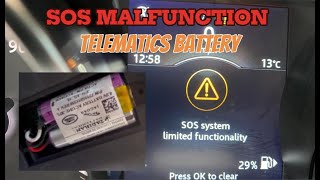
This code almost always means the small, internal backup battery for the Telematics Control Unit (TCU) has failed. This triggers the 'SOS Limited Functionality' warning. The fix is to replace this battery, which is a moderately difficult DIY job costing around $25-$60 for the part. The battery is a known wear item with a 3-5 year life.
- Code U2109-09 with an 'SOS Limited Functionality' warning means the telematics backup battery has failed.
- This is a common issue on 2017-2019 Evoque models and many other JLR vehicles due to the battery's normal 3-5 year service life.
- Before replacing, run the engine for 60 minutes to see if the battery will recharge, as recommended by multiple TSBs.
- The fix is to replace the battery itself (Part No. LR089861), not the entire Telematics Control Unit.
- The TCU is located in the rear cargo area behind the driver's side (left) trim panel.
- A JLR-specific scan tool may be required to read and clear the code properly.
What's Unique About the 2017-2019 Land Rover RANGE ROVER EVOQUE

On the 2017-2019 Evoque and other Jaguar Land Rover (JLR) models of this era, the TCU backup battery has a finite service life, often failing after 3-5 years. This is a common maintenance issue, not necessarily a defect. 🎬 Watch: A quick overview of the SOS warning and fix. Unlike some modules where the entire unit must be replaced, Land Rover designed the TCU with a separately replaceable battery (Part No. LR089861), making the repair more affordable than a full module replacement. This issue is widespread across many JLR vehicles from the period.
Diagnostic Flowchart

Tap your situation to follow the diagnostic path that matches what you're seeing on this vehicle.
Generation note: The 2017-2019 model years fall within the first generation (L538) of the Range Rover Evoque. However, this issue is extremely common across the entire JLR lineup from roughly 2015 onwards, including the second generation Evoque (L551), and various Range Rover, Discovery, and Jaguar models that use the same telematics module and battery.
Symptoms You May Notice

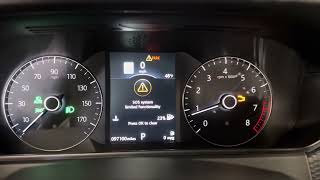
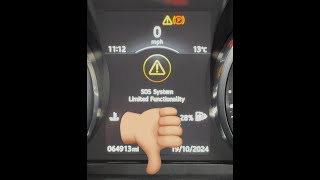
- 'SOS Limited Functionality' message displayed on the instrument cluster.
- The start-stop system may be disabled.
- Inability to activate telematics services.
- A small orange 'i' icon may remain lit on the instrument cluster after dismissing the main warning.
- Inability to use InControl remote features from the smartphone app.
- Replacing the main vehicle battery. While a weak main battery can cause many electrical issues and can lead to the discharge of the TCU battery, the specific code U2109-09 points directly to the small, dedicated battery inside the telematics module.
Most Likely Causes

- TCU Backup Battery Failure 🔴 High Probability → Shop Vehicle Battery The internal lithium or NiMH battery has a natural service life of 3-5 years and simply wears out over time, similar to a cell phone battery. Its health can be checked with a JLR-specific scanner; a voltage reading below 3.9V often indicates failure.
How to confirm: Confirm code U2109-09 is stored in the TCU module using a compatible OBD-II scanner (generic scanners may not read TCU codes). The warning message on the dash is a strong indicator. If a new battery fixes the issue, the diagnosis is confirmed.
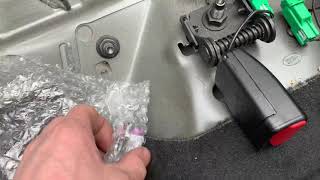
Typical fix: Replace the TCU backup battery. This involves accessing the TCU in the rear cargo area, removing a small cover held by a T10 Torx screw, and swapping the battery pack.
Est. part cost: $25-$60
Rare But Worth Checking
- Discharged TCU Battery After Main Battery Failure: → Shop Vehicle Battery If the main vehicle battery was recently dead or disconnected, the TCU backup battery may have fully discharged. TSBs SSM73299 and SSM74189 suggest running the engine for at least 60 minutes to see if the TCU battery recharges and the code clears before replacing the part. Note: TSB SSM75647 states the engine must be running; ignition-on alone will not charge the battery.
- Faulty Telematics Control Unit (TCU): → Shop Telematics Interface Module In rare cases, the TCU itself may have a fault preventing it from charging or recognizing the battery. If a new battery does not resolve the issue, and a system reset procedure fails, the module itself may be the problem.
- Software Glitch: In some instances, particularly on newer models, a software glitch can falsely trigger the warning. A dealer or specialist with JLR Pathfinder or SDD software may need to update the TCU software. TSB SSM73298 mentions this for Jaguar models.
Diagnosis Steps
- Confirm the presence of the 'SOS Limited Functionality' message on the dash.
- Use a JLR-specific scanner (like iCarsoft LR series, GAP IIDTool, or dealer-level SDD/Pathfinder) to verify that U2109-09 is stored in the Telematics Control Unit (TCU). Generic scanners may not see this code.
- First, attempt to recharge the battery. Per TSB SSM75647, start and run the engine continuously for at least 60 minutes. Ignition-on is not sufficient. After driving, clear the codes and see if the warning returns. If it does, proceed with replacement.
- Locate the TCU. In the Range Rover Evoque, it is located in the rear cargo area, behind the driver's side (left side) trim panel, often near the C-pillar. For the convertible model, it is behind the rear seat on the right-hand side.
- Remove the necessary trunk trim panels to access the TCU module. This may involve removing the loadspace floor, the tailgate sill plate, and the side panel. Videos for trim removal on the Evoque are available and recommended to avoid breaking clips.
- Identify the TCU module. It is a black box with several wiring connectors.
- Identify the small cover on the TCU held in by a single T10 Torx screw.
- Remove the T10 screw and cover to expose the battery pack.
- Carefully unplug the old battery and plug in the new one. The connector is small and requires care.
- Reassemble the TCU cover and vehicle trim panels.
- Clear the DTCs with a scanner. For some JLR models, a specific reset procedure is required: with the ignition on, press and hold the 'wrench' or assistance button (NOT the red SOS button) until the overhead console light blinks rapidly, then slows down. Release the button. If the light persists, a hard clear with a JLR-specific scanner may be required, as the code can be stored as a 'hard fault' that doesn't clear with a simple reset.
Parts You'll Likely Need
- Telematics Control Unit Backup Battery
(OEM #LR089861)— This is the direct cause of the fault code. It is a small, self-contained battery pack that fails with age. The original battery is often a Varta 3/V80H NiMH 3.6V 80mAh or a similar Lithium-Ion pack.
Trusted brands: Genuine Land Rover, Varta (OEM cell manufacturer)
OEM price range: $45-$60
Aftermarket price range: $25-$40
Technical Service Bulletins (TSBs) & Recalls
- SSM74189: Confirms that DTC U2109-09 (Back up Battery Component Failures) stored in the TCU is the cause for the 'SOS Limited Functionality' message and recommends a 60-minute charge cycle after clearing codes.
- SSM73299: An earlier bulletin for 2017 models describing the same issue and providing an initial action to try and recharge the battery by running the vehicle for 40 minutes.
- SSM75647: States that the cause is the TCU using the backup battery when the main 12V battery is flat. It explicitly warns 'Do not replace the Back-up Battery' until a 60-minute charge cycle with the *engine running* has been attempted.
- SSM73298: A parallel TSB for Jaguar models (F-Pace, F-Type, XE, XF, XJ) with the same U2109-09 code, confirming the issue is platform-wide and also recommending a software update and recharge attempt.
Platform-Specific Known Issues
- Land Rover issued Technical Service Bulletin (TSB) #SSM74189 which directly addresses this issue. It notes that the 'SOS Limited Functionality' message is accompanied by DTC U2109-09 and is caused by a failure of the TCU backup battery.
- An earlier TSB, #SSM73299, also describes the same issue for 2017 models and suggests that the initial cause could be a low state of charge, recommending a 40-60 minute drive to attempt a recharge before replacing parts.
- A later TSB, #SSM75647, clarifies that for charging to occur, the engine must be running, not just the ignition on. It also specifies checking the battery voltage with a diagnostic tool; if below 3.9V, charging is recommended.
Mechanic-Grade Diagnostic Values
- TCU Backup Battery Voltage — expected: Above 3.9V. Failure: A reading below 3.9V indicates a low state of charge. Per TSB SSM75647, the battery should be charged for 60 minutes with the engine running before being condemned.
- TCU Backup Battery Capacity — expected: 70-80mAh. Failure: The battery has chemically degraded and can no longer hold a sufficient charge to pass the TCU's internal self-test.
Hidden / Shadow Codes Worth Checking
- U2109-09: This is the primary sub-code for 'Back up Battery Component Failures'. (see via While not technically hidden, this code is stored in the Telematics Control Unit (TCU) and is often invisible to generic OBD-II scanners. A JLR-specific tool (Pathfinder, SDD, GAP IIDTool, iCarsoft LR) is required to read DTCs from this module.)
Scan Tool Commands That Help
- JLR Pathfinder: ECU Diagnostics -> Telematics Control Module (TCU) -> Check Back-up Battery voltage — To read the live voltage of the TCU backup battery to determine if it is below the 3.9V threshold, as recommended by TSB SSM75647.
- JLR Pathfinder: Configure new telematics control module — This is a mandatory service routine to be performed only when the entire TCU module has been replaced with a new unit. It programs the vehicle's configuration file (CCF) and VIN into the blank module.
- GAP IIDTool / iCarsoft LR Series: TCU -> Clear DTCs — After replacing the TCU battery, the U2109-09 fault may be stored as a 'hard code'. A simple battery disconnect or overhead console reset may not clear it. A bidirectional tool is needed to send a specific clear command directly to the TCU module.
Wiring & Ground Locations
- TCU Module — In the rear cargo area, behind the driver's side (left side) trim panel. On convertible models, it is located behind the rear seat on the right-hand side.. This is the physical location of the module that stores the fault and contains the backup battery that needs to be replaced.
Real Owner Repair Stories
- JaguarForums.com user 'genp729' (2018 Jaguar F-Type R (uses similar TCU and battery part LR089861)) — 'SOS Limited Functionality' message on the dash.
❌ Tried (didn't work) Replacing the TCU backup battery with a new OEM part., Disconnecting/reconnecting the main vehicle battery., Using a generic OBDLink MX+ scanner to clear codes (it could not see the OEM code).
✅ What actually fixed it The user discovered that on MY18+ cars, a disconnected center dash speaker can cause the fault. The final fix was a sequence of: reconnecting the center speaker, performing the overhead console 'wrench button' reset, AND disconnecting the main vehicle battery. The combination of these three actions cleared the fault. - Reddit user on r/Jaguar (Jaguar F-Pace) — Persistent 'SOS limited functionality' warning.
❌ Tried (didn't work) Dealer performed a software reflash (worked for 4-6 weeks)., Dealer replaced 'both' GPS antennas (worked for 3 months).
✅ What actually fixed it The issue returned after professional repairs. The community consensus was that the dealer misdiagnosed the issue and the actual, common cause was the failing TCU backup battery, which had not been replaced.
When the Usual Fixes Don't Work
- In a documented case on a similar JLR platform, replacing the TCU backup battery (LR089861) did not resolve the 'SOS Limited Functionality' warning. The fault was stored as a persistent 'hard code' that was invisible to a generic OBD-II scanner and could not be cleared by disconnecting the main battery. The final fix required using a JLR-specific bidirectional scanner (an iCarsoft V3.0) to directly access the TCU and force-clear the stored DTC. This proves that for some vehicles, the repair is a two-step process: mechanical battery replacement followed by an electronic reset with a capable scan tool.
OEM Part Supersession History
LR089861→LR132077— Standard part number update by JLR.
Heads up: No known incompatibilities; the parts are interchangeable. The Jaguar equivalent part number is T2R23864.
Model Year Variations Within This Range
- 2018-2019: Models from MY2018 onwards may use the center dashboard speaker for SOS calls. The TCU in these vehicles performs a continuity check on the speaker, and if it is disconnected or has failed, it can trigger the 'SOS Limited Functionality' warning, even if the TCU battery is good.
- 2017 vs 2018+: Official TSBs evolved. An early TSB for 2017 models (SSM73299) suggested a 40-minute charge cycle. Later TSBs (SSM74189, SSM75647) applicable to the full range specify a 60-minute charge cycle that *must* be done with the engine running and require the use of the newer Pathfinder diagnostic software.
Helpful Videos

We Have This Part in Stock



The information in this article is provided for general reference and educational purposes only. Vehicle specifications, procedures, and part compatibility can vary by production date, trim level, and region. Always consult your vehicle's factory service manual and verify part numbers before purchasing or performing repairs. Safety-critical components such as airbags, seat belts, and braking systems should be installed by a qualified professional.
- Land Rover RANGE ROVER EVOQUE:
- 🧭 Diagnostic Flowchart
- 🎬 Helpful Videos
- 🛍️ Shop This Part
- What's Unique About the 2017-2019 Land Rover RANGE ROVER EVOQUE
- Symptoms You May Notice
- Most Likely Causes
- Rare But Worth Checking
- Diagnosis Steps
- Parts You'll Likely Need
- Technical Service Bulletins (TSBs) & Recalls
- Platform-Specific Known Issues
- Mechanic-Grade Diagnostic Values
- Hidden / Shadow Codes Worth Checking
- Scan Tool Commands That Help
- Wiring & Ground Locations
- Real Owner Repair Stories
- When the Usual Fixes Don't Work
- OEM Part Supersession History
- Model Year Variations Within This Range
- 🎟️ Get 5% Off