

U3000 on 2019-2024 Mazda 3: Control Module Failure Explained
On a 2019-2024 Mazda 3, code U3000 almost always indicates a software glitch in the Telematics Communication Unit (TCU), often appearing as an 'In-Vehicle Network Malfunction' warning when connected services expire. The fix is a dealer-installed software update covered by a Technical Service Bulletin (TSB). Less commonly, it indicates a hardware failure of the Forward Sensing Camera (FSC).
- U3000 on a 2019-2024 Mazda 3 is not a generic code; it almost always points to a specific, known issue.
- The most likely cause is a software bug in the Telematics Control Unit (TCU), which displays an 'In-Vehicle Network Malfunction' warning. This requires a dealer software update per TSB 09-001-24g.
- Do not replace any parts without a proper diagnosis from a Mazda-specific scan tool to identify which module is at fault by reading the suffix code (e.g., U3000:04-TCU).
- If safety systems are disabled, the Forward Sensing Camera (FSC) is the likely culprit (U3000:04-FSC), requiring replacement and mandatory calibration.
- This is not a DIY-friendly repair due to the need for specialized diagnostic and programming tools (MDARS).
What's Unique About the 2019-2024 Mazda 3
The fourth-generation Mazda 3 and its platform mates (like the CX-30) have a well-documented software issue with the Telematics Communication Unit (TCU). This fault often triggers a U3000 code when the complimentary 3-year Mazda Connected Services plan expires. This is not a random hardware failure but a specific software bug that Mazda has addressed via multiple Technical Service Bulletins (TSBs). Therefore, unlike on many other vehicles where U3000 can be a diagnostic dead-end, on this platform it points to a very specific and common repair path involving a dealer software update.
Symptoms You May Notice
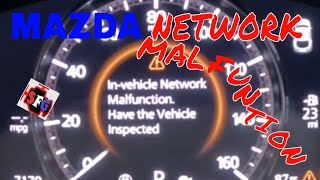
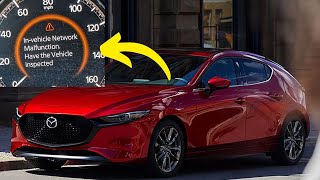
- "In-Vehicle Network Malfunction" message on the instrument cluster or infotainment screen.
- "Telematics Malfunction" message in the instrument cluster.
- Warning lights related to safety systems (i-ACTIVSENSE) being disabled, such as 'Forward SCBS Disabled'.
- Loss of Mazda Connected Services features (remote start, vehicle status via app).
- Red 'SOS' light or eCall system warning.
- i-ACTIVSENSE or Adaptive LED Headlights (ALH) warning lights illuminated on the dashboard.
- Replacing the 12V battery. While a good battery is important, simply replacing it will not fix the underlying TCU software bug that causes the U3000 code.
- Clearing the code with a basic scanner. The code will almost always return immediately or on the next drive cycle until the root cause (software update or module replacement) is addressed.
- Assuming any U3000 code means the TCU is bad. It is critical to read the suffix code (e.g., :04-TCU vs :04-FSC) to differentiate between the common TCU software issue and the more expensive FSC hardware failure.
Most Likely Causes
- Telematics Communication Unit (TCU) Software Error 🔴 High Probability → Shop Telematics Interface Module A software bug often triggers this fault when the vehicle's 3-year complimentary connected services subscription expires or is discontinued. This is a widely documented issue covered by multiple evolving Mazda TSBs.
How to confirm: A Mazda dealer or a shop with Mazda's Diagnostic and Repair Software (MDARS) must read the full DTC, which will identify the TCU (e.g., U3000:00-TCU or U3000:04-TCU). They will then check the software version against the latest TSBs, such as 09-001-24g.
Typical fix: The dealer performs a software update on the TCU module via a USB drive with the new software file. A battery charger must be connected during the update to ensure stable voltage. In rare cases where the update fails or the module is unresponsive, the TCU itself may need replacement.
Est. part cost: $0 - Forward Sensing Camera (FSC) Internal Failure 🟡 Medium Probability → Shop Collision Avoidance Sensor The FSC, which controls active safety features, can experience an internal hardware failure, often flagged by DTC U3000:04-FSC. This is a known failure point covered by TSBs like 15-002/19. Manufacturer TSB Bulletin #15-001-25 confirms that some vehicles experience i-ACTIVSENSE/ALH warning lights and system error messages due to an internal malfunction in the camera hardware.
How to confirm: A Mazda-specific scan tool will show a U3000 code with a suffix pointing to the FSC (e.g., U3000:04-FSC). This is typically accompanied by warnings that i-ACTIVSENSE safety systems are disabled.
Typical fix: The Forward Sensing Camera module, located at the top of the windshield, must be replaced and then calibrated. Calibration is a precise, mandatory procedure that requires special tools and software and cannot be skipped.
Est. part cost: $450-$900
Rare But Worth Checking
- Low Battery Voltage or Power Supply Issue: → Shop Vehicle Battery While not the root cause of the TCU software bug, a weak or failing 12V battery can cause various electronic modules to set communication or internal error codes, sometimes triggering the FSC malfunction light. Always ensure the battery and charging system are healthy before proceeding with module replacement. A simple battery disconnect and reconnect for 30 seconds may be suggested as an initial step.
- Blind Spot Monitoring (BSM) Module Issues: → Shop Collision Avoidance Sensor While more common on other Mazda models, a U3000 code can also relate to the BSM system. Manufacturer TSB Bulletin #09-005-26 notes that if a BSM module is replaced alone without proper configuration, it can trigger DTC U3000:54 and cause the "BSM OFF" indicator to stay on.
Diagnosis Steps
- Read the full, manufacturer-specific Diagnostic Trouble Code (DTC) using a scan tool capable of communicating with all Mazda modules (e.g., MDARS, FORScan). Note the code's suffix (e.g., :00, :04) and the module that stored it (e.g., TCU, FSC).
- If the code is stored in the TCU (U3000:00 or U3000:04) and accompanied by an 'In-Vehicle Network Malfunction' message, consult the latest Mazda TSBs regarding a TCU software update (e.g., 09-001-24g or its successors). This is the most likely scenario.
- If the code is stored in the FSC (U3000:04) and accompanied by disabled safety system warnings, the module has likely failed internally per TSB 15-002/19 or TSB Bulletin #15-001-25.
- Before replacing any modules, verify that the module is receiving proper voltage and has a solid ground connection. Test the 12V battery to ensure it is in good health.
- If the TCU is confirmed as the cause, have a Mazda dealer perform the software update via USB.
- If the FSC is confirmed as the cause, replace the module and perform the necessary static and dynamic calibration procedures as outlined in the service manual. This step is mandatory for the system to function.
Parts You'll Likely Need
- Forward Sensing Camera (FSC)
(OEM #B0J9-67-RC0 (Japan built sedan/Hatchback), BHSC-67-RC0 (Mexico built sedan/Hatchback), BDGF-67-XCX-N (superseded))— This is the part to replace if diagnosis confirms an internal hardware failure of the camera (DTC U3000:04-FSC), which disables i-ACTIVSENSE safety features. Part number is build-location specific.
Trusted brands: Mazda (OEM)
OEM price range: $430-$900
Aftermarket price range: N/A
Technical Service Bulletins (TSBs) & Recalls
- 09-001-24g / 09-001-24c: Addresses the TCU software issue causing the 'Telematics Malfunction' or 'In-Vehicle Network Malfunction' message and DTC U3000:00/U3000:04 in the TCU. Specifies a software update via USB.
- SA-027-23c: Also describes the 'In-Vehicle Network Malfunction' with DTC U3000:04 from the TCU, suggesting a battery disconnect reset and potential software update.
- 15-001-25 / 15-002/19: Addresses i-ACTIVSENSE warning lights with DTC U3000:04 in the FSC due to a non-repairable internal hardware failure, requiring camera replacement.
- 09-005-26: A manufacturer service bulletin notes that replacing a BSM control module without transferring vehicle specifications can lead to DTC U3000:54 and system failure.
Platform-Specific Known Issues
- A widespread software bug in the Telematics Communication Unit (TCU) causes a U3000 code and an 'In-Vehicle Network Malfunction' warning, often triggered by the expiration of the Mazda Connected Services trial period. This is addressed by Mazda TSB 09-001-24g and its various revisions.
- A Reddit user with a 2021 CX-30 reported their dealer's TCU software update failed, leading to a quote of $1600 for a replacement TCU, highlighting a potential risk if the software flash is unsuccessful.
Hidden / Shadow Codes Worth Checking
- U3000:49: Indicates an 'Internal Electronic Failure'. While commonly associated with the ABS module or DC-DC converter on other Mazdas, if it appears for the BCM, it can be triggered by a drained battery. If seen for the FSC or TCU, it points to a non-recoverable hardware fault. (see via Mazda Diagnostic and Repair Software (MDARS) or equivalent professional scan tool.)
- U3000:53: Indicates 'Deactivated'. This code can be stored when the brake system maintenance mode is activated and may not clear automatically after the mode is finished, requiring a manual DTC clear. (see via Mazda Diagnostic and Repair Software (MDARS) or equivalent professional scan tool.)
- U3000:54: As noted in TSB Bulletin #09-005-26, this can indicate a BSM aiming failure or a module that does not retain vehicle specifications.
Scan Tool Commands That Help
- Mazda MDARS: TCU Software Update (via USB) — This is the primary fix for DTC U3000:00 or U3000:04 stored in the TCU. The procedure involves downloading the latest software file from Mazda's Global Service Support (MGSS), loading it onto a USB stick, and following the on-screen prompts in MDARS. A battery charger is mandatory.
- Mazda MDARS: Activating TCU (links TCU to server) — This function is required after installing a *new* TCU to initialize it and link it to the vehicle's VIN and Mazda's servers. It is found under 'Tool Box' -> 'Mazda Connect'. A TCU swapped from another vehicle will not work and will disable connected services on both cars.
- Mazda MDARS: FSC Aiming (Static or Dynamic) — This is a mandatory procedure after replacing the Forward Sensing Camera (FSC). Dynamic aiming is simpler and recommended, but static aiming using targets can be done if weather or lighting conditions are poor. The procedure is found under 'Work Support' -> 'i-ACTIVSENSE'.
- Mazda MDARS: FSC Configuration (Using Read/Write or As-Built Data) — When replacing the FSC, the vehicle specification information must be transferred to the new module. MDARS can read the data from the old FSC before removal and write it to the new one. If the old FSC is unreadable, the configuration must be performed using 'As-Built' data.
Wiring & Ground Locations
- TCU Module — Under the center console, in the forward part of the dash assembly. Access may require removing dash trim panels.. This is the physical location of the module that most commonly sets the U3000 code. While rare, physical damage from a liquid spill or a loose connector could cause this fault instead of the common software bug.
- Main Engine/Chassis Ground — A main grounding point for many OEM systems is a lug bolted to the aluminum intake manifold bracket, near the passenger-side engine mount. Other key grounds are on the transmission bell housing and strut towers.. A poor ground connection can cause intermittent communication errors between modules, potentially leading to a U-code being set. While not the direct cause of the known TCU software bug, ensuring all grounds are clean and tight is a crucial step before replacing expensive modules.
Real Owner Repair Stories
- Reddit user on r/mazda (2021-2023 Mazda CX-50 (platform-mate)) — "In vehicle network malfunction" message appeared after signing up for the MyMazda app.
❌ Tried (didn't work) Calling the dealership, who insisted on a $180 diagnostic fee to perform a software update.
✅ What actually fixed it The owner disconnected the 12V battery for one hour. After reconnecting, the warning message was gone. This acts as a hard reset for the modules and can sometimes temporarily clear the software glitch, though it may return. - Reddit user on r/mazda (Mazda 3 Neo Sport (Australia)) — Intermittent FSC warning light, especially in rain or at night.
❌ Tried (didn't work) Regularly cleaning the windshield in front of the camera.
✅ What actually fixed it The dealer diagnosed a failing FSC and quoted AUD $1420+ for replacement. The owner asked the dealer to submit a report to Mazda, and the FSC replacement was approved as an out-of-warranty 'goodwill' repair due to the vehicle's service history and low mileage. - NHTSA ODI #11495196 — An owner reported that their Blind Spot Monitoring (BSM) indicator was flashing with DTC U3000. Despite no accidents or body damage, the repair quote for module replacement was approximately $2,100.
OEM Part Supersession History
BDGF-67-XCX-N→B0J9-67-RC0 (Japan built) or BHSC-67-RC0 (Mexico built)— Part number consolidation and potential internal revisions for the Forward Sensing Camera (FSC).
Heads up: The FSC part number is specific to the vehicle's place of manufacture (Japan vs. Mexico). Using the wrong one may result in incompatibility. Always verify the correct part number by VIN.
Model Year Variations Within This Range
- 2019-2021: Vehicles produced before approximately mid-2021 are most susceptible to the TCU software bug that triggers the U3000 code upon connected services expiration. Later models may have shipped from the factory with updated TCU software, though the issue can still occur.
Diagnostic Flowchart
Other Known Issues on This Vehicle
Issues unrelated to this code that are worth knowing about as an owner of this generation:
- Rocker Arm Failure (Cylinder Deactivation) 🔴 High — Affects early 2019 models with cylinder deactivation. Can lead to engine misfire, loss of power, or engine stall. (Ref: Recall 3719F (NHTSA #19V-497). Fix is a PCM software reprogram.)
- Phantom Braking (Smart Brake Support) 🔴 High — Some owners report the automatic emergency braking system activating without a real obstacle, often under bridges or in specific lighting conditions. (Ref: Software updates have been issued to improve sensor logic. A recall was issued for 2024 CX-90 models for a similar issue.)
- Leaking Rear Shock Absorbers 🟠 Medium — Premature failure of rear shocks, leading to visible oil leaks, a bouncy ride, and noise over bumps. More common on earlier models in the generation. (Ref: TSB 02-001/21 and 02-004/22 differentiate between normal 'seepage' and a failure requiring replacement with modified parts.)
- Infotainment 'Ghost Touch' or Reboots 🟡 Low — While more prevalent on the previous generation, some 4th gen owners report infotainment screens freezing, rebooting, or registering phantom touches. (Ref: Primarily addressed by software updates. A warranty extension program (CSP13) for this issue mainly covers pre-2019 models but some dealers may apply it.)
- Keyless Entry Touch Sensor Inoperable 🟡 Low — The door handle touch sensor for locking/unlocking may become unresponsive after using hazard lights or if both handles are touched simultaneously. (Ref: TSB 09-046/22. Fix is a software update for the LF control unit (LFU).)
Used vs. New Parts: Buying Guide for This Vehicle
When a used part is the smart pick: A used Forward Sensing Camera (FSC) can be a cost-effective option if the new OEM part is prohibitively expensive, especially for an out-of-warranty vehicle. However, the cost savings must be weighed against the mandatory and potentially expensive professional calibration required.
Donor-vehicle mileage cap: roughly under 80000 miles for the part to have meaningful remaining life.
What to inspect on the donor part:
- For a used FSC, inspect the lens for any scratches, chips, or internal fogging.
- Ensure the electrical connector and pins are clean, straight, and free of corrosion.
- Avoid cameras from vehicles that sustained heavy front-end collision damage, as unseen internal damage is possible.
OEM-only on this vehicle (don't cheap out):
- Telematics Communication Unit (TCU)
Brands owners have reported issues with on this vehicle:
- Unbranded/no-name Forward Sensing Cameras from online marketplaces. These are complex electronic components critical to safety systems, and authenticity/functionality cannot be guaranteed.
Real Owner Stories
Aggregated from forums and TSBs cited above. Mileages and costs reflect what owners reported in those sources.
2020 Mazda 3
Symptoms: The car displays an 'In-Vehicle Network Malfunction' message and stores fault code U3000:00. The owner noted the eCall system was not working, but the error would sometimes disappear after driving for 10–15 minutes and restarting the vehicle.
What fixed it: The standard fix for this platform is a dealer-performed TCU software update via USB drive as per TSB 09-001-24g.
Source hint: Reddit r/mazda3
2021 Mazda CX-30
Symptoms: The vehicle required a TCU software update to address network communication issues (TSB 09-001/24). During the service, the software update failed, rendering the module unresponsive.
What fixed it: The dealer quoted a full replacement of the TCU module.
Cost: $1600-$1600
Source hint: Reddit r/mazda
Mazda 6 Owner
Symptoms: An owner reported a flashing BSM indicator and DTC U3000. The vehicle had no history of accidents or body damage.
What fixed it: The dealer recommended replacing the blind spot modules, quoting a repair cost of $2,100.
Source hint: NHTSA ODI #11495196
Related OBD-II Codes
Frequently Asked Questions
My 2020 Mazda 3 is showing an 'In-Vehicle Network Malfunction' and code U3000:00. Why does it disappear after driving for 15 minutes?
Does TSB 09-001-24g apply to my vehicle if I have a 'Telematics Malfunction' message?
Can I fix the U3000:04-FSC code myself on a 2019 Mazda 3?
Is there a risk to updating the TCU software to fix the network malfunction?
My 2019 Mazda 3 has a U3000 code and the engine stalled; is this related to the TCU?
What is the difference between U3000:00 and U3000:04 on my Mazda?
Helpful Videos

We Have This Part in Stock

The information in this article is provided for general reference and educational purposes only. Vehicle specifications, procedures, and part compatibility can vary by production date, trim level, and region. Always consult your vehicle's factory service manual and verify part numbers before purchasing or performing repairs. Safety-critical components such as airbags, seat belts, and braking systems should be installed by a qualified professional.
- Mazda 3:
- 🧭 Diagnostic Flowchart
- 🎬 Helpful Videos
- 🛍️ Shop This Part
- What's Unique About the 2019-2024 Mazda 3
- Symptoms You May Notice
- Most Likely Causes
- Rare But Worth Checking
- Diagnosis Steps
- Parts You'll Likely Need
- Technical Service Bulletins (TSBs) & Recalls
- Platform-Specific Known Issues
- Hidden / Shadow Codes Worth Checking
- Scan Tool Commands That Help
- Wiring & Ground Locations
- Real Owner Repair Stories
- OEM Part Supersession History
- Model Year Variations Within This Range
- Other Known Issues on This Vehicle
- Used vs. New Parts: Buying Guide for This Vehicle
- Real Owner Stories
- 2020 Mazda 3
- 2021 Mazda CX-30
- Mazda 6 Owner
- Related OBD-II Codes
- Frequently Asked Questions
- 🎟️ Get 5% Off