

1979-1989 GMC P2500 Brake Light Switch: Problems and Replacement Guide
Solve brake lights that are stuck on or won't work at all on your P-series step van.
- A failing brake light switch can either cause your brake lights to not work at all or cause them to stay on, draining your battery.
- Replacement is simple and can be done by a DIYer, though access under the dash is awkward.
- For this vehicle, a quality aftermarket brand like Standard Ignition is a reliable and cost-effective choice.
- If a new switch, fuse, and bulbs don't fix the problem, the turn signal switch in the steering column is the next part to check.
Is Your Brake Light Switch Failing?
A bad brake light switch on these GMC P-series vans usually fails in a few distinct ways. These symptoms point to a switch that needs replacement, not a more complex electrical problem.
Common Symptoms
- Brake Lights Won't Turn On: This is the most dangerous symptom. The switch fails in the 'open' position and doesn't complete the circuit to the lights when you press the pedal. This is a major safety hazard.
- Brake Lights Stay On: You might notice your brake lights are illuminated even when you're not touching the pedal. This happens when the switch gets stuck in the 'closed' position or is out of adjustment. This will drain your battery, often overnight.
- Intermittent Brake Lights: The lights may flicker or only work when the pedal is pressed hard, indicating worn internal contacts.
- Cruise Control Won't Engage or Disengage: If your P2500 has cruise control, a faulty switch can prevent it from working correctly.
Choosing the Right Aftermarket Switch
For a vehicle like the 1979-1989 P2500, original equipment (OEM) switches are likely discontinued or difficult to find. Aftermarket parts are readily available and offer a reliable, cost-effective solution. The key is choosing a brand known for quality materials to avoid replacing the part again in a year.
The main difference between economy and premium aftermarket switches is the quality of the internal contacts and the durability of the plastic housing. Spending a few extra dollars on a better brand can prevent issues like the plunger sticking or the housing becoming brittle.
Aftermarket Brand Tiers
- Premium Aftermarket (Standard Ignition, Rostra): Brands like Standard Ignition (SMP) are well-regarded for producing parts that meet or exceed OEM specifications, often using better materials like copper alloy conductors for longevity. Rostra is a known OE supplier for many electronic components and is a trusted name, though they are more specialized in powertrain and cruise control systems.
- Standard Aftermarket (Dorman): Dorman is a popular choice that offers a huge catalog of replacement parts. They provide a functional, widely available, and affordable solution that gets the job done.
- Economy (Skyward): Economy brands offer the lowest price point. While functional, they may not have the same long-term durability as more established brands. For a critical safety part that is awkward to access, consider spending slightly more for a part from a higher tier.
| Quality Tier | Estimated Price Range |
|---|---|
| New OEM | $35 - $70+ (If available) |
| New Aftermarket (Premium) | $15 - $33 |
| New Aftermarket (Standard/Economy) | $5 - $15 |
Frequently Asked Questions
Where is the brake light switch located on my P2500?
The brake light switch is mounted on a bracket attached to the brake pedal support structure, located up under the dashboard. Follow the arm of the brake pedal up from the floor, and you will see the switch and its electrical connector.
Can I replace the brake light switch myself?
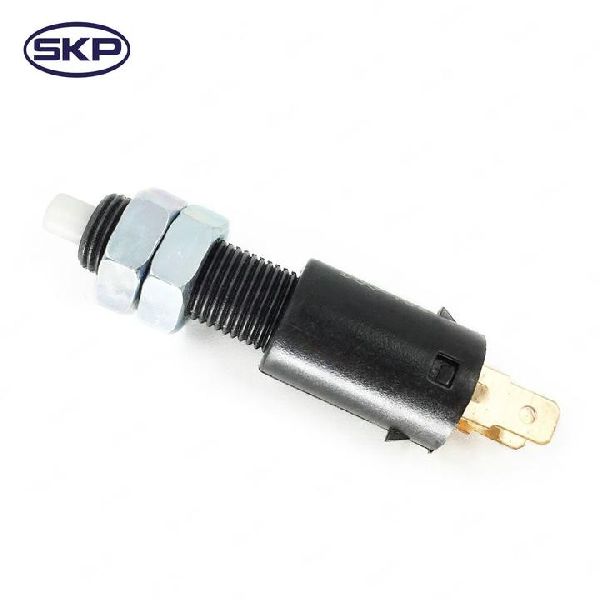
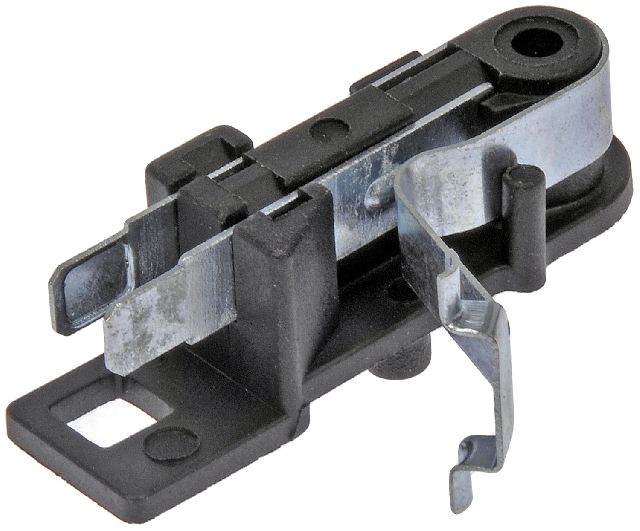
Yes, this is a very DIY-friendly job. The main challenge is the awkward position required to work in the driver's footwell. It typically requires no special tools beyond a screwdriver or a small wrench, and the part itself just unplugs and is removed from its bracket by a clip or by twisting it out.
Do I need to adjust the new switch?
Most modern replacement switches are self-adjusting. However, if your brake lights stay on after installation, it might be because the switch is not installed correctly or needs adjustment. Some older styles can be adjusted on their threads, while others may need to be reset by pulling the pedal up firmly after installation.
My brake lights stay on unless I pull the pedal up with my foot. Is that the switch?
Yes, this is a classic symptom of a worn-out or misadjusted brake light switch. The internal spring is no longer strong enough to fully open the circuit, or the pedal is not returning far enough to press the switch's plunger completely. Replacing the switch is the correct fix.
Technical Specifications
Typically a 2-prong or 4-prong plunger-style switch mounted on the brake pedal assembly. The number of terminals depends on whether the vehicle is equipped with cruise control.
We Have This Part in Stock


The information in this article is provided for general reference and educational purposes only. Vehicle specifications, procedures, and part compatibility can vary by production date, trim level, and region. Always consult your vehicle's factory service manual and verify part numbers before purchasing or performing repairs. Safety-critical components such as airbags, seat belts, and braking systems should be installed by a qualified professional.