

Dodge D250 Brake Light Switch Guide: 1981-1993 Models
Diagnose common brake light problems on your first-generation Dodge Ram and find the correct replacement switch.
- Always check fuses and bulbs before replacing the switch.
- A common issue is the switch being pushed out of adjustment, causing lights to stay on.
- There are two different switches for this generation; verify your truck's year (1981-88 vs 1989-93) before ordering.
- A quality aftermarket brand like Standard Ignition is a reliable and cost-effective solution for this part.
Is Your Brake Light Switch Failing?
A bad brake light switch on a 1981-1993 Dodge D250 usually reveals itself in a few obvious ways. The most common sign is that your brake lights don't turn on at all when you press the pedal. Conversely, you might find that your brake lights are stuck on, even when your foot is off the brake. This can drain your battery and confuse other drivers. Another symptom is your cruise control failing to disengage when you tap the brakes. Before assuming the switch is bad, always check the brake light bulbs and the corresponding fuse first, as these are simpler and more common failure points.
A Common Issue for First-Gen Dodge Trucks: Switch Adjustment
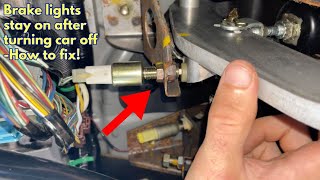
One of the most frequent problems specific to these older Dodge trucks isn't necessarily a broken switch, but one that has been pushed out of its correct position. The switch is mounted in a bracket and held in place by a plastic clip that engages with threads on the switch body. Activities like replacing the master cylinder or even the brake pedal returning too far can knock the switch out of adjustment. This can cause the brake lights to stay on constantly or not come on at all. Some owners have found that the original clip doesn't hold the switch securely enough and have used a small hose clamp or zip tie around the switch body to lock it firmly in place after adjusting it.
🎬 Watch: How to reset and fix a brake light switchPro Tip: Check the Multi-Function Switch
On these trucks, the power for the brake lights often runs through the turn signal switch (also called the multi-function switch) in the steering column. If your brake lights don't work but your hazard lights do, the problem could be in the multi-function switch, not the brake light switch itself.
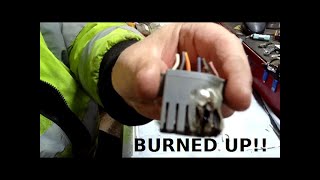
🎬 See how a burned up brake switch is replacedChoosing the Right Aftermarket Brake Light Switch
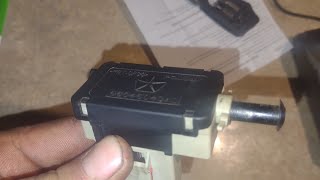
For a vehicle like the 1981-1993 D250, a quality aftermarket switch is a reliable and cost-effective choice. Brands like Standard Ignition (Standard Motor Products) have a long history of producing replacement parts that meet or exceed original equipment specifications. They use durable materials designed for a long service life. Given that the original mounting design can be a weak point, a new aftermarket switch often restores function perfectly.
Important: Order the Correct Part for Your Year
There are two different brake light switches for this generation of D250. Be sure to order the correct one for your truck's model year to ensure proper fit and function. There is a split in the parts used:
- 1981-1988 Dodge D250: Uses switch model Standard Ignition SLS-77.
- 1989-1993 Dodge D250: Uses switch model Standard Ignition SLS-158, which is a 6-terminal switch.
| Part Type | Estimated Cost |
|---|---|
| New Aftermarket (Standard Ignition) | $20.23 - $57.72 |
| New OEM (Mopar) | $40 - $90 |
| Shop Labor | $50 - $75 |
Frequently Asked Questions
Where is the brake light switch on a Dodge D250?
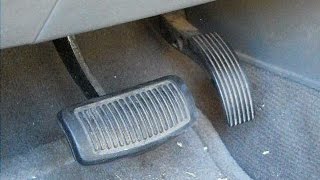
The brake light switch is located under the driver's side dashboard. Follow the brake pedal arm up towards the firewall; the switch is mounted on a bracket and is activated by the movement of the pedal arm.
How do I know if the switch is bad or if it's just a bulb or fuse?
Always start with the easiest checks. Visually inspect the brake light bulbs. Then, check your truck's fuse panel for a blown brake light fuse. If both bulbs and the fuse are good, the brake light switch is the next most likely culprit.
Why are my brake lights stuck on?
This is a common problem on these trucks and is often caused by the switch being pushed backward in its mounting bracket. The switch is no longer making proper contact with the pedal arm when it's in the resting position. You may be able to readjust it, but if the internal clip is worn, replacement is the best option.
🎬 Watch this guide if your brake lights stay onAre there any recalls for the 1981-1993 D250 brake light switch?
No recalls specific to the 1981-1993 Dodge D250 for its factory-installed brake light switch were found in NHTSA records. Recalls have been issued for some aftermarket brand switches used on later model Dodge trucks, but not for this specific vehicle generation.
Helpful Videos
Technical Specifications
OEM Part Numbers: 4373535 56006818 4271850 56006981
Location: Brake pedal support bracket. Activation: Plunger-style switch activated by brake pedal arm. Note: Part number and terminal count (2-pin vs 6-pin) vary by model year range (1981-1988 vs 1989-1993).
We Have This Part in Stock


The information in this article is provided for general reference and educational purposes only. Vehicle specifications, procedures, and part compatibility can vary by production date, trim level, and region. Always consult your vehicle's factory service manual and verify part numbers before purchasing or performing repairs. Safety-critical components such as airbags, seat belts, and braking systems should be installed by a qualified professional.
- Dodge D250:
- 🎬 Helpful Videos
- 🛍️ Shop This Part
- Is Your Brake Light Switch Failing?
- A Common Issue for First-Gen Dodge Trucks: Switch Adjustment
- Pro Tip: Check the Multi-Function Switch
- Choosing the Right Aftermarket Brake Light Switch
- Important: Order the Correct Part for Your Year
- Frequently Asked Questions
- 🎟️ Get 5% Off