

1994-2002 Mazda 626 Brake Light Switch: Diagnosis and Replacement Guide
Solve common issues like no brake lights, getting stuck in park, or cruise control failure by understanding and replacing this simple part.
- A bad brake light switch is a critical safety issue if your brake lights are not working.
- Symptoms are not just limited to lights; it can also prevent you from shifting out of park and disable your cruise control.
- This is an easy and inexpensive DIY replacement that most owners can do in under 30 minutes with basic tools.
- Before replacing the switch, check for a blown fuse, bad bulbs, and ensure the small plastic stopper on the pedal arm is not broken or missing.
Is Your Mazda 626 Brake Light Switch Failing?
A faulty brake light switch can cause a surprising number of problems in your Mazda 626. Because it's tied into multiple systems, the symptoms aren't always just about the lights. This is a common failure point due to age and constant use, but it's usually an easy and inexpensive fix.
Key Failure Symptoms
- Brake Lights Don't Work: The most obvious and dangerous symptom. The switch has failed and isn't completing the circuit to the lights.
- Brake Lights Stay On: The switch is stuck in the 'on' position, which can confuse other drivers and drain your battery overnight.
- Can't Shift Out of Park: The automatic transmission's shift interlock doesn't get the signal that the brake is applied, so it won't release the shifter.
- Cruise Control Won't Engage: The system won't turn on or will shut off randomly because it incorrectly thinks the brakes are being used.
- ABS or Traction Control Light: These systems use the brake switch signal, and a fault can trigger a warning light on your dashboard.
Safety First: Check Your Lights
Before driving, always confirm if your brake lights are working. Have a friend check while you press the pedal, or back up towards a reflective surface at night. Driving without functional brake lights is extremely dangerous and can lead to a rear-end collision.
Choosing the Right Aftermarket Switch
For a part like the brake light switch, an aftermarket replacement offers excellent value. The original OEM switches are not known for exceptional longevity, and a quality aftermarket part can meet or exceed that performance for less money. Here’s a look at the available brand tiers.
Tier 1 Aftermarket: Standard Ignition (Standard Motor Products)
Standard is a highly respected brand in the auto repair industry, known for producing parts that are equivalent to or better than original equipment. If you want a fit-and-forget part with the highest likelihood of long-term reliability, Standard is a solid choice.
Economy Aftermarket: Facet
Facet is an established brand that offers a more budget-friendly alternative. While some reviews for the brand on other vehicles mention occasional fitment issues, they are generally considered a reliable option for common repairs where cost is a primary factor. For a simple switch on a daily driver, Facet provides a good balance of price and function.
Pro Tip: Check the Stopper Pad
Sometimes, the brake lights stay on not because of the switch, but because a small plastic or rubber stopper on the brake pedal arm has broken and fallen out. This stopper is what the switch's plunger presses against. If it's missing, the switch remains extended as if the pedal were pressed. Check for a small hole in the pedal arm where the switch makes contact; if you see one, you need a new stopper, not a new switch.
Cost of Replacing a 1994-2002 Mazda 626 Brake Light Switch
| Part Type | Estimated Cost |
|---|---|
| New Aftermarket | $22.78 - $39.07 |
| New OEM | $40 - $75 |
| Shop Labor | $60 - $120 |
Cost estimates are for the part only, except for shop labor. Prices can vary based on location and supplier.
Installation Overview
Replacing the brake light switch is a great DIY job for beginners. The main challenge is the awkward position required to work under the dashboard.
- Locate the Switch: Look up from the driver's side floor at the top of the brake pedal arm. You will see the switch mounted in a bracket, with a wiring harness connected to it.
- Disconnect Power: It's a good practice to disconnect the negative battery terminal to prevent any electrical shorts.
- Remove the Old Switch: Unplug the electrical connector. The switch itself is usually threaded into the bracket with a locknut or has a clip-in design. Unscrew or unclip it to remove it.
- Install the New Switch: Screw or clip the new switch into place. Before tightening it down, ensure the plunger is depressed when the brake pedal is at rest and released as soon as the pedal is pressed. Adjust the switch's position if necessary.
- Reconnect and Test: Plug in the electrical connector, reconnect the battery, and test all functions: brake lights, shifting from park, and cruise control.
Frequently Asked Questions (FAQ)
Can I replace the brake light switch myself?
Yes, this is a very DIY-friendly repair. It requires basic hand tools and about 30 minutes. The most difficult part is comfortably accessing the switch located up under the dashboard.
My brake lights work, but my cruise control doesn't. Could it still be the switch?
Yes. Some brake light switches have multiple internal circuits. It's possible for the circuit that controls the cruise control to fail while the one for the brake lights still works. Given the low cost of the part, it's a good first step in diagnosing cruise control issues.
How do I know if it's the switch, a fuse, or the bulbs?
If none of your brake lights work, first check the brake light fuse in the fuse panel. If the fuse is good, check the bulbs. If only one light is out, it's the bulb. If all lights are out and the fuse is good, the brake light switch is the most likely culprit. If the fuse keeps blowing, the switch may have an internal short.
Are there any recalls for the brake light switch on my Mazda 626?
No, searches of the NHTSA database show no specific recalls for the brake light switch on the 1994-2002 Mazda 626. Failures are typically due to normal wear and tear over time.
Technical Specifications
OEM Part Numbers: GJ6A66490 GEG166490
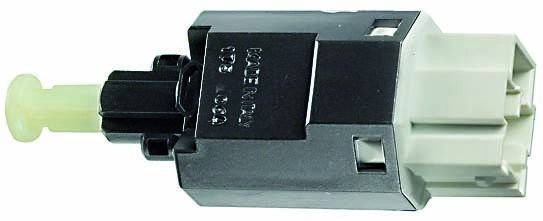
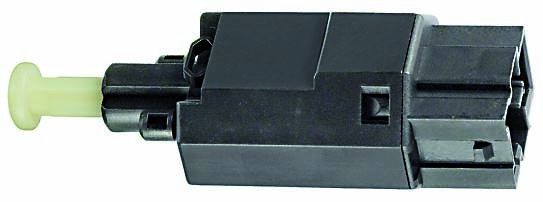
Typically a 2-pin or 4-pin mechanical plunger switch mounted on the brake pedal bracket. Operation is mechanical.
We Have This Part in Stock


The information in this article is provided for general reference and educational purposes only. Vehicle specifications, procedures, and part compatibility can vary by production date, trim level, and region. Always consult your vehicle's factory service manual and verify part numbers before purchasing or performing repairs. Safety-critical components such as airbags, seat belts, and braking systems should be installed by a qualified professional.
- Mazda 626:
- 🛍️ Shop This Part
- Is Your Mazda 626 Brake Light Switch Failing?
- Key Failure Symptoms
- Safety First: Check Your Lights
- Choosing the Right Aftermarket Switch
- Pro Tip: Check the Stopper Pad
- Cost of Replacing a 1994-2002 Mazda 626 Brake Light Switch
- Installation Overview
- Frequently Asked Questions (FAQ)
- 🎟️ Get 5% Off