

1998-2000 Chevrolet C2500 Ambient Air Temperature Sensor Replacement
Is your truck's A/C not blowing cold or is the outside temperature display wrong? Your ambient air temp sensor is the likely culprit.
- A faulty ambient air temp sensor is a primary cause of A/C not blowing cold and incorrect dash temperature readings on these trucks.
- Replacement is an extremely easy DIY job, requiring no special tools and taking less than 15 minutes.
- For this part, a quality aftermarket brand like Standard Ignition offers the same performance as OEM for less money.
- Check for corrosion on the connector before assuming the sensor itself has failed.
Is Your C2500's A/C or Temperature Display Acting Up?
If you're dealing with an air conditioning system that won't blow cold or a temperature gauge on your dash that's stuck on an incorrect reading (like -40°), the ambient air temperature sensor is the first part you should check. On a 1998-2000 Chevrolet C2500, this sensor provides critical data to your climate control system. When it fails, it can cause frustrating and uncomfortable problems that seem bigger than they really are.
Symptoms of a Failing Ambient Air Temperature Sensor
A bad sensor sends faulty information, leading to several noticeable issues:
- Incorrect Outside Temperature Reading: The most common symptom is the temperature display on your dash being wildly inaccurate or not changing at all. It may get stuck on an extreme temperature.
- A/C System Malfunction: The climate control system may not allow the A/C compressor to turn on if it receives an incorrect, very cold temperature reading from the sensor. This results in the system blowing ambient or warm air instead of cold.
- Automatic Climate Control Won't Work: If your truck has an automatic climate setting, it will not function correctly without an accurate outside temperature reading.
- Check Engine Light: In some cases, a failing sensor can trigger the Check Engine Light and store diagnostic trouble codes.
Cost of Replacing a C2500 Ambient Air Temperature Sensor
| Part Type | Price Range |
|---|---|
| New Aftermarket | $9.91 - $72.04 |
| New OEM (GM) | $12 - $25 |
| Shop Labor | $25 - $60 |
Choosing the Right Aftermarket Sensor
For a straightforward part like the ambient air temperature sensor on a GMT400-platform truck, an aftermarket replacement offers excellent value. The technology is simple and has been used for decades. Brands like Standard Ignition and Walker Products produce sensors that meet or exceed original specifications. Forum discussions and mechanic experience show that for non-critical sensors like this, a quality aftermarket part provides the same performance and reliability as a more expensive OEM part. Often, the same company that made the original part for GM manufactures the aftermarket version.
Pro Tip: Check the Connector
This sensor is located in a vulnerable spot at the front of the truck. Before ordering a new part, inspect the old sensor's electrical connector for corrosion or physical damage. Sometimes the problem is a bad connection, not a failed sensor. A general GM service bulletin for newer models notes that moisture can get into the connector and cause issues.
Installation Overview: A 15-Minute DIY Job
Replacing this sensor is one of the easiest jobs you can do on your C2500. No special tools are needed.
- Locate the Sensor: Open the hood and look behind the front grille. The sensor is typically mounted to the radiator support or a nearby bracket, positioned to get a good reading of the outside air.
- Disconnect the Wiring: Press the tab on the electrical connector and pull it off the sensor.
- Remove the Old Sensor: The sensor is usually held in place by a simple clip or pushed into a hole. You can typically wiggle it free by hand or with gentle pressure from a flathead screwdriver.
- Install the New Sensor: Push the new sensor into the mounting location until it clicks or sits firmly in place.
- Reconnect and Test: Plug the electrical connector back in. Start the truck and check the temperature display and A/C function. It may take a few minutes of driving for the reading to update and stabilize.
Frequently Asked Questions
Is this the same as the Intake Air Temperature (IAT) sensor?
No. The Ambient Air Temperature sensor measures the air outside the vehicle for the climate control and dash display. The Intake Air Temperature (IAT) sensor measures the temperature of the air entering the engine for fuel mixture calculations and is located on the engine's air intake duct.
Where is the ambient air temperature sensor located on a 1998-2000 C2500?
It is almost always located at the front of the truck, mounted behind the grille on the radiator core support, where it can be exposed to outside airflow.
Do I need to reset the computer after replacing the sensor?
Usually, no special reset is required. The system should begin reading the new sensor correctly after it's installed and the vehicle is started. In some cases, it may take a short drive for the computer to update the display. If you had a Check Engine Light, you may need to clear the code with an OBD-II scanner or by disconnecting the battery for 15-30 minutes.
Is a Standard Ignition or Walker Products sensor a good choice?
Yes. For this application, reputable aftermarket brands like Standard Motor Products are known to be reliable and are a cost-effective alternative to OEM parts. They provide the same function and fit without the higher dealer price.
Technical Specifications
OEM Part Numbers: 10248414 15029274
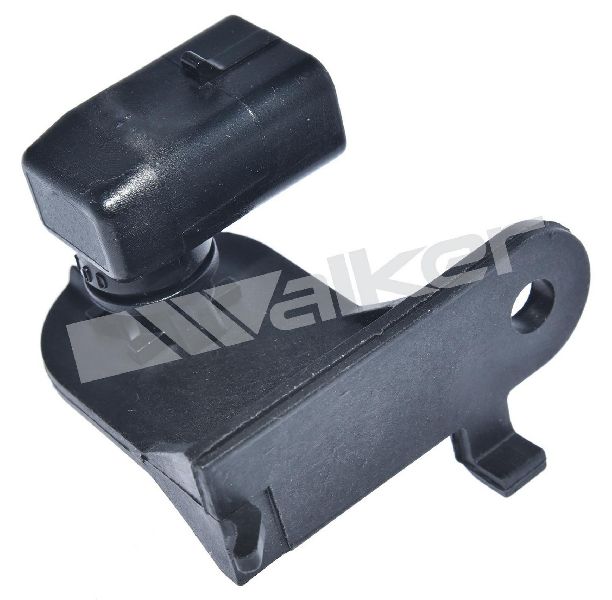
2-pin electrical connector, typically mounts behind the front grille.
We Have This Part in Stock


The information in this article is provided for general reference and educational purposes only. Vehicle specifications, procedures, and part compatibility can vary by production date, trim level, and region. Always consult your vehicle's factory service manual and verify part numbers before purchasing or performing repairs. Safety-critical components such as airbags, seat belts, and braking systems should be installed by a qualified professional.
- Chevrolet C2500:
- 🛍️ Shop This Part
- Is Your C2500's A/C or Temperature Display Acting Up?
- Symptoms of a Failing Ambient Air Temperature Sensor
- Cost of Replacing a C2500 Ambient Air Temperature Sensor
- Choosing the Right Aftermarket Sensor
- Pro Tip: Check the Connector
- Installation Overview: A 15-Minute DIY Job
- Frequently Asked Questions
- 🎟️ Get 5% Off