

Audi S8 (2001-2012) Brake Light Switch Failure: Symptoms and Replacement Guide
Seeing EPC, ABS, or ESP lights on your dash? Your brake light switch is a likely and inexpensive culprit.
- A faulty brake light switch is a primary cause of EPC, ABS, and ESP warning lights on the 2001-2012 Audi S8.
- Symptoms can also include the car not starting, being stuck in Park, or having brake lights that are always on or never on.
- Replacement is a straightforward DIY task that takes less than an hour, with the part located above the brake pedal.
- Choose a high-quality aftermarket brand like Vemo or Facet to ensure reliability and avoid recurring issues.
Is Your S8's Brake Light Switch Failing?
A failing brake light switch on the D2 and D3 generation Audi S8 is a common issue that can cause confusing symptoms. Because the switch is tied into so many different electronic modules, its failure often looks like a more serious problem. Fortunately, it's an inexpensive part and is reasonably easy to replace.
Top 5 Failure Symptoms
- EPC, ABS, and/or ESP Lights On: This is the most common sign. The Electronic Power Control (EPC) light, often accompanied by the stability control (ESP) or ABS light, will illuminate on the dashboard because the engine's computer receives conflicting information from the switch.
- Brake Lights Not Working or Stuck On: Your brake lights may fail to illuminate when you press the pedal, creating a major safety hazard. Conversely, they might stay on constantly, even when the car is parked, which can drain your battery.
- Car Won't Start: For models with push-button ignition, the system requires a signal from the brake light switch to confirm the pedal is pressed before allowing the engine to start. A bad switch can prevent the car from cranking.
- Stuck in Park: The gear selector has a safety interlock that prevents you from shifting out of Park unless the brake pedal is depressed. If the switch fails, the interlock won't disengage.
- Cruise Control Inoperable: The cruise control system relies on the switch to disengage. If the switch is faulty, the cruise control may not activate at all.
Known Issues: Hard Pedal and No-Start Condition
Audi has issued a Technical Service Bulletin (TSB) for some vehicles that experience a hard brake pedal and a no-start condition after being parked. This is caused by a faulty check valve in the brake booster's vacuum line, which allows the vacuum to leak out. Without vacuum assist, the pedal is very hard to press, preventing the driver from pushing it far enough to activate the brake light switch and authorize the engine to start. While the TSB applies to newer models, the principle can affect any vehicle with a similar system and may be misdiagnosed as a bad brake light switch.
Choosing the Right Aftermarket Brake Light Switch
For a critical electronic sensor on a high-performance vehicle like the S8, part quality matters. While an OEM part is always a safe choice, high-quality aftermarket brands offer a reliable alternative for less money. Avoid generic, no-name parts, as they are known to fail prematurely.
The brands available can be grouped into tiers based on their reputation among Audi owners and mechanics:
- Top Tier (OEM-Equivalent): Vemo is a brand well-known for producing parts that meet or exceed original equipment standards for German vehicles. Choosing Vemo is the safest bet for a long-lasting aftermarket repair.
- Mid Tier (Quality Aftermarket): Facet and Standard Ignition (SMP) are established manufacturers with a long history of producing reliable electronic parts. These brands offer a good balance of quality and value and are a solid choice for your S8.
- Entry Tier (Budget-Friendly): Rostra Powertrain produces a wide range of automotive electronics. While functional, they are less specialized in the European market compared to Vemo or Facet, making them a budget-oriented option.
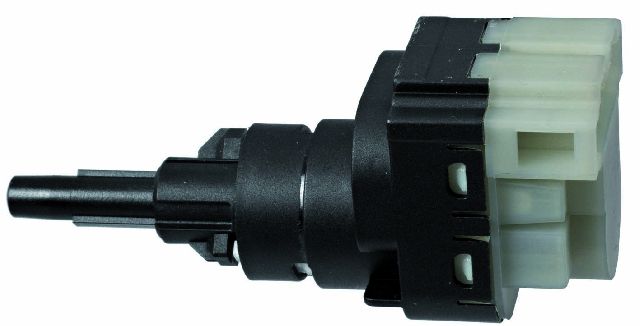
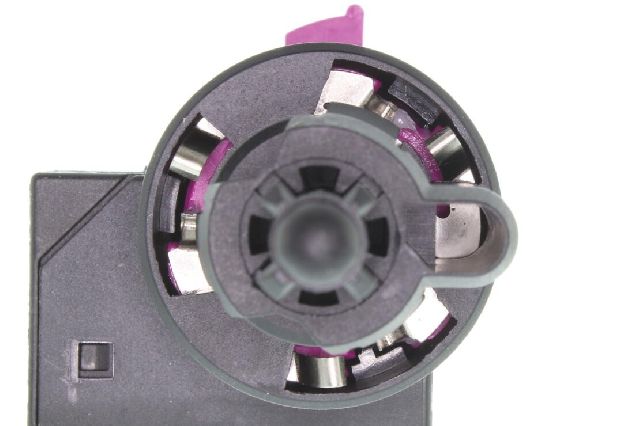
Pro Tip: The original brake light switch in your S8 may have been updated by Audi with a revised part. When ordering, don't be alarmed if the new switch looks slightly different from the one you are replacing. The key is to ensure the plug connector and mounting style are identical.
Cost of Replacing an Audi S8 Brake Light Switch
| Part Type | Price Range |
|---|---|
| New OEM | $50 - $90 |
| New Aftermarket | $15.16 - $65.03 |
| Shop Labor | $100 - $180 |
Frequently Asked Questions
Can I replace the brake light switch myself?
Yes, this is a very DIY-friendly job for most owners. The switch is located above the brake pedal arm. The main challenge is the uncomfortable position required to work in the driver's footwell. The process involves removing the lower dash panel, disconnecting a wiring harness, and twisting the old switch to remove it. The entire job can typically be done in 30-60 minutes with basic tools.
Are there any recalls for the S8 brake light switch?
No, there are no active NHTSA safety recalls specifically for the brake light switch on the 2001-2012 Audi S8. Recalls for brake light systems have been issued for other Audi models like the Q3, but they do not apply to the S8 of this era.
What is the VCDS error code for a bad brake light switch?
When scanning your car with a diagnostic tool like VCDS (VAG-COM), a faulty brake light switch will often store the fault code 00526 - Brake Light Switch (F): Implausible Signal. This is a strong confirmation that the switch is the source of your electronic issues.
What's the difference between a 2-pin and 4-pin switch?
The Audi S8 uses a 4-pin switch. This is because the switch has two separate internal circuits. One circuit operates the brake lights, while the other sends signals to the ECU, TCU, and cruise control module. Using the wrong type of switch will cause some systems to not function correctly. Always verify you are ordering the correct 4-pin switch for your vehicle.
Technical Specifications
OEM Part Numbers: 4F0945459B 1K2945511 3B0945511D
The switch for the Audi S8 is a 4-terminal (4-pin) plunger-style switch that mounts to a bracket near the brake pedal arm.
We Have This Part in Stock


The information in this article is provided for general reference and educational purposes only. Vehicle specifications, procedures, and part compatibility can vary by production date, trim level, and region. Always consult your vehicle's factory service manual and verify part numbers before purchasing or performing repairs. Safety-critical components such as airbags, seat belts, and braking systems should be installed by a qualified professional.
- Audi S8: