

Chevrolet Corvette Brake Pedal Position Sensor Guide for 2005-2013 (C6)
Fixing 'Service Active Handling' warnings and brake light problems on your C6 Corvette.
- A faulty Brake Pedal Position Sensor is a very common cause of the 'Service Active Handling' message on C6 Corvettes.
- After replacing the sensor, you MUST perform a calibration procedure with a GM Tech 2 or equivalent scan tool.
- For this critical electronic part, using the OEM ACDelco brand is strongly recommended to avoid compatibility issues.
- The job is physically awkward due to the sensor's location, but removing the entire mounting bracket makes it easier.
Understanding C6 Corvette Brake Sensor Failures
A failing Brake Pedal Position Sensor (BPPS) is a common issue on the 2005-2013 C6 Corvette. Unlike a simple mechanical switch, this sensor sends variable electronic signals. Over time, the internal components can wear out, leading to incorrect or lost signals. This confuses the car's computers, causing a variety of electronic issues that may seem unrelated to the brakes at first.
Symptoms of a Bad Brake Pedal Position Sensor
The most common sign of a failing BPPS is a message on your Driver Information Center (DIC). You are very likely to see one or more of the following:
- "Service Active Handling" Message: This is the most frequent symptom. The stability system relies on the brake sensor, and a bad signal will cause the system to report a fault.
- "Service Traction Control" Message: Often appears with the Active Handling warning.
- Brake Light Malfunctions: Your brake lights might stay on even when your foot is off the pedal. They might not turn on at all, or they may even work in reverse—staying on until you press the pedal.
- Inability to Start: Automatic transmission cars require you to press the brake to start the engine. If the sensor fails, the car won't know the pedal is pressed, and it will not start.
- Cruise Control Issues: The cruise control may not engage or may not disengage when you tap the brake pedal.
Don't Confuse This with Other Issues
The "Service Active Handling" message can also be caused by a faulty Steering Wheel Position Sensor. If your car is a 2005-2006 model, there was a recall related to the steering sensor's wiring. It is important to scan the vehicle for diagnostic trouble codes (DTCs) to confirm the problem. A code C0161 specifically points to the brake pedal sensor circuit.
Choosing the Right Aftermarket Sensor
For most cars, aftermarket electronic parts are a great way to save money. For a complex car like the C6 Corvette, it's a little different. The car's computers are very sensitive to the electronic signals from sensors. While brands like Standard Ignition (Standard Motor Products) are reputable, most Corvette specialists and experienced owners recommend using the OEM part for this specific job.
- ACDelco (OEM): This is the original part manufacturer for GM. Using an ACDelco sensor (Part # 89047699, which replaces 10302722) is the safest bet to ensure perfect communication with the BCM and avoid future headaches.
- Standard Ignition (Aftermarket): A well-known aftermarket brand that produces quality components. While it may function correctly, there is a small risk of compatibility issues with the Corvette's sensitive electronics. Given the small price difference and the critical nature of the part, sticking with OEM is often the recommended path.
| Part Type | Estimated Cost |
|---|---|
| New OEM (ACDelco) | $25 - $50 |
| New Aftermarket (Standard, etc.) | $23 - $73 |
| Shop Labor | $150 - $300 |
Costs are estimates and can vary by location and supplier. Labor costs include the required electronic calibration.
Installation and Calibration
Replacing the sensor is a job that can be done at home, but it has two major challenges.
- Location: The sensor is in a very tight spot under the dashboard, making it difficult to reach. Many DIYers remove the driver's seat to get enough room to work comfortably.
- Calibration: This is not an optional step. After the new sensor is installed, it must be calibrated using a GM Tech 2 or equivalent professional scan tool. The tool tells the BCM the 'home' position of the new sensor. Skipping this step will cause the warning lights and symptoms to remain.
Pro Tip for Removal
Instead of trying to unbolt the small sensor from its bracket while under the dash, it is much easier to remove the entire bracket assembly first. The bracket is held on by two 7mm screws. Once the bracket is out, swapping the sensor is simple.
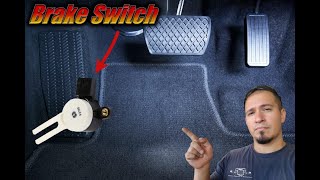
🎬 Watch this walkthrough on replacing the sensor and fixing stuck brake lights.Frequently Asked Questions (FAQ)
Is there a recall for the brake pedal position sensor on the C6 Corvette?
No, there are no official NHTSA recalls for the brake pedal position sensor on 2005-2013 Corvettes. There was a recall for the 2020 C8 Corvette related to the brake system and a recall for the C6's steering wheel position sensor, but not for the C6 brake sensor itself.
Can I drive my Corvette with a bad brake pedal sensor?
It is not recommended. Your brake lights may not work, creating a serious safety hazard. Additionally, the Active Handling system will be disabled, and in rare cases, a faulty sensor signal could cause unpredictable behavior from the stability system.
Why are my brake lights on after replacing the sensor?
The new sensor has not been calibrated. The Body Control Module (BCM) doesn't know the new sensor's correct 'off' position and thinks you are pressing the brakes. You must have the sensor calibrated with a professional scan tool.
Does this part fit a 2004 or 2014 Corvette?
No. This guide and the part numbers mentioned are specific to the C6 generation (2005-2013). The 2004 (C5 generation) and 2014 (C7 generation) Corvettes use different parts and systems.
Helpful Videos
Technical Specifications
OEM Part Numbers: 10302722 89047699 13597429
Rotational position sensor with a 3-pin female connector. Reports pedal position to the Body Control Module (BCM). Requires calibration after installation.
We Have This Part in Stock


The information in this article is provided for general reference and educational purposes only. Vehicle specifications, procedures, and part compatibility can vary by production date, trim level, and region. Always consult your vehicle's factory service manual and verify part numbers before purchasing or performing repairs. Safety-critical components such as airbags, seat belts, and braking systems should be installed by a qualified professional.
- Chevrolet Corvette: