

2021-2024 Genesis GV80 Camera & Sensor Guide: Solving ADAS Faults
This guide clarifies the critical differences between the GV80's cameras and radar sensors, helping you diagnose failures and choose the correct replacement part.
- The GV80 uses separate video cameras for viewing and radar sensors for detection; you must identify which part has failed before buying a replacement.
- Nearly all replacement cameras and ALL radar sensors require mandatory professional calibration, which can cost $300-$500+ in addition to the part and installation labor.
- A software recall (NHTSA 24V-584) can cause intermittent rearview camera issues. Check if your vehicle needs this free update before replacing any hardware.
- Always match the OEM part number exactly from your old unit to the replacement to ensure compatibility with your vehicle's specific options.
Camera, Radar, or Sensor? Identifying Your Faulty Part
Many drivers use the term 'camera' to describe any issue with their vehicle's safety systems. However, on the GV80, it's crucial to know if your problem is with a video camera or a radar sensor, as they are different parts with different functions and part numbers. A failure in one can often disable features that rely on others, leading to confusion.
Key System Components & Locations:
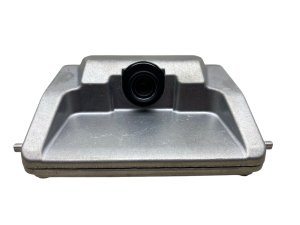
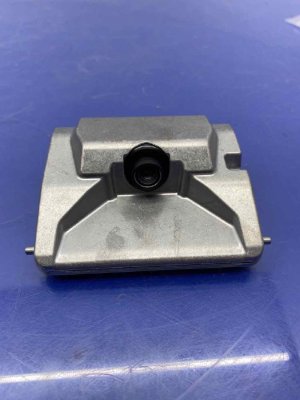
- Front-Facing Camera: Located at the top of the windshield, used for Lane Keeping Assist and other forward-facing safety systems.
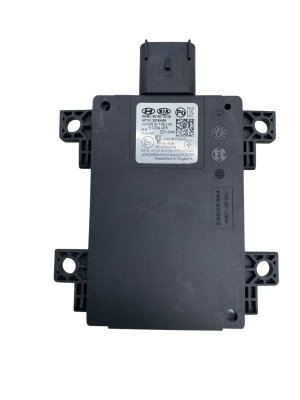
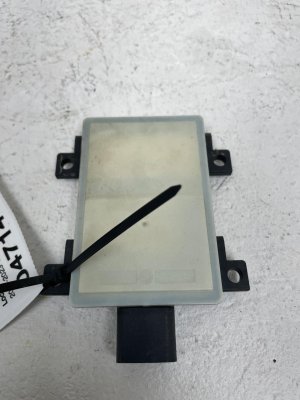
- Front Radar Sensor: Mounted in the lower grille area, this is essential for Adaptive Cruise Control. It is often mistaken for a camera. Part number 99110-T6000 is a common front radar unit.
- Surround View / Parking Cameras: Small cameras located in the front grille, under each side mirror, and on the rear liftgate. These combine to create the 360° top-down view.
- Rear Corner Radar Sensors: Hidden behind the rear bumper cover on the driver's and passenger's sides. These are for the Blind-Spot Collision-Avoidance Assist system and are not cameras. Common part numbers include 99140-T6000 for the left (driver's) side.
- Forward Attention Warning Camera: An in-cabin camera on the steering column that monitors driver fatigue or distraction.
Symptoms of Failure
Diagnosing the correct part starts with observing the specific symptoms. Failures can be caused by physical damage, internal electronic faults, or even simple software glitches.
Video Camera Failure Symptoms:
- Black or Blue Screen: The infotainment display shows a black, blue, or 'no signal' screen when you shift into reverse or activate the Surround View Monitor.
- Flickering or Distorted Image: The camera feed is unstable, grainy, or shows a warped perspective.
- Inoperative Surround View: One or more segments of the 360° view are missing or blacked out, indicating a failure of the camera in that specific location (e.g., a faulty side mirror camera).
- "Forward Attention Warning Disabled" Message: This specific message points to an issue with the in-cabin camera, which could be as simple as an obstruction.
Radar Sensor Failure Symptoms:
- "Check Blind-Spot Safety System" Warning: This is the most common indicator of a faulty rear corner radar sensor. The warning may be intermittent at first.
- "Check Forward Safety System" Warning: This message often points to a problem with the front radar sensor, disabling Adaptive Cruise Control.
- Adaptive Cruise Control Unavailable: The system cannot be activated or shuts off unexpectedly while driving.
- False Alerts or No Alerts: The blind spot system may fail to detect a vehicle or may illuminate the warning light when no vehicle is present.
Pro Tip: Before assuming a radar sensor has failed, thoroughly clean the front and rear bumpers. Dirt, snow, or even heavy rain can block the radar's signal and trigger a "Radar blocked" warning message. The system should return to normal after being cleaned and the vehicle restarted.
Known Issues, Recalls, and Technical Service Bulletins (TSBs)
Recall: Rearview Camera Software Glitch (NHTSA 24V-584)
Genesis issued a recall for a software problem affecting some GV80 models. The issue can cause the rearview camera display to shut off or switch to a different screen if the vehicle is shifted into reverse at speeds over 6 mph before the infotainment unit has fully initialized. This is not a hardware failure. A Genesis dealer can perform a free software update to correct the logic and fix the problem. If you are experiencing intermittent camera issues, you should have your vehicle's VIN checked for this recall before replacing any parts.
TSB 25-GI-007G: Parking Camera Diagnostics
Genesis has released a Technical Service Bulletin that provides dealers with specific diagnostic procedures for various parking camera error conditions. This indicates that camera issues are a known concern, and there is a standardized process for troubleshooting them, which may involve checking connections and software before recommending a hardware replacement.
Buying a Used GV80 Camera or Sensor: What to Look For
Purchasing a used OEM camera or radar sensor can offer significant savings over new dealer parts. However, these are sensitive electronic components, and careful inspection is key.
1. Match the Part Number Exactly
This is the most important rule. Multiple versions of cameras and sensors exist depending on your vehicle's trim level and options (e.g., standard backup camera vs. 360° Surround View camera). The only way to guarantee compatibility is to match the part number from your original unit to the used replacement. Do not rely on visual appearance alone.
2. Physical Inspection
- Camera Lens: Inspect the lens for deep scratches, cracks, or a cloudy, hazy appearance, which indicates the seal has failed and moisture has entered.
- Connectors: Look at the electrical connector pins. They should be straight and free of any green or white corrosion. Bent or corroded pins can cause intermittent issues or a total failure.
- Housing and Mounts: Check the plastic housing for any cracks or broken mounting tabs. This is especially important for radar sensors, as a damaged mount can prevent proper alignment.
3. Understand the Hidden Cost: Calibration
Warning: Nearly all ADAS cameras and radar sensors on the GV80 require professional calibration after installation. This is not an optional step. Failure to calibrate will result in non-functioning safety systems and persistent warning lights on the dash. One owner reported their vehicle was stuck at a dealership for months because a replacement radar module could not be programmed. This procedure requires specialized equipment and software that only dealerships or qualified ADAS service centers possess. You MUST factor the cost of calibration into your budget.
Replacement and Calibration
Physically swapping a camera or sensor often involves removing bumper covers or interior trim panels. While a skilled DIY mechanic might handle the installation, the final, critical step is calibration.
- What is Calibration? Calibration is the process of aligning the sensor or camera's field of view with the vehicle's computer. This ensures the system accurately interprets its surroundings to make correct decisions for features like automatic braking and lane-keeping.
- When is it Required? Calibration is necessary anytime a camera or radar sensor is removed and reinstalled, or if the part it's mounted to (like a windshield or bumper) is replaced. The only potential exception is the basic rear-view camera on models without the 360° view system.
- Who Can Do It? This is not a DIY task. It must be performed by a Genesis dealership or a specialty repair shop with the correct ADAS calibration targets and diagnostic software.
Cost Comparison
The cost of replacing a camera or sensor involves the part itself, labor for installation, and the separate, mandatory cost for calibration.
| Part / Service | Estimated Cost Range |
|---|---|
| New OEM Front Radar Sensor (Part Only) | $1,100 - $1,700 |
| New OEM Rear Blind Spot Sensor (Part Only) | $1,700 - $1,800 |
| New OEM Rear Park Assist Camera (Part Only) | $360 - $540 |
| Used OEM Sensors / Cameras | $150 - $600+ (Varies widely) |
| Shop Labor (Installation Only) | $100 - $250 |
| ADAS Calibration (Separate Charge) | $300 - $500+ per sensor/system |
Frequently Asked Questions (FAQ)
My blind spot warning light is on. Is that a camera issue?
No, the blind spot system on the GV80 uses radar sensors located in the rear corners, behind the bumper cover. It does not use cameras for detection, although some models use side mirror cameras for the separate Blind-Spot View Monitor that displays an image in the dash when you use your turn signal. A "Check Blind-Spot Safety System" warning points to a radar sensor or wiring issue.
Can I just plug in a new camera and have it work?
Almost certainly not. With the exception of the most basic backup camera, all other cameras (front, side mirror) and all radar sensors require professional calibration to function with the vehicle's safety systems. Skipping this step will leave the system inoperative and display errors on your dashboard.
Why does my backup camera only stop working sometimes?
Intermittent camera failure could be a sign of a loose electrical connection, an internal fault in the camera, or the specific software glitch covered by NHTSA Recall 24V-584. Check if your vehicle is affected by the recall first, as a free software update may solve the problem without needing to replace any parts.
Is it safe to drive with a faulty camera or radar sensor?
The vehicle will still drive normally, but critical safety features will be disabled. You will not have assistance from systems like Adaptive Cruise Control, Blind-Spot Collision-Avoidance, or Forward Collision-Avoidance Assist. You must rely solely on your own awareness, as the electronic safety net will not be active.
Technical Specifications
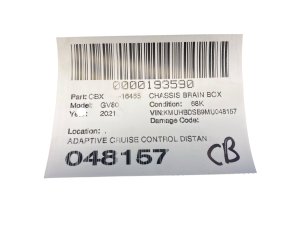
OEM Part Numbers: 94310-T6040 94310-T6540 94310-T6740 99110-T6000 99110T6000 99140-T6000 99140-T6100 99140T6000 99140T6100 99150-T6100 99150T6000 99150T6100 99211-T6000 99211-T6100 99211-T6110 99240-T6000 99240-T6010 99250-T6000 99250-T6010
System components include video cameras and radar sensors. Functionality is dependent on vehicle trim and options package. Professional calibration is required for most replacements.
We Have This Part in Stock

The information in this article is provided for general reference and educational purposes only. Vehicle specifications, procedures, and part compatibility can vary by production date, trim level, and region. Always consult your vehicle's factory service manual and verify part numbers before purchasing or performing repairs. Safety-critical components such as airbags, seat belts, and braking systems should be installed by a qualified professional.
- Genesis GV80:
- 🛍️ Shop This Part
- Camera, Radar, or Sensor? Identifying Your Faulty Part
- Key System Components & Locations:
- Symptoms of Failure
- Video Camera Failure Symptoms:
- Radar Sensor Failure Symptoms:
- Known Issues, Recalls, and Technical Service Bulletins (TSBs)
- Recall: Rearview Camera Software Glitch (NHTSA 24V-584)
- TSB 25-GI-007G: Parking Camera Diagnostics
- Buying a Used GV80 Camera or Sensor: What to Look For
- 1. Match the Part Number Exactly
- 2. Physical Inspection
- 3. Understand the Hidden Cost: Calibration
- Replacement and Calibration
- Cost Comparison
- Frequently Asked Questions (FAQ)
- 🎟️ Get 5% Off