

2014-2016 Mazda 3 Sedan Backup Camera: Flickering, Failure, and Replacement
This guide covers common failures, diagnostic tips, and replacement costs for the rear view camera on the 2014-2016 Mazda 3 sedan, and clarifies confusion surrounding a major recall.
- This camera (BHN1-67-RC0A) is for the 2014-2016 Mazda 3 SEDAN ONLY and is not interchangeable with the hatchback.
- A major recall (6023G) for flickering cameras applies ONLY to the HATCHBACK model, not the sedan.
- Failure is most often a flickering or black screen, commonly caused by a wiring issue in the trunk hinge area or a faulty camera.
- Replacement is a simple DIY job that takes about an hour and requires only basic tools.
Critical Compatibility Warning: Sedan Models Only
Warning: This backup camera, part numbers BHN1-67-RC0 and BHN1-67-RC0A, fits 2014-2016 Mazda 3 SEDAN models only. It is mounted on the decklid (trunk lid). The camera for the 5-door hatchback model has a different design, mounting, and part number and is not interchangeable. Always verify your vehicle's body style before purchasing.
Symptoms of a Failing Mazda 3 Backup Camera
When the backup camera begins to fail, you will likely experience one or more of the following symptoms. These issues can be intermittent, often appearing in cold or wet weather, or after opening and closing the trunk.
- Flickering or Distorted Image: The video feed may flash, roll, or show a scrambled, discolored, or distorted picture. This is the most common sign of a failing connection or a faulty camera.
- Black or Blank Screen: When you shift into reverse, the infotainment screen may go completely black or may not change from the current display (e.g., the radio screen stays on).
- "No Signal" Message: The screen may display an error message like "No Signal," indicating the head unit is not receiving a video feed from the camera.
- Intermittent Operation: The camera may work perfectly one day and fail the next. This often points to a loose connection or a frayed wire in the harness that passes from the trunk lid to the car's body.
Known Issues & Recall Information
Safety Recall 6023G (NHTSA ID: 23V-487): HATCHBACK ONLY
In July 2023, Mazda issued a safety recall for the rearview camera on certain 2014-2018 Mazda 3 5-door HATCHBACK and 2016-2021 CX-3 vehicles. The recall addresses a flickering or distorted image caused by an improperly designed wiring harness fastener. Vibrations from normal use and closing the liftgate can cause the connector pins to wear, leading to high electrical resistance and a poor video signal.
This recall does NOT apply to the Mazda 3 Sedan. However, the root cause—a wiring failure in the flexible harness—is a valuable diagnostic clue for sedan owners experiencing the same symptoms, as the design principle is similar. The wiring harness that runs through the trunk hinge is a common point of failure for many vehicles.
Pro Tip: Before assuming the camera has failed, try rebooting the infotainment system. With the car running, press and hold the NAV + MUTE + BACK buttons on the center console for about 10 seconds until the system restarts. If the camera image returns, it may indicate a software glitch or a temporary connection issue.
Buying a Used 2014-2016 Mazda 3 Camera: What to Check
A used OEM camera is often a reliable and cost-effective alternative to an expensive new dealer part or a low-quality aftermarket unit. Here’s what to inspect before you buy.
1. Confirm the Part Number
Insist on seeing the part number sticker. You are looking for BHN1-67-RC0A or its predecessor, BHN1-67-RC0. Part numbers for the hatchback (like BHY1-67-RCX) will not fit your sedan.
2. Physical Inspection Checklist
- Lens Condition: Check the lens for deep scratches, cracks, or a cloudy/foggy appearance on the inside. Internal fogging means the camera's waterproof seal has failed and it should be avoided.
- Connector Pins: Look closely at the electrical connector. The pins should be straight, clean, and free of any green or white corrosion. The hatchback recall was caused by pin wear, so this is a critical checkpoint.
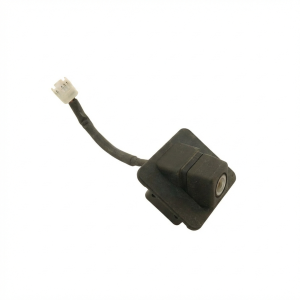
- Housing and Mounts: Inspect the plastic housing for any cracks or broken mounting tabs. Ensure the small wiring pigtail coming off the camera is not frayed or damaged.
3. Why a Used OEM Camera is a Smart Choice
While cheap aftermarket cameras are available, they often come with significant downsides. A used OEM camera provides the original factory-grade image quality, proper low-light performance, and perfect plug-and-play fitment without any wiring modifications. Aftermarket cameras frequently have lower resolution, poor color accuracy, and may not integrate as seamlessly with the vehicle's electronics.
Cost Comparison
| Part Type | Estimated Cost |
|---|---|
| New OEM (Dealer) | $260 - $380 |
| New Aftermarket | $50 - $150 |
| Used OEM | $75 - $200 |
| Shop Labor | $75 - $150 |
Replacement Overview
Replacing the backup camera on a 2014-2016 Mazda 3 sedan is a straightforward job that most DIYers can complete in under an hour with basic tools.
- Difficulty: 2 out of 5
- Estimated Time: 0.5 - 1 hour
- Tools Needed: Trim removal tool, small flathead screwdriver, socket set.
The basic process involves opening the trunk and removing the plastic liner from the inside of the trunk lid by prying out the retaining clips. This will expose the wiring and the nuts that hold the outer chrome or body-colored trim piece. Once the trim piece is removed, the camera can be unbolted and its electrical connector disconnected. Installation is the reverse of removal.
Frequently Asked Questions (FAQ)
Is the backup camera on my 2015 Mazda 3 Sedan covered by the recall?
No. Safety recall 6023G for flickering backup cameras only applies to the 2014-2018 Mazda 3 5-door hatchback model, not the 4-door sedan.
Do I need to program or calibrate the camera after installation?
No. For this vehicle, a replacement OEM camera is a plug-and-play part. No special programming or calibration is required.
Why are the parking guidelines on the screen not moving when I turn the steering wheel?
The 2014-2016 Mazda 3 is equipped with static parking guidelines. These lines are generated by the infotainment head unit and are overlaid on the camera image; they do not move with the steering wheel. This is normal for this model.
My screen is black. How do I know if it's the camera or the wiring?
Intermittent failure often points to wiring. A common failure point is the wiring harness where it flexes near the trunk hinge. You can try opening the trunk, putting the car in reverse (with the parking brake on), and gently wiggling the harness to see if the image appears. If tapping on the camera housing itself causes the image to flicker on and off, the camera's internal connections may be the problem.
Technical Specifications
OEM Part Numbers: BHN1-67-RC0A BHN1-67-RC0 BHN167RC0
Fits 2014-2016 Mazda 3 Sedan (4-door). Mounts to the trunk lid trim piece.
We Have This Part in Stock

The information in this article is provided for general reference and educational purposes only. Vehicle specifications, procedures, and part compatibility can vary by production date, trim level, and region. Always consult your vehicle's factory service manual and verify part numbers before purchasing or performing repairs. Safety-critical components such as airbags, seat belts, and braking systems should be installed by a qualified professional.
- Mazda Mazda 3:
- 🛍️ Shop This Part
- Critical Compatibility Warning: Sedan Models Only
- Symptoms of a Failing Mazda 3 Backup Camera
- Known Issues & Recall Information
- Safety Recall 6023G (NHTSA ID: 23V-487): HATCHBACK ONLY
- Buying a Used 2014-2016 Mazda 3 Camera: What to Check
- 1. Confirm the Part Number
- 2. Physical Inspection Checklist
- 3. Why a Used OEM Camera is a Smart Choice
- Cost Comparison
- Replacement Overview
- Frequently Asked Questions (FAQ)
- 🎟️ Get 5% Off