

2009-2014 Nissan Maxima Backup Camera: Troubleshooting a Blurry or Black Screen
Diagnose a blurry, flickering, or completely dead rearview camera on your 7th generation Maxima and learn what to look for when buying a quality used replacement.
- The most common failure symptom is a black screen where the video feed should be, often with the parking guidelines still visible.
- Internal moisture damage is a primary cause of blurry images and eventual camera failure; inspect any used camera for a clear, haze-free lens.
- Replacement is a very simple DIY task, requiring only basic tools to remove the trunk liner and unbolt the camera.
- OEM part number 28442-9N00B is an updated version of 28442-9N00A, and both are compatible with all 2009-2014 Maxima models.
Symptoms of a Failing 2009-2014 Maxima Backup Camera
When the backup camera in your Nissan Maxima begins to fail, the symptoms are usually obvious. Understanding these signs can help you determine if the camera itself is the problem or if there's an issue with wiring or the display unit.
- Black or Blank Screen: The most common failure is a completely black screen when you shift into reverse. Often, the colored parking guidelines will still appear, but there will be no video image. This indicates the system is getting the signal to turn on, but no video feed is coming from the camera itself.
- Blurry, Foggy, or Distorted Image: The image may appear out of focus, hazy, or as if there's moisture on the lens. This is often caused by a failure of the camera's internal seals, allowing moisture and condensation to get inside the lens housing. A simple dirty lens can also cause this, so it's always worth cleaning the exterior of the lens with a soft cloth first.
- Flickering or Intermittent Video: The video feed may cut in and out, flicker, or show static. This often points to a problem with the wiring or a loose connection rather than the camera itself. The wiring harness that runs from the trunk lid to the car's body is a common point of failure due to repeated opening and closing of the trunk.
- "No Signal" Message: A message on the screen indicating "no signal" typically points to a wiring issue or a blown fuse.
Known Issues, TSBs, and Recalls
While there are no specific recalls or Technical Service Bulletins (TSBs) for the backup camera on the 2009-2014 Nissan Maxima, forum discussions among owners reveal common failure patterns. The primary cause of failure appears to be the camera unit itself, often due to moisture intrusion over time. In other cases, the wiring harness becomes frayed or damaged where it passes through the trunk hinge. Some owners have had success replacing only the camera to fix a black screen issue, confirming the camera was the point of failure.
Pro Tip: If your screen goes black but the parking guidelines are still visible, the problem is almost certainly the camera itself or its direct connection. The display unit and the vehicle's computer are clearly working correctly because they are attempting to show the camera view.
Buying a Used 2009-2014 Maxima Backup Camera
Purchasing a used OEM backup camera is a cost-effective way to restore your car's functionality. However, there are a few key things to inspect to ensure you get a good part.
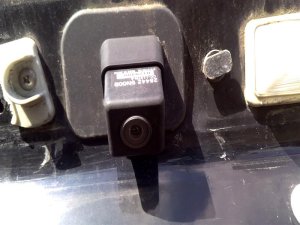
- Inspect the Lens: Look very closely at the camera lens. It should be perfectly clear. Avoid any camera that shows signs of haziness, yellowing, or moisture behind the lens. This is a clear sign the internal seals have failed and the camera will likely produce a blurry image.
- Check the Connector: Examine the electrical connector pins. They should be clean, straight, and free of any green or white corrosion. Corroded pins can cause a poor connection and intermittent video problems.
- Verify Part Numbers: The most common OEM part numbers for this generation Maxima are 28442-9N00A and 28442-9N00B. The 'B' version is a later revision that supersedes the 'A' version. Both should be compatible. Always try to match the part number from your old camera if possible.
- Why OEM is Better: A used original Nissan camera is generally preferable to a cheap aftermarket alternative. It guarantees a perfect fit into the trunk lid housing and ensures the electrical connector is plug-and-play with the factory harness. Image quality and the viewing angle will also match the original factory specifications.
Cost Comparison
The cost to replace a Maxima backup camera can vary significantly depending on the route you take. Here’s a general breakdown of what to expect:
| Part Type | Estimated Cost |
|---|---|
| New OEM | $690 - $1000+ |
| New Aftermarket | $75 - $200 |
| Used OEM | $50 - $150 |
| Shop Labor | $104 - $152 |
Replacement Guide (Difficulty: 1/5)
Replacing the backup camera on a 2009-2014 Maxima is a straightforward job that most DIYers can complete in under 30 minutes. The camera is easily accessible after removing the trunk lid's interior trim panel.
- Open the Trunk: Open the trunk fully to access the interior trim liner.
- Remove Trim Panel: Using a trim removal tool or a flathead screwdriver, carefully pry out the plastic clips holding the carpeted liner to the inside of the trunk lid. Once all clips are removed, the liner will come off.
- Locate the Camera: The camera is mounted in the chrome or body-colored trim piece above the license plate. You will see its wiring harness and mounting nuts from the inside.
- Disconnect and Unbolt: Press the tab on the electrical connector to unplug the camera. Then, use a small socket wrench to remove the nuts holding the camera to the trim piece.
- Install the New Camera: Simply place the new camera into the mounting holes and secure it with the nuts. Reconnect the electrical harness and test the camera by putting the car in reverse (with the ignition on but the engine off) before reinstalling the trunk liner.
- Reassemble: Once you've confirmed the new camera works, reinstall the trunk liner by pushing the plastic clips back into their holes.
Frequently Asked Questions
Do I need to program a replacement backup camera?
No, the backup camera for the 2009-2014 Nissan Maxima is a plug-and-play part. No special programming or calibration is required after installation.
My screen is black but the parking lines show up. Is the camera definitely bad?
In most cases, yes. The fact that the screen activates and shows the guidelines means the car is sending the signal to the camera system. A black image usually means the camera itself has failed internally or has a bad connection right at the unit.
Can I fix a blurry or foggy camera?
If the blurriness is from dirt on the outside of the lens, it can be cleaned. However, if the fogginess is from moisture that has gotten inside the camera housing, the unit cannot be repaired and must be replaced. The seals are not designed to be serviced.
Could a blown fuse cause the camera to stop working?
Yes, a blown fuse could cause a black screen or a "no signal" message. However, it's a less common cause of failure than the camera itself or its wiring. If you suspect a fuse, check your owner's manual for the fuse box diagram to locate the correct one to inspect.
Technical Specifications
OEM Part Numbers: 28442-9N00A 284429N00A 28442-9N00B 284429N00B
N/A
We Have This Part in Stock

The information in this article is provided for general reference and educational purposes only. Vehicle specifications, procedures, and part compatibility can vary by production date, trim level, and region. Always consult your vehicle's factory service manual and verify part numbers before purchasing or performing repairs. Safety-critical components such as airbags, seat belts, and braking systems should be installed by a qualified professional.
- Nissan Maxima: