



Contact Us
USA Flag
SUPPORT
SMALL BUSINESS
📦 My Cart
- OR -

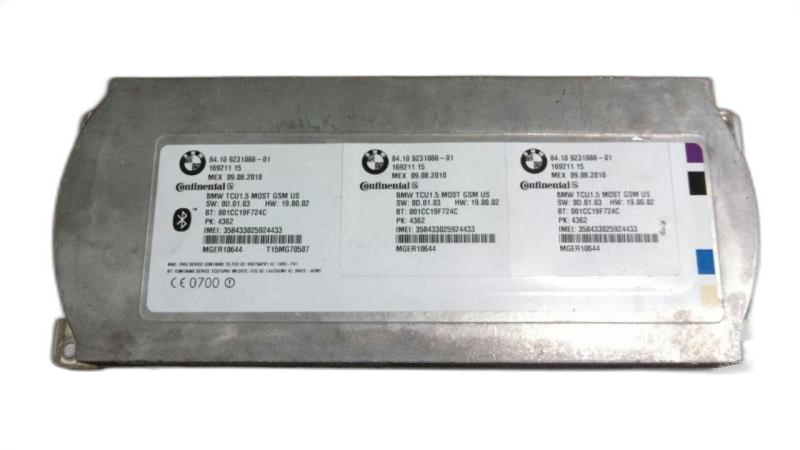
2011 - 2016 BMW Z4 Telematics Control Module (OEM)

Only 1 left in stock
$59.95

ℹ️ Product Notes

This is a used part. It is a Chassis Control Module, sometimes called a Communication ECU.

This module controls Bluetooth and media. Match your part number exactly. This part requires professional programming to work with your vehicle.

Original Part #(s): 84109224674, 84109231088, 84109244198, 84109248181, 84109257160, 84109257163
Condition: Excellent (A)
Like new, minimal to no wear
50,000 miles
Odometer reading when part was removed
SKU #
7989151-11P1MB.195

Why Buy Used OEM Parts?

✓ Quality-Verified: Every used OEM part we sell has been professionally inspected and tested to ensure it meets our quality standards. While it may show some cosmetic wear from previous use, it's fully functional and ready to install.

✓ Original Equipment: This is a genuine OEM (Original Equipment Manufacturer) part - the exact same part that came with your vehicle from the factory. It's designed specifically for your make and model, ensuring perfect fitment and performance.

✓ Works Like New: Despite some visual wear, this part will perform just as well as a brand new one. The internal components and functionality are intact, giving you the same reliability you'd expect from OEM quality.

✓ Significant Savings: Save 50-80% compared to buying new! Used OEM parts offer exceptional value - you get factory quality at a fraction of the cost. It's the smart choice for budget-conscious vehicle owners who won't compromise on quality.

✓ Risk-Free Purchase: We stand behind our used parts with a generous 6-month warranty, 30-day returns, and 100% money-back guarantee. If it doesn't work out for any reason, simply return it for a full refund. You have nothing to lose!

🛡️ 30-Day Returns + 6-Month Warranty - Buy with Confidence!

Wrenchy the Robot

Meet Wrenchy - The Amazing Parts Assistant!Meet Wrenchy
The Amazing Assistant!

Let Wrenchy help you confirm if this is the right part.

Ask Wrenchy -
Type or Speak! 🎤

Vehicle Fitment Guide

This part fits the following vehicles:

BMW
Z4 2011-2016 (tapclick to expand)(tapclick to hide)
Swipe left/right to see more info
SubmodelSUB-
MODEL
Body Style Years Engine Attributes
sDrive23i Convertible 2011 L6 2.5L RWD | Automatic
sDrive23i Convertible 2011 L6 2.5L RWD | Manual
sDrive30i Convertible 2011 L6 3.0L RWD | Manual
sDrive30i Convertible 2011 L6 3.0L RWD | Automatic
sDrive35i Convertible 2011 - 2016 L6 3.0L Turbo RWD | Manual
sDrive35i Convertible 2011 - 2016 L6 3.0L Turbo RWD | Automatic Dual Clutch
sDrive35i Convertible 2011 - 2013 L6 3.0L RWD | Automatic
sDrive35i Convertible 2011 - 2013 L6 3.0L RWD | Manual
sDrive35i Convertible 2011 - 2013 L6 3.0L Turbo RWD | Automatic
sDrive35is Convertible 2011 - 2016 L6 3.0L Turbo RWD | Automatic Dual Clutch
sDrive20i Convertible 2012 - 2013 L4 2.0L Turbo RWD | Automatic
sDrive20i Convertible 2012 - 2013 L4 2.0L Turbo RWD | Manual
sDrive28i Convertible 2012 - 2016 L4 2.0L Turbo RWD | Manual
sDrive28i Convertible 2012 - 2016 L4 2.0L Turbo RWD | Automatic
Design Pure Traction Convertible 2014 - 2016 L4 2.0L Turbo RWD | Automatic
Design Pure Traction Convertible 2014 L4 2.0L Turbo RWD | Manual
M Sport Convertible 2014 - 2016 L4 2.0L Turbo RWD | Automatic
M Sport Convertible 2014 - 2016 L4 2.0L Turbo RWD | Manual
M Sport Convertible 2014 - 2016 L6 3.0L RWD | Automatic
M Sport Convertible 2014 - 2016 L6 3.0L RWD | Manual
sDrive18i Convertible 2014, 2016 L4 2.0L Turbo RWD | Automatic
sDrive18i Convertible 2014 L4 2.0L Turbo RWD | Manual
sDrive35i Pure Traction Convertible 2014 L6 3.0L Turbo RWD | Automatic Dual Clutch
sDrive18iA Convertible 2015 L4 2.0L Turbo RWD | Automatic

⚠️ Important: Please verify your vehicle's year, make, model, and specifications before ordering. If you're unsure about fitment, contact our customer service team for assistance.

Policies

Shipping & Handling

  • Standard shipping: 3-7 business days via UPS Ground
  • Parts are carefully packaged to prevent damage during transit

Returns (30 Days)

We accept returns within 30 days of delivery for this part.

  • Defective parts: We will replace the part or issue a refund at our discretion
  • Electronic parts: Must be returned with the sealed inspection bag unopened. The clear bag allows full visual inspection before opening. Once opened, electronic parts can only be exchanged for a replacement if defective — no refunds
  • Programming: "Needs to be programmed to my vehicle" is not a valid return reason. Many modules require dealer programming — we're happy to help connect you with resources if your dealer says it's not programmable
  • Return shipping: We cover return shipping as part of our 100% money-back guarantee
  • Parts must be returned in original packaging and unmodified condition
  • Poorly packaged returns that arrive damaged will not be credited

6-Month Warranty

All used parts include a 6-month warranty from the date of purchase.

  • If your part fails within 6 months, we will send a replacement
  • Refunds are only issued if we cannot provide a suitable replacement
  • Warranty covers defects — not installation errors, misuse, or damage after installation

Note: Warranty is for replacement, not refund. A part failing on day 80? We'll replace it. But the return window for refunds is 30 days.

Damaged in Shipping?

If your part arrives damaged:

  • Stop immediately — do not install the part
  • Keep all original packaging and boxes
  • Take clear photos of the damage and packaging
  • Contact us within 48 hours of delivery

We will handle the carrier claim. You are not responsible for shipping damage — we just need your help documenting it.

Order Cancellation

Orders can be cancelled before shipment for a full refund. Once shipped, cancellations follow our return policy.

Symptoms & Diagnosis

Is your BMW's telematics system acting up? Here's how to tell if the Telematics Control Module (TCM) might be the problem.

Warning Signs:

  • Loss of BMW Assist services (emergency call, roadside assistance, etc.)
  • Navigation system malfunctions
  • Bluetooth connectivity problems
  • SOS light illuminated on the dashboard
  • Error messages related to communication or telematics systems

Testing the TCM: It's tricky to pinpoint the TCM as the culprit without proper tools. Here's a general idea:

  1. Check the basics: Make sure your car battery is healthy and fully charged. A weak battery can cause all sorts of electrical issues.
  2. Scan for codes: Use an OBD-II scanner to check for any diagnostic trouble codes (DTCs) related to the telematics system. Write down any codes you find.
  3. Inspect wiring: Look for any damaged or corroded wiring connected to the TCM.
  4. Consult a professional: If you're not comfortable with electrical testing, take your BMW to a qualified mechanic for a proper diagnosis. They have specialized tools to test the TCM and other related components.

Common Failure Causes:

  • Water damage or corrosion
  • Electrical surges
  • Overheating
  • Software glitches
  • Age and normal wear and tear

Buyer's Checklist

Buying a Telematics Control Module? Here's what to keep in mind:

What to Look For:

  • Compatibility with your BMW's year and model.
  • Condition of the part (if buying used).
  • Seller's reputation and return policy.

Quality Indicators: | Feature | Used OEM | New Aftermarket | |---|---|---| | Original Manufacturer | Yes | No | | Quality Control | Factory standards | Varies by manufacturer | | Testing | Typically tested | Varies by manufacturer | | Price | Generally lower | Can be comparable or higher |

What's Included:

  • Typically, just the Telematics Control Module itself. You may need to reuse existing hardware.

Installation Overview

Replacing the TCM can be a bit involved.

Difficulty Level: Medium Estimated Time: 1-2 hours

Special Tools:

  • Basic hand tools (sockets, wrenches, screwdrivers)
  • Trim removal tools
  • OBD-II scanner for clearing codes

Critical Steps and Tips:

  1. Disconnect the battery: Always disconnect the negative battery terminal before working on electrical components.
  2. Locate the TCM: The TCM is usually located in the trunk or under the rear seat. Consult your vehicle's repair manual for the exact location.
  3. Remove the old TCM: Disconnect the wiring harness and remove any mounting hardware.
  4. Install the new TCM: Connect the wiring harness and secure the TCM in place.
  5. Reconnect the battery: Reconnect the negative battery terminal.
  6. Clear codes: Use an OBD-II scanner to clear any diagnostic trouble codes.
  7. Test the system: Verify that the telematics system is working properly.

DIY or Professional? If you're comfortable working on cars and have some experience with electrical systems, you may be able to replace the TCM yourself. However, if you're not confident, it's best to have a professional do it.

Buying Options

Let's explore your options for buying a Telematics Control Module.

OptionDescriptionProsCons
Used OEMOriginal equipment from a BMW.Best value, genuine factory part, tested and inspected.May have some wear.
New AftermarketBrand new part made by a third-party manufacturer.Brand new, potentially lower cost.Quality can vary.

Both Used OEM and New Aftermarket are good choices, depending on your budget and needs.

Typical Lifespan

How long should a Telematics Control Module last?

The TCM typically lasts for 8-12 years or more.

Factors Affecting Longevity:

  • Climate (extreme temperatures can shorten lifespan)
  • Driving conditions (frequent short trips can strain the battery)
  • Maintenance (keeping the battery in good condition is important)

Price Ranges

Here's a general idea of what you can expect to pay for a Telematics Control Module:

  • Used OEM: $100 - $300
  • New Aftermarket: $150 - $400

Labor Cost: If you're having a mechanic install the TCM, labor costs can range from $100 to $200, depending on the shop's hourly rate.

Total Job Cost: Expect to pay between $200 and $600 for the entire job, including the part and labor.

Vehicle-Specific Notes

Some BMW models are known to have issues with their telematics systems. Check online forums and technical service bulletins (TSBs) for any known problems specific to your vehicle. Common complaints include intermittent connectivity issues and software glitches.

Verification After Install

After installing the new Telematics Control Module, it's important to verify that it's working properly.

How to Confirm Proper Operation:

  1. Check BMW Assist: Test the emergency call and roadside assistance features.
  2. Verify Navigation: Make sure the navigation system is working correctly.
  3. Test Bluetooth: Connect your phone via Bluetooth and make sure you can make and receive calls.
  4. Check for Error Messages: Make sure there are no error messages related to the telematics system.

What to Look/Listen For:

  • A clear and stable GPS signal.
  • A strong cellular connection.
  • Proper operation of all telematics features.

FAQ

Q: Will this TCM need to be programmed to my car?
A: Yes, it's very likely that the TCM will need to be programmed or coded to your specific BMW after installation. This is usually done by a BMW dealer or a qualified independent mechanic with the proper software.

Q: What happens if I don't program the TCM?
A: If you don't program the TCM, it may not communicate properly with your car's other systems. This can result in various issues, such as error messages, loss of functionality, or even a non-starting vehicle.

Q: How do I find a mechanic who can program the TCM?
A: Search online for BMW specialists or independent mechanics in your area who have experience with BMW programming and coding.

Q: Is it possible to program the TCM myself?
A: It is possible to program the TCM yourself, but it requires specialized software and knowledge. It's generally recommended to have a professional do it unless you have experience with BMW programming.

Q: What if the TCM doesn't fix my problem?
A: If the TCM doesn't fix your problem, there may be other issues with your car's telematics system. It's important to have a qualified mechanic diagnose the problem to determine the best course of action.

Part Specifications

OEM Part Numbers:

  • BMW: 84109224674, 84109231088, 84109244198, 84109248181, 84109257160, 84109257163

Fits Years: 2011 2012 2013 2014 2015 2016

Why Millions Choose Go-Parts

Your Go-To Place for Auto Parts!

6-Month Warranty

Shop with confidence and peace of mind

🏆

Trusted Since 2007

Over 19 years of excellence

🏅

OEM Quality

Meets or exceeds OE standards

🚚 Fast Shipping • ↩️ 30-Day Returns • 🎯 Perfect Fit Guaranteed

Racing Partner Videos

×

Search by Vehicle

1
2
3